Hi,
Something is strange in your theme … Also when I look from it from a smaller screen, everything gets on top of other things.
A quick and dirty patch ?
#bbpress-forums div.bbp-forum-author, #bbpress-forums div.bbp-topic-author, #bbpress-forums div.bbp-reply-author {
  width: 25%;
}
But you need more to fix your whole environment.
Pascal.
If you have ‘Reply Threading’ activated in ‘Settings > Forums > Forum Features’, then your pagination will not work. So you have to choose: Threads or Pagination.
If you are into coding, on this page you can find somebody that has found a workaround.
Pascal.
Hi I’m hoping someone can give me some direction. I should start by saying i’m not a big coder or developer so apologies if this is really simple to solve. Every post in BBpress is accompanies by the user date on the left hand side. On the initial post in a topic this user data column is wide enough to contain all of the relevant data.
On subsequent posts the column is indented and becomes too narrow to display everything. For an example of this issue on the site I’m developing view
https://officerofthewatch.co.uk/Officers-Mess/topic/officer-of-the-watch-help-wanted/
You will note on the second post by ‘aquabon’ the ‘send a message’ text is partially cut off.
Is there anyway to increase this column width to match that of the original poster?
After the todays (13/4) update to WordPress 4.5 link doesn´t funktion in the bbPress edit box.
Is a bbPress update coming to solve this problem?
/Gunilla
Hi Guys,
I got the problem, that bbPress is not splitting the posts in different pages when there are a few answers. For example: http://germansimracing.de/community/thema/dauerstartnummern/
Is there anything to setup or what could be the problem? I updated WordPress a few minutes ago to the newest version. bbPress and all other plugins are up to date, too.
Thanks in Advance for your help! 🙂
Hi,
You seem to have a memory issue, nothing to see with bbPress. Your limit is set to 64MB and you need more.
I will have to refer you to https://wordpress.org/support/ where somebody can help you increasing your memory limit.
Pascal.
bbPress should take the same name as all the others. There might be a bbPress related plugin that changes it ? (just a guess)
I’m personally using Postman SMTP and that one seems to suit my needs.
Pascal.
Hello,
I am using this plugin.
https://wordpress.org/plugins/wp-smtp/
I am trying to change the sender name and sender email address for BBPress. I have successfully done this for BuddyPress, but all the code I have tried for BBPress or all the code I have seen in older topics, is not doing it for me.
Can you please recommend some code that I can change the sender name and sender email address?
Thanks.
Here you go
http://www.coffeeblack.co.uk/wp-content/uploads/2016/04/bbpress-vbulletin-permalinks-1.zip
for now it just basically replicates the permalinks that I have in Vbulletin but it puts the threads into their parent forums etc
You are welcome
Please post any changes here and ill setup the github properly so it can be updated there.
Mods admins etc please see if you can integrate this as an option in the core.
Hello there, every time I attempt to activate the bbPress plugin it throws this error at me.
Plugin could not be activated because it triggered a fatal error.
Fatal error: Allowed memory size of 67108864 bytes exhausted (tried to allocate 4480 bytes) in /mypool/web/vhosts/PR01088/infpunite.org/www/wp-content/plugins/bbpress/includes/replies/functions.php on line 213
How can I fix this? I’ve been really wanting to use bbPress for a while and still can’t get it to work.
There are no spaces between paragraphs in forums, unless I double space, but on the blog posts and other pages where I use the visual editor, there are proper spaces. I realize that the visual editor was removed from bbpress because of issues. I am using a plugin called “bbPress Enable TinyMCE Visual Tab” to re-activate it because for me, the forums are useless without it.
Any ideas on how to fix this, or if there is another solution such as a different plugin? Any info/news when bbpress will be creating a built in visual editor?
Thank you!
Hi there,
I am currently working on my first bbPress site and thoroughly enjoying it! I have one issue though…
On my home page I have a list of 8 latest posts on the site. They include news (standard WP posts), events (custom post type) and bbPress topics and are displayed with query_posts().
I am trying to display the reply count of topics but can’t using bbp_topic_reply_count(), it simply returns 0.
<?php if ( 'topic' == get_post_type()  ) : ?>
	<article class="bit-4 newsPost grid-sizer grid-item">
    	<div class="eventInner homePost">
        	<p class="postLabel">Discussion</p>
            	<h1 class="eventListTitle"><a href="<?php the_permalink(); ?> "><?php the_title(); ?></a></h1>
                	<p class="postedOn"><?php bbp_topic_reply_count(); ?> comments, starting on<?php the_date('d M Y'); ?></p>
                    	<p><?php echo get_excerpt(); ?></p>
        	</div>
    </article>
<?php endif; ?>
Am I missing something? Can someone help please?
Thanks
Not sure I understand. I am new to BuddyPress and BBPress. What should I do?
Thanks
Hello,
i am useing:
Wordpress latest
bbpress latest
using only 1 plugin GD bbPress Tools latest
when visit forum -> topic then i Subscribe
forum -> topic -> post reply
case i lose the subscibe
Hi guys @robin-w
I really don’t get it.
I changed the <?php bbp_list_forums()?> in to
<?php bbp_list_forums(array (
'show_topic_count' => false,
'show_reply_count' => false,
'separator' => '',
));?>
In the bbpress plugin folder and tried it in the theme folder. Both Didn’t work. What am I doing wrong?
Got it to work in the functions.php
For WordPress, could you confirm it’s 4.4.2 ?
Try to switch to a standard theme. If that does not help, switch off all plugins (except bbPress), check that the error is gone and switch them on one after the other to see which one goes in conflict.
Pascal.
The topic-subscribe is for bbPress forums, it seems to have this impact on BuddyPress as the groups are in the forum !
Thank you very much for your quick response!
I have the version 2.5.8 of BBPress , and version 4.4 of WordPress.
I Use the theme Bridge.
I have this plugins:
-GD BBPress Attachments
-Contact form 7
– WP usuario avatar
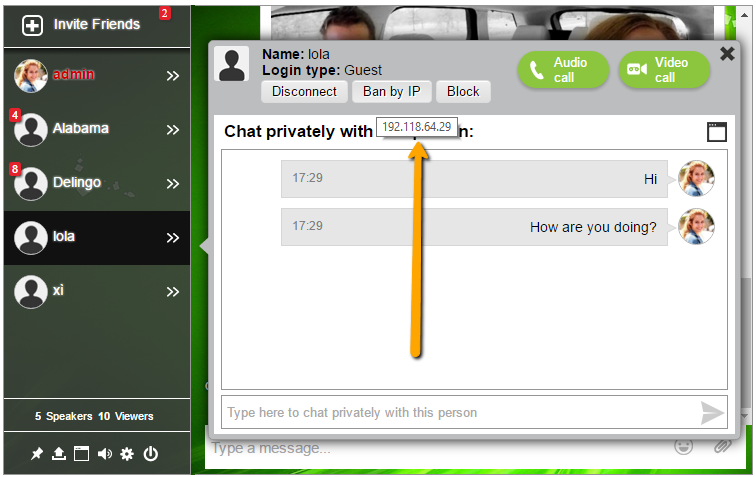
There are many type of chat rooms boxes. Some prefer it as you mentioned, a floating chat or embed in the chat. Once I added a chat GoDaddy forced me to remove it as they do not like chat rooms in a shared server. So I was forced to use a hosted service chat room.
What was important to me is that I could chat in a group as well as private using a video chat. Now there are not a lot of options with respect to video chat, but I used a chat room (a floating one on the right side on the lower part of the chat) that uses WebRTC technology that is basically means it will work good on PC (chrome & dd) but not in mobiles (tried it in my iPhone).
https://wordpress.org/plugins/rumbletalk-chat-a-chat-with-themes/
@sidebarissue
The bbPress sidebar that you see having the issue, is from your theme. bbPress does not have code in it for a bbPress specific sidebar.
You haven’t checked and made sure to see if it was in your theme by switching/testing a default theme.
I still haven’t tried switching to the twentytwelve theme because I don’t want to lose all of my settings for my current theme.
You can try your current theme and a WordPress default theme in a local installation on your cpu to see where the sidebar is coming from.
https://codex.bbpress.org/getting-started/testing-your-bbpress-installation/creating-a-test-site/#local-installation
Hello all,
i am using wordpress latest
bbpress latest
my problem with bbpress plugin root\extend\buddypress\notifications.php i am tring to get to last reply url or the posted reply url.
Regards
Seeing the support forum, others also have identified this one as not working correctly with bbPress.
Pascal.
To be honest I have not seen that before. It does not seem standard bbPress to me.
I would guess this is coming from your theme or from a plugin.
Pascal.
For caching, multiple plugins exists. See my response here for some extra info, but I’m not an expert: https://bbpress.org/forums/topic/should-i-set-up-my-forums-on-another-ms-subsite-to-improve-site-speed/
For the subscription:
If a person is subscribed to a forum, he will get all new topics
If you reply to a topic and tick the box at the bottom, you will get the other replies to this topic.
But I’m not aware of a possibility to get ALL replies to the full forum with just a click …
What I have in my bbP Toolkit plugin is the possibility to tick the box by default so that you get notified for new replies.
Pascal.
Version 4.4.2 the WP noticed that no longer display the name of your forum, instead of them being written Error 404: Page Not Found. Moreover, the entire page is displayed normally, breadcrumbs also displayed normally.
Here is a screen: http://i.imgur.com/i3zGWlp.png
I tried version 4.5 RC2 error is present.
I downgrade to version 4.3.2 and the name appeared.
Version BBPress 2.5.8


