Search Results for 'bbpress'
-
Search Results
-
I have WordPress 4.5.3 running AccessPress Pro theme on my site with the latest version of bbpress at 2.5.10.
I have the Search Function in my forum unfortunately the forum is not public. When I try to search, it only searches through the WordPress posts that I’ve created and not through the forum. I’ve searched with words that I know are included in the topics and topic names.
The search is doing the literal opposite of what I want it to do and what it says it should be doing.
WordPress Version: 4.5.3
bbPress Version: 2.5.10
Website Link: http://www.sva.bc.ca/newforums/Well, this is a strange one. The formatting toolbar (above each editor area with the bold, italics, link, etc. buttons) disappears when someone is logged into my forum.
I have already tried disabling all other plugins, to no avail. No change from clearing my browser’s cache or trying different browsers either.
Any ideas what might be causing this?
I would like the questions to be displayed the same way that on this bbpress forum.
I want them to look very different from replies.
Thanks
Phil1. On Saturday I installed a bbpress forum at drkkd.com/community/
2. That same day, my pageviews suddenly went up.
3. I can provide screenshots of surge.
4. I noticed that the surge is for one page only – drkkd.com/archives – which leads to homepage.
5. Customers started complaining about website being slow since the install.
6. Then I noticed google analytics showing customer computers loading homepage hundreds of times – again I have screenshot of this.
Seems to me, since installing bbpress, what is happening is that some function within bbpress is calling that page in a loop. It isn’t happening everywhere, so there may be browser dependence.
I use Avada theme with s2member, bbpress, and a few other plugins.
WP version – version 4.5.3
bbpress – Version 2.5.10
Any help will be much appreciated.
Hey Guys –
I have a project where its a social community site where all the members create the site content on their own. I have 2 profiles(roles) that all users will fall under (employer & employee). Then I have 3 membership levels for each role (FREE, Standard & Premium). The idea is to pair up these users by category and control the level of access/features they have based on account type. So direct messaging is available only to premium members, push notifications only available to premium members. The more features and ability to build out your profile is based on your membership type. I would obviously add membership plugin to restrict access and capability as well as ecommerce capability for checkout.
I know bbPress and BuddyPress are forums and social communities but will they integrate well into membership type communities where clients need to pay for additional access to social community and forum features?
If not, is there a premium application that handles these types of projects?
Thanks so much!
Topic: bbpress wrong UI
Hello everyone I have problem after I create topic and UI look wrong result. here what I see when topic was created.

Topic: Reply functionality change
Topic: Missing search widget
forum search widget doesn’t display. It sould be at the top of the sidebar here:
http://narcissist.staging.wpengine.com/discussions/topic/will-held-moderation/#post-1258this is 2014 theme with bbpress as the only active plugin.
any thoughts? as the address indicates this is a WP Engine staging site.
thx,
JohnI have a client who wishes to create a website full compliant with the disability W3C standards. Will bbpress work for this?
Thanks
MaryHi As i have installed bbpress theme in my site but i am not able to send replies to forum topics in dashboard->setting ->permalinks if i select as post name.If i change the permalinks to plain then i am able to send replies to forum topics.But i need to select as postname in permalinks.Can you please tell me the issue what is that why it showing like that.Thanks in advance.
I’ve spent a long time looking through fixes, and nothing has worked for me so far. Currently I am trying to set up a forum/website. I am using the Twenty Fifteen theme with bbPress, except I am currently on a child theme so I can make changes safely.
The site portion looks fine, but the forum looks awkward:
I would like to stretch out the forum side of this page so the posts take up more space. I don’t want to be scrolling constantly, especially with much larger posts. I think the best way to do this is removing the sidebar from the forum section. After the sidebar is gone, however, I don’t just want the right section to be centered and be the same size. I want it to take up the whole page. I understand this makes accessibility across the site a bit more difficult, but I can figure something out later.
Topic: Add Forum Role [VIP]
How to add a VIP role same caps as participant.
When I add this code, my site will get a HTTP ERROR 500.
Please help.
Thanks!How can I convert (move) individual HTML webpages in bulk into bbpress?
What I have is just the 1000s of html pages which consist of question and answers. Now how can I move then into bbpress.
This is how my question/answer html pages looks like https://drive.google.com/file/d/0B4RFn3PmjNy9YTNkbE5mejBfV1U/view?usp=sharing
So now what I have to do exactly? I just want to move the questions and answers. Don’t want user login details or anything else. I have thousands of pages like this.
Topic: Private: Private: Forum Name
I have a simple forum with only 1 forum and a couple of topics so far. I set the forum to Private to make it & contents only visible to logged in users. When I load the page, the title shows as “Private: Private: Forum Name”. Is there a way to drop the redundant “Private:”? New user to bbPress, just installed 2.5.10 on WP 4.5.3.
screen shot here: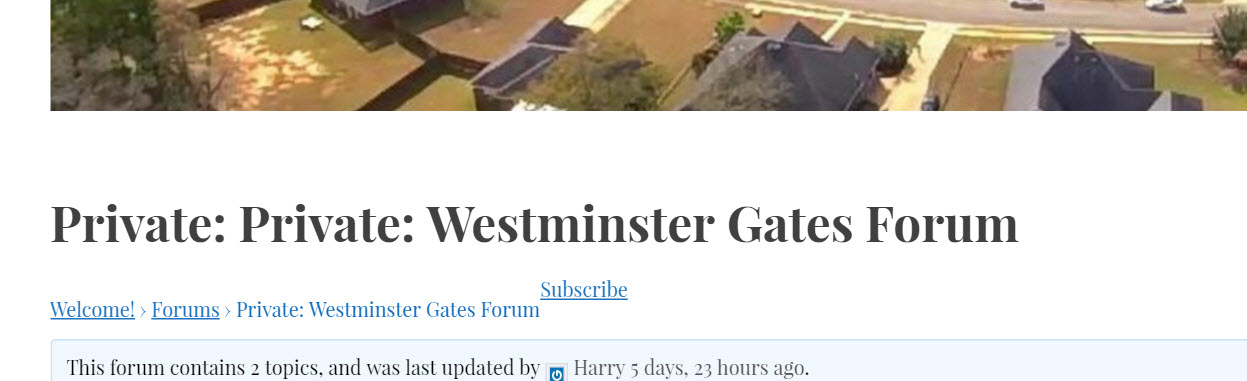
Hi folks,
SMF 2.0.7 to bbpress 2.5.10 import
Wordpress version 4.5.3I’ve just imported the SMF forums here on my server –
http://www.holistic-counseling.ca/Forums/index.php
to bbpress here on my server:
http://nutopia.cc/Holistic-Counseling-WP/holistic-counseling-community-forums/
you’ll need to login to see.
user test
p/w 123456At first glance, everything appears fine, although the number in the Posts column seems to be a product of adding the number of topics to the number of replies in a given forum. I don’t mind this.
Freshness shows zero, but that’s not a big deal either bc A) I can fix the freshness (but it results in losing posts and replies in the forums. B) Once new forum posts happen, it will repopulate.now here’s the main issue
Upon clicking on a forum, it says:This forum contains 8 topics and 15 replies.
Viewing 4 topics – 1 through 4 (of 4 total)So the top area states how many topics there are accurately but then only 4 are actually displayed.
This problem is consistent across the other forums. (sometimes only 3 or 2 are displayed when more are stated above)Any idea what that is about? It’s the main issue.
note: i did a repair Recalculate last activity in each topic and forum
and then the bottom forum dropped to 0 and 0.
Any of the forum repairs that I use that involve Topics creates problems in the number of topics and replies and doesn’t fix anything.HELP is much appreciated.
note 2: here are the messages from the import
(I think nothing appears out of order to me, but maybe there are some issues with this)Conversion Complete
No reply_to parents to convert
Converting replies (50 – 99)
Converting replies (0 – 49)
No tags to convert
No super stickies to stick
No stickies to stick
Converting topics (0 – 49)
No forum parents to convert
Converting forums (0 – 49)
Starting Conversion


