It could be a caching plugin or just cache in general. You may need to clear the cache on your site to see if everything works out well. Just deactivating a cache plugin will not clear whatever cache is still saved on your site.
Troubleshooting
Try to see if it could be a plugin issue, like a spam plugin scanning a reply before it is posted or something.
Troubleshooting
It could also be the bbPress subscriptions hogging everything down. This plugin will hopefully help things out.
https://wordpress.org/plugins/asyncronous-bbpress-subscriptions/
Try to see if it is a plugin issue, a code snippet in your child theme causing the issue.
Troubleshooting
Try a default theme, disable all plugins except bbPress, and hopefully you didn’t try to modify the roles and permissions.
Troubleshooting
1) Are Private forums visible to all logged in users? I thought for sure it restricted access to only moderators and keymasters, but when I did some testing I noticed they’re very much visible. I didn’t see anything about it in the Layout and Funcionality article, so any tips on having a truly private forum for me and my forum staff?
Hidden Forums are only seen by Mods and Keymasters. Layout and Functionality article is basically a code snippet collection not something explaining how bbPress works.
The information you need to know are somewhat in here.
Creating Content
2) I wanted to prevent users changing their display name, so they would be forced to display themselves as whatever their username is, however, when editing form-user-edit.php they still had access to do so in the WP-Admin. Following the steps in Restricting access to WP Admin did nothing. The WP Admin Bar was still visible, and Participants or lower still have access to it.
Deny Ability To Change Display Name
You can use the tag cloud widget, select the taxonomy to be topic tags, then use this PHP function in your child theme or in a functionality plugin.
add_filter('widget_tag_cloud_args','set_tag_cloud_sizes');
function set_tag_cloud_sizes($args) {
$args['smallest'] = 12;
$args['largest'] = 19;
return $args; }
You can use the tag cloud widget, select the taxonomy to be topic tags, then use this PHP function in your child theme or in a functionality plugin.
add_filter('widget_tag_cloud_args','set_tag_cloud_sizes');
function set_tag_cloud_sizes($args) {
$args['smallest'] = 12;
$args['largest'] = 19;
return $args; }
Use this PHP Function. Add it to your child themes function.php file or in a functionaility plugin.
function rkk_last_reply_link() {
	?>
    <a class="rkk-last-reply-link" href="<?php bbp_topic_last_reply_url(); ?>">Go to latest post</a>
    <?php
}
add_action( 'bbp_template_before_replies_loop', 'rkk_last_reply_link' );
Try to see if there is a plugin issue also.
Troubleshooting
Ok so not sure this is the best approach but it seems to work well.
// Run query to get all the published replies for the topic
$widget_query = new WP_Query( array(
			'post_type'           => bbp_get_reply_post_type(),
			'post_parent'		  => bbp_get_topic_id(),
			'ignore_sticky_posts' => true,
			'no_found_rows'       => true,
			'post_status'		  => 'publish',
		) );

// Get the replies per page setting value and the count of the total replies + 1 for the initial topic
$posts_per_page = get_option('_bbp_replies_per_page');
$total_posts = $widget_query->post_count + 1;

// if the total replies is greater than the per page setting pagination is used so need to structure url with page number
if($total_posts > $posts_per_page)
{
	// Work out last page number and build url using topic link and last reply id
        $total_pages = ceil($total_posts/$posts_per_page);
	$url = bbp_get_topic_permalink()."page/".$total_pages."/#post-".$widget_query->posts[0]->ID;
}else{
	// Same url as above but without page number as not needed
        $url = bbp_get_topic_permalink()."#post-".$widget_query->posts[0]->ID;
}
I then added the following where i wanted to place the link
if ( $widget_query->have_posts() ) {
	echo "<a href=\"".$url."\">Go to latest post</a>";
}
just want to add that
editing bbpress/includes/common/shortcodes.php method resolve our problems of cloud size is too big
Hi
we use bbpress 2.5.8, we use shortcode to show tag cloud, is there any way to control cloud’s length? it is way too long for us now
I know that the class=”MsoNormal” is related to pasting directly from MS Word, but the <p> tags are inserted even when text is typed in.
I’m not finding anything in the forums here on this, but I’m new… maybe I’m just missing something.
Topics & replies in our bbpress forums are displaying html tags like this:
<p>Hi everyone!</p><p>Included here is the agenda for the meeting on Saturday. Again, we’re gathering at 9:30, setting up, having some coffee, and then kicking off the meeting at 10am. We’ve got the space until 5, but let’s be super productive and get out of there early!</p><p> </p><p>See you tomorrow,</p><p>Patrick</p><p>———————————————————————————-</p><p class=”MsoNormal” style=”text-align: center;” align=”center”><b style=”mso-bidi-font-weight: normal;”><u>Outdoor Ministries Committee</u></b></p><p class=”MsoNormal” style=”text-align: center;” align=”center”>September 12, 2015 10:00am</p><p class=”MsoNormal” style=”text-align: center;” align=”center”>In-Person Annual Fall Debrief/Kick-Off</p><p class=”MsoNormal”> </p>
Why is this happening, and how can I get it to stop?
I’m running bbpress, bbP Private Groups, bbPress Enable TinyMCE Visual Tab, and GD bbPress Toolbox. Is this a known issue with one of them– or a combo of them?
I’ve been going through Layout and Functionality today, trying to fix some issue I’m currently experiencing with my bbPress forum. There are some things I can’t quite figure out:
1) Are Private forums visible to all logged in users? I thought for sure it restricted access to only moderators and keymasters, but when I did some testing I noticed they’re very much visible. I didn’t see anything about it in the Layout and Funcionality article, so any tips on having a truly private forum for me and my forum staff?
2) I wanted to prevent users changing their display name, so they would be forced to display themselves as whatever their username is, however, when editing form-user-edit.php they still had access to do so in the WP-Admin. Following the steps in Restricting access to WP Admin did nothing. The WP Admin Bar was still visible, and Participants or lower still have access to it.
So iMember360 has a hook that I am trying to attach with to bbPress that I am struggling to do.
I want to set it up so that when a user logins, and they contain certain tags (detected by iMember360), to change bbPress roles.
Below is the hook I am trying to use.
function my_i4w_authenticated_lremote_ogin($wp_user, $arrINFU) {
  //
  // $wp_user is the user object (same as the standard $current_user)
  //
  // $contact is an array with all contact record fields.
  // add your code to perform any desired action, such as sending an email notification
  // or updating contact record to reflect the login that just took place

  $your_code_goes_here = true;

}

add_action('i4w_authenticated_remote_login', 'my_i4w_authenticated_remote_login',10,2);
Here is what I tried to do:
function i4w_authenticated_remote_login_action($user, $contact) {
  global $SESSION;
  IF ($arrTAGS = explode(',', $SESSION['i4wuser']['Groups'])) :
    IF (in_array(38181, $arrTAGS) || in_array(38185, $arrTAGS) || in_array(38193, $arrTAGS)) :
      $bbp = bbpress();
      $bbp->current_user = new WP_User($user->ID);
	  $new_role_forum_role=”bbp_participant”;
	  bbp_set_user_role( $bbp->current_user, $new_role_forum_role );
    ELSEIF (in_array(38177, $arrTAGS) || in_array(38195, $arrTAGS) || in_array(38183, $arrTAGS) || in_array(38187, $arrTAGS) || in_array(38189, $arrTAGS)) :
      $bbp = bbpress();
      $bbp->current_user = new WP_User($user->ID);
	  $new_role_forum_role=”bbp_spectator”;
	  bbp_set_user_role( $bbp->current_user, $new_role_forum_role );
    ENDIF;
  ENDIF;
}
add_action('i4w_authenticated_remote_login', 'i4w_authenticated_remote_login_action', 10, 2);
However, nothing happens. I am not sure what I am missing here, but I suspect it is my lack of understanding with bbPress that is the issue.
bbPress uses the WordPress registration process, they are unified. THe bbPress shortcodes for lost password, registration, and login are there for frontend forms but they are incomplete in functionality, there shouldn’t be a problem with using the default WordPress registration form by default.
You can customize the default the WordPress forms by a plugin, or using some PHP functions too.
Thanks for the quick reply! I think the issue is that even with plain text pasting, there’s still some formatting that’s not getting stripped out.
Following these steps, https://codex.bbpress.org/enable-visual-editor/, I’ve disabled the <text> tab to lock it on visual editing and set it to paste as plain text.
My ideal setup would be to make everything paste in as totally unfortmatted plain text so it’s just like they typed it directly, but then use the visual editor features to let people add links, bold things, etc. It’s not a knowledgeable userbase so I can’t default it to text/code mode, but I also need to get rid of these formatting bugs.
Any suggestions to achieve what I’m after above? This seems like it would be a pretty common setup for basic user editing needs….
Thanks again! Rich
I think you’re on the right trail. keymaster shows an ip address. I do not have a static IP ….it changes several times a day. I’m assuming I need to get into usermeta table and change it to the current ip…assuming it works is there a way to shut that off in the code?
Ok, I’ve been working at this all day (really several weeks) and here’s what I learned.
bbp_add_user_forum_subscription requires user ID which must be obtained by doing
$user_idd = bbp_get_user_id(0,FALSE,TRUE);
these will not work:
$user_idd = bbp_get_user_id()
$user_idd = bbp_get_user_id(0,TRUE,FALSE)
(note that I changed the variable from $user_id so as to not double define)
This works. The working php code is below.
<?php

if (isset($_POST[‘action’])) {
$forum = $_POST[‘action’];
$forumint = 0 + $forum;
$user_idd = bbp_get_user_id(0,FALSE,TRUE);
$subs=bbp_is_user_subscribed_to_forum($user_idd, $forum);
if($subs==false) {
//if user not subscribed, then subscribe
$add=bbp_add_user_forum_subscription( $user_idd, $forumint );
}
else {
$rmv=bbp_remove_user_forum_subscription( $user_idd, $forumint );
}
exit;
}
?>
sorry, one more edit to hopefully help. With the script below, it does not subscribe or unsubscribe from the forum, but when I execute the code and check my subscriptions page (from profile), the titles of the subscribed forums are removed, but the row for the forum remains (ie. when I click subscribe, my subscriptions page shows titles, when I click unsubscribe, the subscriptions page does not show the title for the forum I tried to unsubscribe to, but it shows the number of topics, posts, etc.).
<?php
if (isset($_POST[‘action’])) {
$forum = $_POST[‘action’];
$forumint = 0 + $forum;
$user_id = bbp_get_user_id();
$subs=bbp_is_user_subscribed_to_forum($user_id, $forum);
if($subs==false) {
//if user not subscribed, then subscribe
$add=bbp_add_user_forum_subscription( $user_id, $forumint );
$add2=bbp_add_user_subscription( $user_id, $forumint);
}
else {
$rmv=bbp_remove_user_forum_subscription( $user_id, $forumint );
$rmv=bbp_remove_user_subscription( 0, 79 );
$rmv2=bbp_remove_user_subscription( $user_id, $forumint);
}
echo ‘forum ‘;
var_dump ($forum);
echo ‘subscribed ‘;
var_dump ($subs);
echo ‘add ‘;
var_dump ($add);
echo ‘remove ‘;
var_dump ($rmv);
echo ‘foruminteger ‘;
var_dump ($forumint);
echo ‘userid ‘;
var_dump ($user_id);
exit;
}
?>
I am trying to make a single page where users can choose to subscribe or unsubscribe to their forums (see https://bbpress.org/forums/topic/manage-subscriptions/). I’m pretty new to php/java, so please excuse me if this is obvious.
Basically, I have 3 forums (79, 80, 81). I have a button for each forum. When the user clicks a button, I use AJAX to run a php script. The php script is used to either subscribe or unsubscribe the user depending on whether they are already subscribed or not.
My problem is that when a user is subscribed, I’m not able to remove their subscription, and vice versa. When I click a subscribe button, the php code executes, it is able to determine if the user is subscribed, and the if statement executes properly. My problem is that bbp_add_user_subscription and bbp_remove_user_subscription return false every time.
Any help is greatly appreciated. The PHP and java script are below.
<?php
if (isset($_POST[‘action’])) {
$forum = $_POST[‘action’];
$forumint = 0 + $forum;
$subs=bbp_is_user_subscribed_to_forum($user_id,$forum);
if($subs==false) {
//if user not subscribed, then subscribe
$add=bbp_add_user_subscription($user_id,$forumint);
}
else {
$rmv=bbp_remove_user_subscription($user_id,$forumint);
//do_action(‘bbp_remove_user_subscription’, $user_id, $forumint)
}
echo ‘forum ‘;
var_dump ($forum);
echo ‘subscribed ‘;
var_dump ($subs);
echo ‘add ‘;
var_dump ($add);
echo ‘remove ‘;
var_dump ($rmv);
echo ‘foruminteger ‘;
var_dump ($forumint);
exit;
}
?>
<?php

<!– initiate all buttons –>
<button id=”790″ class=”button” onclick=”Subscriber(‘790’)”>Subscribe</button><br><br>
<button id=”800″ class=”button” onclick=”Subscriber(‘800’)”>Subscribe</button><br><br>
<button id=”810″ class=”button” onclick=”Subscriber(‘810’)”>Subscribe</button><br><br>

<!– change button text on load based on user subscription –>

<script>
$( document ).ready(function() {
$( “.button” ).click(function() {
var ForumID = $(this).attr(“id”)/10;
$.ajax({
//url: ”, // url is empty because I’m working in the same file
data: {‘action’: ForumID},
type: ‘post’,
success: function(result) {
alert(“action performed successfully”); //this alert is fired
$(‘div#result’).text(‘Button clicked: ‘ + result);
}
});
});
});
</script>
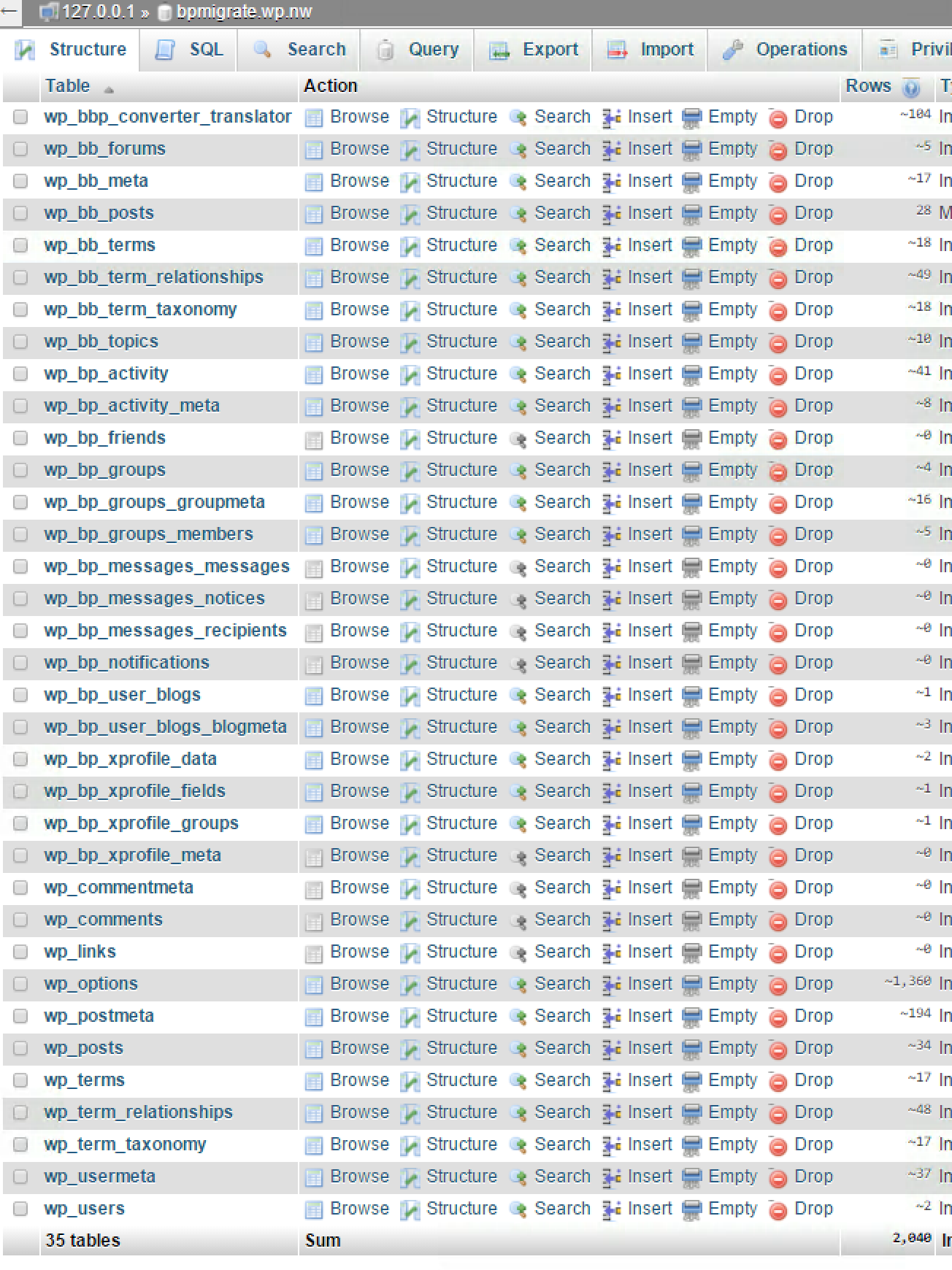
Do you have a wp_bb_terms table at all?
You should have a table setup similar to this:
(This is my BP 1.6.x database I use for testing bbPress imports, it should be pretty much what I’d expect your setup should also look like)
I don’t like the Ning to BuddyPress converter, been there done that, tried to help fix it and all 😉
I’m pretty sure this relates to which version of bbPress you are using when doing the import, what version of bbPress are you using in BuddyPress 1.6? Is it the “included” bbPress 1.x using just “group forums” or do you have bbPress 2.x installed and activated here as well?
The Table 'foo.wp_bb_terms' doesn't exist] is a bbPress 1.x table, bbPress 2.x does not have this table.
A site has 4 parent forums, each with several child forums.
I want to filter bbp_has_forums based on the ID of one or more parent forum IDs.
In this example, I expect the results to only include forums whose parent ID is 886, but all forums are displayed.
<?php $args = array( 'post__parent_in' => array( 886 ) ); ?>
<?php if ( bbp_has_forums( $args ) ) : ?>
Is this possible?
Am I missing something obvious?


