Search Results for 'bbpress'
-
Search Results
-
—
Wordpresss: Latest version
bbPress: Latest version
design theme: Original building
—I have one question.
In the page “Forum Replies Created”, can I show my replies data only?
If I can, which php file is, and how do I change code?
Or if I need to apply certain WordPress plugin, what is it?The page “Forum Replies Created” shows all replies data which contains my relied data.
I’d like not to show other user’s replies data.WordPress version: 4.2.2
bbpress version: 2.5.7Hey all,
I’m wanting to achieve something fairly complex with bbpress, and I’m hoping you all can help me.
Right now my setup looks like this:
Two main forums, Forum A and Forum B. Forum B contains subforums X, Y and Z.
I want all of the users of my site to be able to view and fully participate in Forum A. That’s fine.
However, I want all of the users of my site to be able to fully view Forum B, but for only users with specific permissions to be able to post there.
For example, a user from User Group X will be able to view topics and threads in subforums X, Y and Z, but can only post in subforum X. A user from User Group Y can see subforums X, Y and Z but can only post to User Group Y, and so on.
Right now I’ve achieved part of what I need with Robin Wilson’s “Private groups” bbpress. Unfortunately, with this plugin, users who don’t have permission to access a forum can’t view it – the plugin pushes them to a 404 page or a redirect substitute. I want users to still be able to fully view the forums, just not to be able to post without permission.
Does anyone have any advice as to how to implement something like this?
(I have crossposted this to the Private groups plugin support board. I hope there are no issues with that.)
Hello. I just recently installed a bbpress forum and I cant figure out why on my topic index, it says “started by” then a line break and user avatar, another line break, and then username.
Also I would love to have my topics look more like this if possible. I know it would take some PHP work. Does anybody know how to accomplish this without a whole new theme?
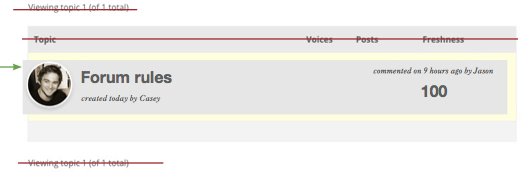
Topic: Forum closed and topic
Hello,
I have a question about bbpress forum.
I would like to close one of my forums (that is to say users can not create new topics inside this forum) but I need that the topics previously created before are still open.Exemple:
Forum (close: Impossible to create new topic)
— Topic (open: Possible to answer)
— Topic (open: Possible to answer)PS: I would like to do this only for one forum (all my other forums should be open)
Thank you very much
YoannHi All,
I’m having some strange issues since this weekend, a weekend without anything happening on the server or installation side.
BBPress version: 2.5.7
Wordpress: 4.2.2 Avada themeProblem 1:
When i want to a edit a topic, as moderator or as superuser, and press save or submit, the form won’t save. Changes are not visible most of the times, after several atempts it works but most of the time it doesnt. When pressing save it returns me back to the topic as is should, but without the changes I made.Problem 2:
Is a bit the same as editing. When I create a new topic and press submit, it doesnt show up in my topic list (not on the user site, nor on the admin back-end). After several atempts, it creates a topic.The problem isnt there when i create or edit a topic in the back-end (the WP dashboard), as superuser or moderator.
I hope someone can help me out!
The website is kb.bee-connected.nl but it is behind a password.
Topic: 502 Error on Replies Page
I am running bbPress 2.5.7 with WP 4.2.2
WPengine support said this was a segmentation fault issue and not a time-out issue.
“A standard 502 is a timeout when waiting for a request, while a segmentation fault is a failure to execute properly. I’d recommend reaching out to bbpress to take a look or provide any common causes, as it may be as simple as a conflicting plugin/theme.”
I added the WANGguard plug-in the day before this happened, but when I deactivated it, the problem persisted.
Here is my forum site:
Topic: SMF Import to bbPress
Hi There,
I thank you for this tool. I need an advice.
What is the best way to convert the embedded video (SMF==> bbpres?
I thank you for your kind replies
Regards
Mei Ling
Hello,
I uses CodeStyling Localization to translate 13 language. and CodeStyling Localization report the issue as below:
PHP runtime error reporting detected !
Reason: some executed PHP code is not written proper | Originator: unknown (probably by Theme or Plugin)
Below listed error reports has been traced and removed during page creation:STRICT Error: [2048] Declaration of BBP_Forums_Group_Extension::display() should be compatible with BP_Group_Extension::display($group_id = NULL) /home/xxx/cookkoo.com/wp-content/plugins/bbpress/includes/extend/buddypress/groups.php on line 28
Please help
Thank youI have set up a website for a local horticultural society with a forum restricted to society members. For the forum, I’m using bbpress; for the membership registration I’m using Simple WordPress Membership. I’m using the customizr theme and the latest version of WordPress. My problem is that, with our 1st topic, the first reply is hidden. I cannot find a way of unhiding it. I’ve posted a reply myself, which is visible, and tried reposting the text of the hidden reply. When I do this, I get van email altering me to the reply but still nothing is visible on the website. Please can someone help? The website is http://www.growchiswick.org.
Many thanks,
Jo Hodges
hello, i am using bbpress in a page with the shortcode.
Ive managed to remove the sidebar creating a template which code is as follows ;
——————————————————————————-
<?php
/*
Template Name: Forums
*/get_header(); ?>
<div id=”primary” class=”site-content-forums”>
<div id=”content” role=”main”><?php while ( have_posts() ) : the_post(); ?>
<?php get_template_part( ‘content’, ‘page’ ); ?>
<?php comments_template( ”, true ); ?>
<?php endwhile; // end of the loop. ?></div><!– #content –>
</div><!– #primary –><?php get_footer(); ?>
——————————————————————-
and then applying this custom CSS#site-content-forums {
float: left;
width: 100%;
}in the page, ive chosen this template.
BUT the forum still is not full width
please help me!!


