Search Results for 'bbpress'
-
Search Results
-
Now I am using bbpress, when I try to login using wrong password/ blank password. it will redirect me to wp-login.php. How can I set the redirect to the same login page?
Hi,
I want to send notification to my members/ participants, when ever new Forum is created. I found plugin that send email notification when new topic and replies created.
Is there any plugin/code that helps me to send email notification when new Forum is created??
Thanks
Hey all,
So I have BuddyBoss and Learndash with bbpress and I want to edit the single forum.
What I exactly want to do is place the Topic Area above the Forums Area. So just swap them around, how am I able to do this?
Thanks
Hello, I am trying to cut down on spam and defaulting all new users to spectator/subscriber mode and use certain “tasks” such as using the site to automatically change their role to participant/member.
I found this link but all it does is just make the forum role blank:
Can someone point me in the right direction? Thanks!
BBpress Version 3.2. Updated to 4.1 but still same issue
Hi !
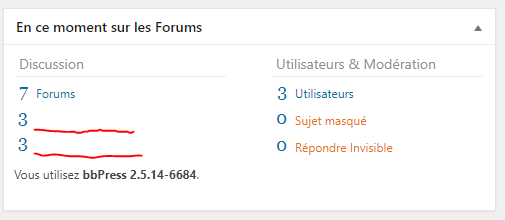
Some texts are missing on the dashboard Widget : any idea ?
I tried with only bbpress plugin enabled and the default WP theme, same problem.It was working when I installed bbpress the first time.
I already tried the tools provided to repair bbpress.Thanks 🙂
This is my website: https://www.9skymachining.com We are a mechanical processing company. I started with WordPRESS, but I changed it now. I am using CMS now, but I want to add a BBpress forum. I don’t know if there is any way?
Topic: First name and last initial
Hello everyone. I’m using the following snippet that will display the first name and last initial for users in buddypress. However, in bbpress it has no effect. Any ideas on how I could edit this to get it to work for bbpress? I’m so sad that something like this isn’t a default option.
$changeLastInitial = new changeLastInitial; add_filter('bp_displayed_user_fullname', array( $changeLastInitial, 'last_initial' ), 7, 1); add_filter('bp_get_member_name', array( $changeLastInitial, 'last_initial' ), 7, 1); add_filter('bp_get_the_profile_field_value', array( $changeLastInitial, 'last_initial_xprofle' ), 7, 3); add_filter('bp_core_get_user_displayname', array( $changeLastInitial, 'bp_core_get_user_displayname' ), 7, 2); class changeLastInitial { function bp_core_get_user_displayname($name, $id) { $name = $this->last_initial($name); return $name; } function last_initial_xprofle($value, $type, $id) { if ($id == 1) { $value = $this->last_initial($value); } return $value; } function last_initial($name) { $name_a = explode(' ', $name); // if there is at least two parts to the name if (count($name_a) == 2) { // replace the last part of the name with the first letter of the last part $name_a[count($name_a) - 1] = substr($name_a[count($name_a) - 1], 0, 1); // put it all back together $name = implode(' ', $name_a)."."; } return $name; } }Hi everyone,
I use WordPress 5.03 with BBpress version 2.5.14.
My website is http://club.geef-model.nlThe issue that I experience with my forum is that I don’t receive a notification when I new user is registered.
Most likely it is just one box I have to enable 😉
but I cannot find it.I hope there is somebody who has the solution for me.
Thank you in advance for your help and response.
With kind regards,
Klaziena Waerts, the NetherlandsMy site is in Dutch and when I must translate it, or change it (for a short while) to English is that no problem at all 🙂
Hi! I tried typing @mention user for reply. but when I try displaying it by query.. it didn’t have the link to the user tag. i just display a plain text
Been looking around about how to convert an old VBulletin forum into BBPress where all of the users in VB are already in WP. What I was planning on doing was processing the topics finding the WP user for the post and then adding it to BBPress.
Only there doesn’t seem to be an API type widget to add a post, is there a bit of a hint somewhere as to what I need to do that will let me add the topics (as topic or reply) so that I can do it diresctly if necessary?
Thanks
LarryAt certain points searching/filtering/sorting in the admin for bbpress custom post types (topics, replies, forums) I get a white screen with the error “Invalid post type.” It appears in the URL that it might be resending the post type which is creating an array so in the url it says &post_type=array& which is throwing the error.
Example: https://mydomain.com/wp-admin/edit.php?orderby=modified&order=asc&s=Product+Releases&post_status=all&post_type=Array&_wpnonce=d255a43653&_wp_http_referer=%2Fwp-admin%2Fedit.php%3Forderby%3Dmodified%26order%3Dasc%26s%3DProduct%2BReleases%26post_status%3Dall%26post_type%3Dtopic%26action%3D-1%26m%3D0%26bbp_forum_id%26action2%3D-1&action=-1&m=0&topic-prefix=0&bbp_forum_id=18134&filter_action=Filter&paged=1&action2=-1Is there any way to fix this? We are trying to sift through many many topics to do some edits on a forum that we are migrating and need better ways to find posts in the admin. Any input as to where to fix it or if it is even fixable would be greatly appreciated.
WP version: 5.0.3
bbPress version: 2.5.14
Site: https://corepointuc.wpengine.com (it’s locked down private but this is an admin issue)
Theme: Divi Child theme
Not sure if this is a bug so please let me know if I need to report it as such. (ie. trac ticket)Thank you for any input or leads in the right direction!
Leslie


