Search Results for 'bbpress'
-
Search Results
-
Hi!
I installed bbpress with deep integration and it was humming along nicely. Then my host went through all the database user passwords and updated them, for security purposes. They had a script to change the .php files for the wordpress installs, but not for bbpress unfortunately.
First I got “ERROR: Could not establish a database connection” on my bbpress install. I thought, no worries, I just need to update bb-config.php with the new password.
Problem: I did just that, and it is still giving me the same error.
Any chance there’s another file that also needs to be updated? Perhaps with the deep integration there’s a second place that I need to change?
Thank you SO much in advance for your help!
Topic: How to recover password
Okay after trying to install my BBPress for 4 hours I finally got it up and running. However I could not figure out the complete integration into my WP blog so I think I got like half of it installed. Long story short, I decided to push it one more time in the Integration section of the admin section and there is a part at the very bottom where it says your two databases might be the same and if so it’s usually _wp so I changed that setting to _wp.
Then it made me log back into my BBpress but it did not recognize my password. Now it is saying that none of the names I’m entering are recognized users. Not even “admin” is working. WTF! Does anyone know how this happened and what I can do to get logged back in as the admin? Why is there not an “send info to email” for a password/user recovery?
Topic: new user email with password
I have recently discovered that new users at my bbpress forum
fail to receive their welcome email with their password.
BBpress version 1.0.2 integrated with WordPress version 2.9.2
I thought it might be the New User Email Setup , http://www.epicalex.com/new-user-email-set-up/ plugin installed in my WP, but deactivating it didn’t fix the issue.
Any tips on where to start looking for a solution would be much appreciated.
Hi at all, I have some question:
first question:
if I put
require_once( dirname( dirname( __FILE__ ) ) . ‘bbpress/bb-load.php’ );
define(‘WP_BB’, true);
on my wp_config.php, for use bbpress function on wordpress, I recive a blank page, why? is the same code that I put on bb-config.php with another path and file. (I can put wordpress function on bbpress, it works). wordpress is on the root and bbpress inside the bbpress folder.
second question:
i have install bbsync, on plugin page I see that there is some config to do, if I click on “It needs your config!” i’m linked on general setting, I don’t understand what I have to do for use this plugin.
third question: is neccesary wp_plugin_bbPress_Integration?
I put all key on bb-config and wp-config.
thank you
kikko088
Topic: Linking to WordPress
I installed a fresh copy of bbpress and during the installation process I was asked if I wanted to connect it to a wordpress database.
Now, when I register a new account on wordpress, it appears as a new account on bbpress.
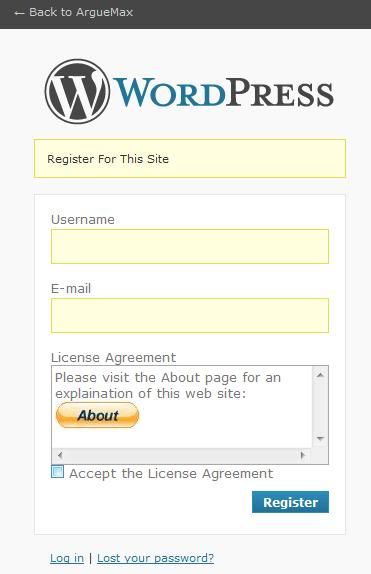
But here is the rub. I have added a plug in on the wordpress side on the registration menu. You have to click to agree to some policy. Since this plugin does not exist on the bbpress side, if I register a new account on the bbpress side, and try to use it to log in on the Wordperss side, I get an error that says “you do not have permission to ….”
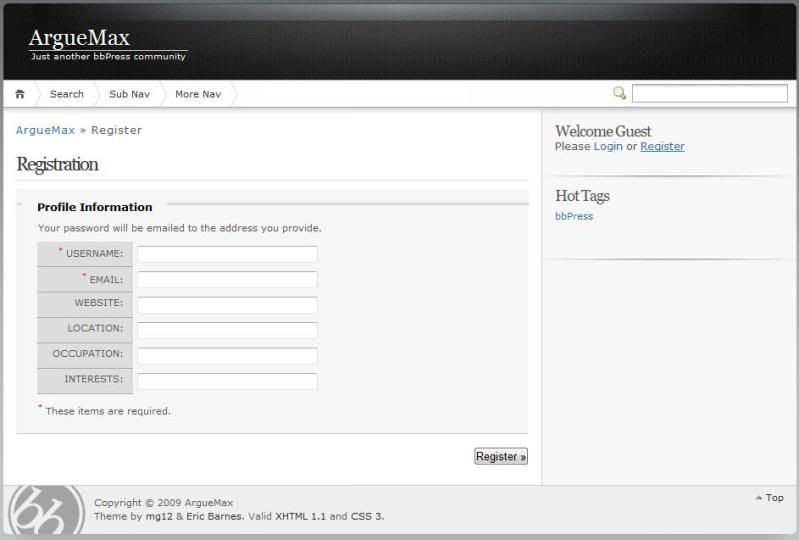
How do I make the registration I have formed on the WordPress side match the Registraion process on the BBPress side. Although the database is shared according to my tests and how I installed the latest versioin of BBPRess, the registration and login pages are not the samel
Here is the registration on the wordpress side showing my custom plugin
http://i67.photobucket.com/albums/h292/Athono/WordPress/arguemaxregistration2.jpg
Here is the registration on the bbpress side.
http://i67.photobucket.com/albums/h292/Athono/WordPress/arguemaxregistration.jpg
Maybe there is a way to make the bbpress such that when they click on the login link it directs the user to the login for the wordpress side (and also if they click on the registration link on the bbpress it goes to the registration on the wordpress side). How would I go about changing that? Is it html code or php code? The page http://www.arguemax.com/bbpress-1.0,2-2/bbpress/ has the login and register links the link for login goes to http://www.arguemax.com/bbpress-1.0,2-2/bbpress/bb-login.php and the link for Register goes to http://www.arguemax.com/bbpress-1.0,2-2/bbpress/register.php . How do I change that?