Skip to:
Content
Pages
Categories
Search
Top
Bottom

Search Results for '"wordpress"'

Viewing 25 results - 4,026 through 4,050 (of 26,873 total)
  • Author
    Search Results
  • #188767
    Perrorist
    Participant

    I should add that the site is using WordPress 4.9.1, bbPress 2.5.14, and bbp style pack 3.6.9, and bbPress Enable TinyMCE Visual Tab 1.0.1.

    #188753
    strike3
    Participant

    Hi,
    Here are the ones that are tied to email/Buddypress/BBPress. I’m wondering–do new topic notifications work for approved topics on a clean BBPress install? I don’t think I can disable many plugins on this site since it’s getting a lot of traffic, but I could probably test it out on a different live site. I think it would have to be a live site or at least have an SMTP provider set up for the notification emails to go out.

    Plugins
    1. Buddypress

    2. AsynCRONous bbPress Subscriptions (added because the default method of BCC’ing all subscribers created too many recipients for our SMTP provider)

    3. bbP Toolkit

    4. BP Profile Search

    5. BBPress Moderation Tools (allows us to put all new topics into moderation, seems to use default BBPress actions for moderation)

    6. Fix Forum Emails (fixes issue where HTML tags/entities show up in notification emails: https://bbpress.trac.wordpress.org/ticket/2865)

    7. WordPress Mail Queue (queues/chunks all mail from wp_mail so we don’t go over SMTP provider limits)

    8. Wordfence Security

    strike3
    Participant

    When a new topic goes to moderation and is approved, some, but not all, of the regular new topic actions take place. One thing that does not seem to happen is sending out the new topic notification email. If possible, can the bbp_notify_forum_subscribers action be added when a forum topic is approved by a moderator (after checking to make sure notifications are enabled)? The new topic notifications are a great way to drive visitors to our forums, so this is turning into an issue on our site. The site owners want to be able to moderate most (or even all) of the new topics, but then no notification emails are sent out.

    If this is something I should try to figure out on my own, please let me know and I’ll give it a shot. I didn’t want to mess with the bbpress core code since it would get overridden on the next update.

    Thanks!

    Matt

    Wordpress Version: 4.7.8
    BBPress Version: 2.5.14

    #188740
    gbbuggs
    Participant

    Is it a reason why my two previous topics have been overlooked and unanswered? Are you not familiar with the question or is this not a support forum for BBpress users?

    I am having issues with BBpress search bar. It is showing results for my entire site, as opposed, to just forum material. Please advise if you are able. Thank you

    I am using BBpress 2.5.14, WordPress 4.9.1 and here is a link to my site. throughunity.org

    #188720
    veppa
    Participant

    You can try “bbPress WP tweaks” https://wordpress.org/plugins/bbpress-wp-tweaks/ plugin for adding forum sidebar. There you can select which wrapper to use for bbPress and which sidebar of your theme replace with bbpress sidebar. Try different wrappers to find one with sidebar because some themes do not have sidebar on page.php, which is in most cases default wrapper for bbpress.

    #188719
    veppa
    Participant

    Hello, you can use bbPress wp Tweaks plugin for adding forum sidebar to your wordpress. Try different wrappers and add some widgets to bbpress sidebar to make it work. Plugin can be found on wordpress https://wordpress.org/plugins/bbpress-wp-tweaks/

    #188714
    abishur
    Participant

    I just installed wordpress and bbpress. I’ve been able to setup the forums, add users, and everything looks like it’s working fine except for two things. When I click on a user profile I get sent to a not found page. This same thing also happens when I try to edit a post. Can anyone provide guidance on what could be causing this problem? I’ve tried multiple different themes to see if it was an issue with the one I had chosen.

    I installed this on a raspberry pi. It used a mariaDB on the backend and I believe php7

    #188713
    Robin W
    Moderator

    sidebars are a nightmare since theme developers went away from the wordpress tradition of having standard files for each page type.

    Many now just have a page.php file, which frequently calls functions and stops any easy solution to the problem of getting a bbpress sidebar.

    So let’s start with what theme are you using?

    #188708
    Robin W
    Moderator

    I’ve now incorporated the code above into my bbp style pack

    bbp style pack

    dashboard>settings>bbp stylepack>forum order

    #188707
    Robin W
    Moderator

    I’ve now incorporated the code above into my bbp style pack

    bbp style pack

    dashboard>settings>bbp stylepack>forum order

    #188706
    Robin W
    Moderator

    Issue resolved.

    Usernames had ‘ Disable the visual editor when writing’ switched off in profile

    I’ve now incorporated the code above into my bbp style pack

    bbp style pack

    dashboard>settings>bbp stylepack>topic/reply form item 9

    jcermak
    Participant

    Did a new install of bbPress and when using the built in Forum Wide Search, when a user clicks “Search” it just brings our WordPress site’s homepage.

    I read on a forum that having spaces in the Single Forum Slug for Search under settings can cause this issue, but the slug used is just the word “search” so that’s not the issue.

    Anyone else having this problem?

    I’m fairly new to WordPress so I’m not sure how to troubleshoot the search. Can anyone help?

    Wordpress 4.9.1
    bbPress 2.5.14-6684

    Bunch – Forums

    #188651
    #188616
    sanam25
    Participant

    I used All In One Migration tool to create a local version of a WordPress site I am working on.

    I am using these versions:
    WordPress 4.6.6
    BuddyPress 2.7.0
    bbPress 2.5.10

    The forum comes up fine, but when I try to post in my local instance, it is not working. The post does not go to the database, and I don’t see any errors (even in debug mode) using the Enfold theme.

    I tried with the Twenty Fourteen theme and I see an error when I submit a post that just says:
    “ERROR: Are you sure you wanted to do that? ”

    What does that mean? How can I debug this?

    Thanks!

    #188575

    In reply to: bbPress Post Via Mail

    rjpivonka
    Participant

    Did you say your name is Sisyphus ? It would seem so..

    You might want to read this article, (I don’t know how old it is or how current the advice..)
    https://codex.wordpress.org/Post_to_your_blog_using_email

    #188571

    Hi all,

    I have made a community using wordpress version 4.8 where I’ve created multiple forums, subforums. I want one particular user should have full control on one specific forum, basically one admin for each forum. Is it possible, is there any specific plugin for it.. or any code changes ?? I searched a lot but didn’t get any. Can anyone please help me on the issue ?

    Thanks.

    #188568
    alexanderbiscajin
    Participant

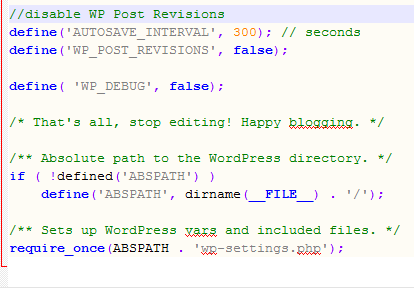
    Disable post

    I think that would be helpful to solve your query https://www.wpblog.com/disable-limit-wordpress-post-revisions/

    haddlyapis
    Participant

    Hi,
    after the 4.9 WP update, the de_DE-formal language was not working correctly (https://core.trac.wordpress.org/ticket/42574). In this time I switched to language setting “Deutsch”. I then started receiving complaints that some users couldn’t login to the forum. Yesterday I switched back to de_DE-formal, as they have fixed this issue and this in turn fixed the login issue. But I wanted to report this to you anyway.
    Is there anything I should be doing in BBPress settings when i change the WP language settings? thx.

    mianajoss
    Participant

    WordPress version: Version 4.9.1
    BBPress version: Version 2.5.14

    For some reason when my users post or when I post, the widgets wont show the new posts anymore. And they’re also not in order. It makes it difficult for my users to see new posts and topics, especially when they aren’t showing up. It worked for a few hours but it stopped working. I’ve tried everything it seems to get it to work again but I’ve had no luck.

    I would love to get help with this because I’d really love to stay with bbpress. I don’t want to have to go to new forum software.

    I hope there’s a way to fix this and I would love help with this! It helps my users see what’s going on in the site and in turn, it drives usage of the forum.

    #188470

    In reply to: robots text

    Jerry
    Participant

    Since my last bbpress post I starting getting two additional google search result:

    PageSquares – PageSquares – PageSquares – Alden, NY
    alden-ny.pagesquares.com/author/pagesquares/
    Welcome to WordPress. This is your first post. Edit or delete it, then start writing! Filed under: Uncategorized. Search Forums. Search for: Recent Topics …

    google search result returns:
    Whoops, no result found!
    It looks like nothing was found at this location. Maybe try a search?
    and
    Uncategorized – PageSquares – Alden, NY
    alden-ny.pagesquares.com/category/uncategorized/
    Welcome to WordPress. This is your first post. Edit or delete it, then start writing! Filed under: Uncategorized. Search Forums. Search for: Recent Topics. Community Square Forum. On the No Labels Community Square Forum by PageSquares. 1 week ago. Community Ideas Forun. On the No Labels Community Ideas Forum …

    google search result returns:
    Whoops, no result found!
    It looks like nothing was found at this location. Maybe try a search?

    I don’t have a blog or is it my intent to ever have one on the website. The post ‘Welcome to WordPress. This is your first post. Edit or…. is a draft and now password protected and continues to appear as a google earch result.
    I addeded two items to my robots txt file in an attempt to remove the additional search results without success. .
    Disallow: /category/uncategorized/
    Disallow: /author/*
    I then added two more items to my robots.txt file.
    Noindes: /category/uncategorized/
    Noindex: /author/*

    Now using the google removal tool and google go fetch I can remove one of the above results but then the other appears in the search results. If I repeat the process I can remove the second search result but the first one is again back in the search result. I also don’t understand why google would index something that isn’t a page or post and make it a search result that returns Whoops, no result found!

    I have now removed the post “Welcome to WordPress… from all my subdomains. Also I used the google removal tool and google go fetch but the google search results are for both the posts and for Forums and Topics. I don’t know how long it will take google to index my sub domains.

    Any help with this would be appreciated.

    #188455
    yemlihakorkmaz
    Participant

    Old smf page url address

    www.website.com/forum/saglik/kanatli-hastaliklari/

    New wordpress bbpres url adress

    www.website.com/topic/kanatli-hastaliklari/

    This is important

    Old smf page first forum later saglık later page name

    New bbpress page direct go page name

    How do i fix the problem ?

    #188424

    In reply to: No bbp-themes folder

    Robin W
    Moderator

    the instructions are quite dated.

    the recent version is here

    Step by step guide to setting up a bbPress forum – Part 1

    bbpress no longer has theme’s – it uses your wordpress theme

    #188415

    Topic: No bbp-themes folder

    in forum Themes
    lisa044
    Participant

    Hi,
    I am following these instructions (https://codex.bbpress.org/themes/theme-compatibility/step-by-step-guide-to-creating-a-custom-bbpress-theme/) and have got Cyberduck connected but in the wwwroot > wp-content > plugins > bbpress folder there is no ‘bbp-themes’ folder as the directions state.

    No idea what to do next, whether I should be using a different folder as the instructions are out of date for my version or what??

    Think Im on wordpress 4.8 and bbpress 2.5.14

    Thanks
    Lisa

    upatil
    Participant

    Thank you Robin for the response.

    1. My emails are setup to come from correct address like eg fred@mysite.com
    2. Emails are going out from the wordpress for other activities except for “Subscribe” action.
    3. Tried the “Asyncronous-bbpress-subscriptions” plugin to fix the email issue on the plugin – it dint work for me.

    Is the email on subscription a default behavior of bbPress. Ideas to fix it is appreciated.

    Thanks.

    #188382
    peter-hamilton
    Participant

    Hi all, I have been playing on and off with WordPress, BBPress and Buddypress, mostly to build my own company website.

    I have almost completed my quest to make BBpress as functional and user friendly as any other major, paid for, forum software offers, and I think I have even improved to my own preference and proven that BBpress is capable to be better then any commercial package.

    Please review my website, I have a demo account as you need to be logged in for all the plugins and hacks to be visible.

    I have added quite a few plugins and function snippets, I do not know how to code php or javascript, just basic html and css for the rest I cut and paste until it works, although I do understand what I am looking at with php after 4 years of cut-and-paste…lol

    http://www.seedism.nl

    username: demo
    passowrd: demo2017

    Just to let you know, I breed hybrid strains of medicinal Cannabis so you will find this content on my website!!

Viewing 25 results - 4,026 through 4,050 (of 26,873 total)
Skip to toolbar