Search Results for 'code'
-
AuthorSearch Results
-
August 17, 2014 at 1:13 am #151009
In reply to: Default template confusion?
Stephen Edgar
KeymasterExcellent, glad your on track to getting your custom templates up and running 🙂
Your correct, we don’t have a donate button, but we’re always on the lookout for extra hands, we need more docs on doing what you doing currently, Robin has already written some introductory docs here.
Pretty much anything goes, we need lots of docs written for our codex and anyone can create new and/or edit existing docs, so if you feel the urge to contribute that way if that’s your thing, that would be great. 🙂 If not we’ll also be having some other initiatives in the new future. 🙂
August 16, 2014 at 11:33 pm #151005In reply to: disable front end editing
KeymasterIf you don’t switch you will constantly have the same issues you are asking us how to fix.
You should implement that same fix again and yes, it will cause issues with your sidebar but you should find that your other issues will be fixed.
What I meant by ‘Source Code’ is to include the contents of the
bbpress.phpin your new topic, copy and paste it into your topic and surround that ‘source code’ using thecodetoolbar button on the topic form..August 16, 2014 at 11:22 pm #151004In reply to: disable front end editing
cybarmitzvah
ParticipantThe only reason I would be a bit concerned to do it again is because my sidebar is fine for now, but if I switch it, then all my users would be confused for the few day while we figure it out. Also whats my source code?
Sorry, I am new to this,
JB
August 16, 2014 at 8:35 pm #150986In reply to: disable front end editing
KeymasterIndeed it would have helped and by switching back you have enabled the error to occur again, redo what you did and then create a new topic and include the source code of your
bbpress.phpfile and the name and link of the theme you are using and we can help get your sidebar back.August 16, 2014 at 8:02 pm #150979In reply to: Importing SMF
KeymasterOh! The version included in bbPress 2.5.4 is the r5191 version, the smf3 you refer to is older than that, essentially there is no need to download any files from trac manually to replace the files that already exist in bbPress 2.5.x.
That said “if” you do download any versions of the importers from trac, you need to match the main bbPress
converter.phpfile, this is not the ‘dropdown’ you refer to.Looking closer at your original message, indeed you did use the
smf_prefix, my bad.Can you open up phpMyAdmin and open the
smf_memberstable and post a screenshot like mine below (if there is sensitive data there then just the column headers would be fine)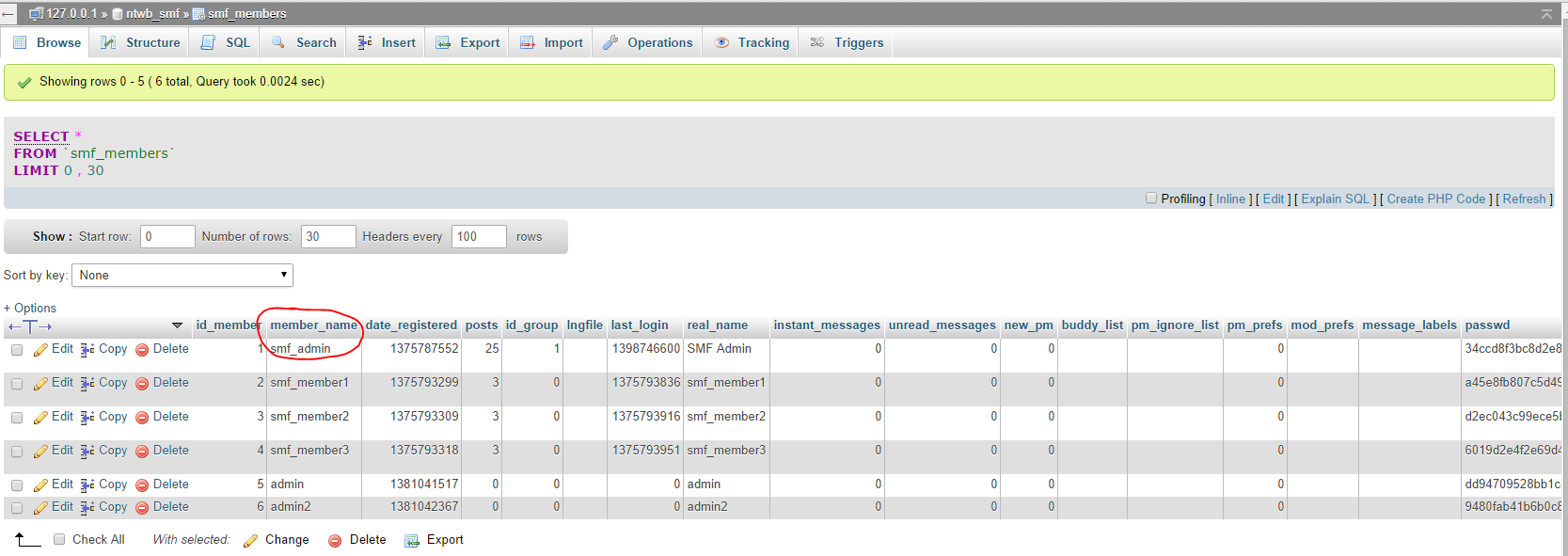
For some reason it appears your table is missing the
member_namecolumn and that is why the error occurs.What version of SMF are you trying to import?
And lastly, no forum is to big for bbPress 😉
August 16, 2014 at 5:55 pm #150973In reply to: 2.5.3 Easy change bbpress title font and color
Piani
ParticipantI havent tested any of the siggestions below. But you can play around with changes as example and change parameters:
#bbpress-forums div.bbp-forum-title h3,
	font-size: 30px;
	color: #CC00CC;
}
….ad this as as separate controls in the code above.
Find colors that you want at: http://www.w3schools.com/tags/ref_colorpicker.asp
You dont need uch change. Just add controls on the text types you want to change woth an } to close the code.
August 16, 2014 at 5:41 pm #150972In reply to: add a "Featured Image" to a forum
freshwater
Participanton her site/post she said we can control the icon size by css or add_image_size. can anyone give exact code for us? i don’t know what “name” we’re supposed to add size to in her above code.
and / or could we see the css code exactly and i guess we put this code in our child theme?
thank YOU!
August 16, 2014 at 5:02 pm #150970In reply to: mobile layout
Yolle
ParticipantHi!
I finally managed to do it.
I added this code so the avatar is at the top of the text#bbpress-forums div.bbp-reply-author { float: none; text-align: center; }Then when the text was below the avatar I inserted this code to the mobile part of the css:
#bbpress-forums div.bbp-reply-content {
		margin-left: 20px;
		padding: 0 0 0 0;
		text-align: left;
}
Thanks for getting me on the right track.
It concerns a closed forum and I was already preparing an access for you but then I managed by myself.
Thanks again!August 16, 2014 at 4:43 pm #150969In reply to: breadcrumbs space and search button
Robkk
Moderatoryou can try this for right now, im not sure how it works though
input #bbp_search_submit.button {
padding: 9px;
border: solid 1px #E5E5E5;
outline: 0;
font: normal 13px/100% Verdana, Tahoma, sans-serif;
width: auto;
background: #FFFFFF url('images/bg_form.png') left top repeat-x;
background: -webkit-gradient(linear, left top, left 25, from(#FFFFFF), color-stop(4%, #EEEEEE), to(#FFFFFF));
background: -moz-linear-gradient(top, #FFFFFF, #EEEEEE 1px, #FFFFFF 25px);
box-shadow: rgba(0,0,0, 0.1) 0px 0px 8px;
-moz-box-shadow: rgba(0,0,0, 0.1) 0px 0px 8px;
-webkit-box-shadow: rgba(0,0,0, 0.1) 0px 0px 8px;
}
August 16, 2014 at 4:30 pm #150967In reply to: Facebook and Twitter is header…
ModeratorIt has nothing to do with bbpress.
contact your theme developer
make a topic on wordpress supportor you can
create a folder called images in your theme if you dont have one already find a facebook icon and rename it fb.jpg
and use this
<a href="fbico"><img style="border:0;" src="fb.jpg" alt="Like Me" width="42" height="42"></a>and just place it in the right template file
then position with css
links with images:
http://www.w3schools.com/html/tryit.asp?filename=tryhtml_imglink
August 16, 2014 at 4:28 pm #150966In reply to: 2.5.3 Easy change bbpress title font and color
Participantwm, this worked perfect, THANKS, i’ve been searching on/off to do this for 1.5 years, (i’m not sure if that says about me?) LOL! i would like to do something extra, do you know how? i would like – your code enlarged the Forum Parent text size, how can i also enlarge the Child Forums that display under the enlarged Parent Forum text?
and can we change the font color in your code?
Thanks a BUNCH!!!
August 16, 2014 at 2:02 pm #150959Robin W
Moderatoryes, you would be looking in the usermeta table 9noramlly called wp_usermeta at meta-key wp__bbp_subscriptions
this is comma deliminated, so if I was user ID 3, and was subscribed to topics 10, 12 and 15, and forums 1, 3 and 6, I would see
user_id 3
meta_key wp__bbp_subscriptions
meta_value 1,3,6,10,12,15So to add category 246, you would just add this to the end, or create if not there
Someone cleverer than me out to be able to give you a sql string or two that would do this which you could run on phpmyadmin.
Logically you’d create two statements, the first would say
for all the user_id’s if wp_bbp_subscriptions exists, then make the meta_value equal to the meta_value concatenated with ‘,246’
Then second one
for all user_id’s if wp_bbp_subscriptions does not exist, make meta_key wp_bbp_subscriptions equal to 246.I’m not good enough at sql to code this without lots of checking – anyone good at this stuff?
August 16, 2014 at 1:47 pm #150958In reply to: EDIT TOPIC in BBPRESS
ModeratorI don’t know either of the two plugins, but essentially I don’t let anyone have access to the backend of my site – it jars with the front end.
https://codex.bbpress.org/bbpress-user-roles-and-capabilities/
contains a list of the capabilities, and most restriction plugins should list these, and you hopefully should be able to find or see edit_topics as a capability that you can restrict.
It may well be that one plugin is conflicting with the other as they both sound like they are trying to do the same job.
August 16, 2014 at 1:14 pm #150952In reply to: mobile layout
Moderatoryou probably decrease the margin-left and add the @media at top
#bbpress-forums div.bbp-topic-content {
margin-left: 130px;
padding: 12px 12px 12px 0;
text-align: left;
}
need a link to just make sure though.
August 16, 2014 at 11:53 am #150943In reply to: Quicktag Toolbar
Moderatorya didnt need to bump your topic after 20 minutes.
try that, it just changes it to black and white. change the colors to whatever you want
#bbpress-forums div.bbp-the-content-wrapper input {
font-size: 12px;
padding: 5px;
margin: 0 2px 0 0;
line-height: 1em;
background: #222;
color: #fff;
}
put it anywhere you can put custom css in
August 15, 2014 at 6:58 pm #150928Topic: Facebook and Twitter is header…
in forum PluginsParticipantHi all,
I am not sure this is necessarily a plugin or just a bit of code I need. But I am trying to get Twitter and Facebook buttons (maybe 32×32) (that link to our social sites) in the header of the site http://www.astronomertalk.com:
http://s24.postimg.org/p71o3hp5x/Screen_Shot_2014_08_15_at_6_18_27_PM.png
http://s24.postimg.org/p71o3hp5x/Screen_Shot_2014_08_15_at_6_18_27_PM.pngIt is a responsive layout so it may not be too easy to to, but all help will be appreciated.
*I want a facebook and twitter button (aka image), not the writing in the picture. I just don’t know how to use photoshop 🙂
Best,
JBAugust 15, 2014 at 12:38 pm #150920In reply to: How to display X last topics from a specific forum ?
ModeratorIn fact took a look today and done !
You now have a template of ‘short’ which just does the titles and topics, no search or other stuff.
see the web for full details on how to do this, but for example
[bbp-display-topic-index show=’5′ forum=’29’ template=’short’ ]
August 15, 2014 at 3:40 am #150908Moderatorjust updated this to do a particular forum as well !
August 15, 2014 at 3:35 am #150907In reply to: New Users Auto Subscribe to One Forum
ModeratorI doubt that would be possible.
This script reverses the logic
so normally the database would have a list of forums you have manually subscribed to.
This changes it to have a list of forums you have manually unsubscribed to, thus you are subscribed by default.
So the code would not work to just have one forum.
August 15, 2014 at 2:07 am #150905In reply to: Default template confusion?
KeymasterOoops, for the topic form, take a look in
content-single-forum.phpand you’ll find:
<?php bbp_get_template_part( 'form', 'topic' ); ?>August 15, 2014 at 2:05 am #150904In reply to: Default template confusion?
KeymasterIf you want paste your templates (or code snippets) in a Gist and I’ll take a look and see if anything stands out… https://gist.github.com/
Unless you have named the files incorrectly, this is what they should be:
content-archive-topic.php–loop-topics.php–loop-single-topic.phpYou have an extra
son two of the three 😉August 15, 2014 at 1:46 am #150903In reply to: Default template confusion?
hitkid
ParticipantThanks again @netweb
Okay, I’m glad too see I wasn’t editing the wrong templates. I was paranoid that I was doing that. Unfortunately, this means something is going on with my archive-topics.php and content-archive-topics.php templates. The other two work great.
What I’m trying to do is add things like: elements, classes, ids, functions I’ve built move around the functions already in the archive-topics.php and content-archive-topics.php templates and so on. When I do this and save changes they don’t appear.
It doesn’t even look like my topic index is using the proper templates because in the content-archive-topics.php template file there is a search function that isn’t appearing in the topic index when I click on a topic off the forum index. eg home>forums>this-is-a-topic.
Also you can create a topic on the topic index page in the website, but I can’t find a call to the form-topics template in any of the topic templates stated in the topic heiarchy. Unless it’s called in another way that’s not something like this:
<?php bbp_get_template_part( 'form', 'topic' ); ?>What could be going on and why could this be ?
Again I thank you for your help!
August 15, 2014 at 1:25 am #150902In reply to: Include sub-forum topics in parent forum loop
KeymasterI am sorry, I am not writing custom plugins for people for free, let alone your assumption that that is what you expect, not going to happen.
If you need some custom code written post an advert on http://jobs.wordpress.net
August 14, 2014 at 11:28 pm #150898In reply to: Importing SMF
KeymasterAlso if you are going to use versions of the importer from the source repo you will need to ensure you also are using the matching the revision of
converter.php.Also not quite sure how you landed on the r5191 revision, there are quite a few since then and a few before!
August 14, 2014 at 11:23 pm #150897In reply to: Importing SMF
KeymasterIt looks like you left out the table prefix, SMF typically uses
smf_Double check by opening your SMF
Settings.phpfile in the root folder of your SMF install:########## Database Info ########## $db_type = 'mysql'; $db_server = 'localhost'; $db_name = 'db_name '; $db_user = 'db_user '; $db_passwd = 'db_passwd '; $ssi_db_user = ''; $ssi_db_passwd = ''; $db_prefix = 'smf_'; $db_persist = 0; $db_error_send = 1; -
AuthorSearch Results


