ok that code looks like shortcodes used with your theme.
suggest you switch back to your theme.
can you post a link to your site?
hello if i keep bbpress and buddypress ans desactivated all the other
when i click on one theme of the forum
it is strange…
i obtain all the list of my forums but like code
and the problem is not solved
[/vc_column_text][vc_column_text letter_spacing= » » el_class= »blocindex » css= ».vc_custom_1462630577662{margin-bottom: 10px !important;border-bottom-width: 0px !important;} »]Dans lxxxxxxx vous consultez des fiches de membre certifiées manuellement donc 100% réelles. Un homme inscrit c’est un homme derrière l’écran, une femme inscrite c’est une femme derrière l’écran. Une évidence pour vous ? Non ! puisque 99% des sites web adultes existants ne vérifient rien …[/vc_column_text][kleo_button title= »En savoir plus ! » href= »http://xxxxxxxt/la-communaute/ » style= »see-through » position= »center » size= »sm » icon= »ok-alt » font_weight= »400″ letter_spacing= » »][/vc_column][/vc_row][vc_row text_align= »center » text_color= »#ffffff » type= »color » bg_color= »#878787″ vertical_align= »yes » padding_top= »20″ padding_bottom= »20″ el_class= »col light »][vc_column width= »1/2″ css= ».vc_custom_1411383486564{background-position: center !important;background-repeat: no-repeat !important;background-size: contain !important;} »][vc_single_image image= »2921″ img_size= »full » alignment= »center » animation= »animate-when-almost-visible » css_animation= »left-to-right »][/vc_column][vc_column width= »1/2″][vc_column_text letter_spacing= » » css= ».vc_custom_1460628373561{margin-top: 10px !important;border-top-width: 0px !important;} »]”
for the theme i use kleo child template
when i choose “Twenty Fifteen”
same problem not fix
Hi,
This is not an issue, it is a feature of the plugin you downloaded, installed and then enabled. That specific part of the plugin (the whitelist) is disabled by default, so you have enabled it yourself.
Please read the text that is provided alongside the options in the plugin.
The solution to this without editing the file is to simply disable the whitelist, or add the shortcodes that aren’t being displayed into the whitelist. You can do that within the ‘Extras’ tab.
– The Plugin author.
How can I rename this page title http://prnt.sc/c6uex8 ? From “Forums Archive” to something else.
I really tried everything.. from adding filters.. to edit the core of BBpress Templates and etc… nothing worked. I don’t want to create a page and add the shortcode in it. Please help me find a different way. I have read everything in internet but nothing solves the problem…
You might also be able to look yourself. In the zippy theme directory, e.g. wp-content/themes/zippy you might find a bbpress folder with some bbPress templates located inside, if that is the case then maybe the Zippy version of form-reply.php is out of date.
I just setup a new site with WP 4.5.3 and bbPress 2.5.10 es_ES
Everything is translated for me: https://cloudup.com/ckbF2DGSPEl
Does the theme you are using include custom bbPress templates?
It looks like there might be an issue with the file form-reply.php
The file can be found in: templates/default/bbpress/form-reply.php
It should match: https://bbpress.trac.wordpress.org/browser/tags/2.5.10/templates/default/bbpress/form-reply.php
Can you check the above for me please?
Thanks for the screenshots, they are a big help 🙂
The “before” screenshot has lots of untranslated strings, Topic, Viewing 2 posts - 1 through 2, Participant, Edit, Move etc etc
Wheres most of the above are now translated in your “after” screenshot, I see 4 strings untranslated though: Reply to, Notify me of follow-up replies via email, Tags: and Submit
Those 4 strings all appear to be translated correctly, e.g https://translate.wordpress.org/projects/wp-plugins/bbpress/stable/es/default?filters%5Bstatus%5D=either&filters%5Boriginal_id%5D=93987&filters%5Btranslation_id%5D=3551506
p.s. Spam isn’t translated, Spam appears to be Spam in any language 😉
I’ll dig around some more and see what I can find
Hi there,
I’m slowly putting together a bbPress forum and have been researching the best ways to quote replies. Many of the threads I’ve seen on the topic are old, some pointing to outdated plugins; others point to trying custom development work. In general, it’s left me wondering how to go about enabling quoted replies.
Is anyone in the same boat? Do any of the mods have any wisdom to share? I’d prefer an updated plugin -type solution, but I’ve also done a bit of web dev and a fair bit of Python, so I’m willing to put in the work and code a solution if need be–I just don’t know where to start.
Thanks in advance for your help,
-maruthemany
For subscribing to a topic you should see this subscribe link by the favorites link. Theme devs can move it though.
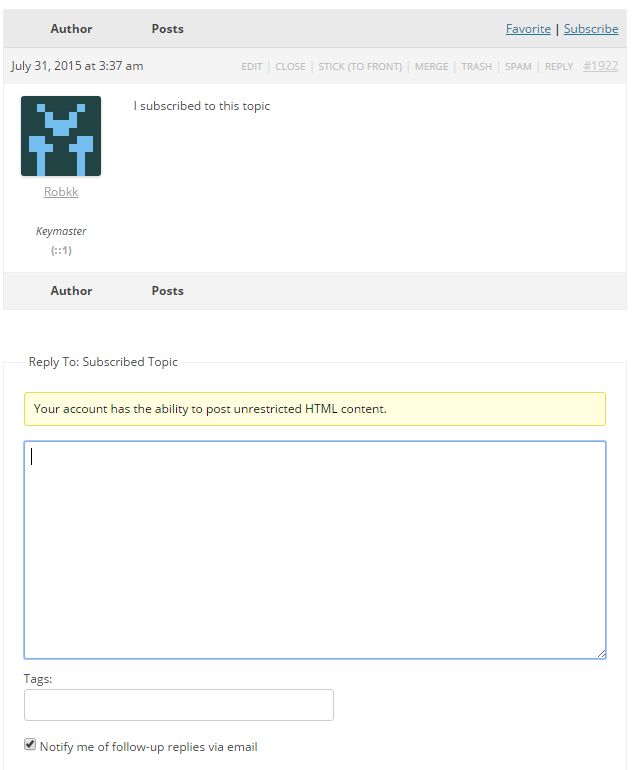
https://codex.bbpress.org/features/subscriptions/
@robin-w
And does this work for all themes, or just this one?
I just come across the issue in themes every now and then. Depends if the theme includes a file called content-search.php as well, like in TwentyFifteen and TwentySixteen default themes.
So whilst copying all the templates to the theme fixed it for the OP, is the fix just to copy content-search.php to get
wp-content/themes/%your-theme-name%/bbpress/content-search.php
Yes this would work as a temporary fix for bbPress forum users right now.
You can add a patch to the ticket I created if you want to create a possible fix.
I think possibly you would need to just rename the file on the bbPress end and that will do it, but there might be other instances in the plugin that would need a name change like in other additional template files, and possibly somewhere in the theme compat code.
Your theme developers will need to be a little more specific than “bbPress code has some problems”.
If bbPress’ code didn’t change and you updated your theme and now bbPress doesn’t work, then this is not a bPress issue, it is a issue with your theme and what changed in the latest theme update.
I suggest you contact the theme developers again, link them here to this post of mine, if there is a bbPress issue, I’m happy to work with the theme author to fix bbPress if that is the case.
i checked with technical support apparently the bbpress plugin code has some problem, hence it is not able to function properly. Is anyone facing that problem?
@phileas013
I would like the questions to be displayed the same way that on this bbpress forum.
On these forums the developer removed the content holding the labels and also moved the post date and id number in a different area.
Robin linked you to a plugin that enables you to show the lead topic, which this site does, so you have that. If you do not want to use the plugin, or you are really just using it to just show the lead topic, you can also use this custom php snippet that is on this site.
https://codex.bbpress.org/bbp_show_lead_topic/
I still do not find a way to add a border around the topic (and not the replies) or find a way to make it look different from the answers.
You can try some custom CSS like this. It won’t look as good as this site because of how its designed as I stated above.
.single-topic .topic {
  border: 2px solid black;
}
I do not understand why the line in blue with “créateur” and “sujet” appears above and below the main topic.
Thats normal, its how the lead topic is supposed to be displayed by default.
put this in your child theme’s functions file, and make the number bigger than the number of forums you have
update_option ('_bbp_forums_per_page', 200) ;
Functions files and child themes – explained !
Hi,
First assure that ‘Allow guest users without accounts to create topics and replies’ is checked.
To allow guest just to create topics, in wp-content/plugins/bbpress/templates/default/bbpress/form-topic.php one line 28 change with:
<?php if ( bbp_current_user_can_access_create_topic_form() && !bbp_is_anonymous() ) : ?>
To allow guest just to create topics, in wp-content/plugins/bbpress/templates/default/bbpress/form-reply.php one line 28 change with:
<?php if ( bbp_current_user_can_access_create_reply_form() && !bbp_is_anonymous() ) : ?>
Update: Still didn’t find a way to fix this…
However, I noticed that the menu is okay on mobile. Also, if I’m using another page and adding the [bbp-forum-index] shortcode to it instead of the default forums root page, it’s okay as well.
I think you are now into custom web design !
I’ll do the following for you, but now you are talking abut amending the tpoics plugin, of which I have no coding knowledge
to get rid of the line below put this in your css
.bbp-footer.last-child {
  display: none;
}
Hi, sorry for the late reply.
We have our forum index which I’ve created by adding a shortcode to a WordPress page: http://red-ferndevelopment.co.uk/FootballMedic/forums/
This page displays fine as I’ve been able to add a H1 and padding, but clicking into any of the other forum pages has no padding or H1 title tag.
Is there any way of doing this without manually editing each PHP file?
On a side note, I have a couple of questions about general customisation that I can’t seem to find answers for in the documentation, or in the forum. Should I start a new thread or post within this one?
Many thanks in advance.
Many thanks,
Austin
Solved! Going line by line through the Bones theme I discovered that the call to load jQuery <script type="text/javascript" src="/wp-content/themes/bones/library/js/jquery.js"></script> was located in the theme’s footer “for faster loading.” Moving this line to the header fixed the problem. Still not quite sure why – seems the editor cannot wait for jQuery to load – but at this point I’m just glad it’s sorted. Thanks again for your help @robin-w.
I had a member post a snippet or two of php in a couple of replies without closing the tag. The order of the replies are now messed up. Sometimes a reply will post up before the last one. Sometimes it will go to the top. On some topics they seem to be fine.
I have deleted all of the entries that had code in them. I have run the repair tools several times.
I have even installed the “Sort topic replies” plugin. The sorting does not appear to be working with that, however the option to always have the main topic post at the top does work and does make it a bit better.
I’m using the latest version and the link is http://www.dualcreatives.com/forums/ but most of this is happening in the private member forums. The public forum only has a few and I don’t see it happening on those.
Does anyone have any ideas on how I might fix this?
2. Changing the titles
The part that says ‘forum’ is harder – this is part of the template, so different title would require recoding that template. If you are up with changing php files, I’ll look at how easy that is
However I suspect you have dome that layout using shortcodes? If so then you could just put a header in your page for each – not as neat but perfectly functional. If not let me know how you have done the layout.
1. Removing the breadcrumbs
if you are fine with code then :
Layout and functionality – Examples you can use
if not then use my style pack plugin to turn them off
https://wordpress.org/plugins/bbp-style-pack/


