So mentions.min.js has this code
bp.mentions.tinyMCEinit = function() {
		if ( typeof window.tinyMCE === 'undefined' || window.tinyMCE.activeEditor === null || typeof window.tinyMCE.activeEditor === 'undefined' ) {
			return;
		} else {
			$( window.tinyMCE.activeEditor.contentDocument.activeElement )
				.atwho( 'setIframe', $( '.wp-editor-wrap iframe' )[0] )
				.bp_mentions( bp.mentions.users );
		}
	};
I think you’ll find that if you put an alert in a js file on forum page load that the if statement returns true. I guess it loads too early and tinyMCE isn’t initialized yet. Try loading in your functions.php a js file with this code:
jQuery(document).ready(function($) {

	/* necessary to get @ mentions working in the tinyMCE on the forums */
	window.onload = function() {
	      my_timing = setInterval(function(){myTimer();},1000);
	      function myTimer() {
	        if (typeof window.tinyMCE !== 'undefined' && window.tinyMCE.activeEditor !== null && typeof window.tinyMCE.activeEditor !== 'undefined') {
		        $( window.tinyMCE.activeEditor.contentDocument.activeElement )
					.atwho( 'setIframe', $( '.wp-editor-wrap iframe' )[0] )
					.bp_mentions( bp.mentions.users );
				 window.clearInterval(my_timing);
		    }
	      }
	      myTimer();
	};
})
I don’t remember where I found this code, but it’s not mine, it just took a long time to find. I think just adding this will work but if it doesn’t get back to me and we’ll work this out
I just found a solution by using the same code in the CSS options of the bbp Style Pack plugin. Thanks!
I tried this but it did not work.
I’m using the bbPress Toolbox plugin and and I did activate bbc code as the method to use quotes so all that happens is a < blockquote > tag added.
I’ve added your suggestion to the css file, which I put in my child theme folder (themes/childtheme/bbpress/bbpress.css).
No difference though, bbpress still uses the CSS from my style.css.
The two ‘test’ items below are easier, as they just use blockquote so you can add this to your css
#bbpress-forums blockquote {
  color: green;
}
I presume that you don’t want to change the class in the other plugin?
Hi, I’m using bbpress on my upcoming videogame website:
http://20160719.gaming-universe.de/guf/topic/testtest/#post-6864
As you can see, the template uses information from the WP theme style.css.
This is overall a good thing but the blockquote function looks off.
I’m also using a couple of plugins so I feel that I might be able to change that via a CSS function but don’t understand CSS very well.
When looking at the code, the blockquote seems to use a specific class from one of my plugins:
blockquote class=”d4pbbc-quote”
Can anyone point me to where I can change the CSS for the blockquote attribute?
Thanks, Matthias
This is the default display.
If you are into coding, you can check out
Layout and functionality – Examples you can use
or if coding is not your thing use my plugin Style Pack which will let you set up lots of stuff, including fixing the above
https://wordpress.org/plugins/bbp-style-pack/
I hope this is the right place for this. Sorry if it isn’t.
The long and short of my issue is that everything is too compact on my forum index. I’ve made a page, with the forum index shortcode, and when it shows, a lot of it is packed together in a way I don’t particularly care for. Here’s a screen shot:

See how all the sub-forums of the category is the title and basic stats? And how the Category shows it’s description? I’d like to have the sub-forums’ descriptions showing here, too. Is that possible? What would I need to change? Is there some plugin or check box I need to hit?
Thanks in advance!
After doing some more work on this, I think that while the visibility of my topic in the subforum is indeed broken after the Subforum’s ID is placed in the _bbp_hidden_forums option, that is only a symptom and not a cause.
I think that the fundamental assumptions of this version of bbPress/BuddyPress preclude the use of Subforums. And evidence of this is that visibility sensitive areas of the code like this just come up with the wrong answer when subforums are involved.
So for me, I think I’m going to stop trying to make subforums work until the core code changes to better support them.
PATH: includes/class-wp-editor.php
Line 74: elseif ( $set[‘editor_height’] > 5000 )
Line 75: $set[‘editor_height’] = 5000;
if you change the last 5000 on line 75 to a smaller number – say 300 or whatever you prefer – then save the file, the ginormous box will re-size to that height.
Good Luck
can you check if it is being logged as spam
Akismet
If the service catches a topic that is spam, you will see it in the WordPress backend in the topics section under spam, and the same process for replies.
create a directory on your theme called ‘bbpress’
ie wp-content/themes/%your-theme-name%/bbpress
where %your-theme-name% is the name of your theme
find
wp-content/plugins/bbpress/templates/default/bbpress/form-anonymous.php
Make a copy of this file, and put in in the directory called bbpress that you created above, so you end up with
wp-content/themes/%your-theme-name%/bbpress/form-anonymous.php
bbPress will now use this template instead of the original
and you can amend this
so you will need to take out lines 31-34 which say
<p>
			<label for="bbp_anonymous_website"><?php _e( 'Website:', 'bbpress' ); ?></label><br />
			<input type="text" id="bbp_anonymous_website" value="<?php bbp_author_url(); ?>" tabindex="<?php bbp_tab_index(); ?>" size="40" name="bbp_anonymous_website" />
		</p>
You should do this in a child theme, but if you do it in your main theme keepo a record as you will need to do this again on any theme update.
Functions files and child themes – explained !
I am just getting set up with BBpress and am in the process of creating the forums.
So I am running into problems.
The first error I get is

I click on OK to clear the error then click publish again then I get this error on a white screen:
Fatal error: Cannot use object of type WP_Post as array in /srv/disk11/2110213/www/jimandms.com/wp-content/plugins/social-networks-auto-poster-facebook-twitter-g/inc/nxs_functions_adv.php on line 155
I can go pull up the forum list and the forum that I just created is there. But I would still much rather not see any errors at all, of course.
My website is http://jimandms.com if you would like to pay a visit for some reason.
Thanks for reading!
Jim
ok that code looks like shortcodes used with your theme.
suggest you switch back to your theme.
can you post a link to your site?
hello if i keep bbpress and buddypress ans desactivated all the other
when i click on one theme of the forum
it is strange…
i obtain all the list of my forums but like code
and the problem is not solved
[/vc_column_text][vc_column_text letter_spacing= » » el_class= »blocindex » css= ».vc_custom_1462630577662{margin-bottom: 10px !important;border-bottom-width: 0px !important;} »]Dans lxxxxxxx vous consultez des fiches de membre certifiées manuellement donc 100% réelles. Un homme inscrit c’est un homme derrière l’écran, une femme inscrite c’est une femme derrière l’écran. Une évidence pour vous ? Non ! puisque 99% des sites web adultes existants ne vérifient rien …[/vc_column_text][kleo_button title= »En savoir plus ! » href= »http://xxxxxxxt/la-communaute/ » style= »see-through » position= »center » size= »sm » icon= »ok-alt » font_weight= »400″ letter_spacing= » »][/vc_column][/vc_row][vc_row text_align= »center » text_color= »#ffffff » type= »color » bg_color= »#878787″ vertical_align= »yes » padding_top= »20″ padding_bottom= »20″ el_class= »col light »][vc_column width= »1/2″ css= ».vc_custom_1411383486564{background-position: center !important;background-repeat: no-repeat !important;background-size: contain !important;} »][vc_single_image image= »2921″ img_size= »full » alignment= »center » animation= »animate-when-almost-visible » css_animation= »left-to-right »][/vc_column][vc_column width= »1/2″][vc_column_text letter_spacing= » » css= ».vc_custom_1460628373561{margin-top: 10px !important;border-top-width: 0px !important;} »]”
for the theme i use kleo child template
when i choose “Twenty Fifteen”
same problem not fix
Hi,
This is not an issue, it is a feature of the plugin you downloaded, installed and then enabled. That specific part of the plugin (the whitelist) is disabled by default, so you have enabled it yourself.
Please read the text that is provided alongside the options in the plugin.
The solution to this without editing the file is to simply disable the whitelist, or add the shortcodes that aren’t being displayed into the whitelist. You can do that within the ‘Extras’ tab.
– The Plugin author.
How can I rename this page title http://prnt.sc/c6uex8 ? From “Forums Archive” to something else.
I really tried everything.. from adding filters.. to edit the core of BBpress Templates and etc… nothing worked. I don’t want to create a page and add the shortcode in it. Please help me find a different way. I have read everything in internet but nothing solves the problem…
You might also be able to look yourself. In the zippy theme directory, e.g. wp-content/themes/zippy you might find a bbpress folder with some bbPress templates located inside, if that is the case then maybe the Zippy version of form-reply.php is out of date.
I just setup a new site with WP 4.5.3 and bbPress 2.5.10 es_ES
Everything is translated for me: https://cloudup.com/ckbF2DGSPEl
Does the theme you are using include custom bbPress templates?
It looks like there might be an issue with the file form-reply.php
The file can be found in: templates/default/bbpress/form-reply.php
It should match: https://bbpress.trac.wordpress.org/browser/tags/2.5.10/templates/default/bbpress/form-reply.php
Can you check the above for me please?
Thanks for the screenshots, they are a big help 🙂
The “before” screenshot has lots of untranslated strings, Topic, Viewing 2 posts - 1 through 2, Participant, Edit, Move etc etc
Wheres most of the above are now translated in your “after” screenshot, I see 4 strings untranslated though: Reply to, Notify me of follow-up replies via email, Tags: and Submit
Those 4 strings all appear to be translated correctly, e.g https://translate.wordpress.org/projects/wp-plugins/bbpress/stable/es/default?filters%5Bstatus%5D=either&filters%5Boriginal_id%5D=93987&filters%5Btranslation_id%5D=3551506
p.s. Spam isn’t translated, Spam appears to be Spam in any language 😉
I’ll dig around some more and see what I can find
Hi there,
I’m slowly putting together a bbPress forum and have been researching the best ways to quote replies. Many of the threads I’ve seen on the topic are old, some pointing to outdated plugins; others point to trying custom development work. In general, it’s left me wondering how to go about enabling quoted replies.
Is anyone in the same boat? Do any of the mods have any wisdom to share? I’d prefer an updated plugin -type solution, but I’ve also done a bit of web dev and a fair bit of Python, so I’m willing to put in the work and code a solution if need be–I just don’t know where to start.
Thanks in advance for your help,
-maruthemany
For subscribing to a topic you should see this subscribe link by the favorites link. Theme devs can move it though.
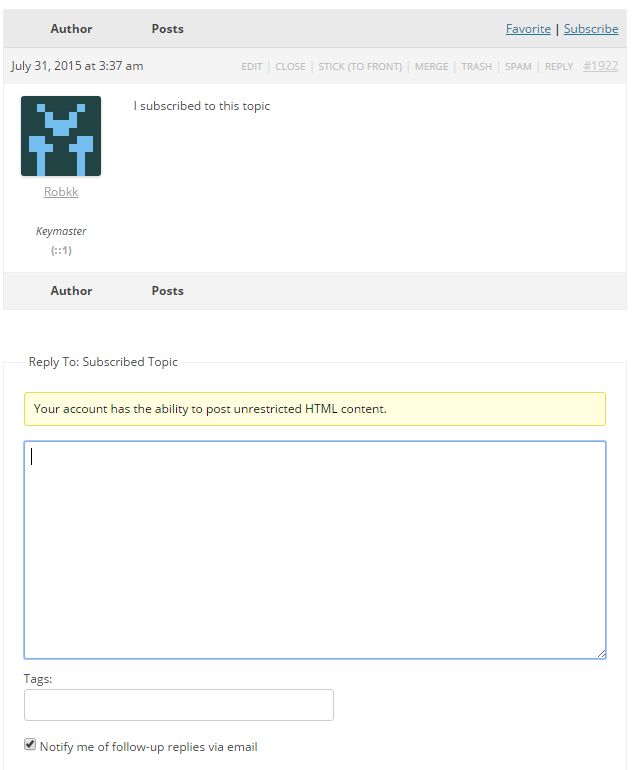
https://codex.bbpress.org/features/subscriptions/
@robin-w
And does this work for all themes, or just this one?
I just come across the issue in themes every now and then. Depends if the theme includes a file called content-search.php as well, like in TwentyFifteen and TwentySixteen default themes.
So whilst copying all the templates to the theme fixed it for the OP, is the fix just to copy content-search.php to get
wp-content/themes/%your-theme-name%/bbpress/content-search.php
Yes this would work as a temporary fix for bbPress forum users right now.
You can add a patch to the ticket I created if you want to create a possible fix.
I think possibly you would need to just rename the file on the bbPress end and that will do it, but there might be other instances in the plugin that would need a name change like in other additional template files, and possibly somewhere in the theme compat code.
Your theme developers will need to be a little more specific than “bbPress code has some problems”.
If bbPress’ code didn’t change and you updated your theme and now bbPress doesn’t work, then this is not a bPress issue, it is a issue with your theme and what changed in the latest theme update.
I suggest you contact the theme developers again, link them here to this post of mine, if there is a bbPress issue, I’m happy to work with the theme author to fix bbPress if that is the case.


