That plugin would be for the old ‘standalone’ version v1.x of bbPress, you would need to find a plugin that works with bbPress 2.x.
Maybe WPML will work? http://wpml.org/ Quite a few people here use it with bbPress:
https://bbpress.org/forums/topic-tag/wpml/
(Note: You have to ask WPML for the extra bbPress additional plugin to use WPML with bbPress)
On a related note, how is the language options provided in this page? (under the subpages heading)
They are just simple ordinary WordPress pages and the parent page is the page you linked. Both the content and the title of each page is written in the authors ‘native tongue’ there is nothing special behind this, standard WordPress is way cool like this. 🙂
That plugin would be for the old ‘standalone’ version v1.x of bbPress, you would need to find a plugin that works with bbPress 2.x.
Maybe WPML will work? A few people here use it https://bbpress.org/forums/topic-tag/wpml/
Turn off define('WP_DEBUG', true); in your wp-config.php file, this is a known issue.
More info on this:
https://bbpress.trac.wordpress.org/ticket/2309 https://core.trac.wordpress.org/ticket/24169
Edit: PS, I did not get an email that there was a reply on this, and it’s definitely checked…
Firstly, did you get this reply?
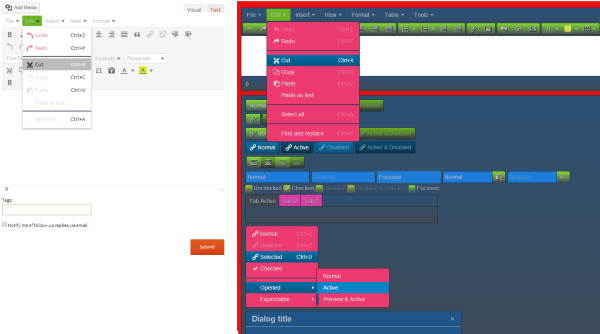
And I’m a little confused: doesn’t bbPress have it’s own editor that’s separate from WordPress? I have an awesome editor for WordPress, but it doesn’t show up for bbPress.
My bad, Yes and no, bbPress can use WordPress’ editor if you enable TinyMCE as detailed here, that is the same editor you see in the backend of WordPress to create posts, pages tec.
The original links I posted are for adding custom themes for TinyMCE.
If you are not using TinyMCE you can edit bbPress CSS in the ‘/* =TinyMCE in themes’ section around line #714.
Ok, so ignore the above, I have found and hit the same wall you have with the ‘editor buttons’, I’m not sure if this has changed with WordPress 3.9 and TinyMCE 4 but I can’t override these either without some serious hacky code.
I’ll create a bbPress and/or WordPress ticket/s in trac so this can be done without quite so much effort. I’ve been messing about for the past hour trying to get the numerous combinations of ‘editor styles’ to work and am now walking away to go ask the experts 😉
I am using theme which has padding of 35px on side of posts. Same style is used for bbpress as well and i have by bbpress forum topics with 35px padding on both sides. Is there any way i could remove this padding only for bbpress forum and not for normal wordpress posts?
Hi,
I have a forum where my users need to be able to have the option to view in two languages. I have added the necessary language files and when any language is defined, it works fine.
But I need users to be able to choose language of their choice. Is there any way to do it?
I did find a plugin,
bbpress language switcher
and an updated version of it.
bbpress language switcher updated
but it does not work for current version of bbpress. I tried to update it but there are too many functions that I am not familiar with.
Is there some other similar plugins?
On a related note, how is the language options provided in this page? (under the subpages heading)
bbpress in your language
After calling bbp_insert_topic with the appropriate args, I have successfully created a bbPress topic inside of a Buddypress Group forum. Unfortunately, I don’t know how to trigger a Buddypress Activity update. I’ve posted this question in the Buddypress forum, but tumbleweeds blew across my post.
Does anyone here know?
Thanks in advance!
Ive searched everywhere and tried everything I found to redirect the BBPress profile and before I will give up I thought to make a request in this forum.
Ive tried this in the .htaccess with no success:
RewriteEngine on
RewriteRule ^forums/users/(.*)/?$ http://www.mysite.com/dashboard/listings/$1 [L,R=301]
Ive tried the Redirection WP plugin and its redirecting the forums/users/(.*)/ where I want but it is also redirecting http://www.mysite.com/forums/users/favorites/ and all the profile links and I DO NOT want this since my idea is to redirect the BBPress profile into a main profile and link the favorites and the topics started from there.
Ive also found this code but I cant get it to work:
add_action(‘bb_init’, ‘profile_redirect’);

function profile_redirect() {

if (is_bb_profile() && $_GET != ‘edit’ && $_GET != ‘favorites’) {

$user = bb_get_user($_GET);

if ($user) wp_redirect(“http://www.example.com/members/” . $user->user_nicename);

}

}
Please help me to do this and I am willing to pay up to $100 for a working solution but I need it as soon as possible.
Thanks for the remove ‘forums’ link. Looks good.
I’ll set up a country forums structure and see how it goes. I just don’t want to create something that will bog down or crash the system with too many separate forums. I ran into this problem with Vanilla, which I was trying to work with previously. So far bbPress seems to be working better.
You won’t really be able to determine the ‘usability’ until you set up a good subset of the forums you want to use and then go exploring yourself to determine what works best for what you are trying to achieve.
See my answer here on removing the ‘forums’ link in the breadcrumb.
To change the user profile url, you can use this – it will build a link to the /profile/username and return that in the bbp_get_user_profile_url function in includes/users/template.php :
add_filter('bbp_pre_get_user_profile_url', 'mjj_profile_link');
function mjj_profile_link( $user_id ){
	$user_info = get_userdata( $user_id );
	$user_nicename = $user_info -> user_nicename;
	return '/profile/' . $user_nicename;
}
This would go in your functions.php file or bbpress-functions.php if you’re using that. Never modify those files in the admin area, only do them if you have ftp access and can undo anything that goes wrong!
Ok… so I’ve been working on this all day. I installed BuddyPress, then I installed bbPress. The only other plugin installed at the time was Jetpack. I’m using Thememakers Blessing Theme on WP 3.8.3 and the latest BuddyPress and bbPress plugins.
However, I went to create a new user (participant) and noticed that none of the new roles usually created when installing bbPress were there. I still only have the standard roles created when WP is installed.
Here are the steps I’ve taken. I uninstalled all other active plugins. I uninstalled BuddyPress and bbPress. (completely deleted) I changed themes to a more generic theme (TwentyThirteen). So I was basically back to a fresh install of WordPress. I’m working on a new site that is not live yet so no big deal.
I went and re-installed bbPress and still nothing. No new roles. No Keymaster, no participant… nothing. I’ve been searching for quite a while and I can’t find that anyone else has had this issue.
Does anyone have any thoughts? Thanks.
Are the passwords being imported already? I have the SMF converter version bbPress (r5189), but before the importing finishes it erases all passwords so users are forced to reset their password.
I noticed the _bbp_class was created in the db but it creates an error when an previously imported user tries to login.
I hope any of you is able to help me with this.
Thanks,
So I followed the instructions at WordPress to change the bbPress editor look, and match my dark theme (as posted above by netweb) and it didn’t work. I’m not sure that page is current for the new WordPress. Not only did it not change my editor’s CSS, it gave me a php header error that wouldn’t let me access some pages.
I also tried to put the CSS in the bbPress css in my child theme, hoping if I narrowed it down enough it would take precedence, but no luck there. Also, there are several buttons involved in the editor that are controlled by css in yet *another* css file (located in the same folder as the editor: wp-includes/css) buttons.min.css that is also causing a ton of white in the editor, and when I tried the php fix to create a custom css file for that one in my child theme the whole site crashed.
It seems really strange to me that such a huge part of this plugin doesn’t have a clear solution for those who prefer a dark theme after all this time. I’ve literally spent hours today trying to problem solve this. The glaring white looks really, really bad in my forums. If I ever sort it out, I’ll do my best to make sure and get the directions out there.
I’ve tried everything you said. Deactivated everything but bbpress, switched to twentytwelve and did it all again on my localhost test area.
Any other ideas on what may be causing this? Or any other way of making private topics inside a public forum?
I am using GD bbpress attachments plugin.
Have a look at these images
with buddypress disabled
with buddypress enabled
After enabling buddypress icon of pdf attachment is gone and look is also different. How do i make the icon appear again?
bbpress should have no problems with any database prefix that wordpress accepts, it just rides on this
Do you know if bbPress has a problem with database prefixes such as:
wp_new_
could be plugin or theme related
Plugins
Deactivate all but bbpress and see if this fixes. if it does, re-enable one at a time to see which is causing the error.
Themes
If plugins don’t pinpoint the problem, switch to a default theme such as twentytwelve, and see if this fixes.
bbpress largely picks up on your wordpress theme, use any of thevdefault ones and you’ll get a great look.
I use twentyten very successfully.
and look at the set up guides
Codex
Plugins
Deactivate all but bbpress and see if this fixes. if it does, re-enable one at a time to see which is causing the error.
Themes
If plugins don’t pinpoint the problem, switch to a default theme such as twentytwelve, and see if this fixes.
if you mean the bbpress shortcodes, they’re held in
includes/common/shortcodes.php
at the simplest just comment out line 109
ie change to
//add_shortcode( $code, $function );
bbpress upgrades will overwrite this, so keep a note to change again as bbpress upgrades are issued.
May well be a plugin or theme issue
Plugins
Deactivate all but bbpress and see if this fixes. if it does, re-enable one at a time to see which is causing the error.
Themes
If plugins don’t pinpoint the problem, switch to a default theme such as twentytwelve, and see if this fixes.
Same thing happening to me. Running WordPress 3.9. I activated bbPress – first time i got a weird access denied error, so I removed and reinstalled. Now when I activate, i get nothing, no welcome page, nothing on the left menu. I do get a widget on the dashboard telling me I have no forums…
Any more thoughts on this?


