WordPress 3.9
bbPress 2.5.3
On website, links to topics work – eg:
http://domain/forums/topic/topic_name
The forums link produces a list of forums – eg:
http://domain/forums
However, the links to forums do not work – eg:
http://domain/forums/forum/forum_name
I get page not found
In addition, the dashboard menu for ‘Forums’ only has the ‘Attachments’ link. ‘All Forums’ and ‘New Forum’ have vanished.
I have tried:
* repairing forums
* re-saving settings
* resaving existing permalinks
* running debug mode (no errors)
The updates were from:
WP: 3.2.1 to 3.9
bbPress: 2.0 to 2.5.3
Any ideas what to look for?
Thanks
Hi.
I am getting this error.
Notice: bbp_setup_current_user was called incorrectly. The current user is being initialized without using $wp->init(). Please see Debugging in WordPress for more information. (This message was added in version 2.3.) in /home/xxx/public_html/xxx/wp-includes/functions.php on line 3245
I saw some of people asked about this question for previous versions. Its supposed to be fixed.
I am using
Debug : True
Wordpress : 3.9
bbPress Version 2.5.3
Robin? We all love you!!!
To me this is a major thing bbPress is still missing.
I’m trying to mark a topic as private via the wordpress visibility options so that only the topic author and admins can read it. After marking it as private the topic text (post content) is only visible to the author (not even admin / keymaster can see it).
I found this post which seems to be semi-related.
https://bbpress.trac.wordpress.org/ticket/2088
Try
#bbpress-forums  input[type='text'], textarea{
background : blue !important ;
}
Just spotted you post on the wordpress forum :
‘My theme (MH Magazine) has no bbPress template by default, so I copied my full-page-width template and renamed it plugin-bbpress.php. I’ve got the forums page set to this template’
If this is how you have it currently, then it is a sidebar template from your theme that you need, not a full width page one. With a siderbar theme, then wp-tweaks will pick this up and add the forum one to the page.
Hi,
I want ifThisThanThat (ifttt.com) service to automatically post postings. They should appear as topics in my bbpress forum.
Now ifttt can do postings, but I don’t see a chance to sync posts and topics (haven’t yet found plugin). The easy way would be to simply give a post the category “bbPress topic” and it automatically would appear as a topic in my forum. Is this possible? bbPress topics are posts within the database anyway, right? So this should be kinda easy?
Ideas?
I have done a fresh installation of wordpress & bbpress and created new topics under forum but my users are unable to create a new topic. Please let me know if anybody knows.
Hello,
I’m looking for a way to show which topics have some new replies. Also I want a button ‘Mark all as read’. I’ve downloaded some plugins but none of them worksfine.
The plugins i’ve tried:
BBpress pencil unread — http://wordpress.org/plugins/bbpress-pencil-unread/ (shows the mark all as read but don’t do anything when pressed)
BBpress unread posts — http://wordpress.org/plugins/bbpress-unread-posts/ (shows a notice of new replies but all the topics are now ‘NEW’ and there is no ‘Mark all as read’ button)
BBpress Mark as read — http://wordpress.org/plugins/bbpress-mark-as-read/ (doesn’t work at all)
Please help me,
My website is: http://www.friendsofgaming.nl
Thanks!
@jakoblanglois has it right, to fix the last issue he describes when just need to modify the breadcrumbs behaviour a bit…
Uncheck the ‘Forum Prefix – Prefix all forum content with the Forum Root slug (Recommended)’ in bbPress settings and then the last bit…
Upon further testing, I noticed that this will not edit the breadcrumbs and will show Home > Forums (linking to domain.com/forums).
Tweak the settings of the breadcrumb using some custom arguments, this is based on the code here though what I have below just removes the ‘forums root’ from the breadcrumb…
<?php
/*
Plugin Name: bbPress - Custom Breadcrumbs
Plugin URI: https://gist.github.com/ntwb/7781901
Description: bbPress - Custom Breadcrumbs
Version: 0.1
Author: Stephen Edgar - Netweb
Author URI: http://netweb.com.au
*/

add_filter('bbp_before_get_breadcrumb_parse_args', 'ntwb_bbpress_custom_breadcrumb' );

function ntwb_bbpress_custom_breadcrumb() {

	// Forum root
	$args['include_root']    = false;

	return $args;
}
Copy the above into a file named ntwb_bbpress_custom_breadcrumb.php in your plugins folder 🙂
If I understood you correctly this is what you’re after.
When in the dashboard, navigate to Settings > Reading.
Change the option that’s called Front page displays to a static page and choose the home page (assuming you’ve created a page to be the front page).
Now navigate to Pages > All Pages and edit the page you selected to be your home page (usually “home”).
Enter the shortcode [bbp-forum-index] and then publish.
For a full list of available shortcodes, visit https://codex.bbpress.org/shortcodes/
Upon further testing, I noticed that this will not edit the breadcrumbs and will show Home > Forums (linking to domain.com/forums). I also tested this by changing the forum root slug in Settings > Forums to “home” (the page I have set to be my front page) and it now shows Home > Home
I am unsure as to how this would be fixed though…
Oh yes you are write palmdoc.your ans so nice and i learn about it.
Nope, it’s not blocking updates from bbPress despite blocking activity types:
new_forum_post, new_forum_topic
Hi, I’m currently running a forum using the MyBB forum software.
For a while now, I’ve considered moving to the bbPress platform, but one thing is stopping me from doing it.
As my site is nothing but a forum, having the forum in a sub-directory is something I do not wish to have, especially since my current domain already contains the word forums.
Is there a way to have the forum at the root directory of the site?
You will start to hit performance issues with that many forums on a single page, in fact bbPress limits this to 50 forums per page for that reason. It can be adjusted but the performance issues would still be there.
Probably I’d suggest
– America’s (Category)
— Canada (Category)
— Forum1
— Forum2
— Forum3
— United States (Category)
— Forum1
— Forum2
— Forum3
-Europe (Category)
— Germany (Category)
— Forum1
— Forum2
— Forum3
— Switzerland (Category)
— Forum1
— Forum2
— Forum3
etc.
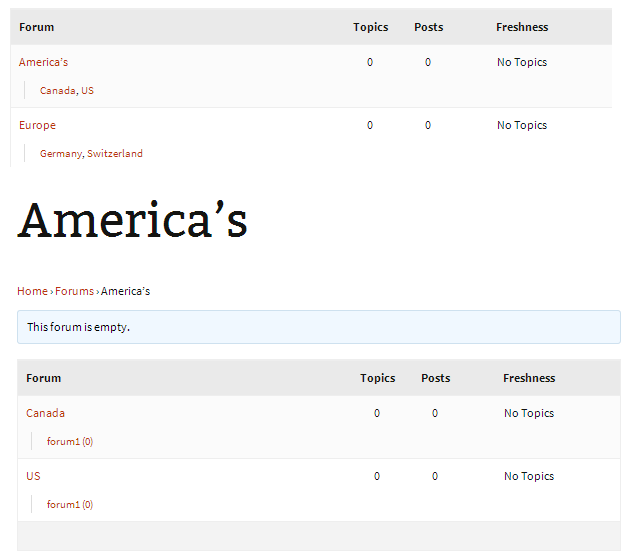
This way when viewing your primary /forums page you will only see:
– America’s (Category)
— Canada (Category)
— United States (Category)
-Europe (Category)
— Germany (Category)
— Switzerland (Category)
Drill down into America’s then you see:
— Canada (Category)
— Forum1
— Forum2
— Forum3
— United States (Category)
— Forum1
— Forum2
— Forum3
Or in pictures 😉
I am not sure how Register Plus Redux registers the new profile fields though an alternate way would be to use user_contactmethods
https://codex.wordpress.org/Plugin_API/Filter_Reference/user_contactmethods
So here is an alternate method using that method as a single standalone plugin:
I’m not saying there is anything wrong with the method you used, just an alternate method.
You could add as many or few extra fields as you want 😉
Source: https://gist.github.com/ntwb/11241301
<?php
/*
Plugin Name: bbPress - CLB Add user school to reply author details
Plugin URI: https://gist.github.com/ntwb/11241301
Description: bbPress - CLB Add user school to reply author details
Version: 0.1
Author: Stephen Edgar - Netweb
Author URI: http://netweb.com.au
*/

function clb_user_contact_methods( $user_contact ){

	/* Add user contact methods */
	$user_contact['school'] = __('School Name');

	return $user_contact;
}
add_filter('user_contactmethods', 'clb_user_contact_methods');

function clb_school_replies_author() {

	echo get_user_meta(bbp_get_reply_author_id(), 'school', true);

}
add_action( 'bbp_theme_after_reply_author_details', 'clb_school_replies_author' );
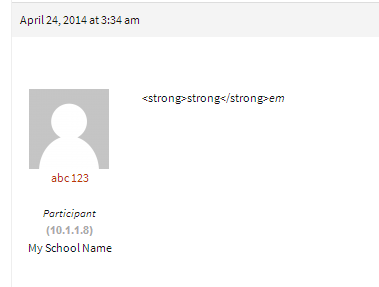
As it displays in each reply under the author details
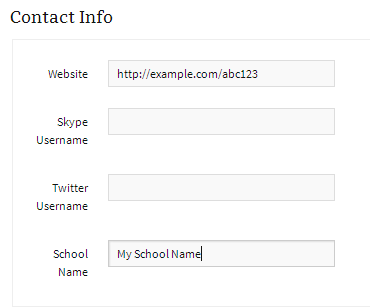
As it displays on a users profile page
Hi.
I’d like feedback on the best way to organize the structure of my forums.
I plan to have a large list of countries, followed by about 6 subcategories under each country.
What would be best?…
1. Make each country be a Category, and each subcategory a forum.
2. Make each country be a forum, and each subcategory be sticky topic, where people would reply rather than make new topics.
Any advice on ease of use and on speed of the site would be appreciated. One thing I am wondering is if 100s of forums (lots of country categories * six forums each) would bog down bbpress.
Thanks.
Looks good, I like that you have the template notices using the colors from your theme, many people miss styling those and it is always the first thing I look for 😉
Take a look at the shortcode [bbp-stats] to display the forum statistics.
https://codex.bbpress.org/shortcodes/
Also the page template page-forum-statistics.php to get some good ideas on adding your stats .
would I *only* be allowed to add a tags with a class (no, I don’t know why either but just pretend…) and not able to add the default img, blockquote, etc tags?
Correct, with the example you posted you would only be able to add an a anchor HTML element with a class CSS class eg. <a class="my-css-class">description</a> note as you removed href from the allowed tags you wouldn’t be able to use <a href="http://example.com">description</a>
I had a similar question last year but never really figured it out – gave up when I decided it didn’t matter: https://bbpress.org/forums/topic/using-wp_filter_kses-filter-for-bbpress-posts/
I fully appreciate this highlights how little I know these things! And thank you. 🙂 This has been a really interesting discussion.
This highlights how little I knew 12 months ago, if I don’t know I don’t answer a question unless I can provide something that IS helpful, we are all constantly learning 🙂
There appears to be quite a few though I have not used any take a look at the WordPress plugins:
https://wordpress.org/plugins/search.php?q=facebook+login+bbpress
Hi all, is there a good plugin that allows people to log in to bbpress and post to forums by using their Facebook or gmail accounts? Please let me know if there are any suggestions I can try out.
Thanks a million!
NightGuy
http://www.aquariumcarebasics.com/
Not at this stage it isn’t ‘out of the box’ you could modify the templates (in a child theme of course) and get the desired effect.
A good starting point for this is the code behind the concept of the following topic:
I have created a bbPress starter theme with a phpBB look and feel
You also reorganize some of your forum structure:
eg.
From:
-The Hunt
–Worldwide
—Los Angeles / Orange County
—New York
—Online
—SF Bay Area
To: (As unless you plan on including other planets and galaxies worldwide is kind of moot 😉
-The Hunt
–Los Angeles / Orange County
–New York
–Online
–SF Bay Area
Maybe use some other bbPress/BuddyPress conditional tags
bbPress Conditional Tags
Template Tag Reference
Note: The BuddyPress codex page is undergoing some updates. There are a few that are now depreciated, you can find an accurate list here.
I also wrote a plugin that makes it super easy to see what conditional tags are being used on a page 🙂
https://wordpress.org/plugins/query-monitor-bbpress-buddypress-conditionals/
(You first need to install https://wordpress.org/plugins/query-monitor/)


