First up, a clarification on what you are calling posts; are you inferring users in the back end editing WordPress blog posts? That is sort of how your last reply reads to me. bbPress uses Forums, Topics and Replies and it can get confusing if these terms aren’t explicitly used at times 😉
When in the back end and you try to restore a trashed topic by clicking restore indeed you will see that error, it’s a know issue and will be fixed in the next release. The workaround is to use the “bulk actions” and select the checkbox next to the topic or topics to restore, select “restore” from the bulk action drop down and click apply.
If you are seeing that error in the font end it shouldn’t be doing that and should work as expected when restoring topics.
Either/or try the same again with a new admin/key master user and see if you can still replicate the issue.
Create new topic and per my previous replies, and include the name of the theme. You are using and include the source code of the contents of the bbpress.php file you created.
disable front end editing
disable front end editing
Hi
I am using the latest wordpress and bbpress
i have my own login form, (for people to upload images to their portfolios) how do i synchronise bbpress with that form rather than having to have 2 login forms which seems silly
Thank you in advance
Melanie
Ok, I have switched it back to my child theme and called it bbpress.php
I’ve also found that by doing it, the edit my profile button still goes to the backend, even for a user
What should I do next, I am a bit lost.
Thank You,
JB
Hi Robkk – It is actually working, last night no matter how many reloads it didn’t
so thank you for your help and patience.
i have ONE MORE question – its quite important – i have my own login form, (for people to upload images to their portfolios) how do i synchronise bbpress with that form rather than having to have 2 login forms which seems silly
Thank you in advance
Melanie
I am attempting to use the shortcode [bbp-forum-form] to allow users (keymasters) to be able to add new forums as needed. I set up a new page and added this shortcode. The page looks great and the shortcode pulls up the form to add a new forum (as desired). However, when I test it by filling out this form and clicking submit, nothing seems to happen. The page does seem to refresh but a new forum is not added.
Am I missing something? I am new to bbpress so perhaps I just missed a setting somewhere? I am running the latest version of WordPress (3.9.2) and bbPress 2.5.4. My site URL is http://wwcustomercare.azurewebsites.net.
Thank you in advance for your help!
Lora
These are issues for the ‘Sort replies’ plugin, this is not a bbPress issue, please see that plugins documentation, FAQ or support forum for help with this.
I am using bbPress – Sort topic replies. When I go to edit the forum I get the option to sort to sort replies in a descending order. This works fine when I go to the forums page http://tenniselbowracquet.com/forums/forum/tennis-racquets-2/ and down into the individual topics.
But I have individual pages where I include an individual topic such as http://tenniselbowracquet.com/tennis-racquets/ and http://tenniselbowracquet.com/tennis-string/ and when I scroll down those pages the oldest replies are first, this is despite going to settings-discussion and checking comments should display newer comments at the top of each page.
It is showing the older comments at the top of these pages. How can I reverse this?
Thank you.
I have used the bbpress shortcodes and widgets, but i can only display the login credential, but not the register and not the lost password.
i understand the steps are
1. to show the register and lost password page, i need to create a new web page, and then put the bbpress shortcodes. I already did that.
2. to show the login credential (user and pass), i use the widget. When installing the widget, it will ask for the url for the register and lost password page. i provided the url in the widget. Widget shows successfully.
But when i click the register and lost password link in the widget, it only show me the new webpage with the shortcode [bbp-register], [bbp-lost-pass], that’s all i see in my new web page.
Please let me know what i do wrong.
Thanks.
Just wondering what the future of bbPress holds?
i wanna bring a cooler look to it. or a bunch of ideas to add on to the look.
as for bbpress community i hope more people help out.
BuddyPress is a far more popular plugin than bbPress, more people those days need community functionality attached to their WordPress sites than support forums
forums arent for everyone
if you look at the bbPress trac it say 64 closed tickets for a very long time.
they can take their time. also i bet more bbpress core developers wouldnt be a bad thing and also just help on trac topics are cool too.
I managed to get user profiles and admin editing privileges to work after changed the url style to default instead of post name. But even after setting the user edit post time to 99999 I cannot edit a post as a user. I disabled all plug-in except bbPress and it still would not work.
1. Is it possible to disable the Text editor, hopefully with CSS?
yeah , heres a way
I dont know for sure if the visual editor is displayed by default when you see the reply form.
post it anywhere where you can put custom css
in your child themes css stylesheet
the jetpack plugin module custom css
a standalone custom css plugin
#bbpress-forums div.bbp-the-content-wrapper div.quicktags-toolbar {
    display: none;
}

#bbpress-forums .wp-editor-tabs {
  display:none;
}
Hi Guys,
I have a similar problem. I have the bbpress default search function on my main forum (forum-idex) but searches have no results. No matter whether I search for “sub-forum titles or topics.
I would like all “topic tags” to from all “sub-forums” to come up as a result.
Is this possible? What do I have to do?
Thanks!
ok i dont know how to disable arrangement from activity , and just leave it where its topics arranged by published date and nothing else. Maybe some other person could help on this forum , or you are going to need to get some freelancers
I do know how to show the published date though
if you haven’t made a child theme create one , and put all the necessary templates into your child theme
ok to display the published date use <?php the_date(); ?>
heres is a
of how your loop-single-topic.php should look
<li class="bbp-topic-freshness">

		<?php do_action( 'bbp_theme_before_topic_freshness_link' ); ?>

		<?php bbp_topic_freshness_link(); ?>

		<?php do_action( 'bbp_theme_after_topic_freshness_link' ); ?>

		<p class="bbp-topic-meta">

			<?php do_action( 'bbp_theme_before_topic_freshness_author' ); ?>

			<span class="bbp-topic-freshness-author"><?php bbp_author_link( array( 'post_id' => bbp_get_topic_last_active_id(), 'size' => 14 ) ); ?></span>

			<?php do_action( 'bbp_theme_after_topic_freshness_author' ); ?>

		</p>
	</li>
heres a
of how your loop-topics.php should look like
<?php do_action( 'bbp_template_before_topics_loop' ); ?>

<ul id="bbp-forum-<?php bbp_forum_id(); ?>" class="bbp-topics">

	<li class="bbp-header">

		<ul class="forum-titles">
			<li class="bbp-topic-title"><?php _e( 'Topic', 'bbpress' ); ?></li>
			<li class="bbp-topic-voice-count"><?php _e( 'Voices', 'bbpress' ); ?></li>
			<li class="bbp-topic-reply-count"><?php bbp_show_lead_topic() ? _e( 'Replies', 'bbpress' ) : _e( 'Posts', 'bbpress' ); ?></li>
			<li class="bbp-topic-freshness"><?php _e( 'Published', 'bbpress' ); ?></li>
		</ul>

	</li>

	<li class="bbp-body">
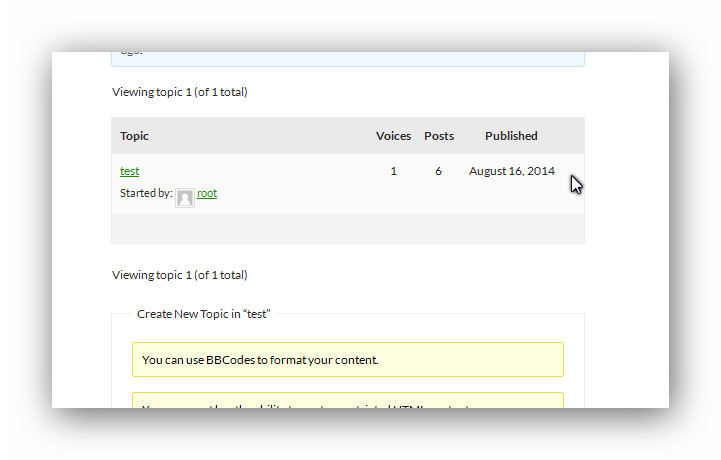
end result should look like this.
I have created a folder “bbpress” within my theme and copied the bbpress.css, could it be the original .css is overriding it?
the one in your theme should overwrite the original
did you get the button now , heres now it looks when i checked out your site.
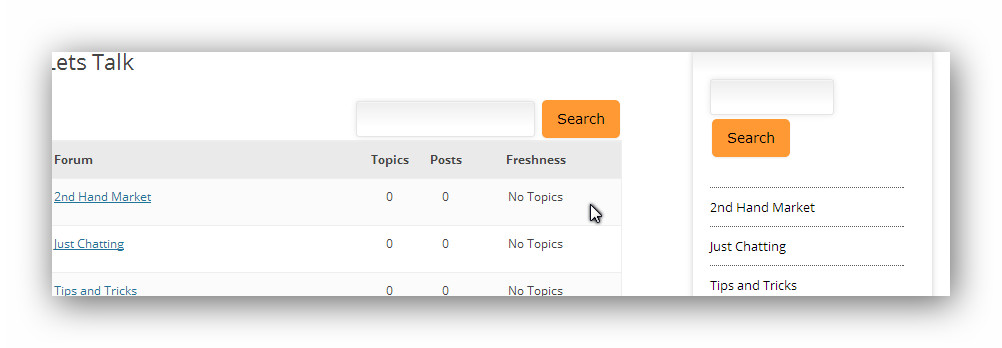
and that code i gave you should remove the space.
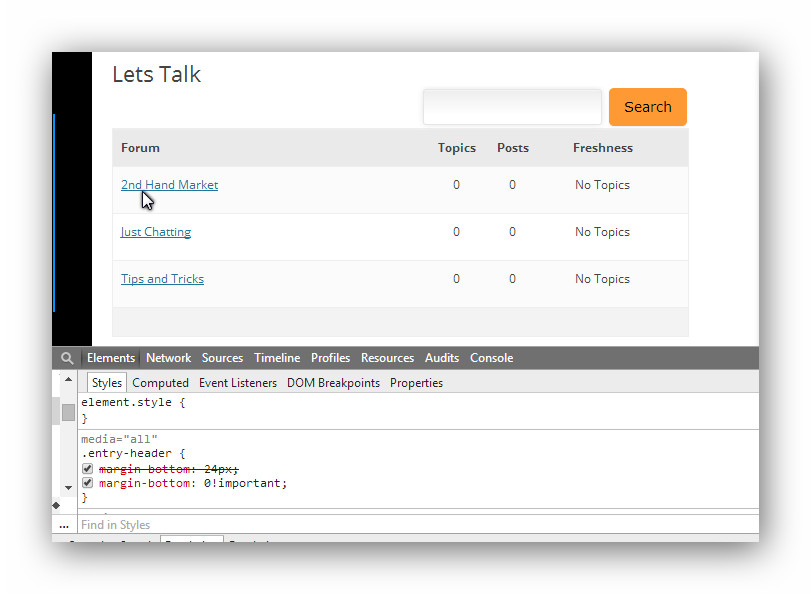
heres what it looked like while editing that css
Hello,
After recently updating my bbPress to 2.5.4 I have been getting people tell me they can’t edit their posts’s after posting. I have read that Remapping existing users to default forum roles would correct this. However, when I try this approach all I get is a blank screen. When user’s click on the Edit button they get redirected to a link similar to the following:
Edit Link: http://www.somewebsite.com/forum/reply/220120/edit/
Redirected Link: http://www.somewebsite.com/forum/reply/220120/
#bbpress-forums div.bbp-the-content-wrapper input {
font-size: 12px;
padding: 5px;
margin: 0 2px 0 0;
line-height: 1em;
background: #222;
color: #fff;
}
its in black in white because thats how i had it in my local site right now, does that work??
After getting deep into the guts of Pagelines, I think this is now fixed… first of all, thanks very much Stephen for being willing to assist. It’s been very good of you.
In case the autopsy helps anyone else, here we go…
There was a transient that Pagelines uses – pagelines_sections_cache – that keeps a record of what different section types are registered with the Pagelines theme.
I haven’t worked out why yet (and won’t try), but though this transient is meant to last 24 hours, it would get re-generated more frequently than that. That plays into what follows.
Pagelines (in my view) runs some of its code much too early on the front-end, unconditionally – and sometimes it was re-generating the transient on requests that another of our plugins was picking up for API calls (i.e. calls that don’t generate a front-end page). On those requests, for performance, the pagelines-bbpress plugin was not active. As a result, the BBPress section type did not get registered with Pagelines. The transient got saved without knowledge of that section type.
Thus, later, when the cached transient was getting used, no BBPress section type was known – so Pagelines would output nothing.
And here’s the really annoying bit. What was the magical BBPress/Pagelines integration code that they used to sell in their store but now give away in the Pagelines-BBPress plugin? What is the wonderful code to get the two to work together? When you scrape away all the boilerplate to find the core code that does something, the whole of it is:
function section_template() {
                while (have_posts()) :
                        the_post();
                        the_content();
                endwhile;
        }
Excuse me whilst I go and bang my head against a wall for a bit.
David
yes it should be as bbpress just uses wp_query once args has been parsed.
see
https://codex.wordpress.org/Class_Reference/WP_Query dates are quite a way down
untested but something like
$week = date( 'W' );
$year = date( 'Y' );
bbp_has_topics( array( 'year' => $year, '&w' => $week ) );
would do last 5 days
Hi robkk
Am afraid neither of above solutions work.
I have created a folder “bbpress” within my theme and copied the bbpress.css, could it be the original .css is overriding it?
The breadcrumbs space still remains.
The button code does not change the button
My theme buttons css below – could i somehow alter it to also include the bbpress button?
#searchform input[type=”submit”] {
padding: 9px 15px;
background: #F93;
border: 0;
font-size: 14px;
color: #000;
-moz-border-radius: 5px;
-webkit-border-radius: 5px;
width: auto;
}
#searchform input[type=”submit”]:hover {
color: #5e5e5e;
background-color: #ebebeb;
background-repeat: repeat-x;
background-image: -moz-linear-gradient(top, #f9f9f9, #ebebeb);
background-image: -ms-linear-gradient(top, #f9f9f9, #ebebeb);
background-image: -webkit-linear-gradient(top, #f9f9f9, #ebebeb);
background-image: -o-linear-gradient(top, #f9f9f9, #ebebeb);
background-image: linear-gradient(top, #f9f9f9, #ebebeb);
}
thank you in advance
site page
http://bunddesign.com/pdm/lets-talk/
Melanie
Hi everyone,
Any one know how to filter topics on date base. means i want to list all last 5 days topics.
i see code this code in function bbp_has_topics( $args = '' )
$default = array(
		'post_type'      => bbp_get_topic_post_type(), // Narrow query down to bbPress topics
		'post_parent'    => $default_post_parent,      // Forum ID
		'meta_key'       => '_bbp_last_active_time',   // Make sure topic has some last activity time
		'orderby'        => 'meta_value',              // 'meta_value', 'author', 'date', 'title', 'modified', 'parent', rand',
		'order'          => 'DESC',                    // 'ASC', 'DESC'
		'posts_per_page' => bbp_get_topics_per_page(), // Topics per page
		'paged'          => bbp_get_paged(),           // Page Number
		's'              => $default_topic_search,     // Topic Search
		'show_stickies'  => $default_show_stickies,    // Ignore sticky topics?
		'max_num_pages'  => false,                     // Maximum number of pages to show
	);
is it possible to pass date filter in function bbp_has_topics argument.
When I click on the link in your menu “Discussion Forums” here http://www.aceachievers.in/#try
I see This content is for Pro and Revision Series with forum members only.
Though I see your forums here http://www.aceachievers.in/forums/
But I cannot read your topic here: http://www.aceachievers.in/forums/topic/test-1/
I can see the topic and replies here: http://www.aceachievers.in/forums/topic/biochem-doubts/
Most likely this is an issue with a plugin that is restricting the viewing of topics and replies, a look at your source shows you are using “Paid Memberships Pro” and this is most likely the cause of your issues.
Can you update or configure it’s settings for any permission changes that differ between the links I added above?
It could also be generally more of an issue with bbPress and “Paid Memberships Pro” as I have seen a few recent issue pop up with this plugin, I’d check their support forum for any related topics and make sure you are using the latest version of their plugin.
Hi,
I’ve disabled all plugins except for BBPress and Pagelines-BBPress (which is required – otherwise you get an error that tells you it’s required…), and the fault was still reproducible.
Now I’m looking at the theme…. but my forum is now working 100% of the time for me during testing, whether with changes or not – so I’ll have to wait for it to revert to broken behaviour again before I can get any further……
David
Yeah, that’s typically the first response here on bbpress.org, try disabling plugins, switch themes etc
Thus once that’s out of the way and out of the way that we haven’t missed something obvious… 😉


