Hello to everybody,
I am currently working on a BBPRESS installation. I have 2 diferent parts on my website : a Blog AND a Forum.
I have a parent page for all my forums called “Forums” So, in my main nav, I have 2 items : “Blog” and “Forums”.
When I click on “Forums” in the nav, I go to the parent page of all my forums. In the nav, the item “Forums” gets the following classes in the HTML :
.menu-item menu-item-type-post_type .menu-item-object-page .current-menu-item .page_item .page-item-20 .current_page_item menu-item-22
Now, when I click on one of my forums, “forum 1” for exemple, my item “Forums” in the nav gets the folowing classes :
.menu-item .menu-item-type-post_type .menu-item-object-page .menu-item-22
and the item “blog” get the classes :
.menu-item .menu-item-type-post_type .menu-item-object-page .menu-item-23 .current_page_parent
I mean that “forum 1” should be a child page of “Forums” ?
Instead, it seems to be a child element of the blog. Does anybody know how to fix this ?
I have the latest version of wordpress and bbpress, work locally with Mamp, using Twenty15 as a theme.
If somebody have a solution, it would be great, thanks for your attention.
Guillaume
@oyeben6
Hello Oyeben6, i have the same issue than you. Have you find any solution to solve this problem ?
I have the latest version of wordpress and BBpress, Twenty Fifteen as a principal theme, no other plugin working, reinstalled everything 2 times, changed the permalinks but work locally.
Thanks for your kind answer and have a nice day
Guillaume
Hi, not yet.
I changed that page to a fullwidth page. The issue with the padding remains. I tried to use some other css but that also effects the bbpress layout.
See this page where the output is still with a padding: https://bfgv.nl/forums/zoeken/test/
How can I remove the padding here without effecting the rest?
Hello @Robk
thanks for you Answers
As you told thumbnail image can be show as post thumbnail is showing
i have to create a new widget for own customization work and where i have to place that file
within theme bbpress folder or i have to place my own customized file into bbpress plugin folder
As i know customization file places under the theme bbpress folder
Advice will be grate
i will look into this and get back to you
thanks
I have this issue too. I logged it first with Yoast, the developers of the SEO plugins and their reply was that as it is a bbPress error, it would need to be addressed through bbPress…
Have you had any success either way?
Thanks!
Using latest version of all plugins.
So i am wanted to disable all forum notifications, as i get endless new reply notifications.
I have removed all code from the file
/bbpress/includes/extend/buddypress/notifications.php
leaving only <?php
Which after testing seems to do what i want.
I realise this isnt the correct method, can anyone point advise me on the proper way to do this, do i use a series of remove_actions ?
Thank you 🙂
I think this is what you were looking for , both are not in bbPress and may need customization to achieve.
Forum Description above a single forum page that might be what you are looking for and bbp style pack does provide a solution to add this to bbPress.
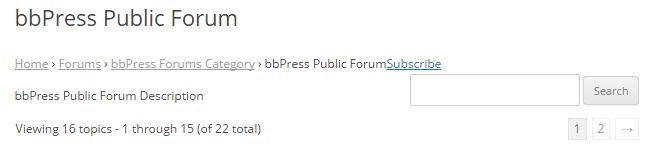
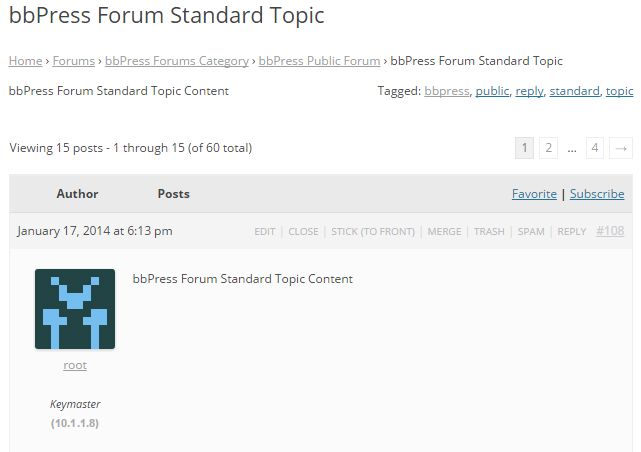
Topic Description how you may have wanted?? This looks dumb though.
I been looking around for a report plugin for bbpress and i dont see one. any one know of a good one? for example some one posts spam a user can click report.
try these troubleshooting steps.
Troubleshooting
I see you are using something different from the default bbPress registration shortcode.
Did your own issue??
In some themes this may be just tossing the bbPress templates in a folder called bbpress in a child theme to fix this.
https://codex.bbpress.org/theme-compatibility/
You might also have to modify the main bbPress template .
https://codex.bbpress.org/theme-compatibility/getting-started-in-modifying-the-main-bbpress-template/
@shanhard
There is BuddyPress that adds this to bbPress right now though.
Bumping this back up.
I hadn’t realized it before because I hadn’t tested it, but we’re still having the same problem as previously described with our forum search functionality. i.e. When a user searches a term in the bbpress forum, the results show a line of gibberish, not search results.
Is there a setting somewhere that I can tweak so that it shows our “forums” page search results?
Thanks,
Michelle
This is a common issue
Your theme may think that the bbPress forum pages are a blog post and displays it in excerpt form.
This guide usually helps users fix this.
https://codex.bbpress.org/theme-compatibility/getting-started-in-modifying-the-main-bbpress-template/
Need any help with this reply back.
If you can think of any improvement for the guide, then tell me some suggestions on how to improve it.
If you want to develop it manually you can use any of these conditional tags for bbPress and WordPress.
bbPress Conditional Tags
https://codex.wordpress.org/Conditional_Tags
or you can use a plugin like
- Restrict Widgets
- Widget Logic
Well there might be other ways , but it would be more complicated.
The guide just says
Find the file bbPress is using (use What the File)
Copy and rename the file to bbpress.php (use FTP)
Edit the file to your liking. (use a code editor like notepad++)
The edit the file part may seem complicated but it is really quite easy , and I would help you out on this part.
If you want find the file bbPress is using and copy the content in the file to a gist.
https://gist.github.com/
After that I will post a link to a gist to help you out.
That guide was for earlier version of bbPress ,it might be archived later for a new guide to take its place.
The following is written for version 2.2 of the bbPress WordPress plugin. Information in this tutorial may not be applicable to earlier or subsequent versions of the plugin.
See if the creating a theme section would help you.
Right now there is really just some placeholder links and text that I just wrote up real quick , so this guide might be improved in some later days.
It should help you create a child theme, understand what is usually in a theme. and how to customize it to your needs.
Customizing
It should do this by default , if you haven’t already try these troubleshooting steps especially the plugin issue steps.
Troubleshooting
If nothing works contact your theme author
Hi Everyone,
I am just newbie on this forum bbPress and i guess something is not right with this part:
Step 6: Copy the Default bbPress Theme to Your Child Theme Folder
The default files are no longer stored in wp-content > plugins > bbpress > bbp-themes. There is a folder called default at bbpress > templates > default, but which files need copying I do not know.
While still in FTP and looking at the root folder of your WordPress installation, go to bbPress’ theme folder. That is, go to wp-content > plugins > bbpress > bbp-themes > bbp-twentyten. Download all the files from this folder except style.css. These are the files that will style your bbPress theme.
Now return to your child theme folder (wp-content > themes > yourthemefolder-child). Upload the default bbPress theme files to the child theme folder. You can change the image you see for your child theme in the admin area by uploading a new screenshot.png image to this folder.
I did not saw wp-content > plugins > bbpress > bbp-themes > bbp-twentyten the plugin directory so maybe it was mess i guess. What i saw is this wp-content > plugins > bbpress > templates > default.
Any helps should highly appreciated.
Thanks.
Do the default bbPress notifications work when you subscribe to a topic or forum??
Test this without the wp-smtp plugin to test just bbPress.
You may need to use this https://wordpress.org/plugins/asyncronous-bbpress-subscriptions/ , but test the default bbPress subscriptions without wp-smtp and this plugin first.
It’s really strange. After the post is submitted (and as long as status is pending), the topic is included in the users subscriptions: (var_dump on wp_footer)
bbp_get_user_subscribed_topic_ids( $reply_author_id );
bbPress Moderation uses the hook “pending_to_publish” to send an Info to all subscribed users that this new reply is published:
function pending_to_publish( $post )
{
   ...
   bbp_notify_topic_subscribers( $reply_id, $topic_id, $forum_id );
}
If I add this:
bbp_get_user_subscribed_topic_ids( $reply_author_id );
into this function before or below “bbp_notify_topic_subscribers” and write a var_dump to a separate file, the topic-id is still inside the topic-id-array during the publish process ( {old}_to_{new} ).
But if I var_dump this array directly afterwards (frontpage: page reload –> wp_footer ), the id isn’t still in there (email fails if I post with another user).
It seems that anything erase this specific topic-id for this specific reply-author between publish and the next page load. All other topic-ids are still in this array..?
To add it manually to the hook ‘publish_reply’ with this bbp-function doesn’t work:
bbp_add_user_topic_subscription( $reply_author_id, $topic_id );
Has anybody an idea why this can happen?
As long as the reply isn’t publish, everything works right with the subscription. It’s also possible to manually add this user to this specific topic after the reply is published. But if this user send a new post for this topic, the topic-id is erased inside the subscription array after publishing..
No caching is active…
You might create a child theme and just use bbPress plugins theme compatibility and transfer your templates to your own bbpress folder.
It depends on how your theme structured everything for bbPress , its CSS , and templates.
Enable Visual Editor
TinyMCE Advanced allows you to include alignment buttons.
You might need this code, because bbPress does not support all html for participant users that TinyMCE Advanced may use for its buttons.
https://gist.github.com/robkk/788f75d47466c74e5340
ACCORDING TO THEMEBUILDER YOUR PLUGIN DOES NOT ALLOW DESCRIPTIONS
The forum description should show at the top of the forum to introduce the topic, between the title and the blue bar. Without it, it’s like walking into a room wanting to have a conversation and no one is there. Please fix this very basic common sense request. It’s simple, allow the dashboard text editor content to show up at the top of the page. Why wouldn’t you include it? Makes no sense. You want people to interact on a title alone.
FROM THE THEMEBUILDER
I have researched this in the BBPress support forums, and the description on the single forum page is not an option in BBPress.
You can even try changing to another theme and you will see that the description on the forum page will not display, it is not a theme issue, rather a BBPress issue.
Who ever told you otherwise was misleading you. Sure it can be done with customization, however it is not how BBPress operates out of the box.
In my research I came across this plugin, it will allow you to do what your after: https://wordpress.org/plugins/bbp-style-pack/
Best regards,
Theme Canon


