I use the German membership plugin Digimember.
It has a direct connection (API) to Digistore24, the Payment Provider and
Quentn, the used Autoresponder.
The problem is: The membership plugin uses the Standard WordPress-Login-Data as bbPress,
so a logged in User is also logged in to full access in bbPress.
So I can’t differentiate between different user Member levels.
so how do you get to the screen you posted headed
‘bbPress moderation’ ??
Hi Robin,
since the membership plugin uses the same WordPress-Login-Data as bbPress does,
if a user registrates a membership and is logged in, he has automatically full access to the bbPress-Forum.
I found no way to make a difference between logged-in users regarding to read- and write-access.
Is there one?
Thxs, best,
Roman
Thanks for coming with me on that one.
I just found the Reset Forums Tab under Tools > Forums.
I found it by Googling: ‘reset bbpress forums’
All better now.
I’m setting up a new site and have been testing registration and forums workflows.
In an effort to reset the site back to 0 content – I deleted all test users and their topics in BBPress. After deleting all topics, I went to the trash and deleted them permanently.
Topics now shows nothing. However the number of topics still show up in the topics column in forums admin.
I’d suggest that as a test you deacativate LearnDash & bbPress Integration nand see if the error persists, from the link I can’t tell what is sending this code
Hi.. I am using bbpress on my website and I don’t know why I got this error. I try to find solution online but I got no luck. Here is the page that got me error.
Amadeus Basic Course Forum
Wordpress version: 5.2.2
bbPress version: 2.5.14
Just to you know. I am also using “LearnDash & bbPress Integration” on my site. I’m not sure if this one causes the problem.
I hope you can help me fix this one.
Kind regards,
Vins
Hello. I‘m using free astra theme, elemntor pro, WooCommerce, bbPress and LearnDash in my website.
I’m trying to make a custom “my-account” which comes with woocommerce. and I did using the short code and elementor. but since I’m using bbpress too, I wanted to view the bbpress user profile that’s located by defualt in “example.com/forums/user/******”
what I did: i created a custom endpoint “/my-account/forums/” and since I wanted the dynamic content. i thought i can use the templates of bbpress. so I added code #1 in my theme functions.php and copied the code of user-profile.php from the bbpress templates into my forums.php that i created in astea/WooCommerce/myaccount/
code #1
`function my_custom_endpoint_content() {
include ‘woocommerce/myaccount/forums.php’;
}
add_action( ‘woocommerce_account_forums_endpoint’, ‘my_custom_endpoint_content’ );
what happened: it showed the content, but it views the data of a normal vistor – non-logged in user- instead of pulling the current user.
so any ideas on how to achieve such a thing ? maybe there is a another method that’s not even related to what I’m trying to do ?
Yup your right after hours and hours it loops with the anonymous reply etc.
I restarted the conversion with your script so we have to wait and see :).
I’ll keep you posted.
ps: hopefully the peepz of BBpress will include a script that works 😉
Has any one succeeded in a good conversion? from PHPbb3 3.2.x to Bbpress – i’m following these threads for ages and made a dozen attempts to convert to BBpress from PHPbb3 3.2.x but each conversion stops with different bugs, loops, etc. I tried all the changed scripts file but they have also the same issues.
Hoping that the guys at BBpress will take a serious look at this script and help us pls!
Help us Obi Bbpress Kenobi you are our only hope
Is it possible to set up BBPress Plugin for WordPress so topics can be viewed by anyone but only the OP and Admin can participate in the thread?
I’d like to use the BBPress plugin with WordPress to add a forum but I’d like the OP to be able to choose one of three options when they start a topic:
1) Public – the topic will be viewable to everyone
2) Public and Anon – the topic will be viewable to everyone but the OP details will be hidden
3) Private – the topic will only be viewable to the OP and Admin
I’m sure 2) needs some custom coding but are 1) and 3) possible.
I saw this thread https://bbpress.org/forums/topic/private-threads/ – which suggests a work around with two forums but what if someone who posted a topic changed their mind and wanted to switch a public post to a private one after a thread already exists. Would this be difficult?
I tried this and it helps me.
Exporting your bbPress data (forums, topics , and replies could be really useful for a quick backup or a migration from one WordPress site with bbPress installed to another.
-Log into your WordPress back-end.
-Go to Tools > Export
-You will see a screen to choose what to export. You can either choose to export the bbPress content by each post type , or you can export all your content at once.
-When you have made your choice on what to export , then click the Download Export File button.
-Now you should be downloading the file that you could later on Import to another site by going to Tools > Import
I saw this forum with the same problem check this link: http://dcjtech.info/topic/how-can-i-add-a-view-counter-to-bbpress/
That might actually help.
@jkw217 thanks. I’m double-checking because it seems to be solved in v2.6 of bbPress.
@casiepa,
I am using bbPress Version 2.5.14.
Bonjour,
As you can see all standard bbPress messages are translated (Favori, me désabonner, modifier, fermer) so you correctly got the French bbPress.
The ‘Block User’, ‘Add User’, etc is being added by an extra plugin or theme that you have, so you need to get that plugin translated into French. If you let me know here what plugin that is we can check together to see how it can be translated.
BàV, Pascal.
Using bbPress for parent/child forums: yes
Collapsing when not used: that might need some programming.
@jkw217,
I have no idea about this error but can you please provide the version of bbPress and WordPress that you are using?
WP v. 5.2.2, bbpress v. 2.5.14. WP is bundled with Bluehost. Theme is OceanWP. Link is http://box5745.temp.domains/~cathyabl/rosecityyachtclub.com/forum/
No matter what I try, I can’t get the bb sidebar to display. I’ve tried bbtweaks, among other gyrations to no avail.
Thanks for any direction you can point me!
I am experiencing 404 errors on forum and topic views. It appears to be at random and not all the time.
Got error 'PHP message: PHP Notice: Undefined offset: 0 in /wp-content/plugins/bbpress/includes/topics/capabilities.php on line 80\nPHP message: PHP Notice: Undefined offset: 0 in /wp-content/plugins/bbpress/includes/replies/capabilities.php on line 62
I have re-saved permalinks, changed->saved then changed-back->saved and still have the 404 errors occasionally.
I googled this error and found:
https://wordpress.org/support/topic/capabilities-undefined-offset-error-with-bbpress/
I tried updating the capabilities.php file as discussed but still having issues.
Does anyone have any experience with this problem and have a fix?
There are 5 tickets open, and at least one was worked on recently (within the past week or so) – https://bbpress.trac.wordpress.org/milestone/2.6
Hopefully they will find some time, but for now I’m running with the RC.
Hello,
My site http://adm54forum.fr is on WordPress 5.2.2 and bbPress 2.5.14.
I use a theme called “Socialized”.
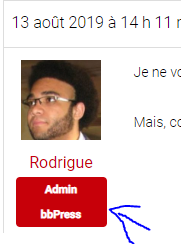
When I post a message on the forum as an administrator, under my profile picture is indicated my role. It says “Admin bbPress”, but how can I change that? I have no role with this name
Unfortunately, my staging site doesn’t allow me to switch themes for some reason. I tried in the past on an earlier bbPress support post I put here. 🙁 I also tried deactivating all the plugins, but it’s still not doing anything.
I read on bbPress that there is an “Approve” function that should be showing up, so it seems that there is a setting for moderation in the plugin? Just not sure what’s going on since the “Approve” used to show up but it doesn’t anymore. I updated bbPress a while back and hadn’t used it since the update, so I’m unsure when the issue actually started happening.
hmm, I can only suggest that
It could be a theme or plugin issue
Themes
As a test switch to a default theme such as twentyfifteen, and see if this fixes.
Plugins
If that doesn’t work, also deactivate all plugins apart from bbpress and see if this fixes. if it does, re-enable one at a time to see which is causing the error.
Then come back


