Skip to:
Content
Pages
Categories
Search
Top
Bottom

Search Results for 'test'

Viewing 25 results - 5,026 through 5,050 (of 11,598 total)
  • Author
    Search Results
  • #142349
    Robin W
    Moderator

    Not quite sure what you are after

    There is a bbpress widget that shows latest topics which you can put into your sidebar.

    Otherwise come back and explain some more !

    #142346
    Robin W
    Moderator

    it’s coming from bbpress stylesheet.

    there may be a quicker way to remove this, but one that should work is as follows.

    I don’t think you have a childtheme, and now may be the time to consider having one, see https://codex.bbpress.org/step-by-step-guide-to-setting-up-a-bbpress-forum-part-2/ for more details

    once done you need to navigate to

    wp-content/plugins/bbpress/templates/default/css/bbpress.css

    copy this file into a folder called css within your theme, so you end up with
    wp-content/themes/mychildtheme/css/bbpress.css

    where mychildtheme is the name of your childtheme

    Then edit every line that has

    background-color : xxxxxxx

    change to

    background: none repeat scroll 0 0 rgba(0, 0, 0, 0.4);

    NOTE it goes from background-color to background
    and it is only the background color that you’ll be changing, not lines which just have color: as that’ll be text!

    eg

    #bbpress-forums div.bbp-forum-header,
    #bbpress-forums div.bbp-topic-header,
    #bbpress-forums div.bbp-reply-header {
    	background-color: #f4f4f4;
    }
    

    becomes

    #bbpress-forums div.bbp-forum-header,
    #bbpress-forums div.bbp-topic-header,
    #bbpress-forums div.bbp-reply-header {
    	background: none repeat scroll 0 0 rgba(0, 0, 0, 0.4);
    }
    

    This will make the background transparent, but with a darker tint shading that you have in your sidebar (the amount of difference is on the 0.4 bit, 0.1 is the lightest, 1.0 the darkest).

    Come back if that doesn’t fix it, or for further help

    #142333
    craftersuniversity
    Participant

    I never get any errors, just a blank page. But only if i reply to some other members forum thread, if i reply to a forum thread i have started, then this problem doesn’t appear…. Also i just noticed that my admin account receives notifications via mail, but not my moderator account…both are subscribed.

    I tried deactivating all plugins except bbPress, but the site crashed completely, showing me empty gray pages. I then activated BuddyPress, and the website started working again, so BuddyPress must be activated for some reason. I also tried repairing the forum, and reinstalling entire bbPress, but still the problem remains. However, when i reinstalled BuddyPress, then it started working again. And for some reason BuddyPress latest version is working, the last time i tried to update, it broke my entire site….

    At any rate, i think it is working now…

    theone-deano
    Participant

    i think they should try to include some extra settings for forum roles. it saves time editing the php file.

    I have a community part of my forum which is open & visible and a clan part that is private & hidden, i hade to modify the capabillities.php file and add my own role Clan Member and give correct rules.

    I tested it on an account and it worked , standard users can only see community forum but if i change a person role to clan member they can see all forums and post etc…

    #142299
    JacobWard
    Participant

    Okay, so if you click my website then go to News & Update then Go to Weapons Update you will see It is not showing what I Posted I tried different browsers I tried uninstalling bbpress and budypress and reinstalling them even just tried bbpress alone that still did not work I have all the latest versions and everything can someone please help me I cant figure this out. I purchased my Template so I’m really not looking to change it but when I tried other templates it still did not work as well what am I doing wrong????

    http://wwww.naruto-mmo.com/

    #142287
    Stephen Edgar
    Keymaster

    @kris35 wrote… There are 68 replies to replies and 68 of them are locked this way

    This shouldn’t be an issue unless edit_lock has incorrect timestamps.

    @kris35 wrote… I had to go into the backend and edit the β€œReply To” box to zero.

    We have just done some testing trying to reproduce “Incorrect Reply To’s” but couldn’t.

    Setting them to 0 will force the replies to be ‘Not Threaded’ and sorted by date (default)

    @shanebp wrote… …any edit to a reply pushes it to the bottom and destroys the threading. Any threaded replies become β€˜flat’.

    I can’t reproduce this, any edit I make to a ‘threaded reply’ in the frontend or backend keeps the correct ‘replyto’ value and works as expected.

    #142284
    crzyhrse
    Participant

    You are welcome, and thank you… I’ll watch out for ways to help out as I bounce around the WordPress world… I’ll also offer that I have what seems to be pretty good test site set up, in case it is helpful…

    #142282
    Stephen Edgar
    Keymaster

    One of my test sites is now the same as everyone else’s in this thread πŸ™‚

    Will go some analysis of what I just did to make this happen and all of the components involved.

    Fingers crossed I’ll find something quickly and we can get this fixed soon πŸ™‚

    Edit: False alarm, it’s isnt actually doing it, different bug, but still investigating all the same.

    #142280
    Robin W
    Moderator

    @crzyhrse

    Hey thanks for your kind words, very much appreciated.

    I have added you submit button at the bottom of the styling guide, and happy to add any others people will think useful.

    I am trying to write a filters and actions guide – but keep getting diverted to other things, and a “creating a test site” guide as well, so hopefully will get these onto site in the next few weeks !

    #142255
    crzyhrse
    Participant

    Latest discovery- when I search the complete directory/folder of bbpres, for- bbp-topic-content or bbp-reply-content, absolutely nothing is found… Which I believe suggests that there is nothing to cascade into the above code…?

    Anonymous User 13302461
    Inactive

    I have noticed a few bugs.

    The freshness is displayed wrong sometimes, seeming to point to the time the thread was made and not the latest activity, or perhaps to recent activity on the wrong thread, because:

    Some topics I click on “recent post by” next to the freshness, it takes me to a completely different topic!

    The forum “subscribe” link is missing

    The topic “subscribe” or “unscubscribe” links make a popup box saying “Undefined”

    Shame because default bbpress layout for multiple forums, categories and sub categories is awful.

    #142225
    Robin W
    Moderator

    Certainly works in the template both in childtheme and if you do it in the original location – just tested the latter.

    It could be that either I’ve not explained well enough or or we’re talking about a different “Forum” position.

    The change you make should be from :

    <li class="bbp-forum-info"><?php _e( 'Forum', 'bbpress' ); ?></li>
    

    to

    <li class="bbp-forum-info"><?php _e( 'Elephant', 'bbpress' ); ?></li>
    

    if you want it to say Elephant.

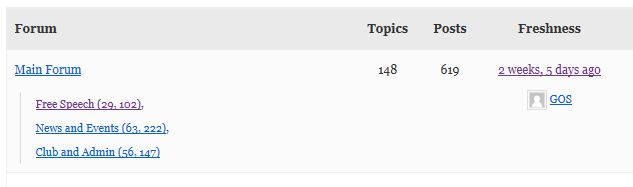
    If that is not the issue, can you confirm that it is the “forum” in the top left of this example that you’re talking about

    https://buddypress.org/wp-content/uploads/53/2013/11/forum-5.jpg

    #142198
    craftersuniversity
    Participant

    Hello

    I just noticed a problem that i don’t know how old it is. I have not had much activity on my sites forum area, and no replies to any topics, so this problem might be as old as the forum itself.

    When i try to make a reply to a topic, the reply get saved in the database, but i get a completely blank page. Even when i check the “page source” it too is completely empty. If i hit reload, another copy of the reply is entered into the database, but still a blank page. However, if i click the browsers address bar and hit enter, then i get the correct page, the updated forum thread. This is true both on my official site CraftersU.com, and its dev site.

    I have tried both Chrome and Firefox, same thing. I’ve deactivated all plugins except BuddyPress and bbPress, same thing. Different themes, same thing. I even deleted and re-installed bbPress without getting rid of this problem…What could possibly be the cause of this?

    Wordpress 3.8.1
    BuddyPress 1.8.1
    bbPress 2.5.3

    You are of course welcome to register as a user in order to test this bug for yourself.

    Gokuuu
    Participant

    Hey guys, i’ve installed the BBpress plugin last version 2.5.3 while running latest wordpress 3.8 version, and i had nothing in the dashboard, no tab, nothing related to BBpress.

    I’ve deactivated all my plugins and set up basic wordpress theme.
    I figured out that once i activate WPML Multilingual CMS, the three tabs related to BBpress : forums, topics and replies disappear from the dashboard…but i can still access to the forums, the pages are still available, because i’ve created it so i could test, the only issue is that if i want to create new category or anything else, i need to deactive my WPML plugin so the BBpress tabs appears again, and then reactivate and so on…

    I can’t run my website without the WPML Multilingual CMS plugin because i run a multilingual ecommerce and most of my contents is translated in two languages…

    So just wanted to let you know the issue in case it was unknown, and you might know what i can do for it ?

    Meanwhile i would have to found another forum plugin πŸ™

    Thanks in advance and Have a nice day πŸ™‚

    #142194
    Gokuuu
    Participant

    Hey guys, i’ve installed the BBpress plugin last version 2.5.3 and i had nothing in the dashboard, no tab, nothing related to BBpress.

    I’ve deactivated all my plugins and set up basic wordpress theme.
    I figured out that once i activate WPML Multilingual CMS, the three tabs related to BBpress : forums, topics and replies disappear from the dashboard…but i can still access to the forums, the pages are still available, because i’ve created it so i could test, the only issue is that if i want to create new category or anything else, i need to deactive my WPML plugin so the BBpress tabs appears again, and then reactivate and so on…

    I can’t run my website without the WPML Multilingual CMS plugin because i run a multilingual ecommerce and most of my contents is translated in two languages…

    So just wanted to let you know the issue in case it was unknown, and you might know what i can do for it ?

    Meanwhile i would have to found another forum plugin πŸ™

    Thanks in advance and Have a nice day πŸ™‚

    #142187
    FlyFishersCorner
    Participant

    EDIT note: Running bbPress 2.5.3 on WordPress 3.8.1
    My theme does not support sidebar widgets, so I instead created a page to house my forums. Additionally, I like the idea of being able to add some content above the forum index. I am running everything through a child theme.

    EDIT note: The breadcrumbs display in the bottom right of the header, in case it’s not obvious when looking.

    As it stands, I’ve added a login box and some content to the page, then used the [bbp-forum-index] shortcode to add my forum index. See the page here.

    Clicking into the first forum, “General Fishing Discussion” (my site is a fly fishing related one), I have no issues. The breadcrumbs can get me perfectly back to the page where the index resides. See here.

    Finally, I have created a couple test topics. Once I click on one of those topics, this is where my problem arises. Instead of the breadcrumbs being Forum>General Fishing Discussion>Topic Title, they switch to Home>Topic>Topic Title. Clicking the Topic link takes me to a 404 page. See it here.

    I’ve been tinkering with this for days, trying several different solutions from this site that I thought might work. The most recent was a fix suggested about two weeks ago whereby I copy the page.php file from my theme folder and rename it to bbPress.php to force bbPress to use it. I have seen no change. I will note that I tried placing it in the theme-child folder as well as the theme-child\bbPress\default folder. Neither worked.

    The other fix I tried that I thought might get me there was one posted here about 4 months ago that offered a replacement code for the loop-forums.php. Unfortunately, that didn’t work either.

    Does anyone have any other ideas? I really appreciate any help you guys can offer! I love the look and integration of bbPress, I just can’t have users running into walls after reading a topic and trying to navigate back out to other forums.

    Thanks in advance!

    #142177

    Exciting news!

    The forum was imported successfully to a test development site.

    I used the plugin “Export Users 2 CSV” by Yoast ( https://wordpress.org/plugins/users-to-csv/ ) to import users.

    Then I used a modified version of Import Users by DagonDesign ( http://www.dagondesign.com/articles/import-users-plugin-for-wordpress/ ) to import the users.

    Important Note: When importing users with this plugin it WILL send notification emails to the Admin and the User. I ALMOST pressed “go” on importing 2,200 users — but then I decided to check the plugin code just in case; sure enough there’s this line of code wp_new_user_notification($user_id, $password); you should delete or comment out.

    Yes, the users will have to re-create their passwords. We will instruct them how to do that on the new forum. That’s perhaps the only drawback of this method. But since out of the 2,200 users there are perhaps only 100 current active users, it shouldn’t be too much of a hassle.

    I did have to write a custom PHP script to help this user export/import process, because the import and export plugins do not match in formatting. You can either do this custom in CSV or make a simple PHP script (took me 10 minutes) to take data from the export CSV and reformat it to meet the delimiters and the stricture of the import CSV. I can help people with this, just ask.

    This user import/export had to be a separate process because using bbPress Export and Import by PippinsPlugins ( https://github.com/pippinsplugins/bbPress-Export-and-Import ) did not properly attribute users to posts if it had to create the user. (It attributed the admin to most of the posts.)

    After the users were imported, I imported my 20 CSV files (~2,000 rows each file) and after much scrutiny in examination, I find that all users have been properly attributed to posts.

    Now all that’s left is performing this process again onto the live site, the fresh bbpress install. (Remember, always back up your site and database before you do this stuff.)

    #142168
    IceReaper
    Participant

    I just installed WordPress the latest version on WordPress with plugins BuddyPress and bbpress.

    I created a dummy user under the role “Participant” but when I login to it and go to the forums I see no “Create New Topic” button anywhere.

    Also I already created a category forum.

    I want my users to be able to make their own topics in my categories that I make.

    #142153
    Robin W
    Moderator

    Suspect you have a conflict somewhere. bbpress and buddypress will work, so it is something else.

    Suggest you start by disabling all your plugins, and switching to a default theme. Add bbpress, buddypress and test that works (it should). Then add woocommerce, again it should work. Then switch to your normal theme, and test again. If that all works, then add back the other plugins one at a time to see which is causing the conflict.

    #142148
    MBonner
    Participant

    I’m doing a fresh install of wordpress and have come to find that

    – the current version of bbpress is not working with the current version(s) of buddypress
    – I also found that WooCommerce isn’t working with the latest version of buddypress but I’ll post that on the buddypress site.

    When I mean by not working, it’s causing my site to go blank.

    If anyone has a solution, please advise and I will do likewise. Thank you.

    exedotdmg
    Participant

    I want avatars displayed, but only when one is viewing the actual post of a user. Right now the avatars appear on the widget for latest forum posts, as well as next to the username and latest post on the forum’s index.

    Sorry if this has been covered. My english is only okay.

    #142126
    kentlii
    Participant

    sorry didnt see the answer her.
    Using the latest replies widget and you click on a topic. Some topics take you to the last page of the thread and some take you to the first page. Most of the time it takes you to page 1 of the thread. So people have to click on the last page to read the latest posts in the thread. This adds a lot of extra clicks for the user, when they have to do this every time they go to another thread.

    #142123
    jamestranm
    Participant

    Hi,

    I’ve installed bbPress, I’m using the latest version of bbPress and WordPress.

    I’m not sure why but the root forum page and profile page is just showing plan text.

    These two page show up with just flat text.
    http://www.gaysofyoutube.com/forums/
    http://www.gaysofyoutube.com/forums/users/admin

    While these pages (forum and topic) actually show up with the tables and so.
    http://www.gaysofyoutube.com/forums/forum/gays-of-youtube/
    http://www.gaysofyoutube.com/forums/topic/hello/

    Also how do I go about removing the blue status bar and the share and infobar at the bottom?

    #142118
    shauny007
    Participant

    Actually that was naive of me, and I now have figured out the problem, but not the fix. Here is what actually happens:

    I upload items to website also, but sometimes in future the same exact item may be in the update, I would then end up with domain-name/item domain-name/item2 domain-name/item3 These are duplicates, I simply delete all these by running this code:

    DELETE bad_rows.*
    from wp_posts as bad_rows
    inner join (
    select post_title, MIN(id) as min_id
    from wp_posts
    group by post_title
    having count(*) > 1
    ) as good_rows on good_rows.post_title = bad_rows.post_title
    and good_rows.min_id <> bad_rows.id;

    This is what is deleting all the forum posts 100%, checked and tested it. The only thing is, I do need to run this. Is there a way to exclude in this code bbpress posts, or something?

    #142111
    Effycom
    Participant

    I seem to have the latest bbPress Version 2.5.3 however there is an issue with the submit button? is there a way of resolving this please as people are unable to participate in my forum. the link is http://zambianmusiccharts.com/forums/forum/general-discussions/ in order to create a new topic i had to create it internally but not all users can do that. Please help.

    thanks

Viewing 25 results - 5,026 through 5,050 (of 11,598 total)
Skip to toolbar