Skip to:
Content
Pages
Categories
Search
Top
Bottom

Search Results for 'code'

Viewing 25 results - 7,751 through 7,775 (of 32,505 total)
  • Author
    Search Results
  • #167183
    Robkk
    Moderator

    Try using something like the menu slug instead. Just type in the name you entered of the menu in lowercase each space is a _.

    && $args->menu->slug == 'name_of_menu')

    #167182
    Robkk
    Moderator

    Use wanguard for a question captcha. Manually approving users can be done with a plugin listed in this guide or if you use BuddyPress too, a plugin listed in their guide possibly. Approving based on a certain field, I am not sure.

    Theme my login is probably the best to use for frontend forms. bbPress has some form shortcodes you can use but they might not work as great because there is functionality missing.

    Dealing with Spam

    Ingridlin
    Participant

    Hi, I just add the bbpress search code posted above by robkk, and it works too fine Some private topics are also show up. How could I use this search function but not include the private topic. Or maybe it could only shows the topic name but not content. Thanks

    #167175
    mica123
    Participant

    @sumanthbhe
    copy this code into your functions.php file – preferably in your child theme.

    artstellars.com
    Participant

    Alright. I downloaded an plugin called “Chinese-username” and it works right now which is great! The code is:

    <?php
    /*
    Plugin Name: Chinese UserName
    Plugin URI: http://www.01on.com/?p=654
    Description: 允许用a-z0-9_.-@和汉字作为用户名
    Author: 白云山
    Version: 1.0
    Author URI: http://www.01on.com/
    */
    add_filter( ‘sanitize_user’, ‘ys_sanitize_user’,3,3);
    function ys_sanitize_user($username, $raw_username, $strict){
    $username = $raw_username;
    $username = strip_tags($username);
    // Kill octets
    $username = preg_replace(‘|%([a-fA-F0-9][a-fA-F0-9])|’, ”, $username);
    $username = preg_replace(‘/&.+?;/’, ”, $username); // Kill entities

    // If strict, reduce to ASCII and chinese for max portability.
    if ( $strict )
    $username = preg_replace(‘|[^a-z0-9 _.\-@\x80-\xFF]|i’, ”, $username);

    // Consolidate contiguous whitespace
    $username = preg_replace(‘|\s+|’, ‘ ‘, $username);

    return $username;
    }
    ?>

    The only problem I found is the Chinese username owner can’t update his info. by clicking on his username in the forum page. Whenever clicking on the hyperlink of the Chinese username, it just redirects to http://artstellars.co.nz/forums/users and displaying a message saying “Not Found – Sorry, but the page you were trying to view does not exist. It looks like this was the result of either a mishtyped address or an out-of-date link”.

    But while registering as an English username there’s no such trouble. Hope WordPress or bbpress can consider support Chinese username in the near future. Thanks.

    #167154
    Anonymous User 13893444
    Inactive
    add_filter('bbp_before_list_forums_parse_args', 'ntwb_bbpress_list_forums' );
    function ntwb_bbpress_list_forums() {
    	$args['show_topic_count'] = false;
    	$args['show_reply_count'] = false;
    	return $args;
    }

    where to copy this code?
    someone please guide me.

    #167153
    mica123
    Participant

    Hello

    After experimenting with all your suggestions I think I would like to use the code from
    https://codex.bbpress.org/layout-and-functionality-examples-you-can-use/ #11.This redirects both logged in and not logged in users to specific pages which is what I want.
    This works partially – I am trying to attach it to my second menu – not the primary menu but whathever I try it doesn’t work. If I leave the code as it is, it displays the links on both menus. I tried to use
    if ($args->theme_location == 'sub-header-menu')
    in various places such as:
    if(is_bbpress() && $args->theme_location == 'sub-header-menu')

    I would need this for both logged in and not logged in users.
    Thank you very much for your patience. I hope you can help.

    #167126
    Henry Wright
    Participant

    Hey @robkk

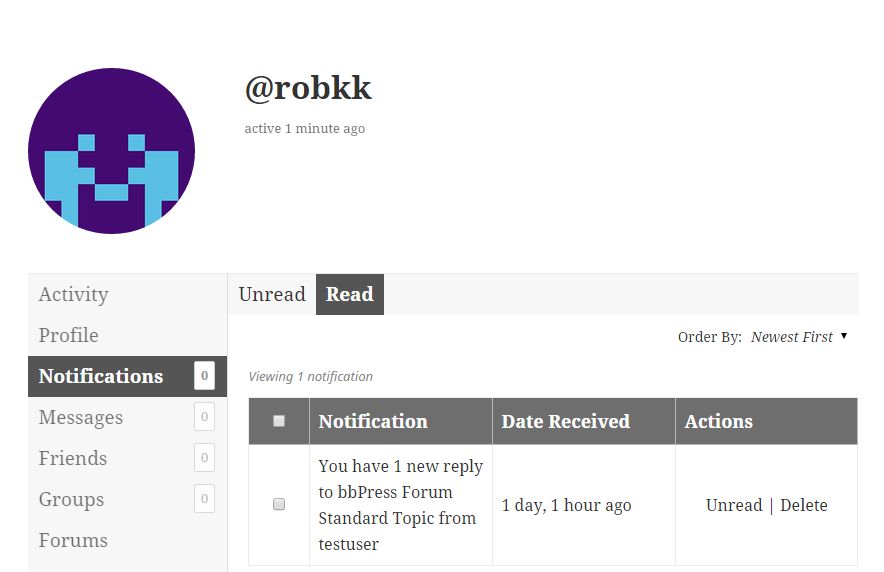
    This is related to the bbPress function bbp_buddypress_add_notification() which fires on bbp_new_reply.

    Ref: https://github.com/ntwb/bbPress/blob/master/src/includes/extend/buddypress/notifications.php#L98

    #167125
    Robkk
    Moderator

    Okay well what you are seeing the notification I guess is somewhat similar to this message.

    I am sorry but looking over this again, I can see that it could be a possible bug.

    We might need to check for a possible bug though on what you are saying. When the user in the notification is wrong.

    You may not need to go back over there for this, as the bbPress plugin has some code for BuddyPress integration for components like the Notifications one. So it could be bbPress’s code for BuddyPress or something else.

    It is that weird limbo of not knowing where the bug is and who to contact for this for sure though.

    I might need to contact the devs as I am not entirely sure where to even look at to find a bug for this exactly.

    #167119

    In reply to: User profile

    Robkk
    Moderator

    Every user in the forum that creates a reply or a topic their username that displays next to their post has a link that leads to their profile.

    You can also use the bbPress login widget too. Once the user has logged in, their name in the widget is also a profile link.

    You can just create a custom link menu item for each authentication page for your site. You can use the default WordPress Pages.

    Go to Appearance > Menus in the WordPress backend. Then toward the left side you will see a menu with a list of pages/posts/forums. Right next to all those is a dropdown to add a custom link. Just manually add the URLs of the default WordPress pages below or any other frontend forms you may have already.

    Register
    http://yoursite.com/wp-login.php?action=register

    Login
    http://yoursite.com/wp-login.php

    Lost Password
    http://yoursite.com/wp-login.php?action=lostpassword

    https://codex.wordpress.org/Appearance_Menus_Screen#Custom_Links

    You can also do the other things I listed in your other topic for user to login/register etc.

    Login, Register, Lost Password links

    #167116
    Robkk
    Moderator

    I am trying to say troubleshoot an issue if it could be something else like a theme causing the issue, so switching to a default theme could test that.

    Troubleshooting

    Remember reply pagination does not show up if you have threaded replies enabled.

    Here is a ticket to fix reply pagination in threaded replies, but for now the patch only works for forums that are not hidden or private.

    https://bbpress.trac.wordpress.org/ticket/2785

    #167103
    myndphunkie
    Participant

    Fixed by installing the Custom CSS plugin and adding code to there (that way it over-rides all other CSS)

    #167092

    In reply to: Sidebar Help

    Robkk
    Moderator

    Well since you did not place the shortcode in a page. bbPress is inheriting a template in your theme. And it could be one that you can just modify in your theme settings to include a sidebar or not.

    To fix the issue you can create a bbpress.php file in your theme and just make sure that the sidebar code is inserted.

    Getting Started in Modifying the Main bbPress Template

    While using the What The File plugin to spot what templates are being used on your forum archive page and also single forum/topic pages, you can see if they are two separate templates being used.
    Or you can just stick to using a sidebar in your theme and not using a fullwidth layout at all on archive/single pages.

    #167091
    Robkk
    Moderator

    Here is some common issues that could create the White Screen of Death issue.

    https://codex.wordpress.org/Common_WordPress_Errors#The_White_Screen_of_Death

    You can try to see if another plugin is also causing the issue with bbPress and your site.

    And you can try to find some debug information on your site by using WP-Debug set to true.

    https://codex.wordpress.org/Editing_wp-config.php#Debug

    #167089
    Robkk
    Moderator

    my apologies for not replying faster.

    Its all good.

    Since I see you do not have a VPS already when using BuddyPress, you may not have enough memory at all on your current plan.

    Having VPS hosting or better is usually recommended if you are going to use BuddyPress. But I guess a small community should be able to handle something like shared hosting.

    Getting Started

    As a test and since the error is related to the Activity component in BuddyPress, you can just try disabling the component in BuddyPress to see if the error disappears.

    For the second error you are getting, hopefully you are not trying to edit the BuddyPress plugin and causing more issues.

    You can also try reinstalling BuddyPress as a last resort to see if that would resolve any issues.

    #167088
    Akawey
    Participant

    Okay, this seems to be an old issue but I’m having the same problem now.
    How about having a shortcode that just does it?
    I didn’t see a bbpress ‘users’ shortcode amongst those listed in the documentation.

    Or is there another fix to this problem…

    @joopstringer
    where do I add the code you suggested?

    I’m setting up a site and only my admin user page comes up, all others are 404 pages.
    Any help please?

    #167086
    Robkk
    Moderator

    It is just a conflicting piece of javascript somewhere in the file. If they already have a fix somewhere in that file for comment threading then something similar may need to be done to bbPress reply threading since both their scripts are very similar.

    Try this custom php code snippet. Place it in your child themes functions.php file or in a functionality plugin.

    add_action( 'wp_print_scripts', 'rkk_reply_threading_divi' );
    
    function rkk_reply_threading_divi() {
    
        if( function_exists( 'is_bbpress' ) && bbp_is_single_topic() && bbp_thread_replies() ) {
            wp_dequeue_script( 'divi-custom-script' );
        }
    }
    #167072
    nikhilnaik
    Participant

    Hello all,

    I wanted to seek help in modifying the following piece of code. I have a site with buddypress groups inside which I have bbpress forums for the respective groups. I want the users of the group to be automatically subscribed to the forums within that group. I tried the following code:

    add_filter( 'bbp_get_user_subscribe_link', 'invert_get_user_subscribe_link', 10, 4 ); //invert forum subscription
    add_filter( 'bbp_is_user_subscribed_to_forum', 'invert_is_user_subscribed_to_forum', 10, 4 ); //invert forum subscription
    add_filter( 'bbp_get_forum_subscribers', 'invert_get_forum_subscribers' ); //invert forum subscription
    add_filter( 'bbp_is_user_subscribed', 'invert_is_user_subscribed', 10, 4 ); //invert forum subscription
    
    function invert_is_user_subscribed($retval, $user_id, $object_id, $subscribed_ids) {
    	if (get_post_type( $object_id ) == bbp_get_forum_post_type())
    		return !$retval;
    	else	
    		return $retval;
    }
    
    function strContains($needle, $haystack) {
    	if (strpos($haystack, $needle) !== false) {
    		return true;
    	} else {
    		return false;
    	}
    }
    
    function invert_get_user_subscribe_link ($html, $r, $user_id, $topic_id) {
    	if (strContains( "bbp_unsubscribe", $html )) {
    		$html = str_replace("bbp_unsubscribe", "bbp_subscribe", $html);
    	} else {
    		$html = str_replace("bbp_subscribe", "bbp_unsubscribe", $html);
    	}
    	return $html;
    }
    
    function invert_get_forum_subscribers( $users ) {
    	$args = array('fields' => 'id');
    	$all_users = get_users($args);
    	$send_to_users    = array_diff($all_users, $users);
    	return $send_to_users;
    }
    
    function invert_is_user_subscribed_to_forum( $retval, $user_id, $forum_id, $subscribed_ids ) {
    	return !$retval;
    }
    

    But there is a problem. Using the following code leads to the user getting subscribed to all the forums of all the groups (even those which they aren’t a part of). I just want them to be automatically subscribed to those forum topics created inside the group which they are a part of. Kindly help me in getting this right.

    Thanks!

    #167062
    wpfundi
    Participant

    WP version: 4.3.1 multisite
    BuddyPress version: 2.3.3
    bbPress version: 2.5.8

    I have been trying to migrate BuddyPress legacy forums to bbPress following the instructions on this link https://codex.buddypress.org/getting-started/guides/migrating-from-old-forums-to-bbpress-2/

    But the migration/import is not going well, after the process:

    1) Topics are missing
    2) Replies are missing

    And during the process I can see “No topics to convert”, No replies to convert.

    When I check the database I can see wp_bb_topics etc.

    What am I doing wrong?

    Thank you in advance.

    #167059
    nikhilnaik
    Participant

    @casiepa, thanks for your response. I tried this:

    function user_subscriptions_count( $user_id = 1) {	
    	$forum_count = count(bbp_get_user_subscribed_forum_ids($user_id));	
    	echo  $forum_count;
    }

    but didn’t seem to work, could you assist in getting it right?

    #167054

    In reply to: Sidebar Help

    wesphily
    Participant

    This is the response I got from Nimva:

    Your code source and current page template might be generated using BBPress templates not by Nimva page templates. Try to edit that Forums page and see if it is possible change the current page template to Default page template under Page Attributes -> Templates. See if that does anything

    I think what they are asking me to do is create a page and put the forum index shortcode in it. Then they want me to try to adjust the page template to see if a sidebar shows up. This might work, but it would only work for the main index page. I don’t think this would work for every category/topic/ect.. unless I create shortcode pages for all of them.

    Can you all please advise?

    #167040
    thrivehau
    Participant

    I’m trying to follow https://codex.bbpress.org/step-by-step-guide-to-setting-up-a-bbpress-forum/ step 6, and every time I make a “forums page” the permalink becomes “forums-2” and I can’t edit it to just “forums”, like there’s already a link with that “forums” even though I don’t have a “forums” page already.

    When I delete the forums-related pages, the mydomain.com/forums is still there.

    I tried the method 2 from the codex, but I do not like it as the Home > forums is there and when I click on forums, it takes me to a blank page.

    How do I fix this permalink issue?

    #167038
    nikhilnaik
    Participant

    Hello All,

    I am using a buddypress+bbpress intergrated site, hence the bbpress profiles are disabled. Only buddypress profiles are made visible because of which I can’t figure out which user is subscribed to which forum. Is there a function or a shortcode using which I can display on the user dashboard the topics/forums he is subscribed to?

    Thanks.

    #167036
    Robkk
    Moderator

    Hi Rob, it is my theme’s style sheet with changed colour code and it’s not styling.

    Did you try adding !important to see if that would work??

    The index was fine – I assume because I filled in description and it’s filled out. Specific board indexes don’t fill to 100% nor do thread pages without much written in the posts.

    Yes. Sorry my mistake. It might be that bbPress is inheriting different templates for archive and single pages. Try to check that by installing the What the File plugin and see what template is being inherited from the forum archive and single topic pages and see if it is different.

Viewing 25 results - 7,751 through 7,775 (of 32,505 total)
Skip to toolbar