Skip to:
Content
Pages
Categories
Search
Top
Bottom

Search Results for 'bbpress'

Viewing 25 results - 23,101 through 23,125 (of 64,518 total)
  • Author
    Search Results
  • #139625

    In reply to: Menu link to Profile

    FreeWPress
    Participant

    Ok, please report your feedback here please https://bbpress.trac.wordpress.org/ticket/2480
    Many thanks for your time…

    #139623

    In reply to: Lost Formatting

    FreeWPress
    Participant

    Hi, if you have update to 2.5 versions you can find other topics with this issue.. There is a patch.. problem is this:

    <link rel='stylesheet' id='bbp-default-css' href='http://qtippoker.com/wp-content/D:Hosting4710742htmlwp-contentpluginsbbpress/templates/default/css/bbpress.css?ver=2.5-5199' type='text/css' media='screen' />

    Your theme can’t find bbpress css…

    #139619
    QTipPoker
    Participant

    My forum site is:

    http://qtippoker.com/forums/forum/qtip_forums/

    I’ve no idea why, but I’ve recently lost the table type formatting that came with bbpress (the way each forum was in a box and such.) I don’t think I’ve installed anything new or made any css changes since I lost saw bbpress in the table format.

    Any ideas? I’m using twenty thirteen.

    Thanks.

    #139616
    Robin W
    Moderator

    @justsayno1

    I just followed the functions until I found these three filters: 🙂

    Ok, so given that loop-single-reply has

    bbp_reply_author_link( array( 'sep' => '<br />', 'show_role' => false ) );

    How did you get from there to “I just followed…”?

    I’ve never got into this area (have only been playing with wordpress since March this year, so am still a newbie), and would love to, but can’t find any tutorials that get you from a line on a display php to the backend function that creates it. I understand how a filter works (and that link is the best explanation I’ve seen so far!), but have you got a logical way to then backtrack to find out what you’re going to create a filter for? – I’ve looked through bbpress and there are lots of “function.php”s, the most obvious being bbpress/includes/common/functions.php, but a search for ‘bbp_get_user_profile_link’ comes up blank.

    If you could explain how you get from a to b, I be really grateful !

    glyndavidson
    Participant

    I’m using:

    • WPMS 3.7.14
    • bbPress 2.5
    • BuddyPress 1.8.1

    I’d like each site on the network to have its own users, groups, forums etc.

    At present, if I create a user on one site, that user appears in all other sites. This is also true for groups. This is not what I want.

    Could anybody tell me how to achieve what I want, and also, point me to some documentation so that I can get a clear understanding of how users are managed within WPMS, bbPress and BuddyPress.

    Many thanks

    Glyn

    #139613
    traderhotel
    Participant

    Hello,
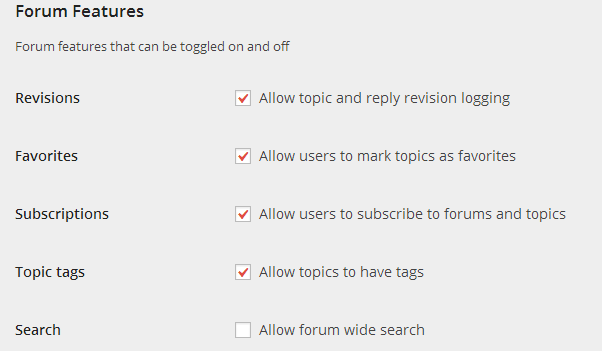
    I just updated to the bbPress 2.5 version and now Im wondering where the settings tab is located?
    I cannot find it on the left side of the backend and neither on the WP-plugin site.

    Thanks

    #139610
    mistercyril
    Participant

    Hello Stephen,

    I am experiencing the same issue on a WP + BP + BBPress setup.

    What I have found so far is the the ul.bbp-replies (used to display topic replies) outputs the “li” (answers) in the wrong order. So its obviously not .css related.

    I haven’t been able to determine for sure if the user rôle has anything to do with the order, but as far as I can tell it doesn’t.

    Hope this helps,

    C.

    #139608
    mouffles
    Participant

    I use a plugin to display pictures in lightbox (plugin name litebox).

    I have modified bbpress post tool bar, to include the class tag to the url.
    I also find the way to allow class tag for images and link in bbpress but i have to modify core files : \bbpress\includes\common\formatting.php

    i already googled a way to override this function in my theme function.php

    and what i did is :

    
    function my_filter_bbpress_allowed_tags() {
    	return array(
     
    		// Links
    		'a' => array(
    			'class'    => true,
    			'href'     => array(),
    			'title'    => array(),
    			'rel'      => array()
    		),
    
    		// Quotes
    		'blockquote'   => array(
    			'cite'     => array()
    		),
    
    		// Code
    		'code'         => array(),
    		'pre'          => array(),
    
    		// Formatting
    		'em'           => array(),
    		'strong'       => array(),
    		'del'          => array(
    			'datetime' => true,
    		),
    
    		// Lists
    		'ul'           => array(),
    		'ol'           => array(
    			'start'    => true,
    		),
    		'li'           => array(),
    
    		// Images
    		'img'          => array(
    			'class'    => true,
    			'src'      => true,
    			'border'   => true,
    			'alt'      => true,
    			'height'   => true,
    			'width'    => true,
    		)
    	);
    }
    add_filter( 'bbp_kses_allowed_tags', 'my_filter_bbpress_allowed_tags' );
    

    But today i updated to bbpress 2.5 and i saw that it didin’t work :/
    What is the correct function to allow this without hacking the bbpress core ?
    Could you in the future add a class tag allowed for link and images ?

    #139606
    mouffles
    Participant

    Hi,

    I updated my forum and i have issues with url redirection.

    When user post to topic (with many replies and many pages) they are redirected to the first page of the topic. It don’t do this for topics with a fex pages (less than 10).

    I saw that this bug exist since years, and i’d like to know how to fix this.

    #139604
    Stephen Edgar
    Keymaster

    Can you give us some more detailed information please.

    Another topic similar I have been looking into is here:

    Edit topic reply, changes post order

    Is this what your seeing or something different?

    #139603
    hyperzzz
    Participant

    Good Morning Folks
    I have setup a brand new website for my local gaming club and I have installed BBpress as an alternative forum to phppress ( to get rid of adverts without having to pay) users are starting to migrate across to the new bbpress however i have noticed that some posts are not appearing in linear order, example – date & time posts listed on the forum its not on all of the forums but it is annoying to see posts not showing as and when folks replied.
    Can anyone offer any thoughts on how to fix this?

    #139601
    Cars10
    Participant

    ok, here my latest uüdates to custom CSS field of my theme:

    #bbpress-forums > #subscription-toggle{
       float:right;
    }
    
    #bbpress-forums div.bbp-reply-content a.subscription-toggle,
    #subscription-toggle a{
       font-weight:bold;
       padding: 0 2px 0 2px;
       border: 1px solid navy;
       background-color: white;
    }
    
    #bbpress-forums div.bbp-reply-content .is-subscribed a.subscription-toggle,
    #subscription-toggle .is-subscribed a.subscription-toggle{
       background-color: #FFE000;
    }
    #139600
    eduardosilva
    Participant

    Hello Stephen,

    Following your recommendations, I disabled all the plugins (except for bbpress) and runned all the repair tools. No change.

    afaik, this happens, on all posts that are edited by any reason.
    One post was created yesterday, edited and have the same issue. Even the answers that I posted today appears before yesterdays edit.

    I migrated from bbpress 1.x around 2 months ago.

    You can see one example at: http://endian.eth0.com.br/forums/topic/novato/
    (also changed the template to twentythirteen now)

    Thank you!

    #139596
    FreeWPress
    Participant

    Stephen, Twenty Thirteen theme is clean, no customization , i never used this theme, folder is original no extra additions here…

    I see same image above with only difference wich i have subscribed 2 topics and see that.. But for forums i see only “You are not currently subscribed to any forums.”

    switched to the Twenty Thirteen remove all customizations for my theme and bbpress template.. it use all original files..

    #139595

    In reply to: Menu link to Profile

    mmichael1991
    Participant

    Hi

    I already tried that. Doesn’t work. Only when replacing the updated bbPress plugin folder back to the previous version.

    I started a Topic of this on my theme support page. So maybe they can find a solution.
    Here.

    #139594

    In reply to: Forum subscriptions

    Stephen Edgar
    Keymaster

    I wonder, have I misunderstood this new (2.5) feature.

    No 🙂

    I expected that once I am subscribed to a forum I would receive email notification of any new post or reply in that forum. But I haven’t received any (and yes, there were posts overnight to forums I have subscribed to)

    Indeed you should receive an email containing something like “You are receiving this email because you subscribed to a forum.”

    You will only get ‘New Topic’ emails, if you want replies you also have to subscribe to that specific topic.

    I had assumed that the subscription feature would mean I could deactivate ‘bbPress Notify’ plugin, but it seems I still need it.

    Essentially yes, you should no longer need to use the ‘bbPress Notify’ plugin

    #139593

    In reply to: Stylesheet Issues

    Stephen Edgar
    Keymaster

    A probably quicker and easier way to test the patch is to download the following file:
    https://bbpress.trac.wordpress.org/export/5210/branches/2.5/includes/core/template-functions.php

    Save that to your PC and then with an FTP program upload it to your web host in this folder /public_html/wp-content/plugins/bbpress/includes/core

    #139592

    In reply to: Stylesheet Issues

    Bright Thought, LLC
    Participant

    Thanks for the reply’s I am going to try what @focallocal did with the new patch that was released to see if that fixes it. I had moved the stylesheet for bbpress into my theme for now and linked it that way so that I could continue working on it for now. I’ll try the fix the mentioned above tomorrow and see what that does for me. I appreciate all of the responses.

    #139591
    Stephen Edgar
    Keymaster

    If you have switched to the Twenty Thirteen you should the same image that I posted above using bbPress 2.5.

    I know you have some custom templates in your normal themes child theme and I have a suspicion that you might also have some in your Twenty Thirteen theme folder and they need to be removed (or backed up), you need to find a theme that is ‘clean’ and has no extra additions in its folder structure, either in the root of the theme or a sub-folder bbpress.

    Stephen Edgar
    Keymaster

    Thanks for the reply, MediaTemple DV should not be a problem and I won’t need the other info.

    Can you try this for me please 🙂 Download the following file and save it to your PC.
    https://bbpress.trac.wordpress.org/export/5210/branches/2.5/includes/core/template-functions.php

    With an FTP program upload it to your web host in this folder /public_html/wp-content/plugins/bbpress/includes/core

    Does this fix the issue for you in either bbPress 2.4 or 2.5 (Preferably 2.5)?

    #139588
    Stephen Edgar
    Keymaster

    Also new replies are inserted before the edits:

    TOPIC A
    – Post 1
    – Post 3
    – Post 4
    – Post 5
    – Post 6
    – Post 2

    In this case was/is ‘Topic A’ a newly created topic in bbPress 2.5 or a migrated topic from v1.x?

    Also can you run the repair tools following the instructions here:
    https://codex.bbpress.org/repair-forums/

    Does this fix the order?

    If the order was fixed and a reply is edited what happens?

    #139585
    eduardosilva
    Participant

    Hello,

    When I was using 1.1 alpha, this problem wasn’t happening.

    After importing the old forum to 2.x, I did noticed this issue.
    Yesterday I also upgraded bbpress to latest version 2.5

    The addons that I have enabled are:
    – BBPress Close Old Posts
    – bbpress Simple Advert Units
    – Captcha
    – Custom Meta Widget
    – Google Analytics for WordPress

    Template: Lobster (bootstrap 3)
    – switched templates and issue stills there

    Also new replies are inserted before the edits:

    TOPIC A
    – Post 1
    – Post 3
    – Post 4
    – Post 5
    – Post 6
    – Post 2

    Thank you

    #139582
    Matoca
    Participant

    Thank you for you extreme patience with me.

    So am I not supposed to be seeing the Visual Tab inside the forum Topic and Replies now that this recommended plugin is installed? This is from the read me file for bbPress Enable Tinymce-visual-tab:
    “Enabling the full default TinyMCE editor mode will display all the buttons, similar to the editor inside the WordPress admin.” I guess I expected to see this.

    Ok, this gets more complex doesn’t it… Another plug in, I will have to look and see what could be doing this. This function of editing user’s image dimensions in topics right in the forum pages was super for the moderators. They are leery of always using the dashboard to do everything and this made it a simple task. Isn’t it always hard to go backwards…

    The Add Media button information came from the Read Me file for bbPress Enable Tinymce-visual-tab:
    “Enabling the media upload button, “Add Media”, will only enable this button for users who have the ability to upload files. By default this is authors and greater. This means this button will _not_ show for normal forum users. This is simply to give administrators the ability to easily upload and insert images into bbPress.”

    I am giving 4 moderators admin and keymaster privileges to add images to posts, delete spam etc. The forum is being run with no registration required, my choice. The topic and reply traffic has been considerable and this is only a hidden test site by invitation only at this point. I had many choices to pick from for forums, and we definitely agreed we did not want to be using FB or yahoo. So far bbPress has been perfect for this. But the plugin problems have been greater than normal this week.
    Thank you for your help,
    Patrice

    #139578
    Stephen Edgar
    Keymaster

    You also go about it this way by adding it to your themes functions.php file or your bbpress-functions.php file in your theme directory.

    To change from Home › Forums › My ForumSubscribe
    To change to Home › Forums › My Forum (Subscribe)

    function ntwb_forum_subscription_link( $args ) {
        $args['before'] = '&nbsp;(';
        $args['after']  = ')';
     
        return $args;
    }
     
    add_filter( 'bbp_before_get_forum_subscribe_link_parse_args', 'ntwb_forum_subscription_link' );

    If you don’t want to add it manually grab the entire file here and add it as a standalone plugin to your WordPress install.

    https://gist.github.com/ntwb/7686980

    #139577
    Stephen Edgar
    Keymaster

    @brucedongcaigmailcom Thanks for that info, helps to make sure we have all the bases covered 🙂

    Probably an easier way would be to download the entire file using this link

    https://bbpress.trac.wordpress.org/export/5210/branches/2.5/includes/core/template-functions.php

    Save that to your PC and then with an FTP program upload it to your web host in this folder /public_html/wp-content/plugins/bbpress/includes/core

    p.s. Just let me know if it doesn’t work

Viewing 25 results - 23,101 through 23,125 (of 64,518 total)
Skip to toolbar