Search Results for 'bbpress'
-
Search Results
-
Topic: Missing search widget
forum search widget doesn’t display. It sould be at the top of the sidebar here:
http://narcissist.staging.wpengine.com/discussions/topic/will-held-moderation/#post-1258this is 2014 theme with bbpress as the only active plugin.
any thoughts? as the address indicates this is a WP Engine staging site.
thx,
JohnI have a client who wishes to create a website full compliant with the disability W3C standards. Will bbpress work for this?
Thanks
MaryHi As i have installed bbpress theme in my site but i am not able to send replies to forum topics in dashboard->setting ->permalinks if i select as post name.If i change the permalinks to plain then i am able to send replies to forum topics.But i need to select as postname in permalinks.Can you please tell me the issue what is that why it showing like that.Thanks in advance.
I’ve spent a long time looking through fixes, and nothing has worked for me so far. Currently I am trying to set up a forum/website. I am using the Twenty Fifteen theme with bbPress, except I am currently on a child theme so I can make changes safely.
The site portion looks fine, but the forum looks awkward:
I would like to stretch out the forum side of this page so the posts take up more space. I don’t want to be scrolling constantly, especially with much larger posts. I think the best way to do this is removing the sidebar from the forum section. After the sidebar is gone, however, I don’t just want the right section to be centered and be the same size. I want it to take up the whole page. I understand this makes accessibility across the site a bit more difficult, but I can figure something out later.
Topic: Add Forum Role [VIP]
How to add a VIP role same caps as participant.
When I add this code, my site will get a HTTP ERROR 500.
Please help.
Thanks!How can I convert (move) individual HTML webpages in bulk into bbpress?
What I have is just the 1000s of html pages which consist of question and answers. Now how can I move then into bbpress.
This is how my question/answer html pages looks like https://drive.google.com/file/d/0B4RFn3PmjNy9YTNkbE5mejBfV1U/view?usp=sharing
So now what I have to do exactly? I just want to move the questions and answers. Don’t want user login details or anything else. I have thousands of pages like this.
Topic: Private: Private: Forum Name
I have a simple forum with only 1 forum and a couple of topics so far. I set the forum to Private to make it & contents only visible to logged in users. When I load the page, the title shows as “Private: Private: Forum Name”. Is there a way to drop the redundant “Private:”? New user to bbPress, just installed 2.5.10 on WP 4.5.3.
screen shot here: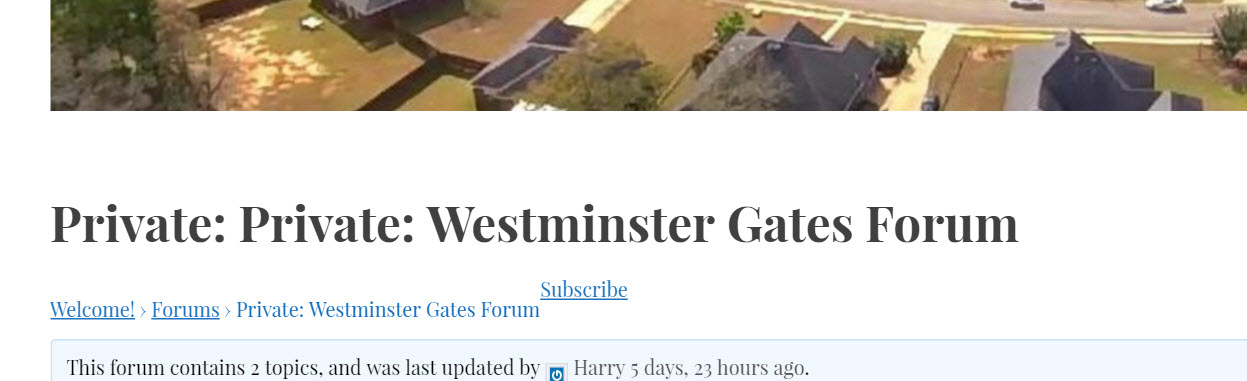
Hi folks,
SMF 2.0.7 to bbpress 2.5.10 import
Wordpress version 4.5.3I’ve just imported the SMF forums here on my server –
http://www.holistic-counseling.ca/Forums/index.php
to bbpress here on my server:
http://nutopia.cc/Holistic-Counseling-WP/holistic-counseling-community-forums/
you’ll need to login to see.
user test
p/w 123456At first glance, everything appears fine, although the number in the Posts column seems to be a product of adding the number of topics to the number of replies in a given forum. I don’t mind this.
Freshness shows zero, but that’s not a big deal either bc A) I can fix the freshness (but it results in losing posts and replies in the forums. B) Once new forum posts happen, it will repopulate.now here’s the main issue
Upon clicking on a forum, it says:This forum contains 8 topics and 15 replies.
Viewing 4 topics – 1 through 4 (of 4 total)So the top area states how many topics there are accurately but then only 4 are actually displayed.
This problem is consistent across the other forums. (sometimes only 3 or 2 are displayed when more are stated above)Any idea what that is about? It’s the main issue.
note: i did a repair Recalculate last activity in each topic and forum
and then the bottom forum dropped to 0 and 0.
Any of the forum repairs that I use that involve Topics creates problems in the number of topics and replies and doesn’t fix anything.HELP is much appreciated.
note 2: here are the messages from the import
(I think nothing appears out of order to me, but maybe there are some issues with this)Conversion Complete
No reply_to parents to convert
Converting replies (50 – 99)
Converting replies (0 – 49)
No tags to convert
No super stickies to stick
No stickies to stick
Converting topics (0 – 49)
No forum parents to convert
Converting forums (0 – 49)
Starting ConversionHello
I am beginner, and wanted to edit topic descriptions please tell me exact path from where it is coming, I am using Emmet LiteVersion: 1.4.3 theme and latest version of bbpress.Hi
I want to show all forums list in widget, but bbPress default widget show only the 50 forums name that sorted with alphabetic characters.Hello
English is not my forte. I will try to write you understand what I mean and what I want and something advise.
We’re going to be a big project. We establish mmporg page in which guild will have its pages, posts and also their forum and all in one website.
BbPress will do together with Budypress.
I set up the group in Buda press and there a separate forum, but can not add multi layer one major forum in the forum. It has to do administration on the bulletin board in WordPress.
Assign rights administrators with limited options, but the problem is that it can delete all topics and I do not want it. It may read topics.
I want to set that could delete your own topics and dirty.
I adjusted the law in the bbPress code, such as false and true, may well lubricated.
I just want that each guild had their own separate forum and in which their users and manage this forum only. The others can not do.
Thank you
Hi,
I’m having an issue with the multi-line text area. I am able to add the box without issue but when I sign in as a member and fill out the field, in this case it’s called “description” and hit save it sends me to a blank page and does not save what was done. Any thoughts on how to fix this issue.
Wordpress 4.5.3
BBPress 2.6.1.1Many thanks,
Victor
Hello, members of BBpress,
I need your assistance,
I want the system of Messenger of Facebook at bbpress
Here my problem, I want that one a person is spirit to write an answer, the members and visitor sees this thing:Voici :
En français :
Bonjour, membres de BBpress,
J’ai besoin de votre aide,
Je veux le système de Messenger de Facebook chez bbpress
Voici mon problème, je veux que qu’on une personne est entrain d’écrire un réponse, les membres et visiteur voie cette chose :


