Search Results for 'bbpress'
-
Search Results
-
Hello.
I’ve just changed host and one of the WP sites I have included a bbpress forum. Someone else managed the site; I only ever updated the core and plugins and didn’t really pay much attention to it other than to see the main site was still working OK. I think I probably missed something regarding this a few years back.However, having moved it, I realise the BBpress forum isn’t working. I’m not sure if it was working on the old site but my hunch is that BBpress has changed.
The old forum was located at http://mysite/bbpress
whereas now, I think BBpress is integrated into WP (which is great, by the way)I also have a bbpress config file with settings for the DB. I’m thinking this is also redundant too as it seems the bbpress settings are just stored in the regular WP db tables.
I can see my old forum within the bb_forums, bb_meta, bb_post table of my db but in the admin of WP, under the ‘forums’ menu I see ‘no forums’
So, my question is, how do I get the info from the bb_ tables to register as an integrated forum in the new bbpress?
Thanks very much in advance if you can help.
By the way, the old site is no more as I have already switched hosts.
When using the shortcode [bbp-single-topic id=$topic_id], and clicking on the Subscribe link, I wouldn’t like any redirect, just back to the post where I embedded the topic. But there is a redirect to the separate topic page. How do I prevent this redirect? I would like to just reload the post where the shortcode is embedded, instead of a redirect. Or even better, even eliminate the reload, just like here on bbpress.org, there is no reload and no redirect when subscribing.
Thanks!
WordPress 5.2.1
Divi theme version
Running PHP version: 7.1.30
BBPress version 2.5.14
GD BBPress Toolbox Pro version 5.5.1 (says its updated, though the latest version is 5.7 I think)My theme styling disappears as soon as a user logs in.
When I disable the Toolbox plugin, the forum styling returns, but the developer said its an issue with BBPress core. The error log reads:
[03-Jun-2019 17:39:49 UTC] WordPress database error You have an error in your SQL syntax; check the manual that corresponds to your MySQL server version for the right syntax to use near ‘79266’)’ at line 2 for query INSERT INTO wp_usermeta (user_id, meta_key, meta_value) VALUES
(‘465’, ‘wp__bbp_favorites, ‘79266’); made by require_once(‘wp-admin/admin.php’), do_action(‘load-tools_page_bbp-repair’), WP_Hook->do_action, WP_Hook->apply_filters, bbp_admin_repair_handler, bbp_admin_repair_user_favorites
[04-Jun-2019 02:41:55 UTC] …/components/SupportCenter.php:2512 ET_Support_Center::add_support_center():
Divi Support Center :: WordPress debug.log is not configured.[04-Jun-2019 03:04:34 UTC] …/components/SupportCenter.php:2512 ET_Support_Center::add_support_center():
Divi Support Center :: WordPress debug.log is not configured.Error Found in file PHP_Errorlog – public_html/wp-content/themes/Divi
[04-Jun-2019 02:51:52 CST6CDT] PHP Fatal error: Uncaught Error: Call to undefined function get_header() in /home/mythicre/public_html/wp-content/themes/Divi/index.php:1
Stack trace:
#0 {main}
thrown in /home/mythicre/public_html/wp-content/themes/Divi/index.php on line 1The Toolbox developer submitted a ticket with bbPress: https://bbpress.trac.wordpress.org/ticket/3259
I tried to make the change in my files that is shown on that changeset, but it didn’t fix the issue. Forum styling is still broken for logged in users.
Any ideas???
Michelle
Topic: style pack – unread post
Hello,
I would like to use the Opt-in or Opt-out options, but I am not using the bbpress profile as I also have buddy press installed and am using their profile.
Is there a way to still use the Opt-in or Opt-out options ?
Thank you
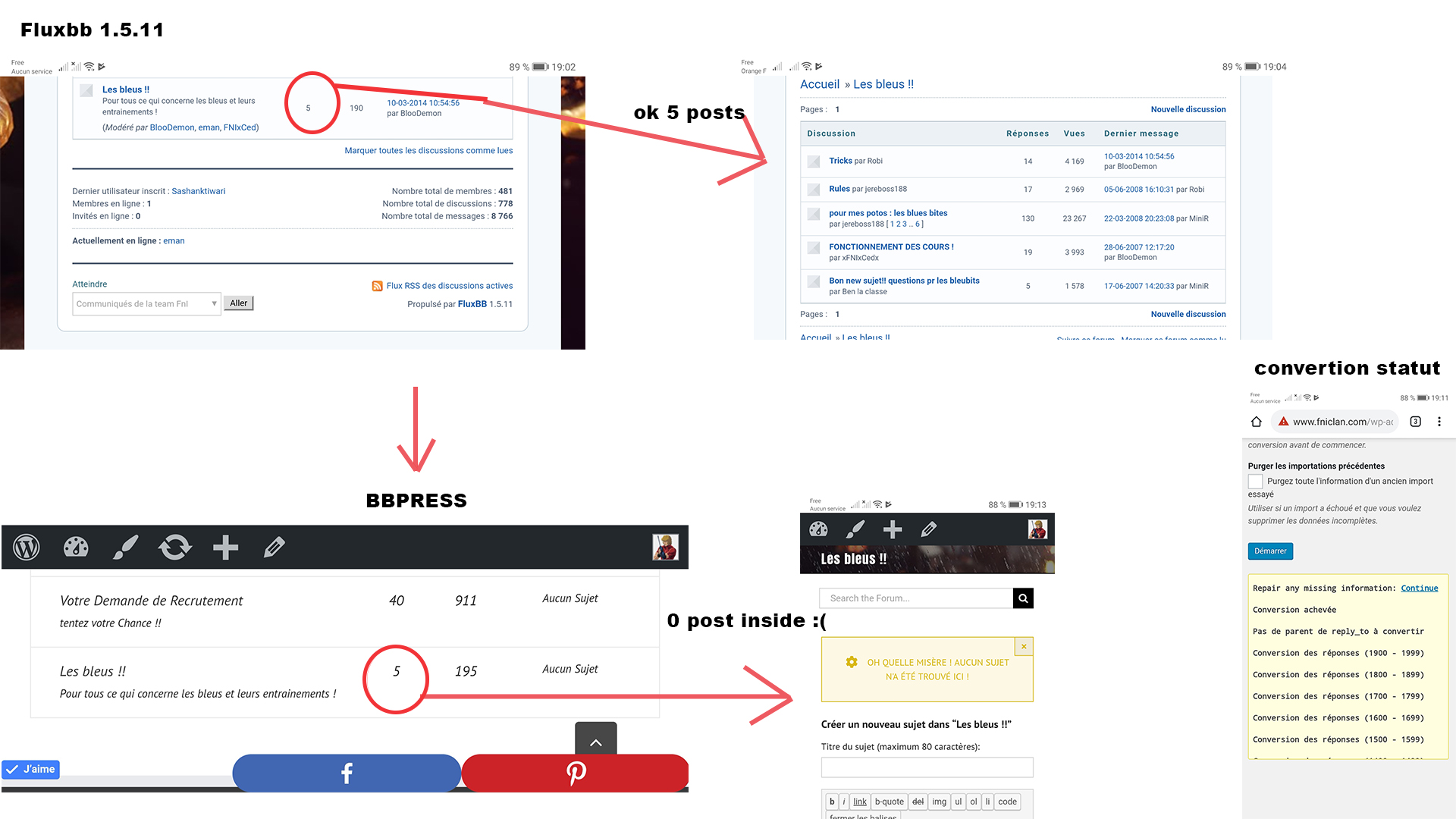
SandraHello to all of you, I need help because my migration from flowbb 1.5.11 to bbpres didn’t work completely.
there are forums with some topics that are transferred and other forums where nothing at all has worked, but it displays the number of topics inside… but it’s empty, as in the attached pictures.Thank you for your help, friends.
Hello All,
I hope all is well.I am pretty new to this and maybe there is already a way to do or a plugin I missing. May have been discussed before but I don’t even know what to call it.
Is there a way to display a custom field from the buddypress profile under the username in the forum comments just like the default bbpress user roles (i.e. like a box containing a specified field from buddypress profile). For my purpose there is an important peice of profile information I’d like to have follow the user around whenever they make posts. Thanks!
I have a WordPress site with 4 languages english (default), french, italian and spanish :
WP v5.2.1, bbPress v2.5.14, Polylang v2.5.4
I set up the custom content types in the polylang settings : Forums, Topics, RepliesThere is no problem for the english forum but I got two problems :
– for the french forum : the english words are not translated (it is fine with italian and spanish). The two bbPress-fr_FR.po and bbPress-fr_FR.mo were missing. I added them but without success.
– for the french, italian and spanish forum : I can add a topic (then it redirects to home page). When I click on it the topic link, it redirects to home page. When I try to view the topic in the back office, it redirects to home page
Thanks in advance for your help
Topic: Favourite topics
Hello,
I am using bbpress and buddypress together. When I mark a topic in a bbp forum as favourite it doesnt show in the buddy press profile under favorites…I am using the buddy press profile. It seems like bbp and BP profiles dont merge or sync together. It seems like this was already the problem years ago and it still hasnt been resolved. Does anybody has a recommendation?
Thank you!Good morning,
How can I set bbpress to receive email (I’m the moderator) before approving a post ?
Thanks
Daniele
Hello,
how can I change the forum email set in bbpress?
My intention would be to assign an email for all notifications of any kind.I noticed that in the bbpress settings there is no setting, can you help me?
Thanks
Topic: Comment Blacklist
Not sure if this is a wordpress or bbpress issue so posting in both places. I run a writers community with buddypress and have set up forums where members can post pieces of work. We are experiencing some difficulty with the comment blacklist which prevents some words from being used even if within a word e.g. double breasted…. and one piece of work I can’t for the life of me find the word that is blocking the post… whilst I want to be able to stop spam comments, surely forum posts from members who have to be signed in to post is another thing? Any suggestions? I am useless with code :). Even if we had something which could identify the rogue word we could do something about it…
Thank you
Hi
Is there any way to show a topic created in a forum, on a page within wordpress? Say the home page.However I want it to look like a normal post that’s been created in wordpress, not a section of bbpress. From what I can tell so far, it shows like a section of bbpress forum.
It’s like sometimes when you browse a website, in the sidebar is almost like a snippet of the forum post. It gets your attention. Then if you click on it, it takes you to the forum where you sign in/register. I’m after this if possible?
Topic: HOW TO CHANGE “FORUM” NAME
Wordpress v. 5.2.1; bbpress v. 2.5.14
I would like to change my “bbpress forum” to another name so that it does not show up as “bbpress Forum” or Just “Forum” in my users profiles or elsewhere. I have seen several dated suggestions of how to do this but none have worked.
I did not find any help here using the search option. So if this is a repeat question, Please accept my apologies and kindly direct me to the codex or other potentially successful answer.
Thank you.


