Hello, I have spent 5 years on my site and downloaded bb press today because of all the great things they said about it on this site.
Now I can no longer access my dashboard to edit anything.
I have been deleting plugins from my file manager in cpanel but it’s not helping.
I have found some things in the forums and tried to change all my wordpress user roles and capablities to the defaults but it’s not doing anything.
I noticed that registration was disabled too so i re-enabled it in the database.
Now my site and database are a complete mess and I have no idea how to fix it.
Why would you ever release this software?
No one will answer me either.
5 years of nonstop hard work and it’s not looking good.
I just saved up for 4 years and did a 20k ad campaign too.
Any idea how to move bottom pagination links place. Its default under this message box. I want it like this site after topics and before message box.
I am using a child themes. I read your instructions on setting up the child themes configuration. I copied the folder
Souce:wp-content/plugins/bbpress/templates/default/bbpress
Destination: /wp-content/themes/%your-theme%/bbpress/
Bbpress will normally use the default files found at
wp-content/plugins/bbpress/templates/default/bbpress
However if you create a directory in your child theme at
/wp-content/themes/%your-theme%/bbpress/
(where %your-theme% is your child theme’s name)
then any files stored there will be used instead.
Thereafter, there appears two “unsubscribe” button in the forum. Before copying the “bbpress” folder to the child-theme, I only see one unsubscribe.
http://goforcrumbs.com/forums/forum/intro/
I think for Czech the files should be bbpress-cs.mo and bbpress-cs.po
When you export the translations from translate.wordpress.org you should also change a couple of the defaults:
• Make sure the filter Current/waiting/fuzzy + untranslated (All) is showing the waiting translation
• Select the only matching the filter and then click export to export the .po .mo (This way you’ll get the those strings that have not yet been approved)
Awesome thanks for the help! I just followed your instructions, and it didnt quite seem to work. It definitely did something, but not quite what was expected. Here’s a screenshot of what happened after i implemented your code: http://imgur.com/Txu9cAz
After seeing the bbpress.org forums, im realizing its not totally neccessary to replace the freshness (last post) column, but to simply add a “started by: author” section directly beneath the topic title – just like on the forums here.
Is that how it should look by default? Or are the bbpress.org forums customized?
I run a multisite installation of WordPress 4.4 and bbPress 2.4 installed with the Twenty Twelve theme.
I exported “all current” bbpress-cs_CZ.mo and bbpress-cs_CZ.po files at https://translate.wordpress.org/projects/wp-plugins/bbpress/dev/cs/default?filters%5Bterm%5D=Your+username+must+be+unique%2C+and+cannot+be+changed+later.&filters%5Buser_login%5D=&filters%5Bstatus%5D=current_or_waiting_or_fuzzy_or_untranslated&filter=Filter&sort%5Bby%5D=priority&sort%5Bhow%5D=desc
The first thing is, that all strings in exported files are in english. I manualy changed the string “Your username must be unique, and cannot be changed later.” to “Vaše přezdívka musí být unikátní a nejde později změnit.” in the bbpress-cs_CZ.mo and inserted that file via ftp to these folders:
/matia.info/wp-content/languages/bbpress
/matia.info/wp-content/languages/plugins
/matia.info/wp-content/plugins/bbpress/languages
None of them works though. My site is at http://www.objasnujeme.cz/registrace/
There is a string “Your username must be unique, and cannot be changed later.” instead of the czech translation.
Closing as this is a duplicate. Please do not create duplicates.
Change default display name from username to firstname
@dlndolgion
Your theme author could have styled the input checkbox on only webkit browsers. I see that you are now using the default WordPress forms, which I usually recommend anyway.
Avatars and username are clickable by default. Maybe you are getting an conflict with some plugins or with the theme.
Thank to your suggestions I’ve made some attemptd, so I deduced that the problem is the theme used. Is it possible to “copy” the editor from default theme to that used on my site?
Hi,
How can I change the default display name from bbpress? I’d like to display first_name instead of username by default, without members having to edit profile to get it.
Thanks
Hi,
How can I change the default display name from bbpress? I’d like to display first_name instead of username by default, without members having to edit profile to get it.
Thanks
Hey guys,
i have the following problem.
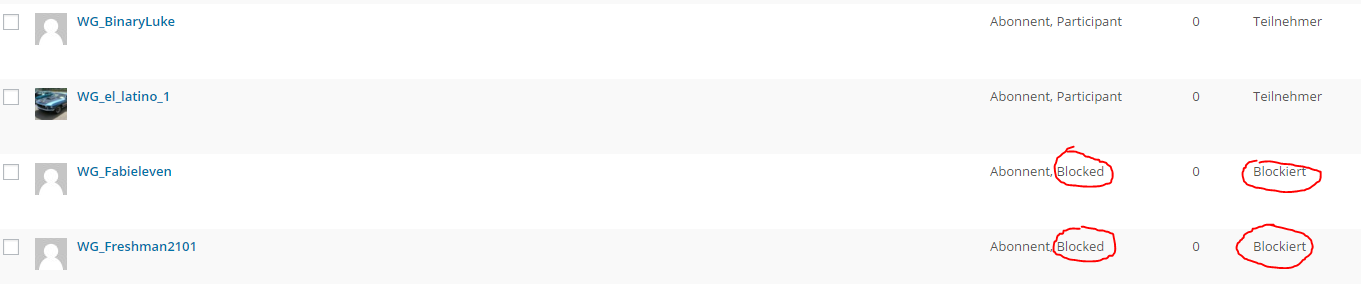
I have a user role named blocked, which is the default one after the registration.
Now if i want to change the role to participant nothing happen.
Anybody experienced this before?
Link to the forum: https://be4stmode.tk/forums/
Hi Casiepa,
Is this the “ultimate fix”?
I changed the line but it does not have any effect. I also tried the “fix” by timsilva_ but that doesn’t work either. I revert back to 4.3.1, disabled all plugins but bbPress and the problem remains. Before the upgrade there were no problems.
I’m using quite a lot of bbPress enhancement addons but i don’t think they interfere
- bbP private groups 3.0.8<
- bbPress Do Short Codes 1.0.3
- ppPress Votes 1.1.0
- GD bbPress Attachments 2.3.1
Since Im a keymaster I didnt notice is but got complains from user there topics were gone. Also – they can actually create new topics and they are saved but they just cant see them. They got the imfamous “Oh bother!” message but the freshness information bar says they actually were the last that posted something.
Now – if I make that user moderator everything seems to be working as it should – but hey – i dont want to apply that workaround.
Our problem has something to do with the upgrade and I guess something to do with rights. The only rights-plugin being used is bbp private groups but people confirmed that that plugin is compatible..
Also change the permalink to default – no effect aswell
Please advice..
Hi Casiepa
Like i said, I have already wp 4.4
I know it’s almost impossible to help, but I really do not know what happend 🙁 I have tried to switch to a default theme and then it worked.
Should I just try to upload a fresh version of the theme? Maybe I just answered my own question 😀
Hi,
When you say ‘until the other day’, can you explain what happened ? Maybe an upgrade to WP 4.4 ?
Did you try to switch to a default theme to see if that fixed ?
Pascal.
The default bbPress forum index shortcode works fine. And it does not have arguments for removing the search bar, and showing specific forums in the forum index only.
You had some code that uses the shortcodes in the plugin bbp style pack.
Here is a shortcode from the bbp style pack plugin.
[bsp-display-forum-index forum= '2932, 2921' breadcrumb='no' search='no']
On your profile page and your forum index page it shoudn’t have this layout by default. It is most likely happening because of the template that bbPress is inheriting. You would need to follow this guide and create a bbpress.php file and place it in your child theme.
Getting Started in Modifying the Main bbPress Template
Here is an example bbpress.php file for your Canvas child theme. It is what I created straight from Canvas original theme code.
https://gist.github.com/robkk/c7ec3a0f2d730f5cb10d
@stewagner
I had a feeling you were using that plugin, that is why you linked to the single reply post.
There is a little shortcode you have to change in the plugins settings for the notification. It should have it this way by default, but it does not. Might need to contact the plugin author to set that as the default setup.
I think you have to change [reply-url] with [reply-replyurl] in the plugins settings. It adds the settings to bbPress default settings in Settings > Forums.
Guys some devs and I are having a hard time duplicating this issue.
This is how I tested it and come across no issues.
WordPress: 4.4
bbPress: 2.5.8
I tried these default WordPress themes
2013, 2014, 2015 and 2016
I tried these forum structures.
Category > Forum > Forum
Category > Forum > Private: Forum
Category > Forum
Category > Private: Forum
Forum > Forum
Forum > Private: Forum
Category > Category > Category > Forum
Category > Category > Category > Private: Forum
Category > Category > Forum
Category > Category > Private: Forum
With the postname permalink structure (since it is most commonly used and I want to try to duplicate it)
Other things I like to ask is if this is a theme side 404 message being outputted or the normal no topics/forums found here message bbPress outputs like the one below (it could be different if you are using a different language than English for bbPress of course).
Oh bother! No topics were found here!
If you guys can help ask a few questions like the ones that @casiepa asked and these additional ones.
What is your bbPress version?
Have you already tried troubleshooting for a possible plugin/theme conflict?
Are you guys using BuddyPress groups for group forums?
Are the issues only happening on private forums? (Like @kpdub has said)
Did you try the postname permalink structure?
Another thing I may suggest to help try to gather information for the developers, is to try to duplicate the issue yourself. Try to duplicate the issue again on a local installation on your computer. If you can tell us step by step to duplicate it.
Creating a Test Site
I’m using default users in wordpress for the bbpress forums as for the regular pages for wordpress.
I’ve installed WordPress Access Control to disallow visitors and regular members from viewing certain pages. These are only allowed to be shown to the paying members of the organisation.
I’ve configured the Access Control to redirect to the page with the bbpress login form when a user isn’t logged in and tries to view a page to encourage paid subscriptions.
The redirect to the login form looks good since it has a value refering to the original page and the link is in this format:
login/?redirect_to=/some-folder/the-page-the-user-tries-to-view
However when a user logs in correctly, the login page is still showing with the message that they’re already logged in. The link has changed to this:
login/?redirect_to=%2Fsome-folder%2Fthe-page-the-user-tries-to-view
So how can I catch that parameter and do the proper redirect to the page where the users initially was?
My forum is this
http://asiahairtalk.com/forums/topic/anyone-here-has-started-any-new-treatment/
And i have tried to edit the font size at /plugins/bbpress/templates/default/css/bbpress.css
but i dont see the font changes at all.
I am trying very hard to edit:
1) reply font size
2) Author name’s font size
3) Avatar size
4) alternate post background colour
Thanks guys for helping.
Hi Guys,
I got the problem, that new posts/threads are shown to every member, even when they got no rights to access them. Is there a fix or workaround available?
I used the default “New posts” widget and the one from GD without success.
Thanks in advance Guys,
Julian
Hello you have mentioned Czech is incomplete right now. I am front-end developer, I need CZ for bbPress so I spent some time to fill all missing strings in GlotPress (https://translate.wordpress.org/projects/wp-plugins/bbpress/dev/cs/default). I am not sure how/when it will be approved.
Right then after some trial and error:
You can add into the footer on the main bbpress forum page by editing the following file:
\wp-content\plugins\bbpress\templates\default\bbpress\content-archive-forum.php
Just add whatever you need where I have put <p>Example text here</p> on the following code
<?php endif; ?>
<p>Example text here</p>
<?php do_action( 'bbp_template_after_forums_index' ); ?>
</div>
Hope this helps others who need this advice!
Regards,
Gareth


