Hi Robin,
since the membership plugin uses the same WordPress-Login-Data as bbPress does,
if a user registrates a membership and is logged in, he has automatically full access to the bbPress-Forum.
I found no way to make a difference between logged-in users regarding to read- and write-access.
Is there one?
Thxs, best,
Roman
If you do not allow anonymous posting, then forums can be seen by everyone, but only written to by logged in users, If you make WordPress registration only available to members, then only members will be able to write
Hi.. I am using bbpress on my website and I don’t know why I got this error. I try to find solution online but I got no luck. Here is the page that got me error.
Amadeus Basic Course Forum
Wordpress version: 5.2.2
bbPress version: 2.5.14
Just to you know. I am also using “LearnDash & bbPress Integration” on my site. I’m not sure if this one causes the problem.
I hope you can help me fix this one.
Kind regards,
Vins
Hello, I’d like to make a wordpress-forum with the following feature:
The Forum will be part of a free membership, so it will be readable for everyone who is logged-in in the membership area,
but it should only be readable but not writeable (!).
Writing-Access (answer to an existing topic or make a new one) should only be possible for members, who became a higher membership-level by paying an amount before.
Is there a possibility to make that beeing done?
Thxs a lot, best,
Roman
Is it possible to set up BBPress Plugin for WordPress so topics can be viewed by anyone but only the OP and Admin can participate in the thread?
I’d like to use the BBPress plugin with WordPress to add a forum but I’d like the OP to be able to choose one of three options when they start a topic:
1) Public – the topic will be viewable to everyone
2) Public and Anon – the topic will be viewable to everyone but the OP details will be hidden
3) Private – the topic will only be viewable to the OP and Admin
I’m sure 2) needs some custom coding but are 1) and 3) possible.
I saw this thread https://bbpress.org/forums/topic/private-threads/ – which suggests a work around with two forums but what if someone who posted a topic changed their mind and wanted to switch a public post to a private one after a thread already exists. Would this be difficult?
I tried this and it helps me.
Exporting your bbPress data (forums, topics , and replies could be really useful for a quick backup or a migration from one WordPress site with bbPress installed to another.
-Log into your WordPress back-end.
-Go to Tools > Export
-You will see a screen to choose what to export. You can either choose to export the bbPress content by each post type , or you can export all your content at once.
-When you have made your choice on what to export , then click the Download Export File button.
-Now you should be downloading the file that you could later on Import to another site by going to Tools > Import
-Log into your WordPress administrator dashboard and navigate to Appearance > Header.
-Click “Choose File” and upload an image from your computer. You will have the opportunity to crop it before saving your settings.
-Alternatively, click “Choose Image” to choose an image from your media library. If you don’t have any images in your media library, simply drag and drop the image you want to use into the box which appears, select the file and click on “Set as header”.
-Click “Save Changes,” and the settings will take effect immediately.
I hope this will help you.
check this out bloggersignal.com/change-user-role-names-in-wordpress/
that blog might helps.
I expect it comes from the theme you use. Did you try to switch to another WordPress Theme?
@jkw217,
I have no idea about this error but can you please provide the version of bbPress and WordPress that you are using?
I am experiencing 404 errors on forum and topic views. It appears to be at random and not all the time.
Got error 'PHP message: PHP Notice: Undefined offset: 0 in /wp-content/plugins/bbpress/includes/topics/capabilities.php on line 80\nPHP message: PHP Notice: Undefined offset: 0 in /wp-content/plugins/bbpress/includes/replies/capabilities.php on line 62
I have re-saved permalinks, changed->saved then changed-back->saved and still have the 404 errors occasionally.
I googled this error and found:
https://wordpress.org/support/topic/capabilities-undefined-offset-error-with-bbpress/
I tried updating the capabilities.php file as discussed but still having issues.
Does anyone have any experience with this problem and have a fix?
I am having a problem with permalinks on livelikeaviking.com WordPress 5.2.2
Every couple days the forum stops working correctly – today when topic was clicked, user was sent to the home page.
Flushing permalinks resolves the issue, but the problem is happening often enough that the users are getting frustrated.
Any solution?
There are 5 tickets open, and at least one was worked on recently (within the past week or so) – https://bbpress.trac.wordpress.org/milestone/2.6
Hopefully they will find some time, but for now I’m running with the RC.
I am having a problem with permalinks on livelikeaviking.com WordPress 5.2.2
Every couple days the forum stops working correctly – today when topic was clicked, user was sent to the home page.
Flushing permalinks resolves the issue, but the problem is happening often enough that the users are getting frustrated.
Any solution?
Hello,
My site http://adm54forum.fr is on WordPress 5.2.2 and bbPress 2.5.14.
I use a theme called “Socialized”.
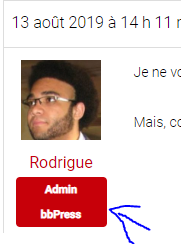
When I post a message on the forum as an administrator, under my profile picture is indicated my role. It says “Admin bbPress”, but how can I change that? I have no role with this name
Hey Robin, thank you so much for your help. I don’t see a plugin that we have that specifically does any type of post moderation once written by the user. The only plugins I have are one for uploading attachments (GD bbPress Attachments) to the posts and one that restricts access to the forums through our membership plugin (Ultimate Member bbPress Extension). Here’s more info on those:
basically you will need a link from teachable to fire up code in wordpress to create the user.
I can only suggest you contact the ‘teachable’ authors to see if they have a hook you can use, or google for linsk eg
https://zapier.com/apps/teachable/integrations/wordpress
Wordpress 5.2.2
bbPress 2.5.14
URL: forums are private, so URL won’t be helpful.
There’s no button or link to approve anything in my forums. Everything’s just pending. In the past, I replies showed up (when we first installed this; we haven’t used it in a long time, and just getting back into getting these set up). When I click to preview the replies/topics, they are just titles, nothing is written about the topic. We’re testing the forums with my team, so I know each team member wrote something and submitted it — they didn’t just write a title. Additionally, each of them are moderators, wouldn’t their posts just go through since they have the power to approve posts, too (or should, if this was working)?
What is happening? Why:
is nothing showing up for the content part of their replies and topics
why aren’t their posts going through automatically (since they are moderators)
why can I not — as the admin/keymaster, see the “approve” link?
Here’s a screenshot:
https://share.getcloudapp.com/Z4uZkZ2K 
Thanks for your reply.
My course is hosted outside of WordPress, on a platform called “teachable”, so my students are not members of my WordPress site. I’m wondering if there is a way to automatically register someone, when they purchase my course. I can automatically add them to Mailchimp, Convert Kit, etc, b so I’m wondering if it is possible with bb Press (WordPress).
Cheers.
I installed the following plugin on my dev site:
https://wpfavs.com/plugins/import-export-for-bbpress
Export is working perfectly (latest wordpress and bbpress).
Import not working at all but I might be doing something wrong. Very disappointing because this plugin looks so promising.
Giving up for now, I hope this helps someone I’ll actively update this if I make any progress.
Hi All,
I’ve spent the last 10 hours 36 minutes trying to import a few topics into my forum from CSV. I’ve tried many different techniques and plugins. I am updating this because maybe it will help someone, or you might be able to help me.
I’m assuming that Stephen’s method worked when he posted it. It appears to me that post_parent does not behave as it used to. I have used Stephen’s files from Github and imported them into my forum. I’ve very carefully followed every nuance of his post, as far as I can tell. Ultimate CSV Importer and WP ALL IMPORT EXPORT (I have the extended pro version) do not expose post_parent in the mapping. However, Ultimate CSV Importer (now known as ‘Import Export Post as CSV File’) does say in the documentation that it will pick up post_parent when importing. Unfortunately I didn’t check in the database before running the repair tools and they always seem to remove the hierarchy when i use them.
When I import using the fields bbp_forum_id and bbp_topic_id I am able to make some progress in that the Topics show that they are in the correct forum in the backend. But they don’t show up in the frontend.
See this post for some useful information:
Bulk-move bbPress topics
Anyway, when I import Stephen’s files, the Topics and Replies won’t show up for me. post_parent is incremented in the database when importing as far as I can tell. I have read many posts on this and other forums virtually begging for a bbpress csv importer and many of the replies mention post_parent as being central to the issues.
One example statement says “The standard WordPress Importer only sets a post’s post_parent if that post also exists in the import; it can’t map an imported post to a post that already exists in the database.”
With that in mind, I went into the database after importing Stephen’s files and I manually updated post_parent for the Topics and Replies. When I do that, the Topics and Replies show up in the frontend as they should. At least I’m understanding what needs to happen for the Topics and Replies to show up on the front end.
Having edited post_parent in the database (using phpMyadmin) I then ran the forum repair tools. Counts were updated and everything is where it should be.
I’m now almost at the point of letting sleeping dogs lie. However, I’m going to try an old plugin on my dev site and I’ll post the results of that shortly.
use then alternate template in
bbp style pack
once activated go to
dashboard>settings>bbp style pack>forum templates
bbpress just uses wordpress users, so if they are registered as part of your course, then bbpress will allocate them the default role (if you change nothing, then that is participant) on first login


