Would appreciate feedback since it seems development has stalled. bbPress 2.6 is 5 weeks overdue according to trac:
https://bbpress.trac.wordpress.org/milestone/2.6
There are only 40 tickets outstanding which is inline with previous releases so I don’t think the number of outstanding tickets is the cause (being so large in number that it would cause the delay).
And it has been more than 3 months since the last major release (2.5). The previous one before that (2.4) was released in a 3 month interval.
bbPRess 2.6 ??????????????????
bbPRess 2.5 November 25th 2013 (3 months)
bbPress 2.4 September 2nd 2013 (5 months)
bbPress 2.3 April 14th 2013 (5 months)
I’m not really quibbling over 3 months or 5 months or 5 weeks overdue, more than any of these it is the lack of activity and movement in clearing out tickets on trac that moves me to post this.
Sorry, I don’t run buddypress.
You might do better on the buddypress support forum
https://buddypress.org/support/
Have you tried
Installing Group and Sitewide Forums
and there is also talk of
https://wordpress.org/plugins/private-bp-pages/
and what have you set visibility within bbp to be eg
https://codex.bbpress.org/step-by-step-guide-to-setting-up-a-bbpress-forum/ section 5
You’d need to change a couple of templates
wp-content/plugins/bbpress/templates/default/bbpress/form-topic.php line 203
and
wp-content/plugins/bbpress/templates/default/bbpress/form-reply.php line 135
You do this by creating a directory under your theme called “bbpress” and copying these two files to there. Then modify the lines as you want, you’ll need to change the word ‘Submit’ in the following towards the end of the line to whatever you want.
<?php _e( ‘Submit’, ‘bbpress’ ); ?>
bbPress will then use these files instead
You could use a translate function, but Submit is such a widely used it might affect any submit on your site
ok, so if you’re not miles down the redesign, I’d copy across your current site and then mod from there
see
https://codex.bbpress.org/creating-a-test-site/
for a lot of detail on this.
@doremdou I believe it is a bug because before buddypress AND bbpress upgraded about 4-6 months ago (i don’t remember) it was working great. Nested replies AND pagination were both displayed and there was no issue with the load time.
I would so much rather pay for bbpress as a plugin in order to get the support we need than to have it free and be lost and without help 🙁
That’s interesting because both topic and reply should both use the same class and styling to display (or not!) the avatar and name.
The code they are drawing from is around line 208 in bbpress.css
#bbpress-forums div.bbp-topic-author a.bbp-author-name, #bbpress-forums div.bbp-reply-author a.bbp-author-name {
clear: left;
display: block;
}
you could add
#bbpress-forums div.bbp-topic-author a.bbp-author-name, #bbpress-forums div.bbp-reply-author a.bbp-author-name {
background-color : none !important ;
}
in your style.css to this to see if it clears it.
Otherwise post a link to your url and I’ll take a closer look
I don’t get to a forum on any of those links, presume you are still testing, so can’t answer the 401 message.
: http://propertycrowdz.com/forums/forum/rentals/ is the way bbPress shows the url.
There is some logic behind it, but it does annoy some people
The general index comes up as mysite.com/forums
but an individual forum is a forum called rentals hence forum/rentals that belongs to the forums index, hence forums/forum/rentals.
You can turn this off – Dashboard>settings>forums go to forum root slug and uncheck the forum prefix.
Below that you can change the names, so for instance you can have “support” instead of forums if you want.
Come back if you still got a 401 error, and I’ll take a look.
This is an avatar or ‘gravatar’ Bbpress uses these. Google the term.
I presume that user stig has set his up to look like that !
Hi donty, yes bbPress still works this way. As I’m using it only on the main site of a network so I can get around the issue by logging in as Super Admin when I need to manage the forums. But it does seem to make bbPress ill suited for true multisite use.
For multisite use, I can recommend https://premium.wpmudev.org/project/forums/?ref=RavanH-27681 wich is a much simpler sort of forum plugin but sometimes that is good 🙂
Hi, I have a problem: I installed bbPress and I configured, but when I try to viualizzare the topic without logging in I get an error redirection loop. Can you tell me how to solve?! Thank you!
I have modified font-sizes and colors of my bbpress-installation, but I’m stuck with an ugly green “blob” in the answers linking to my profile. Where do I find the code to modify this? Looks like this: 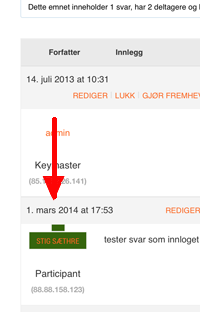
If you’re just moving your bbpress site from one wordpress installation to another, then you don’t need to use migration (this is for forums of different types). Rather just use Dashboard>tools>export and select includes forums, topics and replies. and then Dashboard>tools>import on your new site.
For some reason this code was not implemented into my bbpress defauly bbpress.css file.
I am posting it so you guys can update it for future releases..
When posting an image to the forum your current css makes the image 100% width, so it does not break the forum layout. Unfortunately this does not keep the image proportional so the height stays the same. All you have to do is this.
Change
#bbpress-forums div.bbp-topic-content img,
#bbpress-forums div.bbp-reply-content img {
	max-width: 100%;
To
#bbpress-forums div.bbp-topic-content img,
#bbpress-forums div.bbp-reply-content img {
	max-width: 100%;
        height: auto;
I installed and activated the bbpress plugin. It said it worked however it does not show up on my front end or backend. Help!!!
http://www.araucana.net/newsite/?post_type=forum
bbpress – 2.5.3-5249.
wordpress – 3.8.1
Hello-
I am redesigning a site and want to migrate my current forums, topics and replies from my current site into my new site.
I have read through the instructions but I have 2 issues:
1) What is my platform? I am migrating from current bbpress plugin version to another. Both the production site and the dev site are on the same hosting provider with different databases obviously. I am assuming I use the default setting phpBB?
2) More importantly- what is the table prefix? It is default setting. I did not assign a custom prefix. But I cant find the table prefix anywhere in the MySQL database. There isn’t a table with the prefix wp_bb_ or anything related to that table structure?
* I am only using bbPress for forums, topics and replies. I am not using Buddy Press.
Thanks so much for the advice. The migrating instructions are not very specific.
Hi I have a website i am developing called groupsoz.com.au on a multisite blogfarm with s2member—- I am installing a forum with the plugin called bbpress—it seem to install but pages do not show —when I click on forums it says -PAGE NOT FOUND—could that be that one of the setting is localhost—what do I need to set that as?—-can u help?
I have never seen any response from the devs/leaders of the bbpress team themselves, seems only volunteers (and thank you very much to them) are answering this forum. I can understand that, because they already created this plugin in their spare time, are not paid or anything, so if they had to answer here it would be a lot of more work… that is what I think.
I think the threaded/nested replies included in bbpress are working the way it should, it is not a bug, it is just the way they wanted it to be it seems.
The only way to fix this problem is to find someone skilled enough to code /and/or hack the current code to change the way nested replies are working and add pagination to it.
I am trying to do it, but can’t figured it out yet… I am not a developper at all, so there is a lot of things I don’t understand… :/
Another solution would be to update the bbPress Threaded Replies plugin https://wordpress.org/support/plugin/bbpress-threaded-replies to make it work with the new bbpress version (and disable the integrated system in bbpress…) but I don’t know how to do that either…
Hope we’ll find a fix soon, if someone has an idea we’ll be really grateful 🙂
Thank you,
Dorem
I analysed the situation with the Plugin “Query monitor” and also the addon for bbpress and buddypress. There is normally all green. Sometimes there appear a slow query, but nothing problematic!
I analysed also how many queries there are generated for
administrating a new forum = about 50
and
to show the new result = about 50-60.
So in sum we have about 100 queries to generate and show the new forum.
But after about 30 new forums the system shuts connection and throws install.php
I think it´s a problem on side of the provider and wrote him the situation.
I am very interested to see his reaction…
The question is also for what I am paying now 20 bucks a month more than before, without bettering the situation????!!!!
I managed to add the “new topic” button but nothing happens when I click on it. How can I associate the button with bbpress new topic page?
thanks
I have a couple of bbpress plugin projects to write, but I just need to get round to doing it.
It takes a while doesn’t it, but with all the detailed information around hopefully more and more users will see the beauty of bbPress. You can get stuck into it if you know WordPress where as other forum software is not quite as simple.
Thank you for the reply.
Let me explain the purpose of this feature request.
I’m using WPLMS (LMS theme that uses BuddyPress for social networking and BBPress for forum functionalities within an learning environment).
By setting a maximum number of questions each user may post, I’m trying to control the forum part (used for answering questions made by the paid users) in order to manage instructor’s time.
The idea is to have two types of course user’s (maybe three): regular (capable of posting up to 2 questions per lesson (posting) per course (sub-forum) = 20 replies); gold (4 questions per lesson per course = 40 replies) and platinum (unlimited questions).
This is a very important differential in my niche, so, event if the functionality does not exist, I’m planing to try to develop it or pay for the development.
Best regards,
WanCaSil
‘The box fields are overlapping one of the widgets on my side menu’
Can you give us a url so that we can see the problem?
‘The other thing I need to change the color of the box fields.’
This would be a css change – see https://codex.bbpress.org/bbpress-styling-crib/ and If what you want to do is not thee, come back and tell us which bit needs chnaging


