Search Results for 'bbpress'
-
Search Results
-
Topic: Text Color and Font
Hi,
Can someone help me with the Font and Text Color in the forums. I was looking for some plugin or something but unable to find one.
I was basically looking for if someone is posting in the forums and they need to have ifferent colors to highlight what they type…like I have seen in some forums and also if they can change the size of the fonts…..
Wordpress Version: 3.9.1
BBPress Version: 2.5.4Website: http://www.desi-american.com
Thank You
NikhilI installed bbPress last night for the first time and WOW, this is a FANTASTIC plugin!! Very impressed!!
I have two questions so far:
Question #1. How do I edit the following text when someone comes to my forum and isn’t logged in:
“Sorry, this forum is for verified users only. Please Login or Register to continue”
The issue is that both Login and Register are links that lead to the default WordPress Login and Register pages. bbPress doesn’t offer an option in the settings to specify a custom page for both of these links (which needs to be added in a future update) and I’ve searched the .php files under Dashboard > Plugins > Editor > bbPress but can’t find the file to edit/remove the links? My site has been customized with front-end pages for Login/Register/Edit Profile so that no one is sent to the default Login/Register pages or the Dashboard. The default bbPress installation doesn’t work for my site simply bc I can’t edit these links…
Can anyone please point me in the right direction? Which .php file contains that text? Also, under Dashboard > Settings > Forums
// This path should be changed to:
Dashboard > Settings > bbPress
Not sure why the team chose to use the word “Forums” here but labeling that tab “bbPress” would make a lot more sense for your users. 🙂 Please add the ability to redirect both of those Login and Register links to whatever URL the user desires here: Dashboard > Settings > bbPress
Question #2. After creating topics, to the far left under the word topic there’s a red X and a clock next to the topic titles (I have two dummy topics so far). If I click on the red X, it won’t delete? Why is that delete icon there while the other is a pretty little clock? I didn’t do this, they were both posted a few minutes apart, and both have different icons?? Very confusing.
Cheers!
Topic: Fatal Error BBPRESS..
Hi guys, on my site astronomertalk.com, I saw this fatal error:
Fatal error: Cannot call overloaded function for non-object in /home/vaghar123/public_html/wp-includes/class-wp.php on line 529
it first started just when I clicked one button, then over time (like one minute) it took over the entire site. Then it stopped again, then it came back etc etc
I put my site under maintenance mode while I had the chance…
can anyone tell me whats going on here?
Hi all,
I just installed bbpress using the shortcode to display the forums on my frontpage, but I don’t think the lists are displaying as intended. In the part2 instructions it says the default look is:
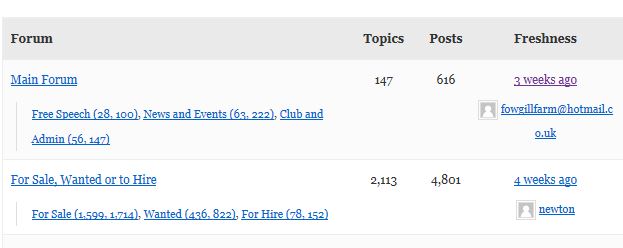
But, by default my forum is displaying as a list: http://pubs.hamlin.org/tech/
I’d be happy to use the default view if I could make it work. Does anyone have an idea of what’s going on here? I’m using the twentyeleven theme.
Thank you in advance for your help!
– LizI’m trying to modify the default bbpress loop on a forum page (loop-topics.php) to include the sub-forum topics.
Here’s an explanation:
Forum A
Sub-forum A1
Sub-forum A2
Forum B
Sub-forum B1
Sub-forum B2
So when viewing Forum A’s page, I’d like to show sub-forum A1 and sub-forum A2. and below sub-forum A1 and sub-forum A2 like to show recents topics from sub-forum A1 and sub-forum A2.how to show 5 recent topics on homepage like bbpress.org??
is it just the recent topics widget, or and edited version of the bbpress index shortcode??
Topic: User settings missing
Hi all
I’m using the default bbPress to which I have added custom css – nothing crazy just some colour changes etc.
Everything seems to working fine apart for the user settings page.
The avatar shows with the navigation underneath.
The information about post started shows and I can edit the user details.
‘Your Posts Started’ doesn’t show any posts.
If I checked the page source it shows the code but it’s offset to the right of the window and just shows it as empty boxes.
Topic: Uninstalling BBPress
Hi,
I can’t seem to find documentation on how to remove bbpress. My issue with the plugin is the ‘edit’ feature on posts doesn’t work (I’m guessing reinstalling would fix this). Disabling the plugin leaves the keymaster usermeta fields in the database causing no access to the dashboard. What’s the correct way of doing this?
Topic: Search box on topics page


