Forums are stored in the database, so you will not find them using ftp
It could be a theme or plugin issue
Plugins
Deactivate all but bbpress and see if this fixes. if it does, re-enable one at a time to see which is causing the error.
Themes
If plugins don’t pinpoint the problem, as a test switch to a default theme such as twentytwelve, and see if this fixes.
like I understood Appressor and ReactOS is the same company, and they provided me with that answer:
“We presently do not have any sort of bbPress support built into Reactor, but I can put it down as a feature request. Do note that I can’t guarantee that it’ll be implemented, and if it is, I can’t give an estimate for how soon.”
So does it mean that I need a hire a developer ONLY for my purpose?
ps: I installed a JetPack and didn’t see anything new into settings-forum as well
Hello,
I have been trying to implement a function to my bbpress forums but am not sure how to do so. I believe I have the correct script though I do not know how to implement it.
My goal is to start a timer on the topic once a new topic is created.
The script that I was informed should work is
<html>
<head>
<title>Untitled Document</title>
<script language=”javascript” type=”text/javascript”>
var timerID = null;
var timerRunning = false;
var now = new Date();
var hours = 0;
var minutes =0;
var seconds =0
function stopclock ()
{
if(timerRunning)
clearTimeout(timerID);
timerRunning = false;
}
function showtime ()
{
if(seconds>=59)
{
seconds=0;
minutes=minutes+1;
}
else
{
seconds=1+seconds;
}
if(minutes>=59)
{
minutes=0;
hours=hours+1;
}
var timeValue =zeroPad(hours,2)+”:”+zeroPad(minutes,2)+”:”+zeroPad(seconds,2);
document.getElementById(“timeDisplay”).innerHTML=timeValue;
timerID = setTimeout(“showtime()”,1000);
timerRunning = true;
}
function startclock()
{
stopclock();
showtime();
}
// End –>
function zeroPad(num,count)
{
var numZeropad = num + ”;
while(numZeropad.length < count) {
numZeropad = “0” + numZeropad;
}
return numZeropad;
}
</script>
</head>
<body onload=”startclock();”>
<h2 style=”color: #000000; margin: left;”>
Processing Time :: <span id=”timeDisplay”></span>
</body>
</html>
It might have been already reported to you, I would like to post another vote to get rid of the following message:
Notice: bbp_setup_current_user was called incorrectly. The current user is being initialized without using $wp->init(). Please see Debugging in WordPress for more information. (This message was added in version 2.3.) in /wp-includes/functions.php on line 3547
which starts showing up when bbPress is activated and WP_DEBUG is on in /wp-config.php. It does not seem to break functionality of bbPress, but it is very annoying, when one tries to debug other stuff.
Thank you very much.
test this out cause im not entirely sure , but install jetpack if you havent already on your site and download the WordPress app from Google Play and connect your self hosted WordPress site to the app.
can you see any settings for bbPress in the app dashboard?? like settings>forums??
just so you know this only allows you to manage your site from the dashboard in the app, nothing frontend. If you want a custom app i highly recommend Apppressor.
if you feel like you need to hire a developer go to http://jobs.wordpress.net/ or any other freelance website for custom development.
@cbsy lots of ways to achieve this – two below
1. Look in
Dashboard>settings>forums>Forum Root slug, and see what ‘forum root’ is set to
The create a page with this name on it – so title the page this
The in that page write whatever intro you want, and then put
[bbp-forum-index] at the bottom of the content
bbpress will then use this page as your forum root.
2.
Add the following to your functions file
add_action ('bbp_template_before_forums_index' , 'my_intro' ) ;

Function my_intro () {
Echo '<div class="entry-content"> Here is my intro text. This is lots of writing to introduce the forums and make people read this stuff </div>' ;
}
Functions files and child themes – explained !
If you hit prolems or need further help, just come back !
thx for the answer. I have an idea:
Is it possible to modify – https://github.com/wordpress-mobile/WordPress-Android and make some changes like add a FORUM button? and create a functional using XML-RPC for BBPress…
if yes here s some questions:
Does the BBPRESS – SEARCH available from XML-RPC?
ANYBODY want to spend 1-2 days to make that stuff, may be open source?
Try the following
//adds login/logout to menu
//filter to add login/logout to menu
add_filter( 'wp_nav_menu_items', 'my_nav_menu_login_link' );
function my_nav_menu_login_link($menu) {
    //uncomment the next line if you only want login on bbpress pages
    //if(is_bbpress()) {
    if (is_user_logged_in()) {
        //set the $url on the next line to the page you want users to go back to when they logout
        $url = 'http://www.mysite.com/forums' ;
        $url2=wp_logout_url($url) ;
        $loginlink = '<li><a title="Logout" href="'.$url2.'">Logout</a></li>';
        }
    else {
        $current_user = wp_get_current_user();
        $user=$current_user->user_login ;
        //set $page on the next line = the permalink for your login page
        $page='login' ;
        $loginlink = '<li><a href="/'.$page.'/">Login</a></li>';
                }
    //uncomment out the next lines if you only want login on bbpress pages
    //      }
    //  else {
    //  $loginlink="" ;
    //      }
        $menu = $menu . $loginlink;
        return $menu;
}
Another thing you might try is one of the many login widgets in the WordPress plugin repository. It doesn’t have to be specific to bbPress to work. For example, here’s a tabbed login widget that looks pretty nice.
So earlier, someone suggested doing the following:
// Add the breadcrumb
// $crumbs[] = '<a href="' . esc_url( $root_url ) . '">' . $r['root_text'] . '</a>';
$crumbs[] = '<a href="/forum/">Forum</a>';
Can I make a duplicate of the template.php to drop into my theme somewhere to make a similar change? This works, but I don’t like the idea of altering the main bbpress files.
Hello.
BBPress have a problem with is that after installing it. I do forums and subforums and I have put a link in the header of the site and list me correctly, coming not find specific forum.
I not find them by FTP
What is happening?
Thanks and regards.
I just activated bbPress and added a Forums menu page. I Tried to set up a topic and then brought up my site after clearing the browser. Yes, I do get the Forums page although I can’t do anything relative to the topic or replies from the front end.
I’m very new to bbPress and definitely would appreciate some direction to instruction or a step by step guide. Yes, I did read the info on the bbPress pages and still can’t figure this out.
You can see my problem here: http://cycleshanty.com/?forum=forums
Yes,I am using WP 4.1
A little help please.
I just finished troubleshooting a problem where user profile links would redirect to the site home page. I’m documenting it here in case others run into the same problem.
It turns out there is a conflict with a feature in the WordPress SEO by Yoast plugin; both in the free and premium versions. There is a “Disable the author archives” setting under “Titles & Metas” –> “Other” that must be unchecked for bbPress profile links to work.
I have reported the issue to Yoast. They agree that there is a context difference between blog authors and bbPress users that should be accommodated. They have created a GitHub issue for it if anyone wants to follow along or participate.
there is alot of RSS/news ticker plugins that could do this vertical scrolling thing.
i suggest doing a google search and seeing what might be the best
to most likely make it work with bbPress you will need to use the bbPress RSS feeds.
you can change how many topics to show in the RSS page in settings>forums
for listing all the most recent topics use something like this for example
https://bbpress.org/feed/?post_type=topic/
so on your site it would be
http://example.com/feed/?post_type=topic/
Several plugins that will do this for you, bbpress stores the entries as 3 custom post types, Forums, Topics, and Replies
I googled ‘wordpress export custom post to excel’ and got several inc.
https://wordpress.org/plugins/wp-ultimate-csv-importer/
https://wordpress.org/plugins/custom-csv-exporter/
easiest way would be to uncode my shortcode
bbp additional shortcodes
or just use the do_shortcode function within your code
https://codex.wordpress.org/Function_Reference/do_shortcode
I’m sorry for few days of silence. My love in the USA, and I’m in Russia without the visa.
@jeffacubed thank you for “спасибо”. I can publish the code. Also I can give you access to my private repo on Bitbucket.
wp_signup_location – it’s the filter which returns the sign up page location (url) and WordPress redirect to this addres. So this address not using in wp-signup.php because you already on the signup page. Your example of grep result shows that this filter using in wp-login.php (this page have the signup link).
My code
All of this files a part of my mu-plugins for this project.
Require necessary files — gist.github.com/korobochkin/06780b88118e35c3bfd1
wp-signup.php — gist.github.com/korobochkin/9e4f9cd6502c4252d902 I use selena_network_signup_main function from this file on page-signup.php template in child theme.
wp-activate.php — gist.github.com/korobochkin/765d0a5d4e028dc3001a I use selena_network_activation_page function from this file on page-activate.php template.
And finally gist.github.com/korobochkin/a161718855b7784bfb10 file which sends notifications after you create an account and disable default WordPress notifications (return false at the end of the function). If you return true at the end of this function then user get 2 emails with different activation links:
site.com/wp-activate.php?key=HASH
site.com/activate/?key=HASH
P. S. can’t post this reply with links (bbPress doesn’t allow post replies with links).
I’m sorry but I don’t understand what you mean.
What shortcodes – where?
You will need to either provide examples or explain further.
Sorry, but I am trying to help you, but there are hundreds of ways to set up wordpress/bbpress so need clear issues to resolve eg it looks like this, it needs to look like this
Well, I didn’t get an y responses but I found a work around to the builtin import tool not working. Jeremy posted an unpublished plugin that worked great for me. Here is the link to the post http://clark-technet.com/2012/04/simplepress-forum-to-bbpress-forum-conversion .
Hopefully this will help anyone in the future that has the same issue I did.
Once again, a big thanks to Jeremy for writing the plugin for all to use!
Hi all,
I need help for programming a little feature for my forum.
I’m willing to pay some money, after a more detailed discussion of price.
But this should be somewhat “easy” for a programmer used to bbpress/wordpress, as most code already exists.
If interested:
Please, have a look at this page:
https://www.tradingview.com/widget
(They supply this for free by the way)
Look at the top widget/stock chart, and look at the code supplied on the same page underneath the chart.
Also notice how you can enter the stock-symbol of choice, in the top left corner of the chart, to search in Teamviewers own database, to load a new chart.
NOTE: This method (from the user interface) does apparently NOT change the “SYMBOL” in the code, as seen on the page above.
– For the “widget” to show another symbol by default, you’ll have to enter it and click “Apply” on the left side, to update the code with a new default SYMBOL.
Please try it out, to have a feeling how it works.
Now my questions:
Q1:
Is it possible to embed this script, in the text-area for bbpress, and run its output “live” when a user edits a new post?
It could be called and embedded into the text area, by clicking a “check-button” labeled “Graf” (‘Chart’ in Danish).
(And removed again unchecking this button – of course)
Q2:
Is it possible for the user, to enter directly on the user interface of the widget, a new symbol, and post it (correct chart) together with the topic?
It would maybe require that the Post-button would need to update the “SYMBOL”-line in the script code, with the symbol the user have chosen and fetched from Tradingviews database, while also posting it all…Like you would do with an WYSIWYG editor
I hope I made myself somewhat understandable 🙂
Thanks in advance !
Best regards,
Martin L. Hansen – Denmark.
@geeorgegeorge
It could be a theme or plugin issue
Plugins
Deactivate all but bbpress and see if this fixes. if it does, re-enable one at a time to see which is causing the error.
Themes
If plugins don’t pinpoint the problem, as a test switch to a default theme such as twentytwelve, and see if this fixes.
then come back
Hi, Sorry that I post my question here as I can’t find the button to create my topic.
My question is very similar to this one. In all my forum, no topic shows, but with the 2 lines.
–
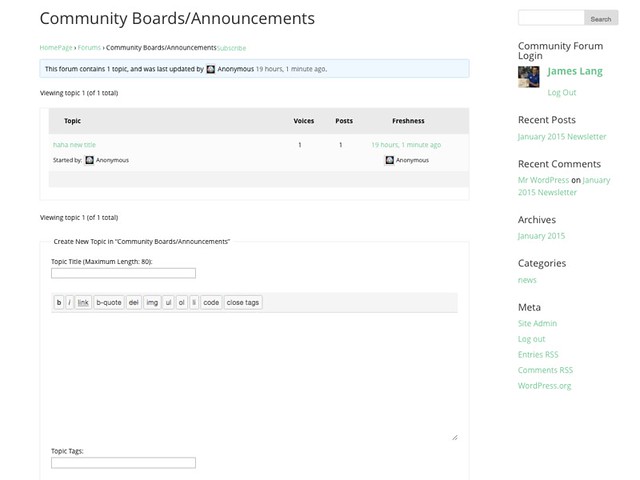
This forum contains 1 topic, and was last updated by george 2 hours, 5 minutes ago.
Oh bother! No topics were found here!
–
I use wp4.1 and bbpress 2.54 . Previously before I upgrade to 4.1, It works alright!
george
Hi!
I want to put tinyMCE in bbPress, I copied this code -> https://codex.bbpress.org/enable-visual-editor/ and it works good but I want to disable html tab and leaving only the visual tab.
Is it possible without using css or javascript solutions?
Hi there, I am using insert_php plugin with bbpress. I have already added [insert_php] as a shortcode to whitelisted shortcode list under ‘bbPress2 shortcode whitelist’s settings. But, I am still getting [insert_php] as text in replies. Please help me understand if I am missing something here?