Search Results for 'bbpress'
-
Search Results
-
I’m experiencing this issue, where edited bbress forum posts keep showing up again in the buddypress activity feed.
I saw that there is a ticket and patch for this. The question is how do I install a patch? Do I just ftp to my server and drop the patch file into the appropriate directory?
It looks like it’s patching this bbpress file: src/includes/extend/buddypress/activity.php
Ticket: https://bbpress.trac.wordpress.org/ticket/2690
Patch: https://bbpress.trac.wordpress.org/attachment/ticket/2690/2690.01.patch
I’d be grateful for advice about how to set up. It’s a website for an amateur choir. Currently hosted somewhere else and using a web package that is fiddly to update. So I’m looking into moving to WP. We need some pages that only choir members can view and some that are only for the committee. I could do that with something like Members plugin, but I wondered whether a bbPress forum would be a better way as it could be an easy way for the committee to post announcements and have their internal discussions. And be a way of setting up user management and privacy settings.
I’m thinking out loud so apologies if this is muddled. If possible, what I want to happen is:
A. Forums can only be viewed by choir and committee members.
– Link to forum visible to everyone (eg public menu or sidebar widget).
– Non-members not to be able to see topic titles or posts.
– If someone isn’t logged in, they could be taken to a login/registration window or to a page telling them how to login/register.
– Registration has to be approved, so only choir members can register (I think. But see below.)B. Two forums:
1. Announcements. Committee members can start new topics and reply. Choir members can read but not reply.
2. Private forum for committee.
– Also hidden apart from to committee members? But doesn’t matter if choir members can see the link as long as they can’t see topic titles and messages.
– Committee members can all start new topics and reply.It would be easier for the committee if they can start new topics and reply from the bbPress front end. So they don’t have to learn how to use WP backend. The less there is for them to learn, the less to put them off using it and asking me to post everyting and the less to go wrong.
I’ve tried a dummy choir member user set as “spectator.” What’s odd is I can start new topics and post replies from that login. I thought spectator couldn’t do that.
If that’s inevitable, another way might be in forum settings to have default registration as participant, then change committee members to moderators (which I’m not sure how to do yet.). Then have the moderators always use WP backend to create new announcements and set to closed.
Can someone advise me what general forum settings I should use and what configuration options for the two forums please?
And how do I make sure new members have to be approved? I think there are some WP new user approve plugins so I can find one of those. But I wondered if it was already something that can be set up in bbPress.
To muddy the waters, I’m waiting to find out how the committee currently organises the newsletter for people interested in coming to concerts. If they do that outside their current web/host setup, fine. But I’m wondering if they’re using the current host’s subscriber interface to send newsletters. In which case I would need another category of WP user. Not sure of titles but something like:
1. Subscriber. No access to the forum but can be sent newsletters. Doesn’t need to be approved.
2. Choir member. Needs to be approved. Can read choir announcements forum. Can’t post.
3. Committee member. Can read and post in both forums. Ideally from bbPress front end.
4. Moderator? Maybe allocate this to one or two key committee members so they can authorise members instead of everything have to come through me.
5. Admin/keymaster/wizzard of everything. Me! And hopefully someone else I can train up later.Sorry to be asking so much and so much detail. But it’s the detail of trying to set it up that has me lost. New to bbPress so I’m not sure whether this is possible or not. Or whether it is, but with a plugin (which?).
I’m trying to get a dummy site set up to demonstrate to the committee, so need to be sure it is possible.
Thank you.
ClareJust curious, for some reason it doesn’t work anymore..
I’ve done this for many years now, visit the Trunk and download the latest version with all raw changes. Activate it locally and run some tests, create themes, make changes..
https://bbpress.trac.wordpress.org/browser/trunk
Right now, when I download this latest raw version of bbPress and activate it in my local environment it doesn’t do the trick it should do for me. bbPress native styles will not load frontend and in the dashboard the icon font is broken, probably lots more doesn’t work like normal.
I just want to install a clean and lean bbPress version only in raw alpha/beta state.
Thanks,
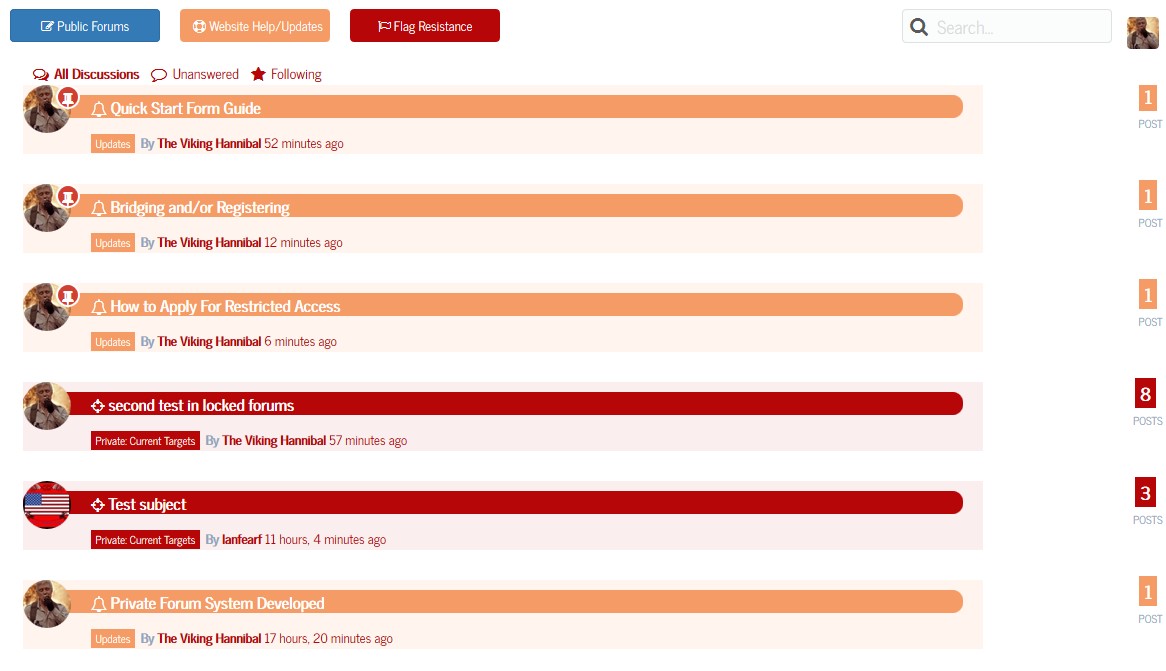
This is a rather huge branch off of the forum that was offered by Sceko in this topic:
The default view shows all topics, color coded with a unique font awesome icon assigned to each category.
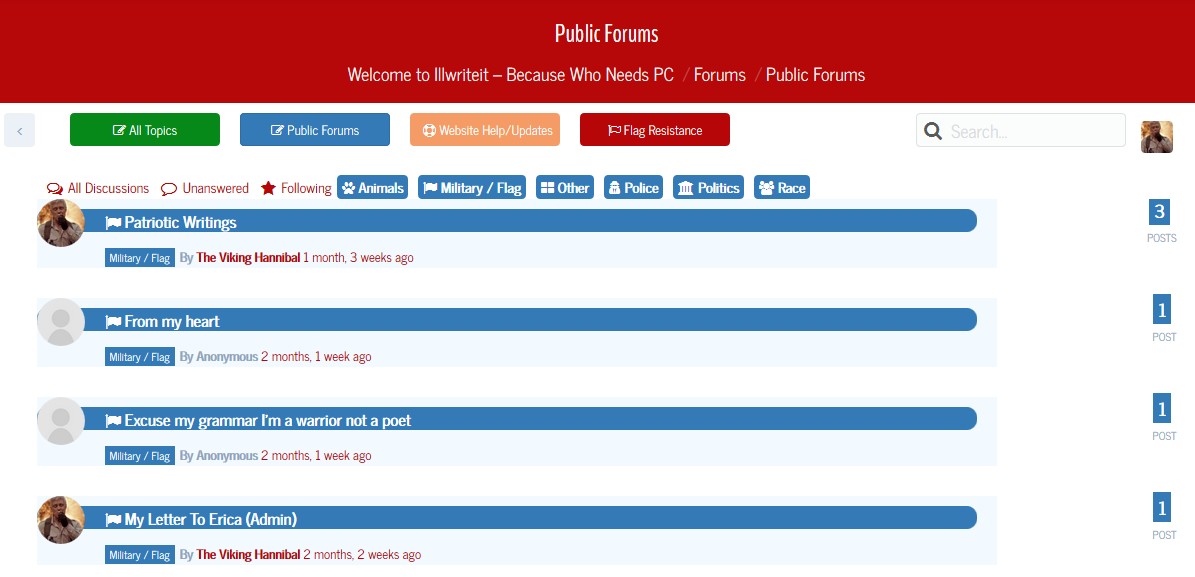
If you click on one of the main categories, whether it be public, support, or the restricted area, it will now show all topics including children forums of that particular category in this view. It also shows all children forums of that category as well:
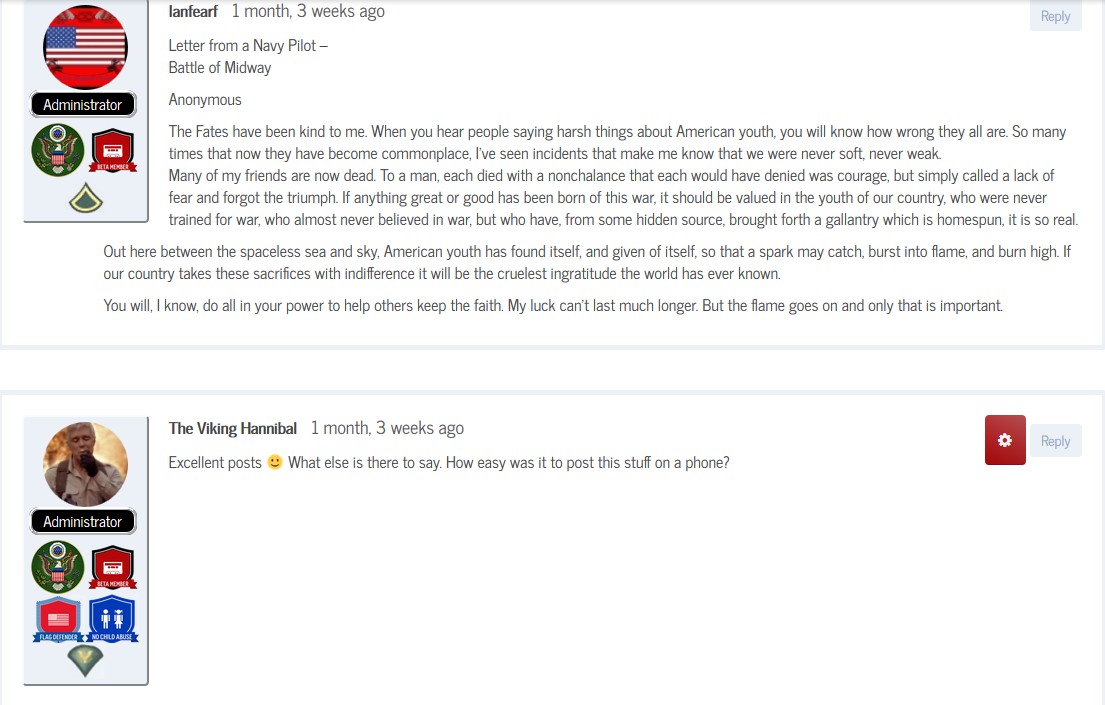
Last but not least the reply look for viewing a topic shows not only the badges from mycred, but the picture rank as well.
Topic: Fix Empty Topic Tags
Problem/Scenario – On my website (http://dcjtech.info/) using the latest version of WordPress, BBPress, and BuddyPress, I closed a topic in my forum. Now, the tags belonging to the closed topic are listed as “empty topic tags”. This issue is always reproducible.
Specific Example – For instance, I closed a topic (http://dcjtech.info/topic/lindows/) and then I see under “Dashboard > Topic > Topic Tags” that “linspire” has a count of zero. Also, in the BBPress statistics widget, it says there are twenty “empty topic tags”. However, http://dcjtech.info/tag/linspire/ lists the Lindows topic as a topic with the “linspire” tag.
Question – Why do these “empty topic tags” appear/form when closing a topic and how can it be fixed and prevented?
Similar Thread on BBPress.org – https://bbpress.org/forums/topic/empty-topic-tags/
In my forum the users achievements are showing below the word moderator/participant. How do i remove this or prevent it from showing any badges at all? The badges come from a plugin call WPAchievements.
site name is Spanishscholars.com
BBpress: 2.5.8
WP : 4.3These two bbpres shortcodes I added to my Main Menu are not working. They were working fine yesterday but not it says ‘That page can’t be found’.
My website: http://mysite.com/recent-replies/
Hi there – I’ve googled; searched plugins and read a fair bit here. My question is about changing the way search results for BBPress display.
I’m using the Avada theme 3.8.3
Wordpress 4.2.4
BBPress 2.5.8There are a couple of issues – only in the visual appearance of BBPress search results, and I need some tips as to how to fix it!
- Search results are not well distinguished (compared to our previous ExpressionEngine forum, where admittedly, the forum post content was not shown, but it easy to see the list of topics and results). A mix of “Topics” and “Replies To” are shown
- Search results may include several posts from the one topic, but these are not collated (they are displayed in order of recency, and usually appear in between the other search results)
- Search results with long forum posts take up too much page realestate
Please see these two screenshots that illustrate the difference:
https://www.dropbox.com/s/04ndkdsjlpa5k8j/avada-forum-search.jpg?dl=0


Clearly the search results are very thorough, and I’m looking for help to represent them more efficiently.
- What template would I look for?
- How can I change the loop so that the results are more like our old forum?
Thanks in advance – feel free to point me to any plugins I may have missed.
Robert
Topic: bbPress and Yootheme
Hi all I know this question has been asked many a time but nothing I try seems to work
I have a client who has an existing site that is hugely based around a bbPress forum
I have moved the forum and all users over using these plugins
Cimy User Manager
https://wordpress.org/plugins/cimy-user-manager/
First used Cimy so that when I imported the forums the correct users would be present to prevent author issues.bbPress Import / Export
https://github.com/pippinsplugins/bbPress-Export-and-Import
Next used this import export plugin only allows you to do one forum at a time and was hard to find the initial export spot (you have to go forum>”forum name”>On the right hand side under update it will be there). To import you must create the forum first and then in the same spot where you found the export button is the import buttonFound these fixes for the plugin on this forum post
Next I installed my theme
http://yootheme.com/demo/wordpress/frequencyThen I did this:
“copy the /wp-content/plugins/bbpress/templates/default/bbpress folder into the /wp-content/themes/my-theme/ folder and then copying the files from /wp-content/plugins/bbpress/templates/default/bbpress/extras/ into the /wp-content/themes/my-theme/ folder”
So this fixed most of my major issues except a couple
First off every user profile page looks like this
http://screencast.com/t/26t9FgsH0maC
and doesnt populate with the correct information that can be seen on the current site
Every user you click comes to a profile page where there name is just profileThe other problem I have is how can I now style this page the transparent background isnt really a possibility with this theme
If anyone can help me out that would be great
Thanks
Worpress version: 4.3
bbPress version: 2.5.8I am the owner and admin of http://dcjtech.info/ and I love computer programming. Not only do I love programming, but I love to help other developers. I would like to contribute to BBPress by offering some suggestions and ideas.
Please keep in mind that these are just my ideas; I understand that the BBPress team has ideas, needs, and concerns of their own that they must address. In addition, even though I learned a lot about the WordPress and BBPress framework and inner workings, I admit that there are some parts that I may have over-looked or mis-understood. In summary, I am trying to help make BBPress better and more powerful based on what I know, and I want to contribute my ideas as a thanks to all the developers that have spent time and effort making BBPress what it is today.
Now, for my ideas –
1. BBPress needs more options and configurable items – the more customizable, the better. Obviously, some developers are concerned about confusing or overwhelming users, so make a special admin page for “advanced” or “miscellaneous” options. Some additional options I think are needed or helpful include disable/enable feeds, specific control over oEmbeds and auto-embed-links, and settings for SEO/SMO control (discussed in #2).
2. Settings and controls for Search Engine Optimization (SEM) and Social Media Optimization (SMO) – SEM and SMO are important to many web admins. Adding options to configure such features may be wise. The “author” meta tag (and others) could be generated on a per-topic basis (if the admin enables such a feature). Here are some links for HTML5 meta tags for SEM and SMO (https://github.com/h5bp/html5-boilerplate/issues/1674 && https://gist.github.com/charlesmudy/b3740c73d5f4d5d5c1f4 && https://thomas.vanhoutte.be/miniblog/dynamic-html5-meta-tags-for-wordpress-header-php-file/)
3. Integrate BBCodes and Shortcodes – This may be something the WordPress should do, or the BBPress developers could pass this idea to them. Add features and options for BBCodes. I think that merging “bbpress2 BBCode” (https://wordpress.org/plugins/bbpress-bbcode/), “bbpress2 shortcode whitelist” (https://wordpress.org/plugins/bbpress2-shortcode-whitelist/), and some ideas from GD BBpres Tools (https://wordpress.org/plugins/gd-bbpress-tools/).
4. Add topic auto-suggestion – This feature can easily be added by merging this plugin – https://wordpress.org/plugins/bbpress-auto-suggest-topics-based-on-new-topic-title/ .
5. Integrate other small, but helpful plugins – “External Links” (https://wordpress.org/plugins/sem-external-links/) and “BBPress Report Content” (https://wordpress.org/plugins/bbpress-report-content/) seem like candidates for merging.
6. Disable/Enable BBPress modules/parts – Obviously, some people may not like or want “BBPress Report Content” or other plugins and features I suggest for merging and adding. The best solution may be to provide a special options page for disabling/enabling certain “BBPress modules” and features. For instance, I use “BBPress Report Content” and I disabled (and I dislike) the BBPress “SPAM” admin-link in my forums. Having more detailed and advanced options may help people like me. Also, more advanced options would (hopefully) make people less likely to edit core files.
7. Export/Import BBPress settings – Correct me if I am wrong, but I do not think BBPress has an easy way to export/save settings to be imported to use as a backup or transfer/share settings.
8. View counter – I think it would be useful to many people to have a “view counter” feature such as I have programmed in my website (http://dcjtech.info/forum/articles/general-computing/). It would be great if BBPress included options for view counters such as displaying topic views in the BBPress-Notice and forum columns (like where I replaced “voices/replies” with “views/viewed”.
9. Options to custom notices and other messages – Some people (like me and others seen on this BBPress forum) want to change “voices” or remove it. Having easy options for this may be helpful.
10. Better forum access control – I would find it helpful to be able to specify that on a particular forum or sub-forum that users with particular permissions can only create new topics or reply.
11. Remove “Topic:” from title – I see a need for some people (like me) to be able to easily configure the appearance of titles (both on the page and in the HTML “title” tag).
12. Implement a built-in avatar system (perhaps BuddyPress or WordPress should use this rather than BBPress) – This would allow local avatars and provide a way for Gravatar to be disabled or used as a secondary. True, BuddyPress provides a way to upload avatars, and “Basic User Avatars” and “Simple Local Avatars” are plugins offering that feature. However, after upgrading my theme to HTML5 and removing Flash from my browser, I can no longer upload avatars using any of the three mentioned possibilities (backend or frontend). However, I can still upload media via the backend (w/o Flash) and via the frontend (with Flash). NOTE: I do list “plupload.full.min.js” and other similar scripts in Autoptimze “Exclude list”.
13. Perhaps, “Grunion Contact Form” should be updated and integrated in BBPress.
14. 100% HTML5 Compliant – I have not studied BBPress in this perspective, so it is possible that I may be very wrong or the developers have a plan already. However, use of HTML5 (or the option to do so) would be helpful.
If you see any features on my website that you want to implement in BBPress, feel free to let me know and then I can give you the code and tell you how I did it. Also, I use my own style sheets for BBPress, BuddyPress, and some plugins. I have been able to increase performance and decrease size by using a CSS minifier (http://csscompressor.com/) and implementing ideas from errors given by a CSS checker (http://csslint.net/). I saw significant improvements even before I changed the style sheets to specifically suit my website.
By the way, making BBPress templates that can be placed in the regular WordPress template was a great idea and feature for BBPress; smart thinking BBPress developers.
I wanted to forums to show New topics on top and the forum index below so I did the following as instructed by Robkk:
Go to Settings > Forums and change the forum root to show Topics by Freshness.
Then add this function to your child themes functions.php or into a functionality plugin.
function recent_bbpress_topics() {
echo do_shortcode(“[bbp-forum-index]“);
}add_action(‘bbp_template_after_topics_index’,’recent_bbpress_topics’);
Now I have noticed that the Forum Index which is below the most recent topics does not display the proper time and date in the “freshness” column.
Any thoughts?


