@JJJ – Excellent, thanks.
@Ryan Gannon – Go to page 13 in this thread, you’ll find some information there.
Any idea when we’re going to see a release beat or otherwise? It’s cool that it’s get updated a lot but it makes doing anything awkward.
For WP comments it makes sense, but doesn’t a bbPress form just needs a textbox and a tag input box?
Did I miss something then? looks fairly ordinary to me.
I also want to try to create my own bbpress plugin 
I am listed as an admin actually and the WP install is not linked to bbpress.
I installed the software in /discussion and am using this as the login:
/discussion/bb-admin
As I said, other than:
Forums
Topics
Posts
Users
I have no other settings that are visible.
I am listed as an admin actually and the WP install is not linked to bbpress.
I installed the software in /discussion and am using this as the login:
/discussion/bb-admin
As I said, other than:
Forums
Topics
Posts
Users
I have no other settings that are visible.
@rootside – Placeholders for the login and registration pages are in the current bbp-twentyten theme, but they don’t work yet. The goal is for the bbPress plugin to include these pages as WordPress page templates and short-codes, to allow for maximum flexibility in configuring your site.
Sorry to just barge in and shout out a random question, this has probably been answered before:
Will the plugin come with a front-end login/signup form? Or will it make use of existing WP plugins?
I’m running the latest version in a test environment, and this function seems to be missing – or is it me who missed something?
Thanks
1BadApple,
Did you ever get an answer on your first question? I got the same “you are not allowed to change your password” message at the reset link. If it helps, I finally found my old password in an email from wordpress.org. The term “bbpress” was not in the email, which is why I had trouble finding it.
Wow, thats indeed a real nice comment form. Really like the slide effect. Hope someone can integrate this into bbpress
those are great instructions! i tried to reinstall and got the login page, but still the error that it can’t connect with the database. i’ll have to wait and see if it is a problem just because of the preview dns. hopefully by the morning the site will actually be up so i can see!
thanks for your help by the way!!
Still a work in progress, we had to get it up ASAP, converted from phpBB.
http://www.herdhaven.com/forum/
Integrated with our WordPress blog
http://www.herdhaven.com
We’re playing with some stuff, trying to do some things with the forums, etc.
This ia big THANKS for the ninja-awesome inline documentation. It makes reading the plugin files significantly easier
Also, I see above that there may be an alpha released in the next week or two. Do you think that would be suitable for running on a live site? I’m not adverse to having to fix bugs and problems here and there, so long as I don’t find myself stuck eternally on some old version without a semi-easy upgrade path. I don’t mind minor upgrades on upgrading, templates malfunctioning etc., but losing usernames, passwords and/or posts/topics would be quite disastrous.
I’m contemplating launching a forum within the next month and would rather use some semi-dicey alpha software than having to use one software for a few months, then upgrading to bbPress once it’s more stable.
Has anyone seen this amazing commentform on http://css-tricks.com/snippets/css/flip-an-image/
That would be perfect for a BBpress theme.
So clean, sharp, easy to understand.
Yet it is original, in the form that the avatars are round float next to each other in block quotes and such. It breaks the tradtionally “square” internet-look and feels more alive.
They say nothing about either WordPress or BBpress there, but I sure wish someone could make that theme for BBpress. With working and easy to upload avatars! Which is absolutely essential to that design.
in your bb config there’s like missing, or incorrect information in one of these fields:
/** The name of the database for bbPress */
define( ‘BBDB_NAME’, ‘database’ );
/** MySQL database username */
define( ‘BBDB_USER’, ‘user_name’ );
/** MySQL database password */
define( ‘BBDB_PASSWORD’, ‘password’ );
/** MySQL hostname */
define( ‘BBDB_HOST’, ‘localhost’ );
check these fields with the information from GoDaddy for your MySQL database. if you haven’t, not sure, never used GoDaddy, you may need to create a MySQL database first?
in your bb config there’s like missing, or incorrect information in one of these fields:
/** The name of the database for bbPress */
define( ‘BBDB_NAME’, ‘database’ );
/** MySQL database username */
define( ‘BBDB_USER’, ‘user_name’ );
/** MySQL database password */
define( ‘BBDB_PASSWORD’, ‘password’ );
/** MySQL hostname */
define( ‘BBDB_HOST’, ‘localhost’ );
check these fields with the information from GoDaddy for your MySQL database. if you haven’t, not sure, never used GoDaddy, you may need to create a MySQL database first?
I have a Forum/Blog that I have been trying to get up and running. Right now I want to tackle the problem of having a huge amount of spam being generated by people — or bots — who are trying to register.
It is a payed web site (to keep out the riff-raff) and people have to buy a subscription to the site. But, suprisingly, this does not stop my inbox from being flooded by “requests for a username”.
Here is what my inbox looks like:
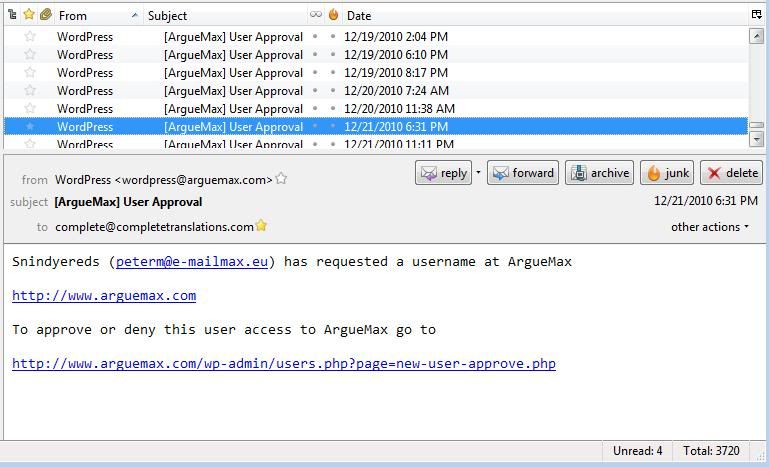
Most of the time, the email addresses in these messages are fake. But sometimes they are not but when I email these persons back, I am ignored. So they really are just spammers looking for a way of posting ad content on my web site for free.
The Registration page has a CAPTCHA Code required entry field:
http://www.arguemax.com/wp-login.php?action=register
But I wonder if the bots are sophisticated enough to get past that.
The user has to click on the “I accept the agreements” field but the agreements field clearly tells the user that they have to buy a subscription. If they do not click on that check box they get this:
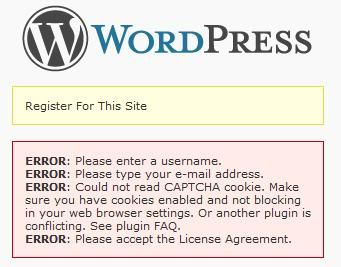
One way I want to try to keep from getting all this spam is to make it such that the registration button is inactive until they click on the subscribe button
https://www.paypal.com/en_US/i/btn/btn_subscribeCC_LG.gif
How do I go about making that happen?
My next problem was:
Registration worked with default themes but not once I got integration correct.
The form would not accept the email address, even when typed in plainly. Dismay!
The following plug fixed everything for me:
https://bbpress.org/plugins/topic/zaerl-wordpress-3-integration/
and I learned about it here:
https://bbpress.org/forums/topic/strange-registration-problems
My next problem was:
Registration worked with default themes but not once I got integration correct.
The form would not accept the email address, even when typed in plainly. Dismay!
The following plug fixed everything for me:
https://bbpress.org/plugins/topic/zaerl-wordpress-3-integration/
and I learned about it here:
https://bbpress.org/forums/topic/strange-registration-problems
I’m a newb, guys, and just wanted to share with other newbs who might have problems with require_once at Dreamhost.
/*the following line of code got the forums to appear correctly but then admin didn’t work. Note: registration does not work here now–email address not accepted.
require_once(‘../wp-load.php’);
*/
/*The program told me: Warning: require_once(../wp-load.php) [function.require-once]: failed to open stream: No such file or directory in /home/my_db_username/foo.com/forums/bb-config.php on line 66
Fatal error: require_once() [function.require]: Failed opening required ‘../wp-load.php’ (include_path=’.:/usr/local/lib/php:/usr/local/php5/lib/pear’) in /home/my_db_username/foo.com/forums/bb-config.php on line 66
So let’s try the full path and see if admin works. Otherwise, we’re going to see if we can load the bbpress admin functions in the main install.
*/
/*first using the /home/my_db_username path*/
require_once(‘/home/my_db_username/foo.com/wp-load.php’);
/*this works to display the forum correctly. Checking the admin side: admin side also working. Note: don’t work on stuff late at night if you’re going to miss simple stuff like this */
YMMV. Hope this helps somebody.
Hi,
I’ve just integrated bloguismo.com and bloguismo.com/foro with BBPress but I’m doing something wrong with cookies.
First of all I’ve done deep integration but I have the logout/login problem…
Second: in the wordpress part (bloguismo.com) i use on the top nav bar this:
<?php $user_info = get_userdata(1);
echo($user_info->first_name . “n”);
?>
So it could shows the first name of the user registered, but shows my name (admin name)… could you register and test?
http://www.bloguismo.com/login/?action=register
http://www.bloguismo.com/foro/register.php (the same)
thanks!