Search Results for ' . default . '
-
Search Results
-
HI,
There is a “double” space in Notice and “By Author” info. I changed my wordpress theme to one of default wordpress theme and the error is fixed. I seems a CSS error.
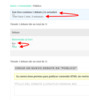
I using a theme called “Hitchcock”.
How can I fixed?
Thanks
Hello
My participants cannot view or reply to private topics. Administrators/keymasters seem to be able to.
I’ve installed bbPress version 2.5.14, and Members Version 2.0.2 plugins. When I look at the participant’s role it:
can read_private_forums
cannot read_private_topics
cannot read_private_repliesand I cannot edit this role: “The Participant role is not editable. This means that it is most likely added via another plugin for a special use or that you do not have permission to edit it.”
I tried deactivating plugins one by one to see if I could edit this role. I thought by default Participants could read and reply to private topics…
Thanks for any help
Topic: Topic template settings
I am having trouble getting the topic page template to default to the same page format as my forum page. I created a custom template “bbp-sidebars” that presents my forum page with a sidebar for forum page views and topic views. The forum picks up the custom template, but the topics page ignores it and defaults to the blog view template. So far I downloaded bbp Style Pack, bbp shortcodes, bbP Tookkit, Weaver for bbPress, and What the File to see if there was a setting to accomplish my goal. I also read multiple articles on custom templates, but none address the topic layout. Also, after a new topic or topic response is posted, I can manually go in and set the page settings to have it display the way I want. While my site is growing I can probably do this, but after a certain point it will be too hard to keep up.
I am using WP 4.9.4, ForeFront theme Version 1.04 as a subtheme under GeneratePress V 2.02
My Website is https://defensecareersHQ.com PW is “VetsHelpingVets”
An example of my issue can be viewed here
https://www.defensecareershq.com/forums/topic/how-about-l-3-technologies/Also, please note I manually set the all other topic pages to display correctly. Any advice is greatly appreciated.
When I create in /wp-content/themes/my-theme/bbpress/loop-topics.php then I can overwrite the default BBPress template this way.
But creating /wp-content/themes/my-theme/bbpress/loop-topics-[FORUM_ID_HERE].php doesn’t use this template for that category ID which seems to be against https://developer.wordpress.org/themes/basics/template-hierarchy/ and https://codex.bbpress.org/themes/theme-compatibility/template-hierarchy-in-detail/
Is there a way to create a separate page template per forum ID without using conditional tags in loop-topics.php?
Topic: No option to create groups
I want to change the default so that all new users are subscribed to all forums by default. I have seen some replies to this question which say it can be set on group admin pages, but I can’t see any way on the BBPress settings to create groups, and I cant find any plugins to add the functionality. What am I doing wrong?
I’m running WordPress 4.9.4 with Twenty Seventeen Child Theme, and bbPress 2.5.14


