Seems a little weird, if you set the number of rows to 100 which is the default it should only take a few seconds before you see either “Converting forums” or “Converting Users”.
I would double check your phpBB config.php file (it should be in the root folder of your phpBB install.
e.g.
// phpBB 3.0.x auto-generated configuration file
// Do not change anything in this file!
$dbms = 'mysqli';
$dbhost = '';
$dbport = '';
$dbname = 'your_db_name';
$dbuser = 'your_db_user_name';
$dbpasswd = 'your_db_user_password';
$table_prefix = 'phpbb_';
$acm_type = 'file';
$load_extensions = '';
Make sure you use the correct table prefix.
I recently switched to the Graphene theme (which I must say is quite awesome!!!), mainly because I wanted something that I could integrate a forum into without creating a separate site or subdomain. Plus this was the only theme that looked great right out of the box.
With that said, if this is a bbPress issue and not a theme issue, I will certainly seek help in a different location. I am horrible with code but with simple instruction, I could navigate my way around it.
I uploaded the bbPress plugin, created a page, and promptly began placing the shortcode in the widget areas for loggin in and registering. The default log-in was already filled out for me and I clicked the ‘Log-In’ button and when I refreshed my screen it took me to the home page. I reopened my WP log-in screen and when I logged in, it took me to my home screen again, not my WP admin panel. Am I doing something wrong? I want to be able to integrate everything in this theme without having to leave and log-in to an entirely different site. Please help.
Thanks
bbPress should work fine using the ‘default’ settings including the default slugs:
The shortcode should be [bbp-forum-index] (You used bbb and not bbp)
The Japanese translations for forum and forums are the same, these should be different based on how the Japanese language uses plurals in this context as if they are the same this will cause a problem for bbPress, I had to use フォーラ so it was different from フォーラム 😉
Here it all is working for me, my domain is http://en-au2.wp.nw/build, yours would be http://careerkokusai.com/ and everything is using ‘native’ Japanese for the permalinks 🙂
bbPress Settings (Slugs/Permalinks) https://cloudup.com/iFKwgluP_5g
Page with (Back end) [bbp-forum-index] https://cloudup.com/icgezwdk6Vk
Single Page (Front end) with Menu link showing the above page フォーラム https://cloudup.com/iy4i3RksjRI
Forums (Front end) https://cloudup.com/iltDJlyKqXK
Single Forum (Back end) https://cloudup.com/iAvcWJ7qBs6
Single Forum (Front end) https://cloudup.com/i061G0kJwtx
Single Topic (Back end) https://cloudup.com/i-hfrIBhgT0
Single Topic (Front end) https://cloudup.com/iOMAKPqAlmu
As I don’t own a Mac, yet, I think this is the issue in that your MAMP setup is using port 8888:
https://bbpress.org/forums/topic/bbpress-2-3-now-available/page/3/#post-133305
The only difference between XAMPP and MAMP (free) is that XAMPP uses “localhost” host name, while MAMP (free) uses “localhost:8888″ when using MAMP ports by default (MAMP pro uses “localhost” that tell why it works OK with you). So I went to MAMP preferences and changed the ports settings to use default Apache and MySQL ports to use “localhost” instead of “localhost:8888″, and finally posting topics and replies is available again 🙂
Even better I setup a virtual hostname manually in MAMP (free) and the everything works fine.
I hope this will help others with the same issue with MAMP (free). Thanks for your time
Apologioes if I’m being thick, but line 29 of bbpress/templates/default/bbpress/form-reply.php says
<legend><?php printf( __( 'Reply To: %s', 'bbpress' ), bbp_get_topic_title() ); ?></legend>
Is that not the line you want to get rid of/change?
yeah just remove the “topics” and “posts” words in the header by the “latest post” word
it should be in loop-forums.php
the rest i guess you can look at the default bbpress stylesheet and use that to help you get it looking right.
Thanks for your reply and sorry that you are “lost in translation”. Following your advice, I have; changed the theme to twenty fourteen, revised a forum page with the text and [bbb-forum-index], added this to the menu, recreated another forum and a topic as well as changing the permalink setting to “default”. What else do I need to do so that the bbpress features finally appear when clicking “forum” on the menu bar ? Thanks again.
A couple of things to also check and try:
– Try creating a new user, assign the participant role, login as that user and post a topic or reply and try editing.
– If that didn’t work, disable all your plugins and switch to the Twenty Fourteen theme and try again.
– Ensure you are trying to edit the topic/reply before the default 5 minute allowed time setting in bbPress settings.
look at the bbpress default stylesheet , then look at your stargazer child themes bbpress stylesheet and see what you need.
heres some code that you might need …i dont know right all that you need
#bbpress-forums div.bbp-reply-content {
margin-left: 130px;
padding: 12px 12px 12px 0;
text-align: left;
}
#bbpress-forums div.bbp-reply-author {
float: left;
text-align: center;
width: 115px;
}
I cant seem to get it working, I downloaded all five php file from the trac and put them in the bbpress folder but this is still what I got : http://mmo4teen.webuda.com/forum-2/
I’m using the normal stargazer theme with default bbpress.
Oh, that’s not what I mean.
By table, I mean that every forum in a category has its own table. Even using the default bbpress ( without the Stargazer Colloquium theme ), I get this:
table top
Category
-forum
-forum
table bottom
table top
category
….
table bottom
I’m getting the han of css but not really understand bbpress div ( or is it class, still confuse, I mean like bbp-something) A
and checking on w3 and google doesn’t help much. Do you now any documentation that will help ? Thanks in advance.
I intend to use a premium theme for the Blog section of my site while I want the bbpress forum in /discuss slug to have a basic theme (preferably Twenty Twelve, as the default themes are best compatible with bbpress). Is that possible by any hacks or plugins?
I guess I could install a different installation (standalone bbpress or as a plugin) in a /discuss directory but I’m afraid at one point the permalinks to the two different sites may be too complicated to handle. Simply put, I don’t like the idea. So I’m hoping this is possible for bbpress [installed as a plugin on the main site] to have a theme of its own other than the one being used on the site.
Please let me know if it’s possible or if there’s any workaround to do what I want.
Thanks in advance for your time.
This is working per design of bbPress.
Removing the “forums prefix” removes be default “forums” or in your case “classes”
What you are alluding to is you want the “forum” slug removed, similar are the “topic” and “reply” slug settings, these cannot be removed in bbPress at this stage though you can change them.
really any plugin that has an included insertable template tag will work.
im going to use jetpack sharing as an example .
first i take every instance of each default area jetpack sharing shows.(also jetpack likes)
function jptweak_remove_share() {
    remove_filter( 'the_content', 'sharing_display',19 );
    remove_filter( 'the_excerpt', 'sharing_display',19 );
    if ( class_exists( 'Jetpack_Likes' ) ) {
        remove_filter( 'the_content', array( Jetpack_Likes::init(), 'post_likes' ), 30, 1 );
    }
}

add_action( 'loop_start', 'jptweak_remove_share' );
and then i could just display it anywhere on the reply. in loop-single-reply.php
with this
if ( function_exists( 'sharing_display' ) ) {
    sharing_display( '', true );
}
this code also removes it from content like posts and pages. but you can just manually insert it into your wordpress templates to with the above code.
bumping too soon ?
at least you did not create an entirely new topic
bbpress has that tabled layout by default , its your child theme
Stargazer Colloquium added that kind of layout to your theme.
what you can do is find each changed template you dont want and just replace it with some of the original bbpress template code by copying it there.
and also check on the bbpress.css in your child theme
To add to the above post, I just tested with default theme and all plugins of except bbPress, BuddyPress and bbp buddypress profile information and the issue persists. Just wanted to rule out any conflicts, since I hadn’t done the first rule of testing plugins.
Hi Robin,
Not sure what was confusing about my questions? I’ll try and make them a bit more clear.
1. The only place within bbPress that says: “Sorry, this forum is for verified users only. Please Login or Register to continue” is on the page after clicking on a topic if you’re not logged in. This is what needs to be edited and I can’t find the php code to edit this.
I need to edit the text that’s contained in the yellow box because the default links to Login and Register take you to the default WordPress login and register screen. I don’t want that and would like to:
A. Remove the links altogether and just leave the text.
B. Edit those two links to lead to my front-end Login / Register pages instead.
In other words, If you go to the default forums page, after clicking on a forum you are taken to the discussions page. If you’re not logged in, at the bottom is a yellow box that says “You must be logged in to create new topics.” This is fine because it not only says exactly what I want it to say, it doesn’t have links to Login and Register.
Next step…
After clicking on any of the listed discussions, you are then taken to the topics within that discussion. If you’re not logged in, at the bottom is a yellow box that says “Sorry, this forum is for verified users only. Please Login or Register to continue. This is the text that I need to edit because the login and register links don’t take my users to the pages I want them to go to. Instead of the front end login and register pages that I’ve created, these two links go to the default WordPress login register. I can’t have this.
How can I:
A. Remove the links altogether.
B. Edit the links to lead to my front-end Login / Register page.
Thank you so much for your time!!
Cheers!
It could be a theme or plugin issue
Plugins
Deactivate all but bbpress and see if this fixes. if it does, re-enable one at a time to see which is causing the error.
Themes
If plugins don’t pinpoint the problem, as a test switch to a default theme such as twentytwelve, and see if this fixes.
Hi,
Lets say I have 2 forums, Forum A and Forum B and two custom fields CF1 and CF2. I want to make the two custom fields available only while creating topic in Forum A, where as for Forum B it should load with default topic form.
Is it possible to do this? Any help or link which help will be helpful.
Also tried going to a default theme and I am still getting 404 error when trying to see the replies through the backend: http://theelitehobbyist.com/wp-admin/edit.php?post_type=reply
Already reuploaded the wp-admin and wp-includes folder as well
When I migrated the site to my clients server for testing I was disappointed to find that neither topic creation or reply posting was working.
when you say not working, exactly what do you mean, the ability to reply doesn’t appear? or it appears but doesn’t work?
I suggest that you also positively eliminate the theme as a contender and as a test switch to a default theme such as twentytwelve, and see if this fixes.
maybe a theme or plugin issue
Plugins
Deactivate all but bbpress and see if this fixes. if it does, re-enable one at a time to see which is causing the error.
Themes
If plugins don’t pinpoint the problem, as a test switch to a default theme such as twentytwelve, and see if this fixes.
I installed bbPress last night for the first time and WOW, this is a FANTASTIC plugin!! Very impressed!!
I have two questions so far:
Question #1. How do I edit the following text when someone comes to my forum and isn’t logged in:
“Sorry, this forum is for verified users only. Please Login or Register to continue”
The issue is that both Login and Register are links that lead to the default WordPress Login and Register pages. bbPress doesn’t offer an option in the settings to specify a custom page for both of these links (which needs to be added in a future update) and I’ve searched the .php files under Dashboard > Plugins > Editor > bbPress but can’t find the file to edit/remove the links? My site has been customized with front-end pages for Login/Register/Edit Profile so that no one is sent to the default Login/Register pages or the Dashboard. The default bbPress installation doesn’t work for my site simply bc I can’t edit these links…
Can anyone please point me in the right direction? Which .php file contains that text? Also, under Dashboard > Settings > Forums
// This path should be changed to:
Dashboard > Settings > bbPress
Not sure why the team chose to use the word “Forums” here but labeling that tab “bbPress” would make a lot more sense for your users. 🙂 Please add the ability to redirect both of those Login and Register links to whatever URL the user desires here: Dashboard > Settings > bbPress
Question #2. After creating topics, to the far left under the word topic there’s a red X and a clock next to the topic titles (I have two dummy topics so far). If I click on the red X, it won’t delete? Why is that delete icon there while the other is a pretty little clock? I didn’t do this, they were both posted a few minutes apart, and both have different icons?? Very confusing.
Cheers!
Hi all,
I just installed bbpress using the shortcode to display the forums on my frontpage, but I don’t think the lists are displaying as intended. In the part2 instructions it says the default look is:
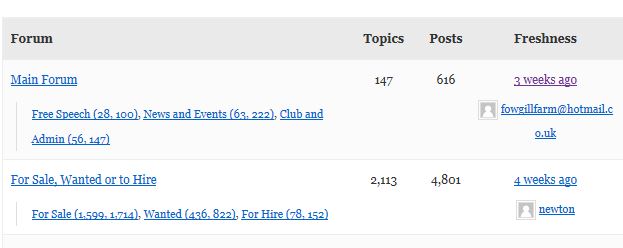
But, by default my forum is displaying as a list: http://pubs.hamlin.org/tech/
I’d be happy to use the default view if I could make it work. Does anyone have an idea of what’s going on here? I’m using the twentyeleven theme.
Thank you in advance for your help!
– Liz
I’m trying to modify the default bbpress loop on a forum page (loop-topics.php) to include the sub-forum topics.
Here’s an explanation:
Forum A
Sub-forum A1
Sub-forum A2
Forum B
Sub-forum B1
Sub-forum B2
So when viewing Forum A’s page, I’d like to show sub-forum A1 and sub-forum A2. and below sub-forum A1 and sub-forum A2 like to show recents topics from sub-forum A1 and sub-forum A2.


