ok guys nice to meet you all and forgive me about my poor English.
my site is http://www.lotyr.cc/ and It’s a Chinese one, bbPress entrance is http://www.lotyr.cc/bbs/.
I’m using WordPress 3.9.2, Customized Thematic 1.0.4 theme and bbPRESS 2.5.4.
Here comes my problem:
I want my bbs users to upload and insert images before submitting a topic, so I used a plugin named [bbPress Enable TinyMCE Visual Tab], I enabled the media upload button through it and it works.
The default role of my site is contributor so [upload_files]capability is on, I double-checked it through another plugin.
And that contributor have the access to “media” in dashboard, upload works.
but when the contributor uploads through the button in the forum, it said “An error occurred in the upload. Please try again later.” I checked the upload folder and there’s no new files.
is there any solution to it?
Well, since no one replied I played around a bit more, broke the website and then started again and tried something new. This answer is really for peeps who come across the same problem and don’t know what the problem is or how to fix, so I hope this helps.
My problem was the .php structure of my permalinks. Our server is configured in a very stupid way (and unfortunately I can’t change it) so I’ve reverted back to the default permalink settings which doesn’t incorporate .php in the URLs. And now everything works fine.
So, if you have .php in your URL, bbpress user profiles won’t work.
I had the same problem with a trial WP site I have running locally on my Mac, using MAMP.
The problem disappeared after I did…
[1]
Dashboard / Settings / Permalink = Post Name.
Dashboard / Settings / General: Anyone Can Register = Y; New User Default Role = Subscriber.
Dashboard / Settings / Forums: Default User Role = Participant; leave other settings at default.
[1]
Dashboard / Settings / General Settings
Two fields to edit, called “WordPress Address (URL); Site Address (URL).
http://localhost:8888/wordpress ORIGINAL…PROBLEM
http://localhost:80/wordpress REVISED… STILL PROBLEM
http://localhost/wordpress REVISED… NO PROBLEM!
[3]
At the MAMP control panel click on Preferences; click on button “Set Apache & MySQL ports to 80, 3306. Log in again to WP.
– – – – – – – – – – – – – – – – – – – – – – – – –
Worked for me!
David
well looks like i solved it,..
created bbpress.php in theme dir , and inserted all from page.php from default theme.
all looks fine so far.
Hate to answer my own post.. anyway, this works okay for me.
1. add shortcode [bbp-topic-form] in the feedback-no-search.php
2. use javascript to change the form default value i.e.
<?php echo do_shortcode('[bbp-topic-form forum_id=4135]'); ?>

<script>
FormObject = document.forms['new-post'];
FormObject.elements["bbp_topic_title"].value = '<?php echo bbp_get_search_terms(); ?>';
</script>
In template feedback-no-search.php, I would like to add a suggestion to the user to create a new topic instead (since there is no result of the search). How can I make the searched keywords as the default title of the new topic ?
I think I can put the shortcode [bbp-topic-form] in the feedback-no-search.php file but would like the new topic form to have a default Title == searched text.
Thanks in advance!
Hello everyone,
I would like to know if and how I can assign a default role in bbpress for users who registered. I have my forums set up that people who are not registered at all cant see or access some forums, while registered users can see and access those forums. Right now I have to manually assign every new registered user to that specific group. Is there a option I can link the wordpress role of participant to a group in bbpress?
it is in
\bbpress\templates\default\bbpress\form-reply.php
However it would be easiest to change the text using a function which you put in your functions file
//This function changes the text wherever it is quoted
function change_translate_text( $translated_text ) {
	if ( $translated_text == 'old text' ) {
	$translated_text = 'new text';
	}
	return $translated_text;
}
add_filter( 'gettext', 'change_translate_text', 20 );
Functions files and child themes – explained !
no i dont want to do that , its harder for me to design the look of the widget.
here let me explain a little bit more on why i want to hack your shortcodes plugin to show recent replies.
well first i want my recent replies (and also recent topics) to look sort of like any recent comments widget. im going to use jetpacks recent comments on their website as an example.
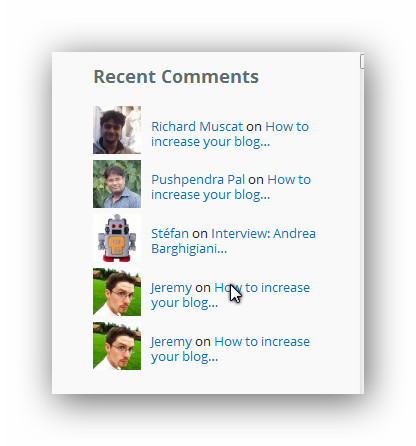
I have already pretty much made a copy of your shortcode plugin , edited it and threw it in my functions.php and put the shortcode in the visual editor widget by blackstudio
heres what it looks like vs the default recent topics widget.
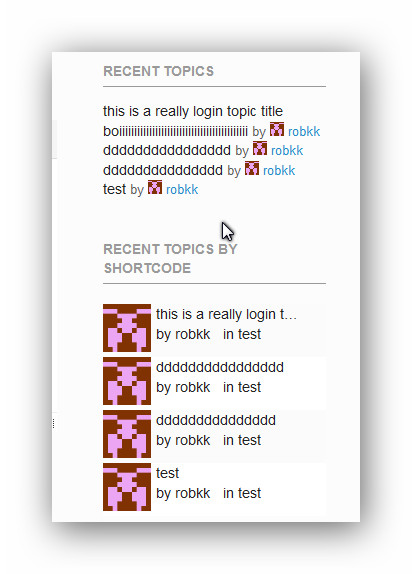
now to make a replies widget with your shortcode all i have to do is rearrange code and use css to style everything together.
to make it look like its showing recent replies, i just show the latest reply authors avatar , their name and what topic they replied on and im done.
The only problem when doing this is if there is no replies on a topic , it would just show the topic author instead.
Plus if you can figure this out i can also make a hack to make a replies archive. Which would be cool for something else i might do and ILL share it all when im done.
i just need help on only showing topics with replies instead of all topics. if that is possible.
you’d do better to just steal the replies widget I wrote for private groups
download
https://wordpress.org/plugins/bbp-private-groups/
and then open up and edit
includes/pg_forum_widgets.php
line 464 onwards has the replies widget, I’m pretty sure that lines 539 to 542
//PRIVATE GROUPS Get an array of IDs which the current user has permissions to view
        $allowed_posts = private_groups_get_permitted_post_ids(new WP_Query($query_data));
        // The default forum query with allowed forum ids array added
        $query_data['post__in'] = $allowed_posts;
is all that’s added to the orginal code, so remove those lines.
and line 574 contains the size
you can just fork all that to the end of the file into your functions file
I managed to get user profiles and admin editing privileges to work after changed the url style to default instead of post name. But even after setting the user edit post time to 99999 I cannot edit a post as a user. I disabled all plug-in except bbPress and it still would not work.
1. Is it possible to disable the Text editor, hopefully with CSS?
yeah , heres a way
I dont know for sure if the visual editor is displayed by default when you see the reply form.
post it anywhere where you can put custom css
in your child themes css stylesheet
the jetpack plugin module custom css
a standalone custom css plugin
#bbpress-forums div.bbp-the-content-wrapper div.quicktags-toolbar {
    display: none;
}

#bbpress-forums .wp-editor-tabs {
  display:none;
}
Hi Guys,
I have a similar problem. I have the bbpress default search function on my main forum (forum-idex) but searches have no results. No matter whether I search for “sub-forum titles or topics.
I would like all “topic tags” to from all “sub-forums” to come up as a result.
Is this possible? What do I have to do?
Thanks!
Hello,
After recently updating my bbPress to 2.5.4 I have been getting people tell me they can’t edit their posts’s after posting. I have read that Remapping existing users to default forum roles would correct this. However, when I try this approach all I get is a blank screen. When user’s click on the Edit button they get redirected to a link similar to the following:
Edit Link: http://www.somewebsite.com/forum/reply/220120/edit/
Redirected Link: http://www.somewebsite.com/forum/reply/220120/
Hi Stephen,
Does
https://updraftplus.com/forums/topic/updraft-migration-issue/?theme_override=1
work (leaving aside the ugliness of an unconfigured default setup for that theme) for you? I’ve not had a failure yet.
David
Hi everyone,
Any one know how to filter topics on date base. means i want to list all last 5 days topics.
i see code this code in function bbp_has_topics( $args = '' )
$default = array(
		'post_type'      => bbp_get_topic_post_type(), // Narrow query down to bbPress topics
		'post_parent'    => $default_post_parent,      // Forum ID
		'meta_key'       => '_bbp_last_active_time',   // Make sure topic has some last activity time
		'orderby'        => 'meta_value',              // 'meta_value', 'author', 'date', 'title', 'modified', 'parent', rand',
		'order'          => 'DESC',                    // 'ASC', 'DESC'
		'posts_per_page' => bbp_get_topics_per_page(), // Topics per page
		'paged'          => bbp_get_paged(),           // Page Number
		's'              => $default_topic_search,     // Topic Search
		'show_stickies'  => $default_show_stickies,    // Ignore sticky topics?
		'max_num_pages'  => false,                     // Maximum number of pages to show
	);
is it possible to pass date filter in function bbp_has_topics argument.
ok, on the specific forum search, it is probably plugin or theme related
Plugins
Deactivate all but bbpress and see if this fixes. if it does, re-enable one at a time to see which is causing the error.
Themes
If plugins don’t pinpoint the problem, as a test switch to a default theme such as twentytwelve, and see if this fixes.
but since you say you don’t really want that, you could disable the forum search
Layout and functionality – Examples you can use
and to add forum searches to the main search use
function filter_search($query) {
    if ($query->is_search) {
	$query->set('post_type', array('post', 'pages', 'forum', 'topic', reply'));
    };
    return $query;
};
add_filter('pre_get_posts', 'filter_search');
This is untested code, I copied it from another forum, but should work, come back if it does or doesn’t to help future readers of this thread!
Sun 17 Aug 2014, 12:17 pm
Thanks, Robin.
Nope, it’s not a plugin problem. But I found the solution in another thread, and might as well pass it along here. This issue seems to come up for a lot of people, and it is v. perplexing.
The problem was a “permissions” issue. Somehow, I don’t know how, in my admin WP user account, my bbPress “role” was reset to “participant,” the default bbPress level for all new WP users. This may have happened because I deleted and reinstalled bbPress. Dunno, but participants do not see the forum links in the dashboard.
Fortunately, a stupid-but-effective solution: Create a new WP user, set as “admin.” Then set the bbPress role to “Keymaster.” As soon as I did that, the forum links in the dashboard reappeared.
It could be a theme or plugin issue
Plugins
Deactivate all but bbpress and see if this fixes. if it does, re-enable one at a time to see which is causing the error.
Themes
If plugins don’t pinpoint the problem, as a test switch to a default theme such as twentytwelve, and see if this fixes.
Could be a number of things.
1. check that you are not present on multiple screens in the same browser, sometimes leaving yourself logged in on one screen whilst logged out on others can do funny things.
then it could be a theme or plugin issue
Plugins
Deactivate all but bbpress and see if this fixes. if it does, re-enable one at a time to see which is causing the error.
Themes
If plugins don’t pinpoint the problem, as a test switch to a default theme such as twentytwelve, and see if this fixes.
@crushdg
I doubt that would be possible.
This script reverses the logic
so normally the database would have a list of forums you have manually subscribed to.
This changes it to have a list of forums you have manually unsubscribed to, thus you are subscribed by default.
So the code would not work to just have one forum.
Robkk,
This worked perfectly!!!! THANK YOU!
For anyone that is looking to do this, the following text below is what I saved in my notes:
“There is a custom theme for bbpress which is mainly used for Envato marketplace plugins or theme authors support. The link can be found below:
https://github.com/syamilmj/Supportte
Find meta-private.php with in the bbpress folder – The text can be found here:
https://github.com/syamilmj/Supportte/blob/61eff729838a28d0b88d6aeab6352a5368687ab8/bbpress/meta-private.php
Open FTP or File Manager and create this path:
public_html > wp-content > themes > YourTheme or YourChildTheme, then create a new folder called bbpress (all lowercase!!).
Inside the new bbpress folder, create a .php file named meta-private.php (you can find any .php file inside public_html, duplicate it, move it inside the bbpress folder, then rename it and replace the text inside with the default text below).
<div class=”bbp-template-notice not-logged-in”>
<p>Sorry, this forum is for verified users only. Please “>Login or “>Register to continue</p>
</div>
You can edit this to reflect whatever you’d like. I changed mine to:
<div class=”bbp-template-notice not-logged-in”>
<p>Sorry, this forum is for verified users only. Please Login or Register to continue.</p>
</div>
Now that it’s inside your theme or child theme, this text is safe for upgrades and the Login / Register links are no longer links!!”
Cheers, Robkk!! Greatly appreciated!
I’m trying to get rid of and change the layout of the: bbp-template-notice info and bbp-breadcrumb, in the topics index. So Home>Forums>Test Topic. I’m having trouble figuring out if there is a bug, or I’m missing something, or I just have the template hierarchy wrong.
How I believe the template hierarchy works: archive-topics.php>content-archive-topics.php>loop-topics.php>loop-single-topics.php
I figure the changes I would need to make would be in archive-topics.php or content-archive-topics.php, but when I delete the <?php bbp_breadcrumb(); ?> as a test it’s still there.
When I make changes to loop-topics.php and loop-single-topics.php, it works fine. It’s just those two page templates.
I’ve tried editing the bbpress.php file from:
<?php /* Start loop */ ?>
	<?php while (have_posts()) : the_post(); ?>
		<article <?php post_class() ?> id="post-<?php the_ID(); ?>">
			<header>
				<h1 class="entry-title"><?php the_title(); ?></h1>
			</header>
			<div class="entry-content">
				<?php the_content(); ?>
			</div>
		</article>
	<?php endwhile; // End the loop ?>
and swapping the content for <?php bbp_get_template_part( ‘content’, ‘archive-topic’ ); ?>. That worked but it messed with my forums index.
I’ve taken a look in the codex to try and figure out what I’m doing wrong and feel lost.
tep-by-Step Guide to Creating a Custom bbPress Theme
Getting Started in Modifying the Main bbPress Template
Sorry if this is a bother, but I’m completely stumped as to what’s going on
Not sure why you only want editing in the backend. Indeed I’m not sure why you want anyone to have access to the backend at all, apart from admins !
However presuming that you actually just want no-one to change their profiles
You will need to modify
wp-content/plugins/bbpress/templates/default/bbpress/user-details.php
make a copy of this file, and put in in a directory called bbpress within your theme, so you end up with
wp-content/%your-theme-name%/bbpress/user-details.php
The take out lines 63-69
<li class="<?php if ( bbp_is_single_user_edit() ) :?>current<?php endif; ?>">
						<span class="bbp-user-edit-link">
							<a href="<?php bbp_user_profile_edit_url(); ?>" title="<?php printf( esc_attr__( "Edit %s's Profile", 'bbpress' ), bbp_get_displayed_user_field( 'display_name' ) ); ?>"><?php _e( 'Edit', 'bbpress' ); ?></a>
						</span>
					</li>

				<?php endif; ?>
This will stop any front end editing
Hi there
I’m not too sure if I’m in the right place to ask/mention this, but I live in hope 🙂
I am working on a site at work and we’re using BBPress for a forum. So firstly, ty very much for making BBPress so intuitive to extend and customise on a theme level! 🙂
Secondly, I may be doing this wrong but when I enable multi threaded replies and use the bbp_list_replies() function to list the replies I noticed that it doesn’t seem to use the custom walker I pass to it. So I thought that maybe there could be a conditional in said function using $r[‘walker’] or defaulting to BBP_Walker_Reply?..
Or I could be totally confused? 8)
Thanks for the great work,
[WP ver3.9.2; BBP ver2.5.4]


