Search Results for '"wordpress'
-
Search Results
-
I am trying to set up a way to manage the members listing on a client site. It appears that once a user has a bbPress role of “participant” they will always appear on the members list. I have tried removing them in a few different ways:
- Changing their bbPress role to “blocked”
- Removing their bbPress role entirely
- Removing their bbPress role and ALL of their WordPress roles
None of these items worked. The ONLY thing that worked was deleting their account from my client’s WordPress site entirely. This isn’t a great solution, for a number of obvious reasons. Does anyone have a solution for this?
Topic: Custom bbpress.css
Unfortunately my custom css-file is still not working after the update to bbpress 2.6 (2.6.2). I’ve put the custom bbpress.css file in my child theme directory in a folder called ‘css’. Are any of the links changed w.r.t. previous wordpress versions?
I originally asked this issue here:
https://wordpress.org/support/topic/user-cant-view-their-profile/
I have now found out why it happens. It has to do with the Title Case of the user name. For example, if my user name is:
Test123
Then I will not be able to view my profile.
But if my user name is:
test123
I can view my profile.
I don’t know if this is a bbPress 2.6.2 bug or bbp style pack bug (since I am using the latter theme templates).
For some reason the administrator can view these profile pages despite the case issue. But not normal participants. I notice that the URL is always the lowercase slug. Are we somehow using the username rather than the nice name? Either way, this is the cause and it means many of my users can’t view their profiles as they have used Title Case in many instances.
Topic: Thread stopped working?
With the recent WordPress and BBpress update I’ve run into an issue where all new posts are now being created as new posts, rather than threaded in replies, and I can’t figure out what’s wrong.
All my previous posts are still threaded correctly, just anything new is broken now. I’ve tried uninstalling and reinstalling the plugin, dropping all plugins and shifting to default themes.
Ideas for things to try? Or am I better off wiping and starting over..
Hi, I am trying to use the wordpress restAPI to get topic data. I am trying to do so via
add_filter( ‘bbp_register_topic_post_type’, ‘enable_restAPI_bbpress_topics’, 10,1);
function enable_restAPI_bbpress_topics ($args) {
$args[‘show_in_rest’] = true;
return $args;
}That is to enable some functionality in another plugin.
But for some reason, doing so causes the bbpress topic editor to alter behavior. It shows a different editor type.
Instead of normal editor which shows a title field and then a content area below, it shows a Gutenberg block for title and content.
But more importantly, when I submit a topic it gets saved with userid set to 0. The revision is saved with correct user id, but the post itself is saved with post_author 0.
Any idea what is going on?
Brian
I’m updating a forum at the moment and while starting working at it I’d opted out of using the 2.6 beta version, because when testing it the feature that I need most didn’t seem to work, pagination and nested replies.
I know this also was not supported on the older versions, but while searching for a solution I came across an article bbPress threaded (nested) replies & paging which fixed the issue for me and this didn’t seem to work on the newer 2.6 version.
I’ve found some threads on this, but they haven’t been updated in some time.
- https://bbpress.org/forums/topic/feature-request-pagination-for-threaded-comments/
- https://bbpress.trac.wordpress.org/ticket/3201
Is there any news on this? My site isn’t going live for some time, but if I know it isn’t on the road map I’ll have to take some measures to fix the issue for this particular site.
I have a sidebar active on all forum pages with the BBpress login widget in it. However, when you enter your username and password, you first get redirected to an extra captcha screen where you have to check you are not a robot. While that is fine for security reasons, after you check that box, you get redirected to the standard WordPress login screen where you have to enter your username and password a second time! And that feels very confusing for the users.
So the question is: how can I eliminate that second step… is this a known issue maybe? Or am I missing a setting somewhere?
If anybody in the hivemind has a suggestion, I’m all ears 🙂 thanks!
The site is running all the latest versions, by the way.
Topic: Can not create a new forum
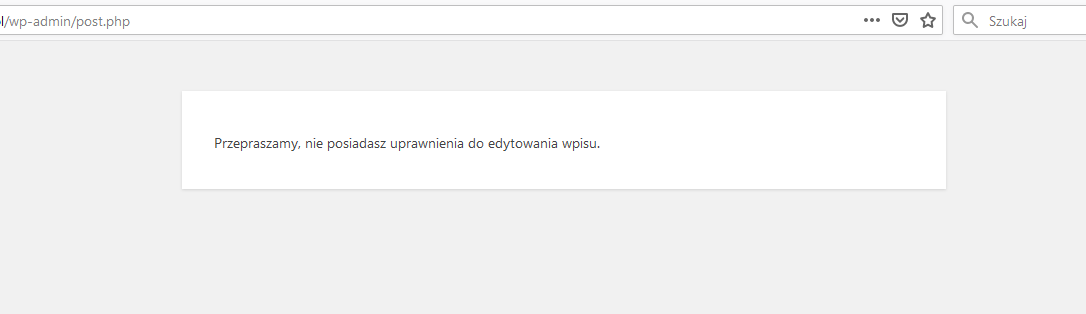
I can’t create a new forum.
When I want to start a new forum, I get information:
“Sorry, you do not have permission to edit this entry”:
https://snipboard.io/9ThQ4W.jpgI am logged in as an administrator with full rights, wordpress is updated to the latest version, I installed the plugin several times and the same error every time.
What is wrong? Why can’t I add anything?
The ALT + SHIFT + M hotkey does not work inside the editor of bbPress (even though I have the media plugin enabled and the functional button on the toolbar.
I raised this both on TinyMCE GitHUB:
https://github.com/tinymce/tinymce/issues/5223
And WordPress:
https://wordpress.org/support/topic/insert-media-hotkey/#post-12174886
TinyMCE support said:
TinyMCE doesn’t provide any shortcuts for the image, nor media plugin by default so this is likely an issue with wordpress or wordpress plugin you’re using. Since there is nothing we can do to fix the issue, I’m going to close this and suggest you log an issue with wordpress or wordpress plugin directly.
WordPress support said:
AFAIK that hot key is unique to the post edit screen only when using the classic editor. It’s not the editor itself that it’s tied to, but the edit screen for posts. If the block editor had a media button it would probably still work there. However, the bbPress forum post screen is not the same as a WP post edit screen. You would need some JavaScript code that listens for the specific keyboard event and when it occurs, launch the media modal.
Therefore, it sounds to me that bbPress needs some tweak to cater for the advertised hotkey for inserting images. Can this be considered please? All other hot keys are functional.
Thank you.
Would it be possible to create share functionality for each replies like
(Jaa = share).
I would try it myself and give some code to add, if I would get some advice how to do it.
I created a new topic today:
It is a private forum post. I used TinyMCE editor and it has:
– Paragraphs
– Table
– Background colour
– Code snippets
– Heading 3I hit “Submit” and the topic looks good.
I click “EDIT” and alot of all the underlaying HTML is stripped.
So I hit BACK in my browser. I set the default editor as TEXT and then I clicked EDIT and this time the whole text showed in the TEXT editor.
Why did the TinyMCE editor strip the content?
I am using:
– WordPress 5.3 (it uses TinyMCE 4.9.6 internally)
– bbp Style Pack
– TinyMCE ADvanced
– Advanced TinyMCE ConfigurationI seem to recall I used to have the same problem in general in Wordress when editing posts that had code in them would show funny. I really don’t know enough about the mechanics of the whole system to know where to look or who to direct the issue towards.
If anyone can replicate this problem or can direct me to a resolution I would be grateful. Thank you.
Hi there!
I’m trying to get a bbpress forum set up on my site, and while we’ve got the majority of it set up the way we’d like, there’s an issue when someone tries to access the forum via mobile/smartphone.
The reply box seems to overflow over the edge of the screen, such as in this picture:

I tried to adjust the width of the bbpress-topic-form using the Custom CSS on my theme, but while this seems to work for narrow browser windows on desktop, the mobile view remains the same as it does in the picture above.
For reference, this was the code I was trying:
@media only screen and (max-width: 600px) {
  #new-topic-0.bbp-topic-form{
    width: 50%;
  }
}
I was wondering if anyone had any ideas on what might be going on here? I’m running the Gridmag theme (not pro) at the minute, could that be causing a conflict?