‘I’m using the newest bbPress plugin as well as the updated version of WP 3.8.1. My site is novasev.com. You can see this issue by navigating to the Requests under Rainmeter forum and then the forum under NovaSev.com Administration.’
sorry couldn’t follow this as I can’t see how to get to the rainmeter forum from the menu.
Can you post two specific links and more detail on what is different in each
So I’m having a few issues here trying to customize stuff – specifically the font sizes through out the bbPress pages.
I’ve been using EM as a standard and it’s always worked well. I’ll give you a very specific example.
I’m trying to change .bbp-topic-permalink font size, but every time I get it the right size it’s bigger or smaller on another page. So the permalink on one forum subject will be small – I’ll increase it to the desired size and then on another forum it’s huge….not seeing how this happens but it’s happening to a lot of items and it’s horridly frustrating.
I’m using the newest bbPress plugin as well as the updated version of WP 3.8.1. My site is novasev.com. You can see this issue by navigating to the Requests under Rainmeter forum and then the forum under NovaSev.com Administration.
@star100
Layout and functionality – Examples you can use
no. 14 & 15
@bob1nz
Thanks, I’ve updated the codex, as I say it doesn’t like switching between visual and text, and alters the code if you do. Sop thanks again it should now read correctly
what exclusion rules would I add to cloudflare and have wp-engine add to their excluded list, nothing is being shown as updated when a new post is made, I need to clear cloudflare, wp-engine and browser cache to see new post
About a month ago I updated to 2.5.3 and at the same time I updated another plugin that integrates with bbPress. A few weeks later I’m having some issues with the other plugin and I’m trying to nail down which plugin is causing the problem but I can’t find where to download older version of bbPress so I can roll back and see if the problem is still there. Any idea where I can download previous release versions? The download page only has the latest and some pre 2.x versions.
Hi,
I just noticed that my forum freshness is not updating. The topic freshness is being updated just not the forum freshness.
Can anyone suggest what I might need to do to resolve this issue?
Thanks.
I’m a bit of a newbie to this area, having just created my first settings page, so of this is irrelevant, please ignore !
The following talks about needing to register
https://codex.wordpress.org/Settings_API
eg “NOTE: You MUST register any options you use with add_settings_field() or they won’t be saved and updated automatically. ” – which seems to describe your problem
and
https://codex.wordpress.org/Function_Reference/register_setting
That may not be necessary as you’re adding it as a filter??
anyway my code cribbed from elsewhere looked like
// register the plugin settings
function ui_register_settings() {

	// create whitelist of options
	register_setting( 'ui_settings_group', 'ui_settings' );
	}
//call register settings function
add_action( 'admin_init', 'ui_register_settings' );
where ui_settings was my array.
I did it again after having refreshed the browser, but nothing,
then I deleted the cookies, switched off and restarted the pc but nothing changed, deleted and reinstalled bbpress, but nothing new happened
And more I noticed that there are into the different files of bbpress some messages that report the name ‘forum’ and they remain like that even if I changed the slugs, i.e. ‘This forum contains 1 topic, and was last updated by admin 22 minutes ago.’
So I entered each file to delete the instruction for breadcrumb, and try to find those messages, one by one to change ‘forum’ into the word of my choice, but it is a long job to do…
Really a wordpress not a bbPress question, and quite a techy area
This is the code that I use to add a location to user details, which should help get you started.
//this function adds the updated town and county info to the database
function bbp_edit_user_tc( $user_id ) {
	$town = ( $_POST['town'] ) ;
	$county = ($_POST['county'] ) ;

	// Update town user meta
	if ( !empty( $town ) )
		update_user_meta( $user_id, 'town', $town);

	// Delete town user meta
	else
		delete_user_meta( $user_id, 'town' );

	//Update county user meta
	if ( !empty( $county ) )
		update_user_meta( $user_id, 'county', $county);

	// Delete county user meta
	else
		delete_user_meta( $user_id, 'county' );
}
add_action( 'personal_options_update',         'bbp_edit_user_tc' );
add_action( 'edit_user_profile_update',        'bbp_edit_user_tc' );

}
Just to be clear, both files are wrong (see below). They have the same behaviour.
I updated bbpress to version 2.5.3, and I still have the same issue.
I solved the other issues reported by whynopadlock.com. Only bbpress issues are remaining, here is what whynopadlock.com says:
Total number of items: 45
Number of insecure items: 2
Insecure URL: http://test.paulkampfstudios.com/training/wp-content/plugins/bbpress/templates/default/css/bbpress.css?ver=2.5.3-5249
Found in: https://test.paulkampfstudios.com/training/video-training/purchase/
Insecure URL: http://test.paulkampfstudios.com/training/wp-content/plugins/bbpress/templates/default/js/editor.js?ver=2.5.3-5249
Found in: https://test.paulkampfstudios.com/training/video-training/purchase/
I found about the chrome javascript console after, but it confirms what whynopadlock.com said.
Hello,
I have a page on my website that I can get access to both in HTTP and HTTPS. But when acessing in HTTP, FireFox tells me that the page is not totally secure because of content that is accessed in HTTP inside the page .
After investigating, I found the website http://www.whynopadlock.com, that says part of the problem is the links from bbpress plugin to the bbpress.css and editor.js files. Both of them being in HTTP instead of HTTPS.
I updated the plugin, uninstalled and reinstalled the plugin, but the problem is still here.
When we get the “premium” SSL certificate approved, we would like the green padlock to show, as for the visitors of the website to have no trust issue…as it seems to prevent the padlock to show without “unsecure website” message, we would like to solve this issue quickly…
Anyone had the same issue?
May it need a fix for the plugin, or is there something I should try before?
Hi there,
I have a site using latest versions of buddypress and bbpress. My users can create groups that contain a forum. In addition I use the “group email subscription” plugin, to keep users in groups updated. This works as a charme.
However, some of the group users now want to have subforums in their groups, in order to have a better overview. As soon as we had created the subforums, we discovered a bug: New posts now dont show up in the activity stream of the group. In addition, it does not reset the “last active” flag of the group. Furthermore, and this is my real problem, the email notifications does not work anymore.
Anything I can do here to get subforums with groups working properly?
Thanks and regards!
You want to use the /dev branch of both projects:
https://translate.wordpress.org/projects/bbpress/dev/sv/default
https://translate.wordpress.org/projects/buddypress/dev/sv/default
On each of the above pages select ‘.mo’ from the dropdown at the bottom of the page and click export.
Rename each file to buddypress-sv.mo & bbpress-sv.mo
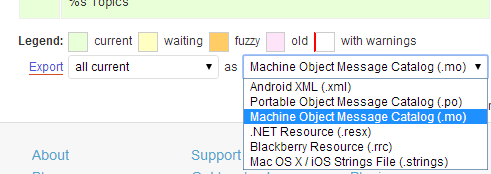
The extra instructions on the BuddyPress site might also help, I’ll try to get the bbPress updated soon also.
https://codex.buddypress.org/developer/translations/
Hi, I have installed your bbpress forum plugin to two WP sites. Both are using same themes Magazine Premium from Bavotasan, however first one is old version and second one is updated version. In updated version bbpress looks great while in the old version List of forums is not displaying correctly as follows:
http://www.thajskyraj.com/forums
For comparrison the updated theme displays it correctly as follows:
http://www.perfectlife.ws/forums
Unfortunately, I need to keep the old version of the theme on the first site and do not want to upgrade that theme to the newever version. But the list of forums is not displaying correctly as far as topics are displaying correctly:
Koh Chang Fórum
Is there anything I can do to correct this error?
Thanks a lot and I highly appreciate your work.
Hey Stephen!
Thanks so much for the help! 😀 I should’ve mentioned that I tried those already and they didn’t appear. It works with other bbpress functions, but just not the author avatar as you shared with the codex. I updated the version of bbpress. buddypress and wordpress that I am using to try and see if that worked and still nothing. The avatar shows just fine in the mychildtheme/bbpress/loop-single-topic. It shows up with the topic index shortcode. Any ideas as to what the problem is? I’m pretty confused as to what’s going on!
Thanks again @netweb !
Hi, I’ve updated to newest version recently. And I’m experiencing a serious bug… If I remember correctly. I installed BBpress some time arround november. It workewd OK for me. Now when new user registers with me he does not get forum role automatically. I must assign it manualy. In forum settings Automatically give registered visitors the Participant forum role is checked.
I’d appreciate your help on this problem or link to the older version whitch was official around the end of november
TIA
Hello
I just noticed a problem that i don’t know how old it is. I have not had much activity on my sites forum area, and no replies to any topics, so this problem might be as old as the forum itself.
When i try to make a reply to a topic, the reply get saved in the database, but i get a completely blank page. Even when i check the “page source” it too is completely empty. If i hit reload, another copy of the reply is entered into the database, but still a blank page. However, if i click the browsers address bar and hit enter, then i get the correct page, the updated forum thread. This is true both on my official site CraftersU.com, and its dev site.
I have tried both Chrome and Firefox, same thing. I’ve deactivated all plugins except BuddyPress and bbPress, same thing. Different themes, same thing. I even deleted and re-installed bbPress without getting rid of this problem…What could possibly be the cause of this?
Wordpress 3.8.1
BuddyPress 1.8.1
bbPress 2.5.3
You are of course welcome to register as a user in order to test this bug for yourself.
Go to the topic you want to merge into another. Click the merge option and the instructions will be onscreen.
All replies within both topics will be merged chronologically. The order of the merged replies is based on the time and date they were posted. If the topic you’re merging to was created after the you’re on, its post date will be updated to a second earlier than the one you’re on. In effect, the topic you’re merging to acts as the ‘parent’ topic and the topic you’re on (where you pressed the merge link) acts as the ‘sub’ topic.
I don’t use an iPhone or iPad but one of my moderators does. I count on her to keep an eye on this capability for me. Today she wrote me that she can’t post at all on either after an ios update.
Is anyone able to advise me how to fix this so she can post? If she can’t post, then others who use the website on their iPhones probably can’t post either.
Thank you,
Matoca
Here is her message to me:
“Today I did an update (ios 7.0.4) to my iPad. NOW, just like my iPhone, I can not post on the forum anymore. Hmmmm……so, now it’s both my iPhone and my iPad, but both AFTER I updated the software. NOW the only way I can communicate (write) on the forum is on my computer. And as I’m rarely home and if so, not often near the computer, I am not able to post often. Hence, I have not been communicating much on the forum – now it will be less until I get this worked out. On both my phone and ipad, I can read all the posts, it updates to the latest and greatest posts, but the keyboard will not come up to write to post.
I will try to go by the Apple store here to see if they have any answers, but as this just happened today after installing the “update” to my iPad, I did not really realize the problem was related to the updates – now, I’m sure it is. Gotta love Apple!! Or not…”
The documentation was wrong. Moderators cannot create/modify forums.
I’ve updated the documentation to match what each role can do.
Actually they can, the documentation was correct 😉
				// Forum caps
				'publish_forums'        => true,
				'edit_forums'           => true,
				'read_private_forums'   => true,
				'read_hidden_forums'    => true,
I have added those changes back to the codex.
The caveat to this is that they can only create and edit forums in the ‘front end’ and not via the admin dashboard. (Details of this are noted in Trac as part of the wider scope Moderator control panels)
To allow moderators to create forums you need to use the [bbp-forum-form] shortcode on a page.
The documentation was wrong. Moderators cannot create/modify forums.
I’ve updated the documentation to match what each role can do.
Just curious as I’m not a PHP-er and learning each day.
What I’m trying to make is a front-end tab-system that shows three tabs
Tab [1] = Topics
Tab [2] = Replies
Tab [3] = Refresh, just a reload of the page

Topics,
This should be a very easy query-/loop in general, it’s just a list of all new topics that have been added to my forum. There’s only one little thing, it should order at the date of creation so that when an older topic gets a reply it doesn’t bounce to the top of the list.
Replies,
This should be a query for latests updated topics of any age, if a topic of 5 years old receives an update or bounce it should jump to the top of this list. + newly or older created topics without replies shouldn’t get listed inside this second ‘Replies’ tab.
I came up with this idea:
<?php if ( bbp_has_topics( array( 'show_stickies' => false, 'order' => 'DESC', 'posts_per_page' => 120, 'max_num_pages' => 1 ) ) ): ?>
<?php while ( bbp_topics() ) : bbp_the_topic(); ?>
	<?php if ( bbp_get_topic_reply_count() ) {
	 bbp_get_template_part( 'last-topic-activity/last-replies-loop' );
	} ?>
<?php endwhile; ?>
<?php endif; ?>
posts_per_page => 120 is a little bold but it’s just for testing right now.
Just curious if this is okay to work with, I found the bbp_get_topic_reply_count() function and it has a True or False statement so I thought lets just check if the topics have a reply_count … if it’s true than list a bunch of stuff through the custom-loop template I made.
Hope somebody can verify if this is okay, it looks like it’s working.
Glad you found the issue.
AWPCP state this is now fixed, contact them for an updated version.
https://wordpress.org/support/topic/awpcp-kills-the-bbpress-dashboard
Too add a menu link just go to ‘Admin -> Appearance -> Menus’ and add a new menu item eg. ‘Forums’ with a link to http://example.com/forums
I see replies listed in the administrative dashboard, but if I click to view them, they are not there.
I believe I updated bbPress 2.5.3, bbPress threaded replies 0.4.3, bbPress Posts Toolbar 0.7.5 and Jetpack by WordPress.com 2.7
I also updated to the latest version of WordPress.
Here is the front of the forum
hxxp://truffledogcompany.com/forums/forum/recreational-truffle-dog-training-101
Single topic which should display 10 replies
hxxp://truffledogcompany.com/forums/topic/matt-and-___-access-until-march-____/
Guys thanks for the help. Also I had not updated from a previous 2.5.2 version, 2.5.3 was first installment.
I now think the problem stems from a plugin added a few days ago – This one: Another WordPress Classifieds Plugin (AWPCP)
I had a little play around and not sure why, but even when I re-installed bbpress none of the icons for forum would show on left, when classifieds was deactivated it sprang to life.
Very odd, but I had to look at what changed have been made recently as I am the only person who works on my site, and other than installing this other plugin last few days, my work has primarily been on content.
I will report back with any update, but thanks for both your help.


