Hi and thanks for the quick reply.
It is indeed set to do that, it always has been in the past to allow new applicants the ability to see areas of the forum that are public and make an application to join.
The difference is now it’s adding it also to anyone who also has a role assigned manually.
I can try turning it off but am concerned this may impact the ability of genuine Spectators (potential applicants and former members) to make applications and see the public forums.
I’ll test it and get back to you if needed.
I have an update for you @robin-w
I thought I had set up “WP Super cache” to ignore the support_forums URLs but I don’t know if that was working. I have deactivated by caching plugin and done a test and it seemed to work.
I am going to leave caching off and see how it goes (with your plugin active and my caching deactivated).
BUT
If I activate your plugin then it works. Those sub forum topics replies are updating the parents forums correctly.
So the only differences are:
1. The forum that I was testing with on my site was closed.
2. Thus the topic I was adding a reply to was closed.
3. For all the others (my private forums) they are inside Categories.
Hope this helps.
I can create the problem now on my test site. If I add the plugin (which I was doing to de-bug) the problem goes away. This is despite it just being the code that the function uses !
I would like to eliminate that you posted to a closed topic.
I would however like you to look at this situation
Forum a – forum, open, public parent 0
Forum b – sub forum, public, parent forum a
Topic x – an OPEN topic
Reply 1 – a reply to the above topic
reply 2 – a second reply
can you get the problem with this set up and my plugin deactivated ?
ok, I think I am becoming deranged by this problem 🙂
Would someone like to try this very small plugin and let me know if it fixes.
I don’t promise it will – it works on my test site but it should make no difference !!
so go to
bbp Refresh Last Active Time
and download the plugin to your PC.
Go into
dashboard>plugins>add new plugin>upload and upload the file you have just downloaded then activate
Then try to add a new reply on a sub forum – please do this on public forums and hierarchy – this does not fix public/private mixes, and I don’t know if it works for private forums yet !
Please report back in either case
I have a sidebar active on all forum pages with the BBpress login widget in it. However, when you enter your username and password, you first get redirected to an extra captcha screen where you have to check you are not a robot. While that is fine for security reasons, after you check that box, you get redirected to the standard WordPress login screen where you have to enter your username and password a second time! And that feels very confusing for the users.
So the question is: how can I eliminate that second step… is this a known issue maybe? Or am I missing a setting somewhere?
If anybody in the hivemind has a suggestion, I’m all ears 🙂 thanks!
The site is running all the latest versions, by the way.
When I go to your site, if I select the testing forum as a non logged in user, I cannot see the topic form, but I can reply to an existing topic.
I thought that was what you wanted?
WP 4.9.4
Suffusion Child Theme, 4.4.9
Browsers, latest versions of Firefox and Chrome
PHP version 7.2.7
bbPress Version 2.6.2
Topic Title: http://forums.typeheritage.com/topic/tangier/
Page Title: http://forums.typeheritage.com/status/
I want topic titles to match page titles—green, not orange. I am semi-clueless about coding but have tried a few ideas that don’t work.
Can someone suggest a css entry to solve this problem?
Many thanks, Anna
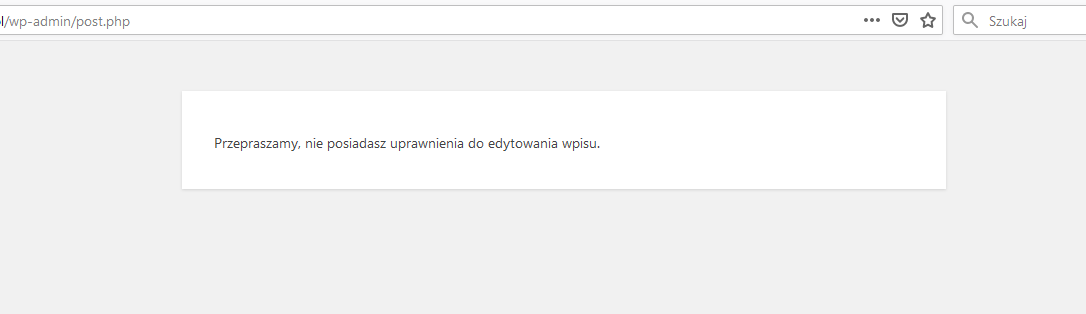
I can’t create a new forum.
When I want to start a new forum, I get information:
“Sorry, you do not have permission to edit this entry”:
https://snipboard.io/9ThQ4W.jpg
I am logged in as an administrator with full rights, wordpress is updated to the latest version, I installed the plugin several times and the same error every time.
What is wrong? Why can’t I add anything?
Hi,
This is my testing site
sandboxtest1.server4.demoswp.com/forums/forum/testing/
Thanks
ok, so running that fix gets latest activity back to normal, but only of course until the next post puts it out again – just wanted to check that was the case.
on the showroom, yes I can see that they have gone again – out of 100 how ceratin are you that they were there immediately before you ran then repair? and did you only run the repair for latest activity ?
From what I can observe,
– NEW TOPICS, will show the correct time, in the Index. (ex: in Challenges, I posted a new topic 2 days ago and it shows as 1 day 20 hours ago and it is accurate)
– REPLIES to new topics don’t seem to show all the time:
ex: in the LET’S TALK forum, inside the PSP Talk forum, Ken posted something over 2 days ago. That is what is displayed in the Index, however, I added a reply to his thread, and it is not taken into consideration (the time or even that *I* posted last)
I have tested it just now:
– I posted a new thread inside the LOBBY, not inside any other sub-forum: the date appears ok in the Index
– I replied to a post in the LOBBY (Date issue in the forum): the date does not appear at all in the Index, but if you go in the LOBBY, then the date shows and is correct.
Hope this helps.
@ajtruckle – I’m happy that I know your problem – I think cassel and hardel have different issues and may each have a different issue to the other. So I don’t need access as I can generate your problem on my test site, but thanks for the offer 🙂
I did another test today for this issue and it seemed to be working. I will keep an eye on it.
@robin-w and @johnjamesjacoby
I made the change on the development/test instance of my membership website and changing the setting to ASC did fix the problem.
How should I proceed as I did not make the change to the production website?
ok, I’ll try that on my test site tomorrow
I tried 2.6.2 as well. As reported in the Child CSS post, I am facing this issue as well. Sub-forums are not displayed. I did purge the cache and tried saving forums too. The following things are not working.
- Subforums wont display
- Replies to topic wont display
- Custom CSS won’t load
@johnjamesjacoby, if it’s any help, I found these info after testing other versions of BBPress.
The subforums and replies were still working in 2.6-beta-1 and 2.6-beta-2.
Additional information:
- CSS stopped working since
2.6-beta-1.
- Replies to topics stopped working since
2.6-rc-1.
- Subforum display stopped working in
2.6-rc-7.
This is a nightmare from what i can see unless you use the TEXT editor and the CODE tag ONLY.
If I insert some sample XSL script into CODE blocks. Example:
<xsl:choose>
  <xsl:when test="@ItemPosition='1' and Assistant!=''">
    <xsl:text><span style="background-color: #ffff00;">1st:</span> </xsl:text>
  </xsl:when>
  <xsl:when test="@ItemPosition='2'">
    <xsl:text><span style="background-color: #ffff00;">2nd:</span> </xsl:text>
  </xsl:when>
  <xsl:when test="@ItemPosition='3'">
      <xsl:text><span style="background-color: #ffff00;">3rd:</span> </xsl:text>
  </xsl:when>
</xsl:choose>
I can edit it to my hearts content. But if I use the TinyMCE edit to edit this post (with the TinYMCE editor being the default at the moment I edit) it strips all the XSL syntax.
Now, I realise that I can add a load of XSL tags into my custom functions.php class to permit these syntax words but that will be a nightmare. XSL has a lot of syntax. Is there really no standard (TinyMCE compatible) where we can insert code snippets and they look correct to the user and still be editable afterwards in either editor?
Hi Robin,
I did try that but it made the reply too small.
Before we look more I would like to share what I see on the mobiletest.me
Iphone res 640px topic create off screen – reply off screen
HTC res 1080px topic create off screen – reply off screen
Lumia res 768px topic create off Screen – Reply off screen
Galaxy res 240px topic create OK screen – reply off screen
tablets all OK
what I find really strange is that on ALL the above phones the Header pic, post title and contents all fit OK.
website is wateratairports.com
@maksanse
As indicated, the best option would indeed be to restart a correct import into a database with the proper characterset. If this is not an option then indeed there are plugins that replace in the DB. Some examples: https://wordpress.org/plugins/search/search+replace/
One main remark: do this in a test environment first and always make a backup of everything before launching it
I have inspect data from comparing the pre 2.6 and latest version as seen on Chrome
I can see the difference but cannot get to show it here “IMG” does not seem to work so I don’t know how to put a picture here.
that’s great, can you give me your hierarchy for one chain, and whether category or forum
eg
‘help forum’ – category
‘self help’ – forum – parent ‘help forum’ order 0
‘self help ideas’ – forum – parent ‘self help’ order 0
etc.
Then I can see if I can replicate on my test site
@ajtruckle yes the post meta table – glad you found it.
interesting that it set the last active to the topic date in all three settings, as thugh no reply had been set.
ok we seem to have issues with moderation and freshness and this post also seems to be an issue.
Notification is showing latest update for unapproved replies
1. can you confirm you now have moderation turned off ?
and
2. having run the correction, can you replicate the issue, ie make it happen again or does it just randomly do so?
I still have a bug with the inserting of videos. If I am creating the topic / reply as an ADMIn then the code is correct:
<video controls="controls" width="300" height="150">
<source src="https://www.publictalksoftware.co.uk/videos/forum/pts-test-video.mp4" type="video/mp4" /></video>
When you hit SUBMIT the video can be played etc.
But when you are NON-ADMIN and hit SUBMIT the outer chevrons of the inner SOURCE tag get escaped. I don’t know where this issue lies:
– WordPress 5.3?
– TinyMCE Insert Media Plugin 4.9.6 ?
– bbPress 2.6.2?