Search Results for 'test'
-
Search Results
-
To test:
Just click Submit to try and submit an empty reply to a topic that is quite long (perhaps several replies already).
When you hit submit it scrolls to the top of the page. This is misleading. If I scroll back down to the forum I tried submitting I now see some errors:
- ERROR: Your reply cannot be empty.
- ERROR: Please solve Captcha correctly.
The user should have been taken to the location of this error div, not the top of the page.
Topic: bbpress links after install
I’m having an issue with links instead of it being keebu.com/forums/dommains there is a double forum listing as seen below!! i’m new guys to bbpress I’m using the latest install of
wordpress 5.3
bbpress 2.6.2
buddyPress 5.0.0I originally asked this issue here:
https://wordpress.org/support/topic/user-cant-view-their-profile/
I have now found out why it happens. It has to do with the Title Case of the user name. For example, if my user name is:
Test123
Then I will not be able to view my profile.
But if my user name is:
test123
I can view my profile.
I don’t know if this is a bbPress 2.6.2 bug or bbp style pack bug (since I am using the latter theme templates).
For some reason the administrator can view these profile pages despite the case issue. But not normal participants. I notice that the URL is always the lowercase slug. Are we somehow using the username rather than the nice name? Either way, this is the cause and it means many of my users can’t view their profiles as they have used Title Case in many instances.
I have only just noticed this. I use the “bbPress Advanced Statistics” plugin as I like the way it presents the data at the bottom on the forum page.
However, if I “log out”, it still lists all the names of the users from the last 24 hours. That is not right. It should only list last 24 forum activity if a user is logged in. Technically it is exposing users names for a non logged in user when I don’t want it to.
I am using latest bbPress 2.6.2
Any advice appreciated. Thanks.
I am using the latest version of the forums 2.6.2 and associated bbp style pack plugin | forum template.
Today I was creating a topic and hit submit. At first I wondered what had happened because it didn’t seem to submit. I then eventually noticed (see image):
https://www.dropbox.com/s/cxv5lwz2ya82hcy/bbPress-Error.png?dl=0
I assume that it must have scrolled to the top but this error message is just not standing out from the crowd. Any advice to get this error message more noticeable?
Thank you.
I’m updating a forum at the moment and while starting working at it I’d opted out of using the 2.6 beta version, because when testing it the feature that I need most didn’t seem to work, pagination and nested replies.
I know this also was not supported on the older versions, but while searching for a solution I came across an article bbPress threaded (nested) replies & paging which fixed the issue for me and this didn’t seem to work on the newer 2.6 version.
I’ve found some threads on this, but they haven’t been updated in some time.
- https://bbpress.org/forums/topic/feature-request-pagination-for-threaded-comments/
- https://bbpress.trac.wordpress.org/ticket/3201
Is there any news on this? My site isn’t going live for some time, but if I know it isn’t on the road map I’ll have to take some measures to fix the issue for this particular site.
I have a sidebar active on all forum pages with the BBpress login widget in it. However, when you enter your username and password, you first get redirected to an extra captcha screen where you have to check you are not a robot. While that is fine for security reasons, after you check that box, you get redirected to the standard WordPress login screen where you have to enter your username and password a second time! And that feels very confusing for the users.
So the question is: how can I eliminate that second step… is this a known issue maybe? Or am I missing a setting somewhere?
If anybody in the hivemind has a suggestion, I’m all ears 🙂 thanks!
The site is running all the latest versions, by the way.
Topic: Styling Topic Title
WP 4.9.4
Suffusion Child Theme, 4.4.9
Browsers, latest versions of Firefox and Chrome
PHP version 7.2.7
bbPress Version 2.6.2Topic Title: http://forums.typeheritage.com/topic/tangier/
Page Title: http://forums.typeheritage.com/status/I want topic titles to match page titles—green, not orange. I am semi-clueless about coding but have tried a few ideas that don’t work.
Can someone suggest a css entry to solve this problem?
Many thanks, Anna
Topic: Can not create a new forum
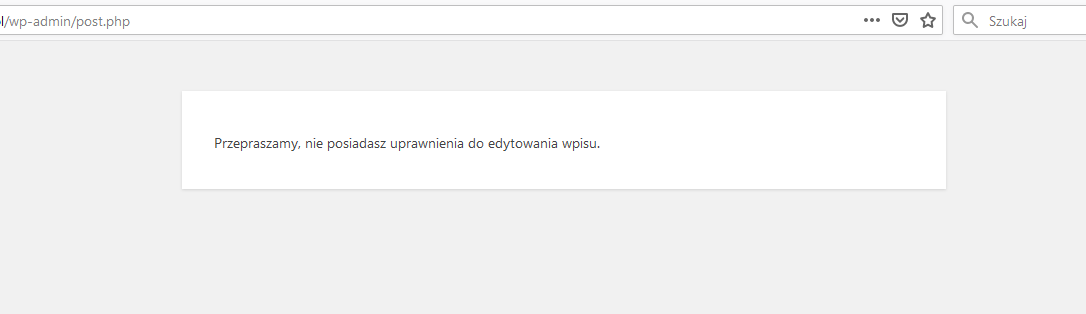
I can’t create a new forum.
When I want to start a new forum, I get information:
“Sorry, you do not have permission to edit this entry”:
https://snipboard.io/9ThQ4W.jpgI am logged in as an administrator with full rights, wordpress is updated to the latest version, I installed the plugin several times and the same error every time.
What is wrong? Why can’t I add anything?