No problems.
Just experimenting anyway in a test environment.
Managed to speed up the process a little.
Currently converting at the speed of 130 000 rows an hour vs previous 95 000 rows/hour.
Do not know exactly but the slow speed might have to do with the fact that in the old DB post/reply content is stored in the DB in a serialized array and i added a function to unserialize all the data during the import.
For some reason at 2 million post rows a big drop in speed, statistics show that MySQL command ratio dropped by three times compared to normal.
Had to stop/start the converter to get back to the normal speed.
I’d try this as a non admin/keymaster and see if it works. Say set up a test user as you intend your users to be. Normally admins are allowed to override any restrictions in WP and bbp.
Hi all
I have bbPress installed and everything is working fine.
I would like to use wordpress’s moderation tools.
This post states that bbPress uses the same moderation tools as WordPress.
Moderation and BlackListing
I have entered test words in the moderation text box:
Dashboard > Settings > Discussion > Comment Moderation
If I use these words in a post nothing happens and the post is added to the forum.
I’m logged in as admin and the words are used in the post not comments.
Does the user effect the moderation?
Is the moderation only on comments?
turns out there is this theme that has this function working
check out https://wordpress.org/themes/wp-knowledge-base
put it on a test site and see that i has what i need in that theme
now all i need is to scrape that code out and i think wrap it in an if user is logged in function and thats it
after that this topic should be done.
I’m running WP 3.9.1 and the latest copy of the plugin on a very vanilla site with not much on it yet.
phpBB 3.0.12, Tap-a-talk is the only mod it’s running
Database size: 20MB, about 6000 posts total
I’ve tried this twice using the remote server (after adding the WP server’s IP to the allowed remote MySQL connections) as well as on the same local server doing a sqldump from the remote into the local box. Both times, I get the scrolling of text showing nothing to import/convert and it finishes without error (aside from the fact nothing is imported).
This forum was originally vBulletin 3.x and it was converted to phpBB about a year ago but I don’t believe this should have much to do with it since there is no other modification/customization running except Tap-a-talk.
Where to go from here?
Guess i have done something wrong?
probably not !
Ok, we need to eliminate other plugins and your theme
Plugins
As a test, deactivate all but bbpress and see if this fixes. If it does, re-enable one at a time to see which is causing the error.
Themes
If plugins don’t pinpoint the problem, test by switching to a default theme such as twentytwelve, and see if this fixes.
#1 is related to your theme I reckon. Try as a test switching to a default theme such as twentytwelve and see if it disappears. If it foes come back and we’ll try to help further.
#2 see https://codex.bbpress.org/bbpress-styling-crib/
Please check the user_nicename entry in the Database/wp_users.
Is it Max Mustermann or max-mustermann?
I solved the problem (404) by changing the nicename to the latest.
And, after I’ve tested it with 2014 on the same page nothing still happens.
On my localhost the plugin works fine. Conflict with another plugin?
I am importing a large bbPress 1.2 forum into the current version. All is working well in my test run except everyone’s favorites are gone. Should favorites be imported or is that just not part of the importer? Thanks.
Thanks for your support.
The page is live and in use. So as soon as possible for you. But it’s the main tool for subscribers and at least it works for them. It would be great if you could load UAM and test it in a few days.
Like @rastarr two years ago and @acornale last week, I’m looking for a way to perform a unified search of both my website and the bbpress forum. (Forum results show up in WordPress search, not just in separate forum search.)
In both cases, Search bbPress was a recommended solution. Unfortunately, the plugin hasn’t been updated since 2011, and Support threads indicate it does not work well with the latest version of bbPress. The forum on my site is also behind a paywall, and the search function in this plugin would circumvent the login page.
bbPress Search Widget was the other recommendation, and the author is still active in the Support threads. However, “unified search”, or anything similar, is not one of the features listed in the description.
Does anyone know if bbPress Search Widget includes a unified search of the site and the forum? (I’ve reached out to the author and am waiting on an answer, but it seems unlikely that a feature such as unified search wouldn’t be listed under bbPress Search Widget features.)
If not, are there any current alternatives for making a unified site search? Is bbPress likely to add this function as an option in the future?
Thanks for your time.
Thanks for the answer. I’ve tested all plugins and the theme like you told me to.
The problem comes form the UAM – User Access Manager (http://www.gm-alex.de/projects/wordpress/plugins/user-access-manager/). I need this plugin to protect some parts of the website (not the forum). Any idea how to solve this?
bbpress has a number of converters, including phpbb
https://codex.bbpress.org/import-forums/phpbb/
suggest you create a test site and give it a go. That will tell you if you need to get back to a vanilla version first.
https://codex.bbpress.org/creating-a-test-site/
to convert, just go into dashboard>tools>forums>import forums
Stephen Edgar is the bbpress converter guru, and if you hit difficulties I’d suggest you post a new thread, and I’m sure he’ll help.
It should work for just the shortcode, but let me test on my site
do you want to remove the “The SEO Test Laboratory” ??
suspect this is theme related.
Try switching as a test to a default theme such as twentytwleve and see if this fixes – if so then theme issue.
Since this is a paid for theme, I’d then suggest you contact the theme support site form help at
http://help.themeva.com/
The double avatar was fine, because there were two instances on that page that were calling for the avatar; If there were more posters there could be two different avatars there.
The only problem I saw was that they were too large on the one page and it was nerfing your layout. The code I gave you above worked when I tested it, what was it doing that wasn’t working for you? If you have Gyazo or some other way to show a screenshot, that would be helpful, since you are still playing with it and it’s changing when we go to look.
My opinion is that the larger avatars looked great in the other areas of your forum, and that you only needed small avatars in that one spot so that they didn’t make your layout look wonky.
Running latest WP and bbpress versions, the main index list of forums at /forums is cutting off midway through the list:
http://www.londonfosteringachievement.org.uk/forums/
I feel like this is probably something very easy to fix but can’t seem to locate the issue, any help gratefully received!
Hello Dears,
@Robin – did run a test yesterday; please see below. Yes – it is still missing the ‘s’. This test was with both Easy WP SMTP and WP Email Template Pro deactivated.
@nightcoder – sorry you are having this problem also, however it is always good having another set of variables for troubleshooting. Hopefully we can get this resolved for everyone :-).
Kind Regards,
Sura
——-
Return-Path: soiseattle@ps304111.dreamhostps.com
Received: from imta27.westchester.pa.mail.comcast.net (LHLO
imta27.westchester.pa.mail.comcast.net) (76.96.62.95) by
resmail-po-395v.sys.comcast.net with LMTP; Fri, 18 Jul 2014 16:33:29 +0000
(UTC)
Received: from ps304111.dreamhostps.com ([208.113.253.50])
by imta27.westchester.pa.mail.comcast.net with comcast
id TsZL1o00R160WiQ0TsZNEA; Fri, 18 Jul 2014 16:33:23 +0000
X-CAA-SPAM: 00000
X-Authority-Analysis: v=2.1 cv=ArbXgoNP c=1 sm=1 tr=0
a=NcV50e7I1kQ8B/O3WndQqA==:117 a=NcV50e7I1kQ8B/O3WndQqA==:17 a=XZDE9umKAAAA:8
a=C_IRinGWAAAA:8 a=GGcpBh7Jt_oA:10 a=uq16MROfcOUA:10 a=uu93pNcUhmwA:10
a=IkcTkHD0fZMA:10 a=IG5F5yMIAAAA:8 a=Iz4Y0fGcAAAA:8 a=hw_3Kq5EVvpHEeQqwo8A:9
a=QEXdDO2ut3YA:10 a=C0YYocD4L-gA:10 a=T_gbqimHre8A:10 a=Dufu7xK66WEA:10
a=uMZShaPKYjEA:10
Received: by ps304111.dreamhostps.com (Postfix, from userid 12776964)
id 6BCD0425A6AB; Fri, 18 Jul 2014 09:33:14 -0700 (PDT)
To: noreply@oi-seattle-kinship.org
Subject: [SOI-Seattle Kinship] Testing w/o Email Plug-ins
X-PHP-Originating-Script: 12776964:class-phpmailer.php
Date: Fri, 18 Jul 2014 16:33:14 +0000
From: SOI-Seattle Kinship <noreply@oi-seattle-kinship.org>
Message-ID: <6f30a1cc387fed63ffcb2460d5c09f2a@soi-seattle-kinship.org>
X-Priority: 3
X-Mailer: PHPMailer 5.2.7 (https://github.com/PHPMailer/PHPMailer/)
MIME-Version: 1.0
Content-Type: text/plain; charset=UTF-8
Content-Transfer-Encoding: 8bit
Arus wrote:
Did you receive this with the proper ‘no-reply’ address in the header?
Topic Link: http://soi-seattle-kinship.org/forums/topic/testing-wo-email-plug-ins/
———–
You are receiving this email because you subscribed to a forum.
Login and visit the topic to unsubscribe from these emails.
Hmm… not sure what’s going on here. Have you tested it on a default theme?
My avatars were not doing that the last I checked. I’m pretty sure they were auto-resizing smaller, and fitting in quite nice. But, I stopped using this bbPress theme before the last couple WordPress updates because it’s not responsive, and the default bbPress is. It’s possible something changed in the WordPress code to make it act different.
If you can make a child theme, you could try this to change the avatars’ size on the page where they’re squished with css:
bbp-topic-meta .avatar {
     width: 30px;
     height: 30px;
}
topic/reply author
avatar
role
link to user profile
title
content
link to other replies
no reply in after search
only topic title (ancor test title)
Sorry for my bad english.
Are you sure you selected “PunBB” from the select platform list?
Do any of the forums and categories get imported? What about users?
I also haven’t tested punBB 1.4, I have done all my testing using 1.4.2
These are the settings I just used testing this:
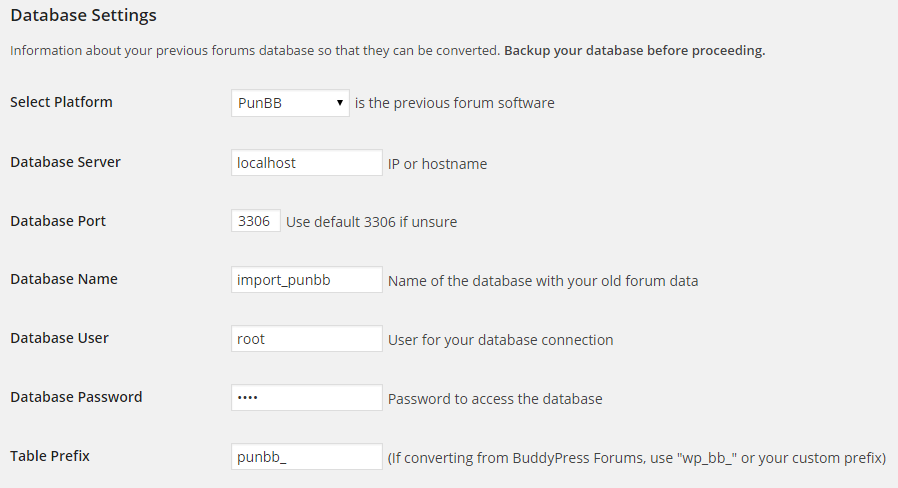
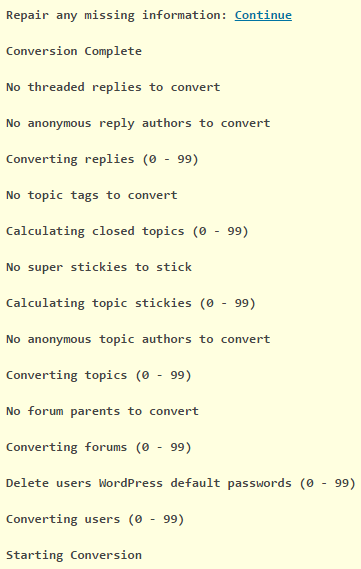
And the results are working as expected for me (This screenshot includes a few enhancements coming in the next release of bbPress)
Best way to find out if it is their plugin is to deactivate it and do a test post to see if that goes through.
Email is at best a shaky medium, and many things from host provider, server, links, wordpress, plugins and just plain complexity can make something that worked stop. Switch it off and on again can fix quite a lot, so even deactivating a plugin and reactivating it can fix.
good luck !
ok, this theme has annoyed me so much that I have down loaded it.
I then saw that it claims to be a bbpress friendly theme, aghh!!! why not include a fullwidth forum????
so had a little play
on my test site the following works
bbpress.php looks like
<?php get_header(); // Loads the header.php template. ?>

<main>

	<?php if ( have_posts() ) : // Checks if any posts were found. ?>


		<?php while ( have_posts() ) : // Begins the loop through found posts. ?>

			<?php the_post(); // Loads the post data. ?>

			<article <?php hybrid_attr( 'post' ); ?>>

				<?php if ( is_singular( get_post_type() ) ) : // If viewing a single page. ?>

					<header class="entry-header">
						<h1 <?php hybrid_attr( 'entry-title' ); ?>><?php single_post_title(); ?></h1>
					</header><!-- .entry-header -->

					<div <?php hybrid_attr( 'entry-content' ); ?>>
						<?php the_content(); ?>
						<?php wp_link_pages(); ?>
					</div><!-- .entry-content -->

				<?php else : // If not viewing a single page. ?>

					<header class="entry-header">
						<?php the_title( '<h2 ' . hybrid_get_attr( 'entry-title' ) . '><a href="' . get_permalink() . '" rel="bookmark" itemprop="url">', '</a></h2>' ); ?>
					</header><!-- .entry-header -->

					<div <?php hybrid_attr( 'entry-content' ); ?>>
						<?php the_content(); ?>
						<?php wp_link_pages(); ?>
					</div><!-- .entry-content -->

				<?php endif; // End single page check. ?>

			</article><!-- .entry -->

		<?php endwhile; // End found posts loop. ?>

	<?php else : // If no posts were found. ?>

		<?php locate_template( array( 'content/error.php' ), true ); // Loads the content/error.php template. ?>

	<?php endif; // End check for posts. ?>

</main><!-- #content -->


		<footer <?php hybrid_attr( 'footer' ); ?>>

			<div class="wrap">

				<?php hybrid_get_menu( 'social' ); // Loads the menu/social.php template. ?>

				<p class="credit">
					<?php printf(
						/* Translators: 1 is current year, 2 is site name/link, 3 is WordPress name/link, and 4 is theme name/link. */
						__( 'Copyright © %1$s %2$s. Powered by %3$s and %4$s.', 'stargazer' ),
						date_i18n( 'Y' ), hybrid_get_site_link(), hybrid_get_wp_link(), hybrid_get_theme_link()
					); ?>
				</p><!-- .credit -->

			</div><!-- .wrap -->

		</footer><!-- #footer -->

	</div><!-- #container -->

	<?php wp_footer(); // WordPress hook for loading JavaScript, toolbar, and other things in the footer. ?>

</body>
</html>


