Search Results for 'forum css'
-
Search Results
-
Hi all
(This only happens when viewing my BBpress forum on a smartphone.)
When viewing a forum and scrolling down to below the forum topics to the editor, the right hand side of TinyMCE editor is off the screen by a few pixels.
When viewing a topic the TinyMCE editor fits fine on my smartphone screen.
Is the width of TinyMCE adjustable anywhere or is there some CSS I can add to fix this?
WP version 6.3.1
BBPress version 2.6.9I’m confused. Does BBPress get its CSS and template support from the active WordPress theme or are there optional plug-in themes one can install that only apply to styling your BBPress implementation?
I’ve been asked to add forums to an existing Elementor-built site running the Astra Pro theme which apparently has no support for BBPress. Because the web site is already built, approved by the bosses and currently live I can’t change the WordPress theme. But the default styling in BBPress doesn’t work for them either (we have an approved font family, size, color, etc too).
I’m fairly adept with CSS and WordPress but I’d rather use a design by someone who actually knows the software. That, and I’m a bit graphically challenged.
I noticed that there’s a dropdown for “Forum Theme Packages” in Forum settings and was hoping that such BBPress-specific child theme plug-ins exist which allow WordPress to use another parent theme. Do such plug-ins exist and is there a repository of them somewhere on the net?
Topic: Tweak CSS from another theme
Hi everyone,
I’m sorry if the questions was already post, but since yesterday i couldn’t find any answer..
The problem :
Theme : Hello-elementor
I have 100+ Hours design on my theme website.
I wanted to use bbpress, (forums page broken, and the design is from 1980 with my theme)I want to change the theme of bbpress forums from another theme (ex : astra, Kadence…) to make it look better, but without changing my main theme because i’ve worked a lot on it.
Any advice, solution ?
Thank you so much… love
Topic: Different look of forums
Hi,
I have several forums on my site and want to customize them to look different.
I create custom css for global look, but I don’t know how to customize different look for particular forum.
I tried with #bbpress-forums li.bbp-forum-143737 where is 143737 forum’s id but it didn’t works.
The idea is to put different forums in three columns in one page. Then the cover for each one should be some photo or text. Click on the photo opens the forum’s topics.Anyone can help?
WP is 6.2.2, bbPress 2.6.9, theme is Kleo, site is still at localhost.
Hi – I’m using Astra theme with a 3-col grid layout for blog archives, see:
https://greensmoothie.com/category/blendBut for the forum archives I need full-width, see:
https://greensmoothie.com/membersRight now I’ve fixed it by targeting the post and each forum in the css, like this:
#post-9486,#bbp-forum-9475{width:100%;}I’ve intentionally left the second forum (Newcomers – #bbp-forum-9473) out of the css — so you can see how it displays only in the first column – same as /category/blend above.
Moderators need to set up forums that will display by default as full-width. They don’t have access to the css.
Is there a higher-level I can target in the css that will automatically force ALL forums to display full-width?
thanks for your help!
Re-posting this. For some reason my original post got marked as spam. So, this time I took out the screenshot link.
I wanted to share some code I cooked up for one of my sites. I want to disclaimer that I’m not a professional coder but through lots of trail, error, and zero hair left I’ve found this code works very well for my website.
There are two functions. The first one creates a “New Topic” button and uses a template hook to display it above the forum list. The second function does the same thing, but just uses a hook to display the button over the single topic display to create a “New Reply” button. The second function is basically the first function but renamed and uses a different template hook.
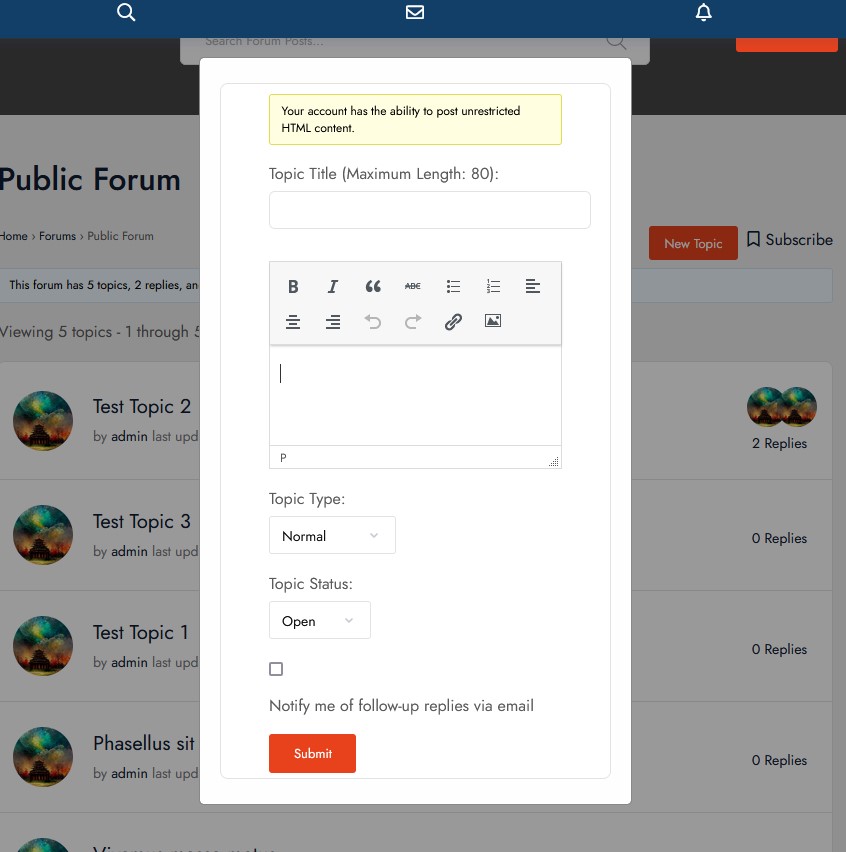
These buttons, when clicked, open a modal that has the shortcode for a new topic/new reply. The code also passes the current forum id into the shortcode, so there is no need for the user to select a forum from the drop down menu. In my screenshot, I’ve enabled the WYSWYG TinyMCE editor and all buttons on it work properly. In addition, I’ve fixed it so that the user can’t accidentally close the modal. They have to physically click on the “Close” button in order to close it. I decided to do this for simplicity sake and so my users won’t accidentally click off the screen and close the modal.
I made it because I was tired of users getting confused about the new topic/new reply topic area of bbpress. So, in order to bring it more in line with other forum software I made this code (through many trial and errors). I hope that it can help anyone in the community who’s using bbpress for their forums. Oh, I also made sure it displays nicely in mobile size screens. I added a screenshot to show people what it looks like.
/*
This function adds the New Topic button to bbpress above the forum list template
*/

function add_new_topic_button() {
    $forum_id = bbp_get_forum_id();
    ?>
    <button id="new-topic-button">New Topic</button>
    <div id="new-topic-modal">
        <button id="close-modal-button">Close</button>
        <div class="modal-content">
            <?php echo do_shortcode('[bbp-topic-form forum_id=' . $forum_id . ']'); ?>
        </div>
    </div>
    <script>
    jQuery(document).ready(function($) {
        var newTopicButton = $('#new-topic-button');
        var modal = $('#new-topic-modal');
        var close = $('#close-modal-button');
        newTopicButton.click(function() {
            modal.show();
            setTimeout(function() {
                if (typeof bp !== 'undefined' && typeof bp.mentions !== 'undefined') {
                    bp.mentions.tinyMCEinit();
                }
            }, 1000);
        });
        close.click(function() {
            modal.hide();
        });
        $('textarea#bbp_topic_content').addClass('bbp_topic_content');
    });
    </script>
    <style>
    #new-topic-modal {
        display: none;
        position: fixed;
        z-index: 999;
        left: 0;
        top: 0;
        width: 100%;
        height: 100%;
        overflow: auto;
        background-color: rgba(0,0,0,0.6);
    }
    .modal-content {
        background-color: #fefefe;
        margin: auto;
        padding: 20px;
        border: 1px solid #888;
        width: 50%;
        max-width: 600px;
        border-radius: 5px;
        position: absolute;
        top: 50%;
        left: 50%;
        transform: translate(-50%, -50%);
    }
    #close-modal-button {
        color: #aaaaaa;
        float: right;
        font-size: 28px;
        font-weight: bold;
        margin-right: 10px;
        margin-top: 40px;
    }
    #close-modal-button:hover,
    #close-modal-button:focus {
        color: #000;
        text-decoration: none;
        cursor: pointer;
    }
    @media only screen and (max-width: 600px) {
        .modal-content {
            width: 90%;
            max-width: 90%;
        }
    }
    </style>
    <?php
}
add_action('bbp_template_before_single_forum', 'add_new_topic_button');
/* This function adds the New Reply button to bbpress above the single topic template */ function add_new_reply_button() { $forum_id = bbp_get_forum_id(); ?> <button id="new-topic-button">New Topic</button> <div id="new-topic-modal"> <button id="close-modal-button">Close</button> <div class="modal-content"> <?php echo do_shortcode('[bbp-reply-form forum_id=' . $forum_id . ']'); ?> </div> </div> <script> jQuery(document).ready(function($) { var newTopicButton = $('#new-topic-button'); var modal = $('#new-topic-modal'); var close = $('#close-modal-button'); newTopicButton.click(function() { modal.show(); setTimeout(function() { if (typeof bp !== 'undefined' && typeof bp.mentions !== 'undefined') { bp.mentions.tinyMCEinit(); } }, 1000); }); close.click(function() { modal.hide(); }); $('textarea#bbp_topic_content').addClass('bbp_topic_content'); }); </script> <style> #new-topic-modal { display: none; position: fixed; z-index: 999; left: 0; top: 0; width: 100%; height: 100%; overflow: auto; background-color: rgba(0,0,0,0.6); } .modal-content { background-color: #fefefe; margin: auto; padding: 20px; border: 1px solid #888; width: 50%; max-width: 600px; border-radius: 5px; position: absolute; top: 50%; left: 50%; transform: translate(-50%, -50%); } #close-modal-button { color: #aaaaaa; float: right; font-size: 28px; font-weight: bold; margin-right: 10px; margin-top: 40px; } #close-modal-button:hover, #close-modal-button:focus { color: #000; text-decoration: none; cursor: pointer; } @media only screen and (max-width: 600px) { .modal-content { width: 90%; max-width: 90%; } } </style> <?php } add_action('bbp_template_before_single_topic', 'add_new_reply_button');/* This function calls the Buddypress js file to bbpress pages only so that @mentions can work in the modal */ function enqueue_buddypress_js() { if ( function_exists( 'bp_is_active' ) && bp_is_active( 'mentions' ) ) { wp_enqueue_script( 'bp-mentions-js' ); } } add_action( 'wp_enqueue_scripts', 'enqueue_buddypress_js' );/* Additional Custom Forum Modal CSS This will hide the default new topic/reply form boxes but shouldn't hide the ones inside of the modal */ .modal-content .bbp-topic-form, .modal-content .bbp-reply-form { padding-top: 5px; padding-bottom: 5px; margin-top: 5px; margin-bottom: 5px; } .bbpress-wrapper > .bbp-topic-form { display: none; } .modal-content .bbp-topic-form legend { display: none; } #new-topic-button { float: right; margin-right: 10px; } #bbpress-forums > .bbp-reply-form { display: none; }Topic: New Topic/Reply Modal
I wanted to share some code I cooked up for one of my sites. I want to disclaimer that I’m not a professional coder but through lots of trail, error, and zero hair left I’ve found this code works very well for my website.
There are two functions. The first one creates a “New Topic” button and uses a template hook to display it above the forum list. The second function does the same thing, but just uses a hook to display the button over the single topic display to create a “New Reply” button. The second function is basically the first function but renamed and uses a different template hook.
These buttons, when clicked, open a modal that has the shortcode for a new topic/new reply. The code also passes the current forum id into the shortcode, so there is no need for the user to select a forum from the drop down menu. In my screenshot, I’ve enabled the WYSWYG TinyMCE editor and all buttons on it work properly. In addition, I’ve fixed it so that the user can’t accidentally close the modal. They have to physically click on the “Close” button in order to close it. I decided to do this for simplicity sake and so my users won’t accidentally click off the screen and close the modal.
I made it because I was tired of users getting confused about the new topic/new reply topic area of bbpress. So, in order to bring it more in line with other forum software I made this code (through many trial and errors). I hope that it can help anyone in the community who’s using bbpress for their forums. Oh, I also made sure it displays nicely in mobile size screens. I added a screenshot to show people what it looks like.
https://img.iwebnow.net/screenshots/popup.jpg
/*
This function adds the New Topic button to bbpress above the forum list template
*/

function add_new_topic_button() {
    $forum_id = bbp_get_forum_id();
    ?>
    <button id="new-topic-button">New Topic</button>
    <div id="new-topic-modal">
        <button id="close-modal-button">Close</button>
        <div class="modal-content">
            <?php echo do_shortcode('[bbp-topic-form forum_id=' . $forum_id . ']'); ?>
        </div>
    </div>
    <script>
    jQuery(document).ready(function($) {
        var newTopicButton = $('#new-topic-button');
        var modal = $('#new-topic-modal');
        var close = $('#close-modal-button');
        newTopicButton.click(function() {
            modal.show();
            setTimeout(function() {
                if (typeof bp !== 'undefined' && typeof bp.mentions !== 'undefined') {
                    bp.mentions.tinyMCEinit();
                }
            }, 1000);
        });
        close.click(function() {
            modal.hide();
        });
        $('textarea#bbp_topic_content').addClass('bbp_topic_content');
    });
    </script>
    <style>
    #new-topic-modal {
        display: none;
        position: fixed;
        z-index: 999;
        left: 0;
        top: 0;
        width: 100%;
        height: 100%;
        overflow: auto;
        background-color: rgba(0,0,0,0.6);
    }
    .modal-content {
        background-color: #fefefe;
        margin: auto;
        padding: 20px;
        border: 1px solid #888;
        width: 50%;
        max-width: 600px;
        border-radius: 5px;
        position: absolute;
        top: 50%;
        left: 50%;
        transform: translate(-50%, -50%);
    }
    #close-modal-button {
        color: #aaaaaa;
        float: right;
        font-size: 28px;
        font-weight: bold;
        margin-right: 10px;
        margin-top: 40px;
    }
    #close-modal-button:hover,
    #close-modal-button:focus {
        color: #000;
        text-decoration: none;
        cursor: pointer;
    }
    @media only screen and (max-width: 600px) {
        .modal-content {
            width: 90%;
            max-width: 90%;
        }
    }
    </style>
    <?php
}
add_action('bbp_template_before_single_forum', 'add_new_topic_button');
/* This function adds the New Reply button to bbpress above the single topic template */ function add_new_reply_button() { $forum_id = bbp_get_forum_id(); ?> <button id="new-topic-button">New Topic</button> <div id="new-topic-modal"> <button id="close-modal-button">Close</button> <div class="modal-content"> <?php echo do_shortcode('[bbp-reply-form forum_id=' . $forum_id . ']'); ?> </div> </div> <script> jQuery(document).ready(function($) { var newTopicButton = $('#new-topic-button'); var modal = $('#new-topic-modal'); var close = $('#close-modal-button'); newTopicButton.click(function() { modal.show(); setTimeout(function() { if (typeof bp !== 'undefined' && typeof bp.mentions !== 'undefined') { bp.mentions.tinyMCEinit(); } }, 1000); }); close.click(function() { modal.hide(); }); $('textarea#bbp_topic_content').addClass('bbp_topic_content'); }); </script> <style> #new-topic-modal { display: none; position: fixed; z-index: 999; left: 0; top: 0; width: 100%; height: 100%; overflow: auto; background-color: rgba(0,0,0,0.6); } .modal-content { background-color: #fefefe; margin: auto; padding: 20px; border: 1px solid #888; width: 50%; max-width: 600px; border-radius: 5px; position: absolute; top: 50%; left: 50%; transform: translate(-50%, -50%); } #close-modal-button { color: #aaaaaa; float: right; font-size: 28px; font-weight: bold; margin-right: 10px; margin-top: 40px; } #close-modal-button:hover, #close-modal-button:focus { color: #000; text-decoration: none; cursor: pointer; } @media only screen and (max-width: 600px) { .modal-content { width: 90%; max-width: 90%; } } </style> <?php } add_action('bbp_template_before_single_topic', 'add_new_reply_button');/* This function calls the Buddypress js file to bbpress pages only so that @mentions can work in the modal */ function enqueue_buddypress_js() { if ( function_exists( 'bp_is_active' ) && bp_is_active( 'mentions' ) ) { wp_enqueue_script( 'bp-mentions-js' ); } } add_action( 'wp_enqueue_scripts', 'enqueue_buddypress_js' );/* Additional Custom Forum Modal CSS This will hide the default new topic/reply form boxes but shouldn't hide the ones inside of the modal */ .modal-content .bbp-topic-form, .modal-content .bbp-reply-form { padding-top: 5px; padding-bottom: 5px; margin-top: 5px; margin-bottom: 5px; } .bbpress-wrapper > .bbp-topic-form { display: none; } .modal-content .bbp-topic-form legend { display: none; } #new-topic-button { float: right; margin-right: 10px; } #bbpress-forums > .bbp-reply-form { display: none; }


