Search Results for 'code'
-
Search Results
-
Since i noticed the new bbpress wasnt going to be “theme integration friendly” just like the previous versions, i started to look for other forum plugins, simple:press was the next step but i find it quite slow loading.
Today while browsing an “drupal7 vs joomla 1.6” article i found a forum plugin for wordpress:
The Mingle Forum Plugin
http://cartpauj.com/projects/mingle-forum-plugin/
no need to ftp files, you can install it from within wordpress plugin page, no need for extra themes, it can use whatever theme wordpress uses, international localization/languages etc etc
@bbpress devs: in my opinion you’re overcomplicating something that should be “easy as 1,2,3” in bbpress (theme integration), you’re “integrating” not the opposite, lots and lots of people voiced their problems with complicated integrations or deep integration, why insist on having separate thmes for something that “uses” wordpress that itself already uses a theme. Make it simple.
REQUIREMENTS:
PHP 5.x
WordPress 3.0 or newer
FEATURES:
* NEW! SEO Friendly URLs
* NEW! Forum sitemap (../wp-content/plugins/mingle-forum/sitemap.php)
* NEW! Adsense areas
* Media embedding into forum posts (like Youtube, Flickr, Photobucket…)
* WordPress 3.0 ready!
* Categories with sub-forums
* User Groups
* User Levels (EX: Newbie, Beginner, Pro…)
* Private Messages – Forum integrates seamlessly with my Cartpauj PM Plugin (Requires Cartpauj PM vs. 1.0.09 or greater)
* Moderators
* Skins
* Captcha
* BB Code
* Smilies
* Custom Forum Search
* Guest posts (See Mingle Forum Guest Info add-on by wpweaver)
* Hot/Very Hot topics
* Sticky (Pinned) Topics
* Move, Edit, Remove and Close topics
* Forum RSS Feeds
* Email notifications on replies to topics
* Recent posts widget (or PHP shortcode for your theme)
* Integrates nicely with most themes (It’s tough to make it work for all themes so some skin modifications may be required for your site)
* Allow/Dis-allow other users to view your profile from the Forum
* Supports different languages
* Integrates with the Mingle Plugin (by Blair Williams) NOTE: The “Mingle” plugin is NOT required for forum to work
o Avatars
o Profile’s (Works with/without Pretty Profile URLs enabled in Mingle settings)
o Activity in the forum shows up as activity in mingle (Helps increase discussion in both your forums and your SN)
o Deleted forum topics will also delete the corresponding Mingle board post
Screenshots
http://www.flickr.com/photos/ricardouk/sets/72157625882755704/
Hello
I have domain domainnameDOTcom/
My WordPress directory is domainnameDOTcom/wordpress/
Installed BuddyPress Default 1.2.7 with WordPress 3.0.4
With BB-Press Forum
When I select any tab that is not created in WP then the FULL url including the WP install directory is evident
How can I ensure this WP directory remains “hidden” from the users perspective
I have tried to implement bp-custom.php which resides in /public_html/wptest/wp-content/plugins/buddypress without success.
That is the WP directory can be seen in the URL when I select “Forum” tab, thereafter the site adopts the extended url even though permalinks is set to /%category%/%postname%/
Here is the code I found on this site and tested:
code:
<?php
// Getting rid of the subfolder in URLs/permalinks
function my_bp_override_core_domain() {
$domain = get_bloginfo(‘url’);
return $domain;
}
add_filter(‘bp_core_get_root_domain’,’my_bp_override_core_domain’);
?>
I look forward to hearing feedback
Phil
Is it possible to call wordpress plugin functions in bbpress?
I’ve added the deep integration code in bb-config.php:
/* Deep integration */
if ( !defined(‘ABSPATH’) & !defined(‘XMLRPC_REQUEST’))
{
define(‘WP_USE_THEMES’, false);
include_once(dirname(__FILE__) . ‘/../wp-blog-header.php’ );
header(“HTTP/1.1 200 OK”);
header(“Status: 200 All rosy”);
}
I added this too:
require_once(dirname(__FILE__) . ‘/../wp-load.php’);
define(‘WP_BB’, true);
However, i can only call the theme functions of wordpress i.e., get_header(), get_footer() etc…but i cannot get the wordpress plugin functions to work in my bbpress. I’m trying to call a function from a wordpress plugin named “Marquee” and placed it at the bottom of my bbpress template.
I have a Forum/Blog that I have been trying to get up and running. Right now I want to tackle the problem of having a huge amount of spam being generated by people — or bots — who are trying to register.
It is a payed web site (to keep out the riff-raff) and people have to buy a subscription to the site. But, suprisingly, this does not stop my inbox from being flooded by “requests for a username”.
Here is what my inbox looks like:
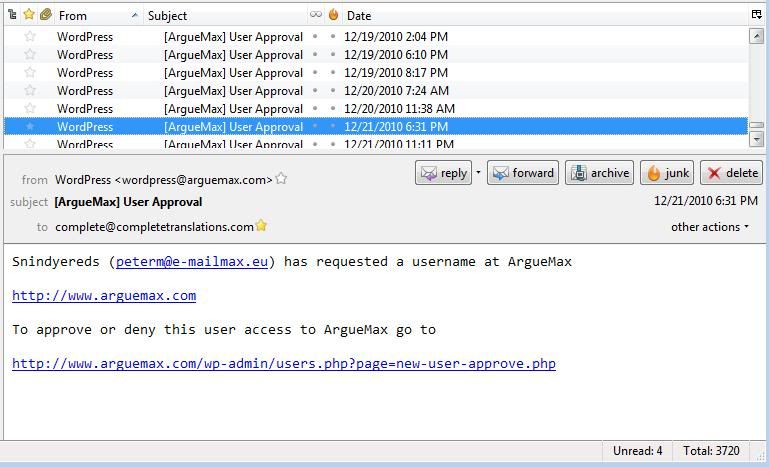
Most of the time, the email addresses in these messages are fake. But sometimes they are not but when I email these persons back, I am ignored. So they really are just spammers looking for a way of posting ad content on my web site for free.
The Registration page has a CAPTCHA Code required entry field:
http://www.arguemax.com/wp-login.php?action=register
But I wonder if the bots are sophisticated enough to get past that.
The user has to click on the “I accept the agreements” field but the agreements field clearly tells the user that they have to buy a subscription. If they do not click on that check box they get this:
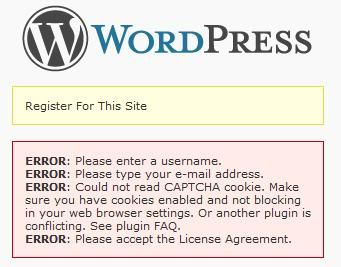
One way I want to try to keep from getting all this spam is to make it such that the registration button is inactive until they click on the subscribe button
https://www.paypal.com/en_US/i/btn/btn_subscribeCC_LG.gif
How do I go about making that happen?
I’m a newb, guys, and just wanted to share with other newbs who might have problems with require_once at Dreamhost.
/*the following line of code got the forums to appear correctly but then admin didn’t work. Note: registration does not work here now–email address not accepted.
require_once(‘../wp-load.php’);
*/
/*The program told me: Warning: require_once(../wp-load.php) [function.require-once]: failed to open stream: No such file or directory in /home/my_db_username/foo.com/forums/bb-config.php on line 66
Fatal error: require_once() [function.require]: Failed opening required ‘../wp-load.php’ (include_path=’.:/usr/local/lib/php:/usr/local/php5/lib/pear’) in /home/my_db_username/foo.com/forums/bb-config.php on line 66
So let’s try the full path and see if admin works. Otherwise, we’re going to see if we can load the bbpress admin functions in the main install.
*/
/*first using the /home/my_db_username path*/
require_once(‘/home/my_db_username/foo.com/wp-load.php’);
/*this works to display the forum correctly. Checking the admin side: admin side also working. Note: don’t work on stuff late at night if you’re going to miss simple stuff like this */
YMMV. Hope this helps somebody.
Topic: Deep Integration Error
So i’m trying to Deep Integrate my WordPress with BBpress, everything is fine until now I get:
Parse error: syntax error, unexpected $end in /hermes/web03/b619/moo.defendersofthefallen/KaoTech/Forum/bb-config.php on line 72
In my bb-config.php line 72 is ‘ ?> ‘
You can see it for yourself at http://www.kaotech.co.uk/Forum
I’m sure I entered the code correctly
/* Deep integration */if ( !defined('ABSPATH') & !defined('XMLRPC_REQUEST')) {
define('WP_USE_THEMES', false);
include_once(dirname(__FILE__) . '/../wp-blog-header.php' );
header("HTTP/1.1 200 OK");
header("Status: 200 All rosy");
I had to start on line 2 instead of line 1 as ‘ <?php ‘ was the start of the file, and the same tags were closed on line 72.
Am I missing something obvious or? Anyhelp would be great!
Thanks!