If you download the buddypress plugin, there will be a widget called: Who’s online ..
That’s a easy solution for now.
https://codex.buddypress.org/buddypress-components-and-features/buddypress-widgets/
Do you think there is a limit with database size?
No, all size constraints are upstream and relate directly to WordPress and the size you are talking about is not an issue.
There is almost 100,000 posts and the database is bigger than 350 Mb
That’s fine…
Now the fine print, this will take a while to import, depending on your setup it might be a couple of hours right through to 8, 16 or 24, “how long is a piece of string” theory.
I am not sure what tools Invision includes but optimizing and cleaning the database first is a very good idea.
As bbPress imports the topics and replies it parses all the BBCodes ([b][i][url] etc) through a custom conversion script, if it comes across data it doesn’t like it will stop and no longer continue. Thus it is advisable to setup a local MAMP/XAMPP install and perform an import on your local machine as it gives you a good idea on how the process works, how much time it will take and the data integrity. Once your happy with all that then give it a go on your webhost.
Make sure you have the settings correct, check the e107_config.php file for the correct seetings:
eg.
$mySQLserver         = 'localhost';
$mySQLuser           = 'my_database_user_name';
$mySQLpassword       = 'my_database_password';
$mySQLdefaultdb      = 'my_database_name';
$mySQLprefix         = 'e107v1_';
All Invision 3.1x, 3.2x, 3.3x and 3.4.x versions should import fine… Remember to make sure you select ‘Invision’ from the dropdown (I still make this mistake quite frequently :P)
Maybe open up your Invision config file conf_global.php and confirm your settings:
$INFO['sql_host']			=	'localhost';
$INFO['sql_database']			=	'my_db_name';
$INFO['sql_user']			=	'my_db_user';
$INFO['sql_pass']			=	'my_password';
$INFO['sql_tbl_prefix']			=	'iv34_';
Also to note some web hosts will not use ‘localhost’ and use a FQDN instance eg. ‘sql1234.example.com’
(Rather than bumping very old topics I split this into a new topic)
https://codex.bbpress.org/bbpress-user-roles-and-capabilities/
Participants can ‘assign_topic_tags’
Keymasters and Moderators can ‘manage_topic_tags’, ‘edit_topic_tags’, ‘delete_topic_tags’ & ‘assign_topic_tags’.
Are you seeing something different? What user role are you using to test this?
@tharsheblows, thanks for inquiring about this. No, I have not figured it out. Sorry I did not get back to you; I was in Europe traveling on business.
As a temporary fix I had removed the function call to my google books search function from form-topic.php. But I prefer to keep that function call in there. When you were trying to replicate this, I was calling my function via a shortcode.
If you go to my site, and got to “Generations”, then click on “add a book”, you will see the google books search window. Just search for a book in that window, then watch what happens.
Any insight you can give me would be greatly appreciated. There are still many other things I am trying to figure out, but this would be a great step.
Thanks,
Jerry
Hi
WP 3.9
BBP 2.5.3
TwentyTen
I use WPPA a lot on my blog and would like to integrate in BBPress.
When I add it in topic i get this:
http://goandstay.co.za/blog/forums/topic/testtopic-2/#.U15rdfmSySo
The code instead of the slideshow.
Jacob Breedtveld . aka Opajaap (author of this amazing plugin) (http://wppa.opajaap.nl/ & https://wordpress.org/plugins/wp-photo-album-plus/) says:
If this also does not work, ask the BBPress boys if there is a possiility that on the particular text shortcodes can be expanded ( $text = do_shortcode( $text ); ) or that the standard content filters can be run. ( $text = apply_filters( ‘the_content’, $text ); )
I don’t have a clue what Jacob says, but think you will know!
Thanks
This site here bbpress.org uses a customized theme and customized code to achieve the results in the pictures you show above.
I suggest you have a read of some of the tutorials in our docs, much of what you want has been documented in the codex.
Codex
Step by step guide to setting up a bbPress forum – Part 1 – Getting it working
Step by step guide to setting up a bbPress forum – Part 2 – Styling bbPress
Step by step guide to setting up a bbPress forum – Part 3 – Changing layout & functionality
Step by step guide to setting up a bbPress forum – Part 4 – Adding Actions
Step by step guide to setting up a bbPress forum – Part 5 – Using filters
Thanks Mike, I am one of the bbPress core developers, with some luck I’ll get this fixed within the next few days. At this stage until I dig into all the code properly it is about as clear as mud for myself also.
Either or, glad you have a temp fix for now 🙂
Hi
(Sorry, sorry, sorry for my bad English.)
I’m doing a thousand attempts with shortcode, use bbPress folder in my template folder. Using plugins bbPress WP Tweaks and I set page.php in its settings.
When I try to do this:
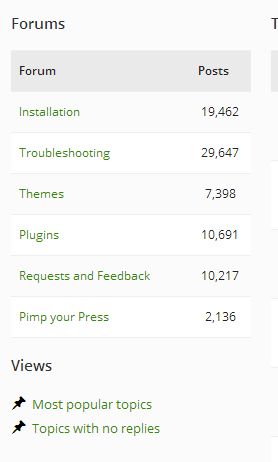
Instead I get this:
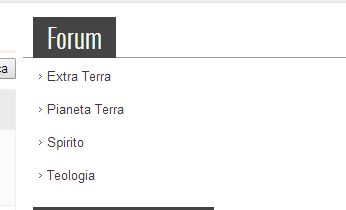
No column post no number 🙁
Then I can not get this:
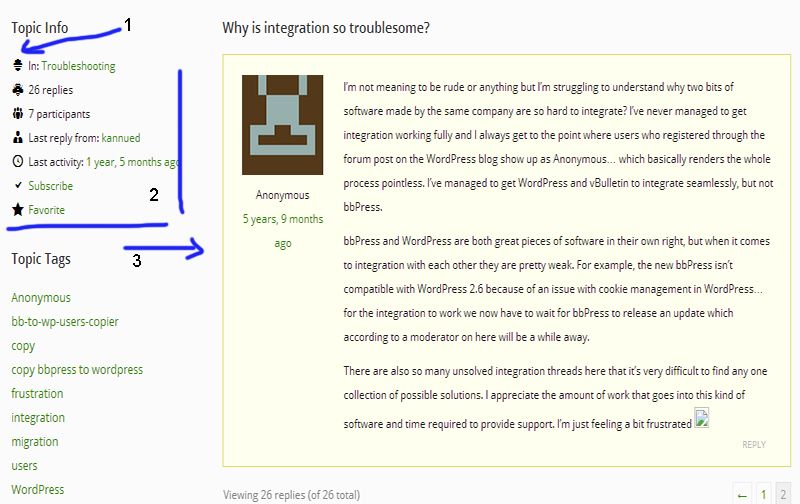
1) I can never see these icons
2) I want to see this box on my forum, “Topic Info”, “Info Forum” equal to that bbPress is a very clever solution.
3) in my forum (xamp server to the local machine to create complete style) when there are topics with more pages does not happen what happens here, where the first reply is seen on every page and a different color.
I read a lot on the forum and many people asking for a similar style to this bbPress.org. No one answered a precise code, but this I can understand, this style of bbPress is magnificent.
I have been working for many hours but I managed to get anything, if I fix the things listed above I am happy.
I doubt that this can not be done with the system widgets, as I’m trying …. widgets can not do this … who gives me the changes to make to the template? Please.
Hi Stephen
I saw you are very helpful on the forum, but unfortunately I don’t comprehend most of your proposed solutions.
I temporarily solved the problem by copying the functions:
- bbp_user_subscribe_link
- bbp_get_user_subscribe_link
to my theme. Funny enough, even when I deleted the “|” from both functions it still appeared.
But I noticed that the AJAX was triggered by $wrap = true in bbp_user_subscribe_link so I changed it to false and now I get what I want. I will wait patiently for the AJAX when it has more ammonia.
Cheers
Mike
I suggest you have a read of some of the docs, most of what you are asking about is in the docs.
For example you can use shortcodes and widgets for login and register actions:
https://codex.bbpress.org/shortcodes/ https://codex.bbpress.org/widgets/
The majority of bbPress actions including moderation can all be performed in the ‘front end’ and only some specific actions (configuration and settings) are required to be performed in the WordPress dashboard (back-end).
https://codex.bbpress.org/getting-started-with-bbpress/
Codex
Ask and you shall rec… Oh wait… This is kind of goals of the bbPress and BuddyPress codex’s, just like WordPress’. Have you seen the new WordPress developer reference that was launched a couple of days ago?
Reference
Do you think that will be useful? I presume by your statement you’d like a forum topic associated with each item… Maybe bbPress and BuddyPress will get there own versions of this reference 😉
Add this code to your `themes functions.php file:
add_filter( 'bbp_after_get_the_content_parse_args', 'ntwb_bbp_enable_visual_editor' );
function ntwb_bbp_enable_visual_editor( $args = array() ) {
	$args['quicktags']         = array( 'buttons' => 'strong,em,block,del,ins,ul,ol,li,code,close' );

   return $args;
}
I have removed the default link and img items from the list so they do not show.
Thanks, Stephen, this is an excellent start! Really appreciate it.
Some days, I really wish developers would expose everything in a neatly correlated database with generous descriptions, perhaps even with forum entries that relate to those individual code items and descriptions, plus code examples… What a beautiful world that would be!
Anyways, enough dreaming… I’ll take a look at what you suggested.
This has nothing to do with bbPress per se, if you have added Thank you in advance those terms to ‘Comment Moderation’ or ‘Comment Blacklist’ in Settings -> Discussion then you should remove them this also includes if you have the term van then because ‘advance’ includes ‘van’ it will be blocked.
See this for more details: https://codex.wordpress.org/Combating_Comment_Spam#Comment_Blacklist
Hi
I am trying to use bbp_topic_subscription_link with a genericon icon.
No problem displaying the icons on browser load, but as Ajax is being used the reverse genericon on a click, the icon is not reversed on the this click. Instead a “|” is displayed even though I have set the array to not display that. I have tried loading the icons through the subscribe/unsubscribe settings, and via an “if” with the conditional tag, ‘bbp_is_user_subscribed_to_topic()’ in “before” with separate subscribe and unsubscribe statements.
Example 1
<span class="my-class"><?php bbp_topic_subscription_link(array('unsubscribe'=> '<i class="genericon genericon-unsubscribe"></i>Unsubscribe','subscribe'=> '<i class="genericon genericon-subscribe"></i>Subscribe','before' => ' ')); ?></span>
Example 2
<?php
	if (bbp_is_user_subscribed_to_topic())
	{ ?>
	<span class="my-class"><?php bbp_topic_subscription_link(array('unsubscribe'=> '<i class="genericon genericon-unsubscribe"></i>Unsubscribe')); ?></span>
	<?php }
	else
	{  ?>
	<span class="my-class"><?php bbp_topic_subscription_link(array('subscribe'=> '<i class="genericon genericon-subscribe"></i>Subscribe')); ?></span>
	<?php }
Cheers
Mike
See my test:
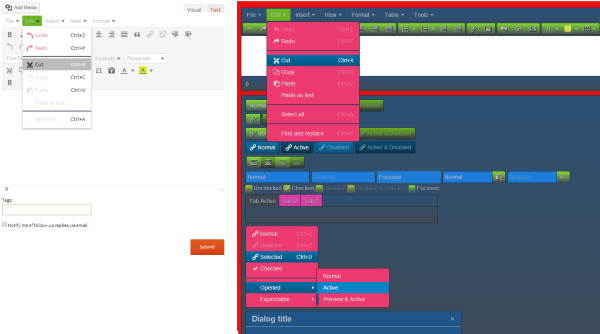
<a href="https://www.dropbox.com/s/kkeoj8bqrs0jok5/Topic.png" title="bbcode" target="_blank"></a>
nothing appears
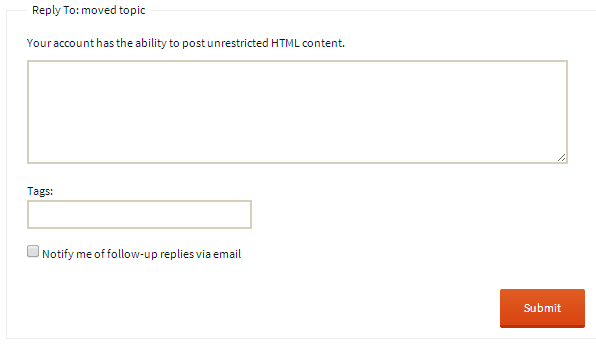
once again: I want to disable only 2 dysfunktional bbcodes – e. g. link and img. This buttons works also not in this forum – try it! It’s a bug!
I make no sense to frustrate user.
Participants can create topics by default:
See the default capabilities here https://codex.bbpress.org/bbpress-user-roles-and-capabilities/
If you uncheck the setting as mentioned above:

You will no longer see the ‘BBCode’ buttons:
Turn off define('WP_DEBUG', true); in your wp-config.php file, this is a known issue.
More info on this:
https://bbpress.trac.wordpress.org/ticket/2309 https://core.trac.wordpress.org/ticket/24169
Double check your database settings, it looks like you are using phpbb for the table prefix, most likely this needs to be phpbb_.
You can check these settings by opening your phpBB config.php file and get the settings from that file:
eg.
$dbname = 'db_name';
$dbuser = 'db_user';
$dbpasswd = '1234';
$table_prefix = 'phpbb_';
Edit: PS, I did not get an email that there was a reply on this, and it’s definitely checked…
Firstly, did you get this reply?
And I’m a little confused: doesn’t bbPress have it’s own editor that’s separate from WordPress? I have an awesome editor for WordPress, but it doesn’t show up for bbPress.
My bad, Yes and no, bbPress can use WordPress’ editor if you enable TinyMCE as detailed here, that is the same editor you see in the backend of WordPress to create posts, pages tec.
The original links I posted are for adding custom themes for TinyMCE.
If you are not using TinyMCE you can edit bbPress CSS in the ‘/* =TinyMCE in themes’ section around line #714.
Ok, so ignore the above, I have found and hit the same wall you have with the ‘editor buttons’, I’m not sure if this has changed with WordPress 3.9 and TinyMCE 4 but I can’t override these either without some serious hacky code.
I’ll create a bbPress and/or WordPress ticket/s in trac so this can be done without quite so much effort. I’ve been messing about for the past hour trying to get the numerous combinations of ‘editor styles’ to work and am now walking away to go ask the experts 😉