Search Results for 'code'
-
AuthorSearch Results
-
July 19, 2014 at 11:29 pm #149363
In reply to: customizing bbpress admin links
Robkk
Moderatorheres is what i have now , the sticky and super sticky link are still in one
libecause i dont know how to split the two links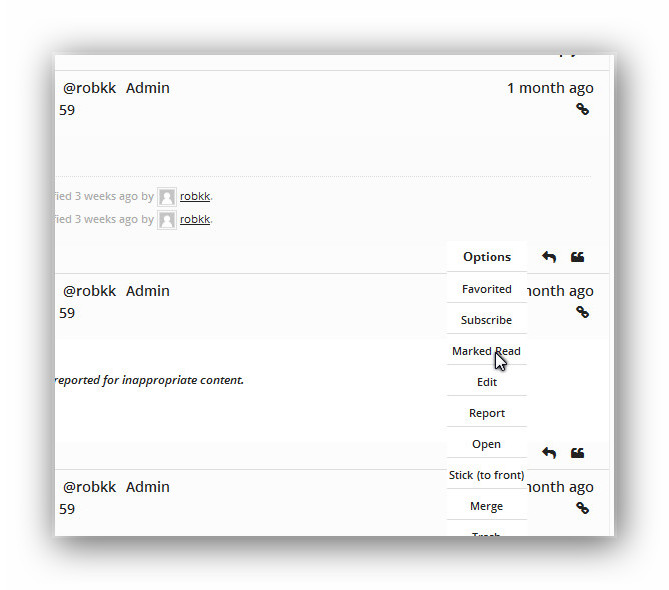
there is a new problem though with a new css way of displaying a dropdown and working on every post , i have run into some blank lists when i switch to a user with a participant role.
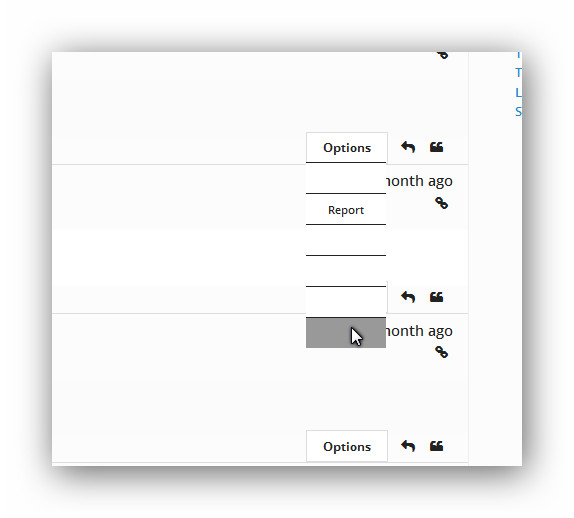
i thought maybe i could use
if current_user_can 'moderate'to display only the certain lists (
<li>)and also only show the entire menu if the user is logged in
but i dont know how to stack three if functions together
this is the code i have in my loop-single-reply.php
<?php if (bbp_is_topic(bbp_get_reply_id()) ) { ?>
<div id="bbpdropdown">
    <div class="wrapper">
        <div class="content">
            <ul>
<li> <?php echo bbp_get_user_favorites_link(); ?></li>
<li> <?php echo bbp_get_user_subscribe_link(); ?></li>
<li> <?php echo bbp_get_topic_edit_link(); ?></li>
<li><?php echo bbp_get_topic_close_link(); ?></li>
<li><?php echo bbp_get_topic_stick_link(); ?></li>
<li><?php echo bbp_get_topic_merge_link(); ?></li>
<li><?php echo bbp_get_topic_trash_link(); ?></li>
<li><?php echo bbp_get_topic_spam_link(); ?></li>
            </ul>
        </div>
        <div class="first">Options</div>
    </div>
<?php } ?>

<?php if (bbp_is_reply(bbp_get_reply_id()) ) { ?>
<div id="bbpdropdown">
    <div class="wrapper">
        <div class="content">
            <ul>
<li><?php echo bbp_get_reply_edit_link(); ?></li>
<li><?php echo bbp_get_reply_move_link(); ?></li>
<li><?php echo bbp_get_topic_split_link(); ?></li>
<li><?php echo bbp_get_reply_trash_link(); ?></li>
<li><?php echo bbp_get_reply_spam_link(); ?></li>
            </ul>
        </div>
        <div class="first">Options</div>
    </div>
<?php } ?>
This is what i have in my custom css
#bbpdropdown {
        margin:0;
        font-family:inherit;
    }

#bbpdropdown .wrapper {
    display: inline-block;
    width: 80px;
    margin-right: 10px;
    height: 0px;
    position: relative;
    float: right;
  bottom:5px;
}

#bbpdropdown .first {
    width: 100%;
    display: inline-block;
    cursor: pointer;
    line-height: 30px;
    height: 30px;
    background: #fff;
    color: #222;
    font-weight: bold;
    z-index: 2;
    position: relative;
    text-align: center;
  border:1px solid #ddd;
}

    #bbpdropdown .first:hover,
    #bbpdropdown .content:hover ~ .parent {
        background: #fff;
        -webkit-transition-delay: 0s, 0s, 0s;
    }

    #bbpdropdown .content:hover ~ .parent {
        border-bottom-left-radius: 0;
        border-bottom-right-radius: 0;
        z-index: 0;
    }

#bbpdropdown .content {
    position: absolute;
    display: block;
    z-index: 1;
    height: 0;
    width: 80px;
    box-shadow: none);
    padding-top: 30px;
    border: none;
}

    #bbpdropdown .wrapper:active .content {
        height: auto;
        z-index: 3;
        -webkit-transition-delay: 0s;
    }

    #bbpdropdown .content:hover {
        height: auto;
        z-index: 3;
        -webkit-transition-delay: 0s;
    }


    #bbpdropdown .content ul {
        background: #fff;
        margin: 0;
        padding: 0;
        overflow: hidden;
        height: 100%;
    }

    #bbpdropdown .content ul a {
        text-decoration: none;
  color:#222;
  font-size:11px;
    }

    #bbpdropdown .content li:hover {
        background: #999;
        color: #222;
    }

  #bbpdropdown .content li {
    list-style: none outside none;
    text-align: center;
    color: #222 !important;
    font-size: 14px;
    height: 30px;
  line-height:30px;
    border-top: 1px solid #DDD;
}
@robin-w you want to try this??July 19, 2014 at 1:48 pm #149357In reply to: how to upgrade bbpress 1.0.2 to a newer version?
Robin W
Moderatorthis thread discusses
https://bbpress.org/forums/topic/upgrade-bbpress-1-0-2-to-2-1-2/
looks like you need to go via 1.2 but then should just be export/import?
of course back everything up before you start.
Actually if I were doing this I’d do it on a test site first
https://codex.bbpress.org/creating-a-test-site/
and just see if it works !
Can you document as you go, and When you’ve done it, come back and give us how you did it, and I’ll add it to the
https://codex.bbpress.org/import-forums/bbpress-1-x-buddypress-group-forums/
to help someone in future
July 19, 2014 at 12:24 pm #149354In reply to: Help with getting basic plugin to work
3djake
ParticipantThanks heaps for your help guys.
I ended up using Robins plugin, I edited his display.php file.
For future reference for others, here is what I did
I replaced everyrpi_label1with the name of table in SQL database, this works great.I needed it to work like that because the fields are completed upon registration.
July 19, 2014 at 10:27 am #149349In reply to: Sidebar reappear in topic and topic/
ModeratorHey don’t worry, code is just a bunch of stuff that either works or doesn’t – and yours now works.
what I couldn’t figure out was why the sidebar was showing, and now that you’ve posted the footer.php I can see why. Strange bit of theme coding to put the sidebar in a footer.php but there are only conventions not rules. All you’ve done by deleting the footer line is stop the sidebar running, which is what you wanted.
The fact that I changed your code also is worrying me since I have absolutely no knowledge about php coding. I mean, I’ve found out there is a something called php coding.Don’t worry you’ve done nothing wrong, it’s all good.
NOW the only thing you’ll need to do is make a note of all the changes you made. Themes sometimes have updates, and these may overwrite existing files, and in your case may also delete the bbpress.php. So keep copies of any files you have changed or added on your PC.
July 19, 2014 at 10:14 am #149348In reply to: Sidebar reappear in topic and topic/
gogitossj34
ParticipantOkay, now this is what I did:
I replaced the line above<?php the_title( ‘<h2 ‘ . hybrid_get_attr( ‘entry-title’ ) . ‘>‘, ‘</h2>’ ); ?>
with this line in my old bbpress.php file because I see they are in the similar position and the page work ok.
<?php the_title( ‘<h2 ‘ . hybrid_get_attr( ‘entry-title’ ) . ‘>‘, ‘</h2>’ ); ?>
But at the topic page, it pushed the sidebar to the bottom. So, I deleted the get footer line and everything looks exactly how I want them to be.
Only that now I don’t know if they’ll be any problem, especially when I removed the get footer line.
The fact that I changed your code also is worrying me since I have absolutely no knowledge about php coding. I mean, I’ve found out there is a something called php coding.
Anyway, here is my footer.php content, can you check if anything is important ?
<?php hybrid_get_sidebar( ‘primary’ ); // Loads the sidebar/primary.php template. ?>
</div><!– #main –>
<?php hybrid_get_sidebar( ‘subsidiary’ ); // Loads the sidebar/subsidiary.php template. ?>
</div><!– .wrap –>
<footer <?php hybrid_attr( ‘footer’ ); ?>>
<div class=”wrap”>
<?php hybrid_get_menu( ‘social’ ); // Loads the menu/social.php template. ?>
<p class=”credit”>
<?php printf(
/* Translators: 1 is current year, 2 is site name/link, 3 is WordPress name/link, and 4 is theme name/link. */
__( ‘Copyright © %1$s %2$s. Powered by %3$s and %4$s.’, ‘stargazer’ ),
date_i18n( ‘Y’ ), hybrid_get_site_link(), hybrid_get_wp_link(), hybrid_get_theme_link()
); ?>
</p><!– .credit –>
</div><!– .wrap –>
</footer><!– #footer –>
</div><!– #container –>
<?php wp_footer(); // WordPress hook for loading JavaScript, toolbar, and other things in the footer. ?>
</body>
</html>
July 19, 2014 at 10:13 am #149347In reply to: compact bbpress
Moderatorto get rid of avatar
//get rid of the avatar
function my_bbp_change_avatar_size($author_avatar, $topic_id, $size) {
    $author_avatar = '';
    return $author_avatar;
}

/* Add priority (default=10) and number of arguments */
add_filter('bbp_get_topic_author_avatar', 'my_bbp_change_avatar_size', 20, 3);
add_filter('bbp_get_reply_author_avatar', 'my_bbp_change_avatar_size', 20, 3);
add_filter('bbp_get_current_user_avatar', 'my_bbp_change_avatar_size', 20, 3);
can you give us your url so we can see the lack of search !
July 19, 2014 at 9:39 am #149343In reply to: Sidebar reappear in topic and topic/
ParticipantI tried it but this happen when I get in the General:
Parse error: syntax error, unexpected T_STRING in …/bbpress.php on line 14You can see it here
http://mmo4teens.netai.net/forums/forum/general/I don’t know if this is right but the error seems to be in this line ( ran some php code checker and read the error on my page):
<?php the_title( ‘<h2 ‘ . hybrid_get_attr( ‘entry-title’ ) . ‘>‘, ‘</h2>’ ); ?>
July 19, 2014 at 8:05 am #149342In reply to: Sidebar reappear in topic and topic/
ModeratorHey no need to apologise, it’s often difficult to resolve these things, and it’s not due to your lack of explanation, it will just be something simple that needs fixing !
can you try the following as your bbpress.php
<?php get_header(); // Loads the header.php template. ?>

<main <?php hybrid_attr( ‘content’ ); ?>>

<?php if ( have_posts() ) : // Checks if any posts were found. ?>

<?php while ( have_posts() ) : // Begins the loop through found posts. ?>

<?php the_post(); // Loads the post data. ?>

<article <?php hybrid_attr( ‘post’ ); ?>>

<header class=”entry-header”>
 <?php the_title( ‘<h2 ‘ . hybrid_get_attr( ‘entry-title’ ) . ‘>‘, ‘</h2>’ ); ?>
 </header><!– .entry-header –>

<div <?php hybrid_attr( ‘entry-content’ ); ?>>
 <?php the_content(); ?>
 <?php wp_link_pages(); ?>
 </div><!– .entry-content –>

</article><!– .entry –>

<?php endwhile; // End found posts loop. ?>

<?php else : // If no posts were found. ?>

<?php locate_template( array( ‘content/error.php’ ), true ); // Loads the content/error.php template. ?>

<?php endif; // End check for posts. ?>

</main><!– #content –>

<?php get_footer(); // Loads the footer.php template. ?>
July 19, 2014 at 6:38 am #149341In reply to: Help with getting basic plugin to work
Moderatoralso either use or crack open my plugin that does exactly this, you’ll find all the code in there
July 19, 2014 at 3:35 am #149339In reply to: Forum Page does not have link to Login
ModeratorThanks. But the other problem is
so is the first issue fixed, and how did you do it? or is this part of the same issue?
sounds like you are directing users to a [bbp-login] shortcode not a [bbp-forum-index].
July 19, 2014 at 1:46 am #149333In reply to: Help with getting basic plugin to work
Stephen Edgar
KeymasterUse WordPress’
user_contactmethodshttps://codex.wordpress.org/Plugin_API/Filter_Reference/user_contactmethods
July 19, 2014 at 12:54 am #149332Topic: Help with getting basic plugin to work
in forum PluginsParticipantHi there
I want to add more fields to the users profile and also display them under the users role in posts.
I just want it to fetch the information from the users meta data.
How ever the following does not appear to work
`

<?php
function add_author_details( $user_details ){
/* Add author details */
$user_details['soldier'] = __('Soldier Name');return $user_details;
}
add_filter('user_adddetails', 'add_author_details');function add_author_details_author() {
echo get_user_meta(bbp_get_reply_author_id(), 'soldier', true);
}
add_action( 'bbp_theme_after_reply_author_details', 'add_author_details_author' ); ?>
`Any help would be appreciated.
July 19, 2014 at 12:08 am #149330In reply to: User Groups and Forums
KeymasterbbPress’ ‘private’ forums can be viewed by any bbPress user logged in.
bbPress’ ‘hidden’ forums can only be viewed by any bbPress moderators and keymasters.https://codex.bbpress.org/getting-started-with-bbpress/#creating-your-first-forum
For BuddyPress specific info you should see http://buddypress.org
https://codex.buddypress.org/buddypress-components-and-features/groups/group-settings-and-roles/
July 18, 2014 at 11:58 pm #149328In reply to: Update 2.5.4 – Lost Languages Files
KeymasterYou’ll need to download the translations manually per the details here:
https://codex.bbpress.org/bbpress-in-your-language/
https://translate.wordpress.org/projects/bbpress/2.5.xSave them into
/wp-content/languages/pluginsWith some luck these two direct links will get you the .mo and .po. Make sure you rename both files so they are named
bbpress-fr_FR.moandbbpress-fr_FR.porespectively.The reason I asked for the language you are using is because if the language translation is 100% translated then bbPress translations are delived to you automatically by the same WordPress Core ‘Automatic Updates’ mechanism, sadly bbPress French translations are not at 100%. (Technically they are at 100% translated but there are 228 strings waiting to be approved.)
July 18, 2014 at 7:08 pm #149320In reply to: Update 2.5.4 – Lost Languages Files
KeymasterWhat language are you using? You should see bbPress’ translations in
/wp-content/languages/(Dependant on the language you use also changes a couple of things)
July 18, 2014 at 4:29 pm #149315In reply to: compact bbpress
ModeratorThat doesn’t seem to be possible in 2012, which forces a sidebar if you want a search facility, and which consumes a lot of vertical space with the identity of the contributor, including a large avatar.
Good job we’re in 2014 then 🙂
If you switch on the search facility
dashboard>settings>forums and look for search allow forum wide search, you’ll get a search bar at the top of the forums pagefor the avatar size use the following code in your functions file
function my_bbp_change_avatar_size($author_avatar, $topic_id, $size) {
    $author_avatar = '';
    if ($size == 14) {
        $size = 24;
    }
    if ($size == 80) {
        $size = 110;
    }
    $topic_id = bbp_get_topic_id( $topic_id );
    if ( !empty( $topic_id ) ) {
        if ( !bbp_is_topic_anonymous( $topic_id ) ) {
            $author_avatar = get_avatar( bbp_get_topic_author_id( $topic_id ), $size );
        } else {
            $author_avatar = get_avatar( get_post_meta( $topic_id, '_bbp_anonymous_email', true ), $size );
        }
    }
    return $author_avatar;
}

/* Add priority (default=10) and number of arguments */
add_filter('bbp_get_topic_author_avatar', 'my_bbp_change_avatar_size', 20, 3);
add_filter('bbp_get_reply_author_avatar', 'my_bbp_change_avatar_size', 20, 3);
add_filter('bbp_get_current_user_avatar', 'my_bbp_change_avatar_size', 20, 3);
The example increase the size, just change to to what you want
see https://codex.bbpress.org/functions-files-and-child-themes-explained/ for how to do that
you can also remove things like keymaster – just come back with what you want – and we’ll try to help you
July 18, 2014 at 4:18 pm #149314In reply to: Forum Page does not have link to Login
ModeratorYour link takes you to a registration page
there are several ways to get a login.
You can use a sidebar and add the login widget
or you can add a login to your menus
or a modal loginJuly 18, 2014 at 4:09 pm #149313In reply to: My topics side bar is not appearing in my forum?
ModeratorOk,
Can you confirm that that you actually followed my instructions? Which weren’t to re-install the widget. If you’ve simply done that then you would not have changed any settings (they remain in the database on deletion and are just re-enlivened when the widget is re-installed) and you would still have the problem. If you follow the instructions, this changes settings and in many cases gets it working.
But assuming you haven’t tried to guess what I was trying to get you to do, and have followed the instructions and these didn’t work, then we’ll try approach 2.
This involves installing another plugin and using that to set conditions on the sidebar.
so go to dashboard>plugins>install new and look for ‘widget logic’ by Alan Trewartha and install that.
This lets you set conditions on when a widget appears in the sidebar.
so now in your main sidebar if you look at any widgert you’ll see a new box at the bottom which says widget_logic
for any widgets you want in all your pages including bbpress – just leave this blank
for widgets that you just want in bbpress pages add the logic
is_bbpress()in the widget logic box
for widgets that you don’t want in bbpress pages add the logic
!is_bbpress()in the widget logic boxJuly 18, 2014 at 3:42 pm #149312Topic: Forum Page does not have link to Login
in forum Installationarminius
ParticipantHello, just setup my first forum, and it does not give the user an option to login if they have already created the account. On my forum page, I have the code: [bbp-forum-index]. Here is the page: http://bodybuildingdietapp.com/forum/. Insight would be appreciated.
July 18, 2014 at 1:11 pm #149308In reply to: Sidebar reappear in topic and topic/
Moderatorcan you post the code from your current bbpress.php
July 18, 2014 at 1:06 pm #149307In reply to: bbPress menus not appearing in some of my sites
Moderator“well, that’s life in the world of WordPress, so live with it”, which is what your first comment conveyed” – yep and it’s what I meant – having coded several plugins, I can with some certainty say that the way you link to wordpress does mean that several people can hook to the same item and affect each other, and no we can’t test all plugins against all other plugins.
But your offer to try and come up with a repeatable problem would be great, and if you can do so I’d be happy to try and look and let you know why a particular plugin is affecting.
However 5 people going to the doctor after having been to the gym doesn’t mean there’s a common problem or that the gym is to blame 🙂
Anyway I look forward to hearing from you when you’ve had a chance to investigate.
July 18, 2014 at 10:58 am #149303In reply to: Sidebar reappear in topic and topic/
ParticipantOk. Now this is what I’m currently have:
The forum page is okay with full width and no sidebar but topic is still like before, with sidebar.
Note that I also did thing a bit differently. This time I didn’t remove the get_footer line. Instead I chose the 1 page width layout ( not template ). I did try this before but it didn’t work because I put the [bbp-index] line inside c.o.d.e in the page. After I remove them, it worked.
So now, I want the topic to be like the forum page, no sidebar and full width.And also, I’ve just came across this other things. I notice that there are 2 “forum” page. forumS and forum. the things is. When I access the forum page through the forum permalink, it doesn’t have side bar but when I access it through the forumS permalink like when I click on forums at Home > forums > …, it act just like the topic page.
This is a long post but to summarize:
The topic and the forum access from the forums permalink to be full width with no sidebar.Thanks in advance.
July 18, 2014 at 10:56 am #149302ModeratorI deactivated, deleted, reinstalled, and reactivated the Easy WP SMTP plug-in and tested: same result (below.)
OK, but did you just deactivate the plugin, and then test a forum post. I was keen to see if the problem was being caused by bbpress or the plugin.
@nightcoder – you’re issue may or may not be the same. That’s why I’m keen to get surachar
to see if they have the problem without the plugin.The bit of code you quote is the bit that sets up the variable for the to address, but as far as I can see there’s nothing there that should be causing a problem, it simply strips the http part from the URL as set in wp_options ‘home’.
July 18, 2014 at 10:33 am #149299In reply to: bbPress menus not appearing in some of my sites
ModeratorThese issues will occur with different combinations of plugins, and it is nobody’s fault.
and it will never be eliminated.Wordpress is free open source software. It allows others to hook into it using Filters and actions, as well as using templates and functions. Additionally theme developers can affect the way wordpress functions. This lets lots of other people change how wordpress works and add both functionality and looks.
So if two developers both hook into the same bit of code, the actions of one can alter or even cancel out the other’s code.
With many thousands of plugins it is simply impossible for developers to test to see if their plugin works with every other plugin out there.
bbPress is thoroughly tested with the latest version of WordPress, in combination with all of the wordpress default themes (twentyten, twentyeleven etc.) to ensure it functions. Most bbpress plugin developers will also test against this combination to give a good degree of conformance.
This is the best that you can get.
It is no more the fault of bbpress that it doesn’t work with plugin A, than it is the fault of plugin A that it doesn’t work with bbpress!
Sorry but that is life 🙂
Open source means you get lots of great FREE software but you don’t get an integration guarantee – it’s pretty damn good, but sorry not perfect.
And It’s nobody’s fault !
July 18, 2014 at 10:09 am #149295In reply to: bbPress menus not appearing in some of my sites
linkomatic
ParticipantI have experienced similar problems with the bbPress menus not showing in the dashboard. For example, I have a site where both CPT UI and WordPress SEO plugins are installed. The menu items appeared adjacent to each other in the dashboard – then WordPress SEO menu appeared just above the CPT UI menu. After I installed bbPress, the Forums, Topics and Replies menus did not appear in the dashboard. When I use Chrome inspector to look at the code, it appeared that the bbPress menus were trying to display below the WordPress SEO menu and above the CPT UI menu — but they did not appear. I tried deactivating the WordPress SEO plugin to see what would happen and, sure enough, the bbPress menus then DID appear in the dashboard, just above the CPT UI menu. I reactivated WordPRess SEO, and everything now looks fine: SEO appears above Forums, Topics and Replies, followed by CPT UI.
So, perhaps all’s well that ends well, but this semi-random behavior is concerning. I’ve seen other similar issues myself, and employed different solutions recommended by others on different discussion threads. One of these involved installing the Capability Manager plugin. That fixed the dashboard menu problem but BROKE the CPT UI plugin! I deactivated Capability Manager, which un-broke CPT UI, and still the menus displayed correctly. So, again, all’s well that ends well — but what the heck is going on here? It would be nice if the bbPress plugin developer would weigh in on this topic — and figure out a way to eliminate these issues.
-
AuthorSearch Results

