Search Results for 'code'
-
AuthorSearch Results
-
July 21, 2014 at 10:33 pm #149450
In reply to: Sidebar reappear in topic and topic/
gogitossj34
ParticipantThanks for trying so hard to help me.
Can you send the file to me since I’ve notice that copying the code sometime corrupt this theme. Even copying the original code break it sometime.July 21, 2014 at 7:15 pm #149448Halo Diehard
ParticipantHmm… not sure what’s going on here. Have you tested it on a default theme?
My avatars were not doing that the last I checked. I’m pretty sure they were auto-resizing smaller, and fitting in quite nice. But, I stopped using this bbPress theme before the last couple WordPress updates because it’s not responsive, and the default bbPress is. It’s possible something changed in the WordPress code to make it act different.
If you can make a child theme, you could try this to change the avatars’ size on the page where they’re squished with css:
bbp-topic-meta .avatar {
     width: 30px;
     height: 30px;
}
July 21, 2014 at 5:24 pm #149433In reply to: Forum Page does not have link to Login
Robin W
Moderatorok, so now we are back to my first response which gave you two ways to do it.
If you want it within the screen, then add this to your functions file
//add login to top of index
function index_login () {
if (!is_user_logged_in() ) {
echo do_shortcode('[bbp-login]');
}
}
add_action ('bbp_template_before_forums_index', 'index_login' ) ;
see
for how to do this
July 21, 2014 at 2:17 pm #149426In reply to: Sidebar reappear in topic and topic/
Moderatorok, this theme has annoyed me so much that I have down loaded it.
I then saw that it claims to be a bbpress friendly theme, aghh!!! why not include a fullwidth forum????
so had a little play
on my test site the following works
bbpress.php looks like
<?php get_header(); // Loads the header.php template. ?>

<main>

	<?php if ( have_posts() ) : // Checks if any posts were found. ?>


		<?php while ( have_posts() ) : // Begins the loop through found posts. ?>

			<?php the_post(); // Loads the post data. ?>

			<article <?php hybrid_attr( 'post' ); ?>>

				<?php if ( is_singular( get_post_type() ) ) : // If viewing a single page. ?>

					<header class="entry-header">
						<h1 <?php hybrid_attr( 'entry-title' ); ?>><?php single_post_title(); ?></h1>
					</header><!-- .entry-header -->

					<div <?php hybrid_attr( 'entry-content' ); ?>>
						<?php the_content(); ?>
						<?php wp_link_pages(); ?>
					</div><!-- .entry-content -->

				<?php else : // If not viewing a single page. ?>

					<header class="entry-header">
						<?php the_title( '<h2 ' . hybrid_get_attr( 'entry-title' ) . '><a href="' . get_permalink() . '" rel="bookmark" itemprop="url">', '</a></h2>' ); ?>
					</header><!-- .entry-header -->

					<div <?php hybrid_attr( 'entry-content' ); ?>>
						<?php the_content(); ?>
						<?php wp_link_pages(); ?>
					</div><!-- .entry-content -->

				<?php endif; // End single page check. ?>

			</article><!-- .entry -->

		<?php endwhile; // End found posts loop. ?>

	<?php else : // If no posts were found. ?>

		<?php locate_template( array( 'content/error.php' ), true ); // Loads the content/error.php template. ?>

	<?php endif; // End check for posts. ?>

</main><!-- #content -->


		<footer <?php hybrid_attr( 'footer' ); ?>>

			<div class="wrap">

				<?php hybrid_get_menu( 'social' ); // Loads the menu/social.php template. ?>

				<p class="credit">
					<?php printf(
						/* Translators: 1 is current year, 2 is site name/link, 3 is WordPress name/link, and 4 is theme name/link. */
						__( 'Copyright © %1$s %2$s. Powered by %3$s and %4$s.', 'stargazer' ),
						date_i18n( 'Y' ), hybrid_get_site_link(), hybrid_get_wp_link(), hybrid_get_theme_link()
					); ?>
				</p><!-- .credit -->

			</div><!-- .wrap -->

		</footer><!-- #footer -->

	</div><!-- #container -->

	<?php wp_footer(); // WordPress hook for loading JavaScript, toolbar, and other things in the footer. ?>

</body>
</html>
July 21, 2014 at 6:00 am #149413In reply to: Sidebar reappear in topic and topic/
ParticipantSorry, ignore the code checker part, the error said it all.
July 21, 2014 at 5:52 am #149412In reply to: Sidebar reappear in topic and topic/
Participantgetting this, code checker said it’s mssing ); ?> on line 52 or 50
Parse error: syntax error, unexpected ‘;’ in /home/a7203024/public_html/wp-content/themes/stargazer/bbpress.php on line 52
Just have this weird idea. What if we make a copy of footer.php, name it footer1.php then delete the getsidebar line in it. Afterthat, modified bbpress.php for it to call the footer1.php nstead of footer.php ?
July 21, 2014 at 5:25 am #149410In reply to: Sidebar reappear in topic and topic/
ModeratorThe fact that your theme has coded the sidebar in the footer is really annoying !
No idea why that isn’t working, but plan b
change footer.php back to how it was, that way all the other pages will work.
now go back into bbpress.php and instead of the
<?php get_footer(); // Loads the footer.php template. ?>paste the footer.php code, but without the two sidebar lines
</div><!– #main –>
</div><!– .wrap –>
<footer <?php hybrid_attr( ‘footer’ ); ?>>
<div class=”wrap”>
<?php hybrid_get_menu( ‘social’ ); // Loads the menu/social.php template. ?>
<p class=”credit”>
<?php printf(
/* Translators: 1 is current year, 2 is site name/link, 3 is WordPress name/link, and 4 is theme name/link. */
__( ‘Copyright © %1$s %2$s. Powered by %3$s and %4$s.’, ‘stargazer’ ),
date_i18n( ‘Y’ ), hybrid_get_site_link(), hybrid_get_wp_link(), hybrid_get_theme_link()
); ?>
</p><!– .credit –>
</div><!– .wrap –>
</footer><!– #footer –>
</div><!– #container –>
<?php wp_footer(); // WordPress hook for loading JavaScript, toolbar, and other things in the footer. ?>
and see what that does ! Sorry without having your theme, I’m guessing at some of the code, and am as before likely to miss some grammer so you may need to play a bit with it.
July 21, 2014 at 4:21 am #149408In reply to: Sidebar reappear in topic and topic/
ParticipantI’m getting this instead
Parse error: syntax error, unexpected ‘<‘ in /home/a7203024/public_html/wp-content/themes/stargazer/footer.php on line 7I noticed that your code was missing a .?> thing so I added it and no error but the sidebar is now hidden in everypage.
July 21, 2014 at 3:04 am #149406ModeratorApologies was trying to answer many threads with guests due for dinner, so prevouis answer was a bit short !
I followed it and copy-and-pasted the code into my capabilities.php
ahhh, now I understand, as per original thread you need to add that code to your functions.php, not to capabilities.php, and that would explain the error.
Whilst you could amend the participant role, I haven’t documented that, so easiest is just for you to create a new role and give it the participant capabilities plus the ‘delete topics’ and ‘delete replies’. This article explains how
add this code to your functions file – see
https://codex.bbpress.org/functions-files-and-child-themes-explained/
July 21, 2014 at 2:50 am #149405In reply to: Sidebar reappear in topic and topic/
Moderatorlate night brain fade
try
<?php if (!bbpress()) {hybrid_get_sidebar( ‘primary’ ); } // Loads the sidebar/primary.php template.?>

</div><!– #main –>

<?php if (!bbpress()) {hybrid_get_sidebar( ‘subsidiary’ ); }// Loads the sidebar/subsidiary
July 21, 2014 at 2:44 am #149402Leonyipa
Participantyes, I followed your instructions, and when I saw:
I followed it and copy-and-pasted the code into my capabilities.php
however, it still show me the error message.
sorry but pastebin adds millions of blank lines, so without re-editing the file I can’t see what you are doing.
Does it work if using RAW Paste Data?
July 20, 2014 at 8:00 pm #149397In reply to: Import forums from localhost
Stephen Edgar
KeymasterDoes it import anything at all? Do see any messages such as ‘Conversion Complete’?
I think most likely it will be you have an incorrect table prefix, my PunBB dtatabase tables are all prefixed with
punbb_so you should check what yours is via phpMyAdmin. Also double check your MySQL username and password.If neither of the above work let me know the punBB version you are importing from and I will take a closer look for anything that may have changed recently.
July 20, 2014 at 5:32 pm #149395Robkk
Moderator@robin-w got this done successfully , didnt need a filter the way i did it
took me about a few minutes when i found how this bit of code is arranged
July 20, 2014 at 5:01 pm #149394In reply to: Forum Page does not have link to Login
arminius
ParticipantBBDT Forum will bring you to enter username/password, but no link to new user registration. That page is using: [bbp-forum-index] and is one I setup in wordpress, no link. Does that answer your question? Also, do I need to have a page called Forum Registration using: [bbp-login] that seems redundant. When I initally started I used this link as a guide if that helps: https://codex.bbpress.org/step-by-step-guide-to-setting-up-a-bbpress-forum/
July 20, 2014 at 3:55 pm #149389In reply to: Sidebar reappear in topic and topic/
Moderatorok no problem
Normally you would have a bbpress.php that would contain
header stuff
while have posts loop stuff
do_sidebar stuff
do_footer stuffYour theme has decided that the sidebar stuff will be in the footer stuff.
Now all this will work for non bbpress pages, so all we need to do is stop sidebars for bbpress pages.
so put back the footer line in bbpress.php
and then edit footer.php to make the first lines that were
<?php hybrid_get_sidebar( ‘primary’ ); // Loads the sidebar/primary.php template. ?>

</div><!– #main –>

<?php hybrid_get_sidebar( ‘subsidiary’ ); // Loads the sidebar/subsidiary.php template. ?>
change to
<?php if !bbpress() {hybrid_get_sidebar( ‘primary’ ); } // Loads the sidebar/primary.php template.?>

</div><!– #main –>

<?php if !bbpress() {hybrid_get_sidebar( ‘subsidiary’ ); }// Loads the sidebar/subsidiary.php template. ?>
essentially that code says ‘if the page is not a bbpress page ‘ the do the sidebar stuff the ‘!’ is a not statement and bbpress() checks if we are dispaying a bbprtess page
Give it a try, and come back and let me know if it works.
July 20, 2014 at 3:47 pm #149388Moderatorwhy changing directly doesn’t work?
because on every software update you will lose your changes!
My Full Code
sorry but pastebin adds millions of blank lines, so without re-editing the file I can’t see what you are doing.
If you go back to my original instructions and follow these and get an error, then come back and I’ll try and help you further
or if you go back to your
2) making custom role, but it says:
“ Parse error: syntax error, unexpected ‘roles’ (T_STRING), expecting ‘(‘ in /home/gleam/public_html/wp-content/plugins/bbpress/includes/core/capabilities.php on line 216
216: function add_new roles( $bbp_roles )
217: {and let me have lines 210 to 220 I’ll try and sort the error
July 20, 2014 at 3:19 pm #149386In reply to: What could make bbPress better? I have ideas…
ModeratorThe ethos behind bbpress is keep it light and let other add plugins for the functionality you require, so you don’t get tons of code for functions that you don’t need.
1. You can create menu logins such as
or
or add this code to your functions file
//add login to top of index
function index_login () {
if (!is_user_logged_in() ) {
echo do_shortcode('[bbp-login]');
}
}
add_action ('bbp_template_before_forums_index', 'index_login' ) ;
see
2. Easily added as a plugin
https://wordpress.org/plugins/bbp-signature/
3. can you give an example of how you would like it to look? doesn’t need to be a bbpress site
July 20, 2014 at 2:43 pm #149385In reply to: Accept shortcodes in forum
ModeratorJuly 20, 2014 at 11:27 am #149381Topic: Accept shortcodes in forum
in forum TroubleshootingSAPinfoASAP
ParticipantHi,
Is it possible to allow shortcodes in the forum? These shortcodes are not part of bbpress, but other wordpress plugins I have installed.
For example one short code allows me to add an optin form, I would like to add this to the end of my forum post.
Thanks in advance,
July 20, 2014 at 10:28 am #149380Topic: Allow subscriber upload media in reply topic
in forum TroubleshootingThanh Sang Nguyen
ParticipantI have use your plugin bbPress. I has add this code into form-reply.php and form-topic.php
bbp_the_content( array( 'context' => 'reply', 'media_buttons' => true ));
Add media button appear, when I upload image, it not work and error “An error occurred in the upload. Please try again later.”
How can I upload image with subscriber. Please don’t sugguest me use GD bbPress attchment.
WP 3.9.1 and bbPress version 2.5.3.July 20, 2014 at 9:01 am #149376In reply to: need some help
Moderatoryou put this into your child themes functions.php
source https://gist.github.com/ntwb/7864894
add_filter( 'bbp_get_dynamic_roles', 'ntwb_bbpress_custom_role_names' );

function ntwb_bbpress_custom_role_names() {
	return array(

		// Keymaster
		bbp_get_keymaster_role() => array(
			'name'         => 'My Custom Keymaster Role Name',
			'capabilities' => bbp_get_caps_for_role( bbp_get_keymaster_role() )
		),

		// Moderator
		bbp_get_moderator_role() => array(
			'name'         => 'My Custom Moderator Role Name',
			'capabilities' => bbp_get_caps_for_role( bbp_get_moderator_role() )
		),

		// Participant
		bbp_get_participant_role() => array(
			'name'         => 'My Custom Participant Role Name',
			'capabilities' => bbp_get_caps_for_role( bbp_get_participant_role() )
		),

		// Spectator
		bbp_get_spectator_role() => array(
			'name'         => 'My Custom Spectator Role Name',
			'capabilities' => bbp_get_caps_for_role( bbp_get_spectator_role() )
		),

		// Blocked
		bbp_get_blocked_role() => array(
			'name'         => 'My Custom Blocked Role Name',
			'capabilities' => bbp_get_caps_for_role( bbp_get_blocked_role() )
		)
	);
}
July 20, 2014 at 5:42 am #149374ParticipantMy Full Code in /public_html/wp-content/plugins/bbpress/includes/core/capabilitiese.php
July 20, 2014 at 5:33 am #149373ParticipantSorry for the late reply,
why changing directly doesn’t work? I am a bit confused sorry
yes, I will paste the code
July 20, 2014 at 1:17 am #149369In reply to: Updating BBpress question
Moderatorvery high chance it will be fine, but risk that your developer will have changed some core files.
Since your trying to learn stuff, then I strongly recommend that you create a test site, which will let you try it there first, but also will teach you loads about wordpress and how it operates, and give you confidence to make other changes in a test area first
July 19, 2014 at 11:29 pm #149363In reply to: customizing bbpress admin links
Moderatorheres is what i have now , the sticky and super sticky link are still in one
libecause i dont know how to split the two links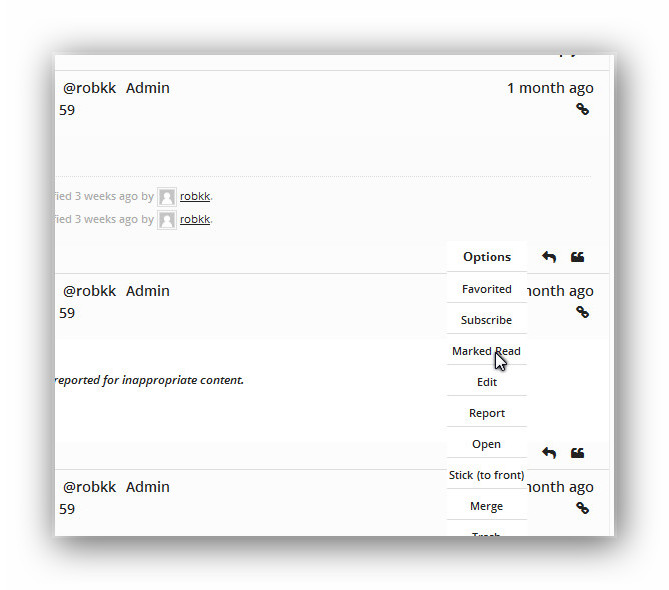
there is a new problem though with a new css way of displaying a dropdown and working on every post , i have run into some blank lists when i switch to a user with a participant role.
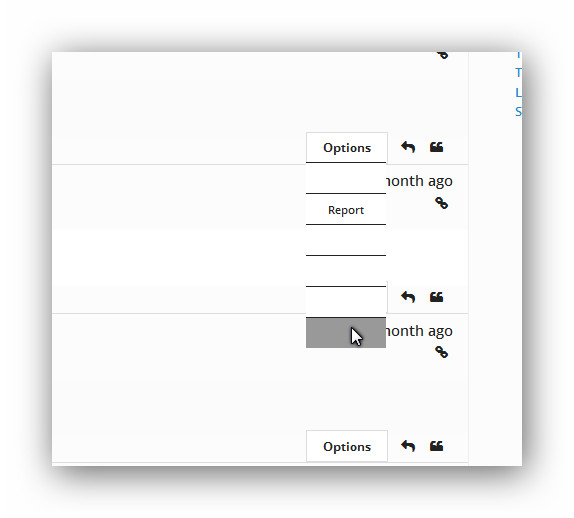
i thought maybe i could use
if current_user_can 'moderate'to display only the certain lists (
<li>)and also only show the entire menu if the user is logged in
but i dont know how to stack three if functions together
this is the code i have in my loop-single-reply.php
<?php if (bbp_is_topic(bbp_get_reply_id()) ) { ?>
<div id="bbpdropdown">
    <div class="wrapper">
        <div class="content">
            <ul>
<li> <?php echo bbp_get_user_favorites_link(); ?></li>
<li> <?php echo bbp_get_user_subscribe_link(); ?></li>
<li> <?php echo bbp_get_topic_edit_link(); ?></li>
<li><?php echo bbp_get_topic_close_link(); ?></li>
<li><?php echo bbp_get_topic_stick_link(); ?></li>
<li><?php echo bbp_get_topic_merge_link(); ?></li>
<li><?php echo bbp_get_topic_trash_link(); ?></li>
<li><?php echo bbp_get_topic_spam_link(); ?></li>
            </ul>
        </div>
        <div class="first">Options</div>
    </div>
<?php } ?>

<?php if (bbp_is_reply(bbp_get_reply_id()) ) { ?>
<div id="bbpdropdown">
    <div class="wrapper">
        <div class="content">
            <ul>
<li><?php echo bbp_get_reply_edit_link(); ?></li>
<li><?php echo bbp_get_reply_move_link(); ?></li>
<li><?php echo bbp_get_topic_split_link(); ?></li>
<li><?php echo bbp_get_reply_trash_link(); ?></li>
<li><?php echo bbp_get_reply_spam_link(); ?></li>
            </ul>
        </div>
        <div class="first">Options</div>
    </div>
<?php } ?>
This is what i have in my custom css
#bbpdropdown {
        margin:0;
        font-family:inherit;
    }

#bbpdropdown .wrapper {
    display: inline-block;
    width: 80px;
    margin-right: 10px;
    height: 0px;
    position: relative;
    float: right;
  bottom:5px;
}

#bbpdropdown .first {
    width: 100%;
    display: inline-block;
    cursor: pointer;
    line-height: 30px;
    height: 30px;
    background: #fff;
    color: #222;
    font-weight: bold;
    z-index: 2;
    position: relative;
    text-align: center;
  border:1px solid #ddd;
}

    #bbpdropdown .first:hover,
    #bbpdropdown .content:hover ~ .parent {
        background: #fff;
        -webkit-transition-delay: 0s, 0s, 0s;
    }

    #bbpdropdown .content:hover ~ .parent {
        border-bottom-left-radius: 0;
        border-bottom-right-radius: 0;
        z-index: 0;
    }

#bbpdropdown .content {
    position: absolute;
    display: block;
    z-index: 1;
    height: 0;
    width: 80px;
    box-shadow: none);
    padding-top: 30px;
    border: none;
}

    #bbpdropdown .wrapper:active .content {
        height: auto;
        z-index: 3;
        -webkit-transition-delay: 0s;
    }

    #bbpdropdown .content:hover {
        height: auto;
        z-index: 3;
        -webkit-transition-delay: 0s;
    }


    #bbpdropdown .content ul {
        background: #fff;
        margin: 0;
        padding: 0;
        overflow: hidden;
        height: 100%;
    }

    #bbpdropdown .content ul a {
        text-decoration: none;
  color:#222;
  font-size:11px;
    }

    #bbpdropdown .content li:hover {
        background: #999;
        color: #222;
    }

  #bbpdropdown .content li {
    list-style: none outside none;
    text-align: center;
    color: #222 !important;
    font-size: 14px;
    height: 30px;
  line-height:30px;
    border-top: 1px solid #DDD;
}
@robin-w you want to try this??
-
AuthorSearch Results

