Ah ok thanks! I did find the code for that on here
Check out the docs in the codex, this I think should help you get started:
Functions files and child themes – explained !
You can do this by creating a child theme and editing the form-anonymous template, you can find details on doing this here https://codex.bbpress.org/functions-files-and-child-themes-explained/
I read through this forum because I am experiencing similar issues…(I am a keyholder). I am using both Buddypress and bbpress. I do not have programming knowledge or experience, I do not understand codex or php, I’m just looking for someone to hopefully assist me with a simple solution to these issues, so that when people sign up as users, their interactions are seamless and they are able to quickly find the information they are looking for.
1. When logged in as a user, I am not able to access forums without using the URL to the page. I used the “user roles and capabilities” plugin as recommended above, to change the user settings in the back end so I could view “private” posts and that sort of worked but I still have to use the URL to find the forum page. I have also run the tools for both Buddypress and bbpress. There are several links in the user profile area but they all seem to direct me to the user activities only…I cannot link to any of the content posted by other users through those links. (Same with the tool bar at the top of the page and all of the drop down menus).
2. I just created a topic to post under a forum. Under my keyholder account, I am able to see the topic when I click on it but when I try clicking on it as a user, it doesnt show up. It just tells me there is “0 replies, has 1 post, and last updated by me” and the topic is not there.
No plugin bbpress Login Register Links OnForumPage
Quando coloco echo do_shortcode(‘[bbp-login]‘); já imprime o formulário, como que eu faço para colocar o nome login e quando eu clicar ir para esse formulário?
here is what I got.
I had to edit loop-single-reply.php after all,
I used a conditional to output the minimal layout only for single topics only.
I had to use bbp_reply_permalink(); instead of bbp_reply_url();.
Like I said you for sure do have to edit the bbPress reply titles plugin for what you exactly want, your gonna have to possibly make the reply title required as well.
You are going to end up doing a lot of customization to get the rest of the funcitonality, because I am not sure how submitting a threaded reply works on the other forum.
You are also going to figure out how to show the threads on the single reply page, for the specific topic they were originally from.
Bunch more customizing, much more than free support could possible help with.
I will share any custom templates I used later.

Thank you for your help. Unfortunately I think I have reached a dead end.
I decided to give another try. I created a new phpbb database, and a new WordPress installation, just in case I had caused some damage.
Attempting the import produced the following error. Presumably it is objecting to something in my phpbb database. I can not find ‘forum_topics_approved’ anywhere (but have little experience with MySQL).
WordPress database error: [Unknown column ‘forums.forum_topics_approved’ in ‘field list’]
SELECT convert(forums.forum_id USING “utf8mb4”) AS forum_id,convert(forums.parent_id USING “utf8mb4”) AS parent_id,convert(forums.forum_topics_approved USING “utf8mb4”) AS forum_topics_approved,convert(forums.forum_posts_approved USING “utf8mb4”) AS forum_posts_approved,convert(forums.forum_name USING “utf8mb4”) AS forum_name,convert(forums.forum_desc USING “utf8mb4”) AS forum_desc,convert(forums.left_id USING “utf8mb4”) AS left_id,convert(forums.forum_type USING “utf8mb4”) AS forum_type,convert(forums.forum_status USING “utf8mb4”) AS forum_status FROM phpbb_forums AS forums LIMIT 0, 100
No forums to convert
Starting Conversion
My comment about lack of stats was that there was no positive feedback e.g. x forums imported, which would be helpful.
I did not understand the comment “If you also view the source of the page, right click and “inspect” will also bring this up, you should see some debug code showing the SQL queries being performed during the import:”
Use this custom CSS, add it anywhere you can put custom css like in a child themes style.css file or in a custom css plugin.
#bbpress-forums p.bbp-topic-meta img.avatar,
#bbpress-forums ul.bbp-reply-revision-log img.avatar,
#bbpress-forums ul.bbp-topic-revision-log img.avatar,
#bbpress-forums div.bbp-template-notice img.avatar,
#bbpress-forums .widget_display_topics img.avatar,
#bbpress-forums .widget_display_replies img.avatar {
  float: none;
  margin-bottom: auto;
  border: none;
  vertical-align: middle;
  padding: 0;
}
@douglsmith
Oh shoot your right Doug. I might have suggested the wrong thing.
I have also seen this happen with TinyMCE activated. It seems to be iOS users and they claim that they haven’t pasted anything, but I have not observed this for myself yet.
I have no idea if it could be IOS specific?? I can check I guess?? Damn thats weird if it is.
@harjindersingh645
You will need to use this since you copied text to your forums. Pasting other articles content in the Visual Editor in TinyMCE could end up posting the HTML content, its recommended to post any articles content into the HTML editor, but you can also use this PHP code snippet from this guide below, that I think Doug did add, that would help resolve this issue that could be caused pasting articles in the visual editor for any further posts submitted.
function bbp_tinymce_paste_plain_text( $plugins = array() ) {
    $plugins[] = 'paste';
    return $plugins;
}
add_filter( 'bbp_get_tiny_mce_plugins', 'bbp_tinymce_paste_plain_text' );
https://codex.bbpress.org/enable-visual-editor/
For editing the already messed up posts, I think you can just copy the original post, edit it, and paste the text into the HTML editor over the original content and hopefully that would fix it. THere might be also a chance of it going away just by editing it, then just republishing after you used the code snippet.
No, you should not be using phpBB Converter file 5795, you should be using the version that is included with 2.6-alpha.
That will fix the problem in your screenshot.
It does give stats as it imports, you should be something similar to:
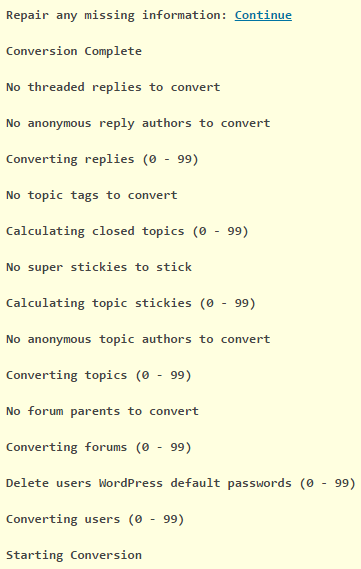
If you also view the source of the page, right click and “inspect” will also bring this up, you should see some debug code showing the SQL queries being performed during the import:
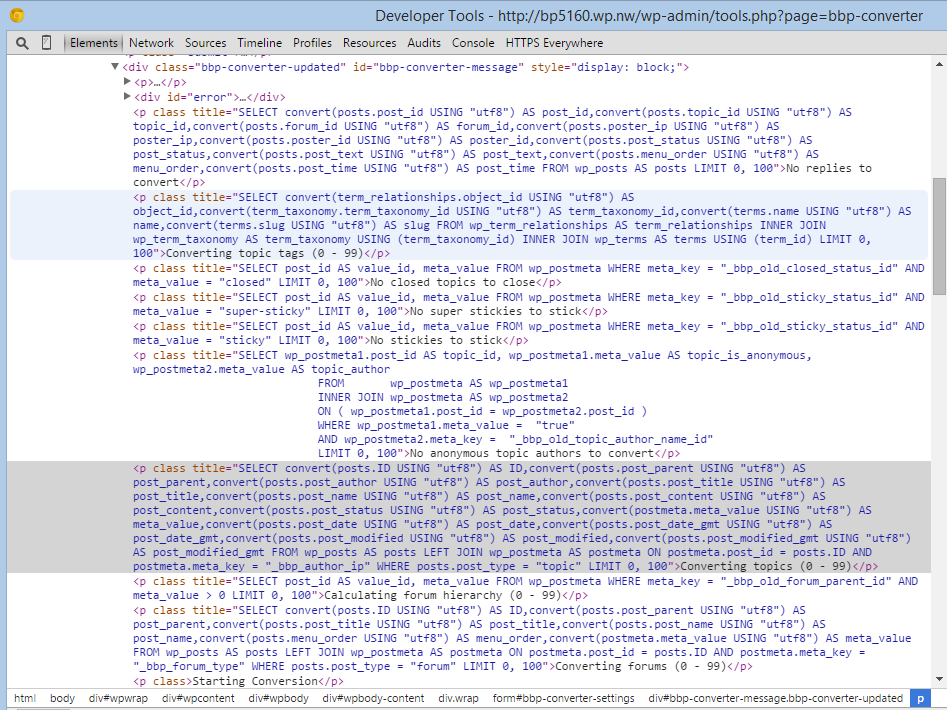
The forums, if imported will be in the wp_posts table of your WordPress database, if you filter the posts and search the post_type column for forum, topic, or reply you should see any imported posts.
sorry the code is/was untested.
Try this with a correction
function add_custom_role( $bbp_roles ) {

$bbp_roles['my_custom_role1'] = array(
'name' => 'vip',
'capabilities' => bbp_get_caps_for_role( bbp_get_participant_role() ) // the same capabilities as participants
);
return $bbp_roles;
}
add_filter( 'bbp_get_dynamic_roles', 'add_custom_role', 1 );
On the importer screen there is an option to select what forum you are importing from, I presume you selected phpBB from that dropdown?
Install the other wpfix 2 plugin. It should have the same code snippet you are trying to use, without having to place any code anywhere.
I recommend users who are beginners to not edit bbPress core files. Or any other plugin/theme/wordpress core files unless you know exactly what you are doing code wise.
Okay, yeah this site does have an interesting layout.
http://eat.at/swap/forum1/251729_Help_Need_recipe_for_fig_jam_ASAP
From what I can see real quick.
Your not going to edit the loop-single-reply.php file like @netweb suggested, because after clicking the reply title link you are redirected to a normal layout single reply. So to get this layout you are going to edit content-single-topic.php, remove the pagination, and place a custom template instead of loop-replies..php so that you won’t mess with replies in a forum profile.
<?php if ( bbp_has_replies() ) : ?>

	<?php bbp_get_template_part( 'pagination', 'replies' ); ?>

	<?php bbp_get_template_part( 'loop',       'replies' ); ?>

	<?php bbp_get_template_part( 'pagination', 'replies' ); ?>

<?php endif; ?>
Replace the above code with this for example.
<?php if ( bbp_has_replies() ) : ?>

	<?php bbp_get_template_part( 'loop',       'classic-threads' ); ?>

<?php endif; ?>
The code that will be in loop-classic-threads.phpwill be a copy of loop-replies.php and a very minimal loop-single-reply.php. Wherever say <?php bbp_get_template_part( 'loop', 'single-reply' ); ?> is called in the new loop-classic-threads.php file, I would just copy the whole loop-single-reply.php template where that get template function was and keep only the code you need.
The code that is going to be in the area you put the loop-single-reply.php code is only going to have the username, date, maybe the reply positions, and reply title. The reply title is going to mostly come from a customized version of the bbPress reply title plugin. But you are going to output the reply title in the template as a link. A link (I think bbp_reply_url() is the right function ) to the single reply template, which is only 1 reply isolated, which bbPress can do.
Does this help enough??
I’m gonna see if I can recreate most of this layout later
You did try Robins plugin right. I think this plugin was created to solve this exact issue that might occur when using membership plugins. It mainly fixes a bug in bbPress that is triggered using these plugins.
http://www.rewweb.co.uk/bbpress-wp4-fix/
There is also this which basically includes the show lead function in the plugin, that is still here.
https://codex.bbpress.org/bbp_show_lead_topic/
http://www.rewweb.co.uk/bbpress-wp4-fix2/
Hi Stephen,
I had actually created the custom template previously and tried what you said. But all it does is eliminate the content and this is why I moved on to try to identify what is going on in the function. I would much rather not touch the function code and do everything via custom template for a lot of reasons including staying safe with future updates.
As it is, if I remove the reply_content code in the child theme, it still leaves the replies in there but just with no content in them other than the author area. If I remove the author area as well then I no longer see anything but there are no links to the replies.
I tried figuring out some sort of reply_url but nothing has worked for me – where I’m stuck. The closest I’ve come is to use this:
<?php bbp_reply_url(); ?>
in that same area. The result is that I get plain text urls (not hyperlinks) in a thread tree of sorts. However those links do not link to the actual content of the reply. So what you get is like this:
The topic is at the url http://testsite.com/forum/topic/test1/
The content of the original post is at the top and underneath are urls like:
August 27, 2016 at 9:04 pm http://testsite.com/forum/topic/test1/#post-10
August 27, 2016 at 9:06 pm http://testsite.com/forum/topic/test1/#post-11
August 27, 2016 at 9:03 pm http://testsite.com/forum/topic/test1/#post-8
August 27, 2016 at 9:04 pm http://testsite.com/forum/topic/test1/#post-9
If I go to any of those urls then it just displays the original post and scrolls down to where that URL exists in the tree below the original post content. The actual content of the reply is not displayed – just the content of the original post.
@robin-w
I undo my post above in functions file then paste the code you provide.
Then…
The site.domain page isn’t working
site.domain is currently unable to handle this request.
HTTP ERROR 500
please help
if tyoun just want a role called VIP with participant capabilities, then undo whatever you did above, and then put this in your functions file
function add_custom_role( $bbp_roles ) {

$bbp_roles[''my_custom_role1'] = array(
'name' => 'vip',
'capabilities' => bbp_get_caps_for_role( bbp_get_participant_role() ) // the same capabilities as participants
);
return $bbp_roles;
}
add_filter( 'bbp_get_dynamic_roles', 'add_custom_role', 1 );
I have setup WordPress on a computer (Raspberry Pi3 running Ubuntu MATE 16.04) and it is working.
I installed bbPress and am trying to import my phpBB Forum http://binnie.id.au/BulletinBoard/index.php
It is unclear exactly what I need to enter in the “Import Forums” dialog.
I have tried many different options. I am assuming that this is asking for MySQL details.
My CPanel reports
Server: Localhost via UNIX socket
Server type: MySQL
Server version: 5.5.48-cll – MySQL Community Server (GPL)
Protocol version: 10
User: iabi1038@localhost
Server charset: UTF-8 Unicode (utf8)
MySQL® Databases shows
Database Size Privileged Users
iabi1038_phpb1 2.32 MB iabi1038_phpb1
I have tried
Database Server binnie.id.au
Database Name iabi1038_phpb1
Database User iabi1038_phpb1
Table Prefix phpbb_
This chugs along, with no obvious errors, except it seems to find nothing.
No reply_to parents to convert
No replies to convert
No tags to convert
No super stickies to stick
No stickies to stick
No topics to convert
No forum parents to convert
No forums to convert
No passwords to clear
No users to convert
Starting Conversion
Please help me create a new bbp role w/c is VIP.
add_filter( 'bbp_get_dynamic_roles', 'ntwb_bbpress_custom_role_names' );

function ntwb_bbpress_custom_role_names() {
    return array(

        // Keymaster
        bbp_get_keymaster_role() => array(
            'name'         => 'Administrator',
            'capabilities' => bbp_get_caps_for_role( bbp_get_keymaster_role() )
        ),

        // Moderator
        bbp_get_moderator_role() => array(
            'name'         => 'Moderator',
            'capabilities' => bbp_get_caps_for_role( bbp_get_moderator_role() )
        ),

        // Participant
        bbp_get_participant_role() => array(
            'name'         => 'Member',
            'capabilities' => bbp_get_caps_for_role( bbp_get_participant_role() )
        ),

        // VIP
        bbp_get_participant_role() => array(
            'name'         => 'VIP',
            'capabilities' => bbp_get_caps_for_role( bbp_get_participant_role() )
        ),

        // Spectator
        bbp_get_spectator_role() => array(
            'name'         => 'Guest',
            'capabilities' => bbp_get_caps_for_role( bbp_get_spectator_role() )
        ),

        // Blocked
        bbp_get_blocked_role() => array(
            'name'         => 'Banned',
            'capabilities' => bbp_get_caps_for_role( bbp_get_blocked_role() )
        )
    );
}
If you’re using any phpBB mods this might cause issues.
You also need to make sure you use bbPress 2.6 alpha, which includes all the changes required , you cannot simply copy the changed phpBB.php file to a different bbPress version.
To use the most up to date phpBB importer use bbPress 2.6-alpha as I pointed out, if you have to use the old phpBB version use bbPress 2.5.10.
But as I’ve said, there are huge improvements to the phpBB importer in 2.6-alpha so updating phpBB to the latest version is my recommendation.
I’ve been silently lurking about here for a few months, this is my first official post.
I always try to do my best flying solo per se when it comes to troubleshooting.
Having said that, I have a quick question pertaining to the Codex ‘examples you can use’ in the functionality and layout section; if one of you might nudge me a bit then I would be most appreciative… I’m but a padawan with regard to coding/ comprehending the language, but I’m slowly learning little by little.
For ease of reference, the example I am referring to is for the following (direct copy/paste of statement): “This solution lets you add an “edit profile” to your wordpress menu – this only appears as a menu item if the user is logged in.”
To take this a step further, is it possible to get this working but not yielding it as being a main parent menu item?, perhaps it is achievable by changing some of the code in the example published in the codex?… or adding additional code?
That is, if at present there is an existing menu of Home, About, Accounts, Contact us, etc. etc…. who might be able to provide me with clues on how one could read/interpret/tweak the code provided on that codex page such that the ‘edit profile’ looks and performs exactly as intended, but rather than showing up on the main nav menu to instead have it be revealed, let’s say, under the ‘Accounts’ item, i.e., as a child to Accounts…
Yes this reveals what little I know in terms of understanding how to read code, and/but/so I’d appreciate any helpful suggestions on whether the above scenario is possible.
Thanks for reading 🙂
Cheers,
This issue is caused because the widget links have the same classes as other links throughout bbPress. In your theme mesocolumn, there is CSS in a bb-css stylesheet that bolds the forum titles.
In this custom CSS I just set a default font-weight for any widget area.
You may need to show your theme author this so that maybe they can add it or something similar to their theme.
And I need to note this down as a possible issue that users might occur when customizing their forums/developing themes.
This is custom CSS add it in the custom css area your theme provides.
.widget-area li a {
  font-weight: normal;
}


