Search Results for 'code'
-
AuthorSearch Results
-
September 28, 2016 at 5:32 pm #178152
In reply to: The problem of writing topic or reply
Robkk
ModeratorI think you are using the bbPress moderation plugin, or a fork of it possibly.
There might be a case you might not be using that plugin, and it could be the link limit bbPress uses that is located in the Discussion settings of your site.
https://codex.bbpress.org/moderation-and-blacklisting/
If the posts are pending it might be what I stated above, if its marked as spam, then of course its a spam plugin.
September 28, 2016 at 4:59 pm #178149In reply to: topic post type issue
ModeratorYou are probably going to have to rename the custom post type “topic” in bbPress then. And areas that might be needed to modify the topic post type.
I think you need to check out the bbpress.php file in the bbPress plugin where the custom post types are registered. There might be a filter you can use that will make you be able to modify the code externally and safely without changing the core files internally, which I don’t suggest you do if you are a beginner in coding.
September 28, 2016 at 4:31 pm #178147In reply to: Our Ideal Forum Look We Want
ModeratorWe also do not want another log in. We want them to be able to log into their profile in our student portal and that is it. They have access to the forum aswell and no additional login or registering, as right now we pre-create their profiles, no one registers.
Like @netweb said bbPress and WordPress share user data, so as long as your student portal is compatible with WordPress it should be fine. You do not need a separate login for the forum as long as the student login, logs into your WordPress site.
We need a forum that has all the features that a forum system includes, such as:
Adding/Creating Threads by both Student and Admins. Instructors also need to be able to create them.
We do not want external links like Share to facebook and such. As this is a forum in a portal and do not want anyone but Students having access to it.Ok, you can manually create users and assign different forum roles if need be. And you can create custom forum roles with help form a code snippet. You definitely need private forums, but I am not sure how private. Do you want private user groups for specific forums, only logged in users can see the forums, or only logged in users can see the whole site.
We do not want a profiling. We already have a profile system where the profile in wordpress is their student profile which includes their address, email, username, phone number and also their student id. This information cannot be visible to other students.
So either if this plugin gives an external profile system where it does not interact with the profile already made in the USERS area of wordpress it would work, but if it works with the USERS part of wordpress then the clickable link to view a profile, edit profile would need to be removed for our sake.There is a php code snippet around these forums to remove the author link in replies and topics from going to their profile and instead show up in the forum as text. Removing profile links in descriptions and a widget might need another code snippet, or it could be easily avoidable by not using a widget and removing the descriptions.
bbPress doesn’t add any additional user meta fields if I remember correctly.
Removing the profiles, I haven’t looked at what code you could possibly need, but it could be possibly avoidable by redirecting any user forum profiles (if users somehow reach them) to somewhere else.
September 28, 2016 at 3:46 pm #178145In reply to: How can I change front-end form for anonymous
ModeratorEmail address is required to post using anonymous/guest posting.
In this stackoverflow topic, there is a php codesnippet/plugin you can use that might be helpful.
September 28, 2016 at 10:47 am #178141Topic: Need individual premium posts
in forum Requests & Feedbackdenisecontent
ParticipantI have a client with a request that seems simple but I am having a dilly of a time figuring it out.
They want to be able to charge users for premium posts. These posts will *not* appear at the top. Instead they will look different from other posts – bolded links, different color font – not at the users choice simply coded in by us. This will be a one time thing for a user – the users should not be able to do any other posts this way. I already set up the forum so that the client will approve all posts – he wants to be able to go in and click a button that will then style that post a different way.
I can style the sticky to do this easily and have done so on my demo but am unsure how to proceed with his request. I do have a child theme.
I know enough code to add stuff into functions and php pages. I am much better at HTML5 and CSS (can do animations).
I have tried a few things I came up with on my own but they do not work and rather than show them I would rather hear your thoughts.
Here is my demo – it is still pretty primitive… http://www.contentandsolutions.com/njywf/
I am using
Wordpress Version 4.6.1Customizr theme using child theme. Customizr Version: 3.4.23
BBPress Plugin Version 2.5.10
Code or a plugin (even a paid for plugin) if possible. Thank you!
September 28, 2016 at 10:21 am #178139In reply to: Add custom tab to profile page
Robin W
ModeratorArguing with those trying to help you is probably not the best way forward.
How to do a link is easily googled, but I’ve put one in here that you can add to the template
<li>
	<span class="vcard bbp-user-profile-link">
		<a class="url fn n" href="www.mysite.com/read-this" title="read this">Read this</a>
	</span>
</li>
September 28, 2016 at 10:01 am #178138In reply to: Add custom tab to profile page
Dave
ParticipantWhy should that make a difference? Once I can find out how this is done I could add any content.
To keep it simple, let’s just say hard coded text to display, when the user clicks on a link called “Read this”.
Thanks.
September 28, 2016 at 3:32 am #178131In reply to: BBpress 2.6 alpha – problem importing phpBB
giobby
ParticipantHi @senatorman , I think you’ve replied in the wrong topic (https://bbpress.org/forums/topic/bbpress-2-6-alpha-problem-importing-phpbb/page/2/#post-178123).
Just to follow up on your error: I’ve copied and pasted my queries from a Ms Word document and something got broken.
In fact you look at the single quotes in the queries they are all wrong (’ instead of ‘).I have fixed the query for you and you can find the new version below:
/* Get all posts with wrong author and correspondent right author from translator table */

create table TMP_ORPHANS as
select
<YOUR_SCHEMA>.wp_posts.ID,
<YOUR_SCHEMA>.wp_posts.post_author,
<YOUR_SCHEMA>.wp_bbp_converter_translator.value_id real_author,
IFNULL(<YOUR_SCHEMA>.wp_posts.post_date, NULL) post_date,
IFNULL(<YOUR_SCHEMA>.wp_posts.post_date_gmt, NULL) post_date_gmt,
<YOUR_SCHEMA>.wp_posts.post_content,
CASE
WHEN <YOUR_SCHEMA>.wp_posts.post_type = 'reply'
THEN (SELECT tmposts.post_title from <YOUR_SCHEMA>.wp_posts as tmposts where tmposts.id = <YOUR_SCHEMA>.wp_posts.post_parent)
ELSE <YOUR_SCHEMA>.wp_posts.post_title
END post_title,
<YOUR_SCHEMA>.wp_posts.post_excerpt,
<YOUR_SCHEMA>.wp_posts.post_status,
<YOUR_SCHEMA>.wp_posts.comment_status,
<YOUR_SCHEMA>.wp_posts.ping_status,
<YOUR_SCHEMA>.wp_posts.post_password,
<YOUR_SCHEMA>.wp_posts.post_name,
<YOUR_SCHEMA>.wp_posts.to_ping,
<YOUR_SCHEMA>.wp_posts.pinged,
IFNULL(<YOUR_SCHEMA>.wp_posts.post_modified, NULL) post_modified,
IFNULL(<YOUR_SCHEMA>.wp_posts.post_modified_gmt, NULL) post_modified_gmt,
<YOUR_SCHEMA>.wp_posts.post_content_filtered,
<YOUR_SCHEMA>.wp_posts.post_parent,
<YOUR_SCHEMA>.wp_posts.guid,
<YOUR_SCHEMA>.wp_posts.menu_order,
<YOUR_SCHEMA>.wp_posts.post_type,
<YOUR_SCHEMA>.wp_posts.post_mime_type,
<YOUR_SCHEMA>.wp_posts.comment_count,
(	select <YOUR_SCHEMA>.wp_postmeta.meta_value
from <YOUR_SCHEMA>.wp_postmeta
where
<YOUR_SCHEMA>.wp_postmeta.meta_key = '_bbp_author_ip' and
<YOUR_SCHEMA>.wp_postmeta.post_id = <YOUR_SCHEMA>.wp_posts.id
) user_ip
from <YOUR_SCHEMA>.wp_posts
left join <YOUR_SCHEMA>.wp_users on <YOUR_SCHEMA>.wp_posts.post_author = <YOUR_SCHEMA>.wp_users.id
left join <YOUR_SCHEMA>.wp_bbp_converter_translator on <YOUR_SCHEMA>.wp_posts.post_author = <YOUR_SCHEMA>.wp_bbp_converter_translator.meta_value
where
<YOUR_SCHEMA>.wp_posts.post_type in ('forum', 'reply', 'topic') and
(<YOUR_SCHEMA>.wp_users.id is null or
<YOUR_SCHEMA>.wp_users.id = 1) and
<YOUR_SCHEMA>.wp_bbp_converter_translator.value_type = 'user' and
<YOUR_SCHEMA>.wp_bbp_converter_translator.meta_key = '_bbp_old_user_id';

/* Do this to be able to create indexes later – some may not work */
ALTER TABLE TMP_ORPHANS modify column post_date datetime default NULL;
ALTER TABLE TMP_ORPHANS modify column post_date_gmt datetime default NULL;
ALTER TABLE TMP_ORPHANS modify column post_modified datetime default NULL;
ALTER TABLE TMP_ORPHANS modify column post_modified_gmt datetime default NULL;
ALTER TABLE TMP_ORPHANS modify column user_ip varchar(40);
ALTER TABLE TMP_ORPHANS modify column post_title varchar(255);

/* we create indexes to speed up the update process */
ALTER TABLE TMP_ORPHANS ADD INDEX(post_date);
ALTER TABLE TMP_ORPHANS ADD INDEX(post_author);
ALTER TABLE TMP_ORPHANS ADD INDEX(real_author);
ALTER TABLE TMP_ORPHANS ADD INDEX(user_ip);
ALTER TABLE TMP_ORPHANS ADD INDEX(post_title);

/* Revert bad authors to good authors */
UPDATE
<YOUR_SCHEMA>.wp_postsINNER JOIN <YOUR_SCHEMA>.TMP_ORPHANS
ON <YOUR_SCHEMA>.wp_posts.id = <YOUR_SCHEMA>.TMP_ORPHANS.id
set <YOUR_SCHEMA>.wp_posts.post_author = <YOUR_SCHEMA>.TMP_ORPHANS.real_author
where <YOUR_SCHEMA>.wp_posts.post_type in ('reply', 'topic') ;

/* Drop TMP table */
DROP TABLE <YOUR_SCHEMA>.TMP_ORPHANS;
Please remember to execute each query individually and not all of them together.
You can easily distinguish the queries as I have put a comment before each of them.September 27, 2016 at 4:42 pm #178122In reply to: BBpress 2.6 alpha – problem importing phpBB
ParticipantI try to post here the steps I did to import from PHPBB to BuddyPress v2.6 alpha.
The concept is the same of what you’ve already read in my previous post but I think the SQL scripts are different.So first of all I’ve created manually all the missing columns in my PHPBB tables (I was converting from an old version of PHPBB and the converter was expecting some columns that didn’t exist – this could not be your case):
ALTER TABLE forum_forums
ADD forum_posts_approved numeric;ALTER TABLE forum_forums
ADD forum_topics_approved numeric;ALTER TABLE forum_topics
ADD topic_posts_approved numeric;ALTER TABLE forum_profile_fields_data
ADD pf_phpbb_facebook varchar(255);ALTER TABLE forum_profile_fields_data
ADD pf_phpbb_twitter varchar(255);ALTER TABLE forum_profile_fields_data
ADD pf_phpbb_occupation varchar(255);ALTER TABLE forum_profile_fields_data
ADD pf_phpbb_interests varchar(255);ALTER TABLE forum_profile_fields_data
ADD pf_phpbb_location varchar(255);ALTER TABLE forum_profile_fields_data
ADD pf_phpbb_youtube varchar(255);ALTER TABLE forum_profile_fields_data
ADD pf_phpbb_skype varchar(255);ALTER TABLE forum_profile_fields_data
ADD pf_phpbb_googleplus varchar(255);ALTER TABLE forum_profile_fields_data
ADD pf_phpbb_website varchar(255);ALTER TABLE forum_profile_fields_data
ADD pf_phpbb_aol varchar(255);ALTER TABLE forum_profile_fields_data
ADD pf_phpbb_yahoo varchar(255);ALTER TABLE forum_profile_fields_data
ADD pf_phpbb_icq varchar(255);ALTER TABLE forum_profile_fields_data
ADD pf_phpbb_wlm varchar(255);Then I’ve performed this KEY STEP: insert a dummy row in the WP_USERS table with a very high userid (e.g.: 99999). This should be higher than the highest userid you have in your phpbb installation.
In this way, when the users get converted, the system will assigned IDs starting from 100000 (again, if you have more than 100K users, then you need a higher value).
This step is necessary, so you will always be able to distinguish the old id (PHPBB, < 100000) from the new one assigned after conversion (>= 100000).After that I’ve started the conversion (it took long).
After converting, the authors of certain posts were wrong.
There is a table that is generated after the conversion that maps the old IDs to the new ones.
So I’ve execute the following scripts to readjust (cannot guarantee this would fix entirely the problem):/* Get all posts with wrong author and correspondent right author from translator table */
create table TMP_ORPHANS as
select
<YOUR_SCHEMA>.wp_posts.ID,
<YOUR_SCHEMA>.wp_posts.post_author,
<YOUR_SCHEMA>.wp_bbp_converter_translator.value_id real_author,
IFNULL(<YOUR_SCHEMA>.wp_posts.post_date, NULL) post_date,
IFNULL(<YOUR_SCHEMA>.wp_posts.post_date_gmt, NULL) post_date_gmt,
<YOUR_SCHEMA>.wp_posts.post_content,
CASE
WHEN <YOUR_SCHEMA>.wp_posts.post_type= ‘reply’
THEN (SELECT tmposts.post_title from <YOUR_SCHEMA>.wp_postsas tmposts where tmposts.id = <YOUR_SCHEMA>.wp_posts.post_parent)
ELSE <YOUR_SCHEMA>.wp_posts.post_title
END post_title,
<YOUR_SCHEMA>.wp_posts.post_excerpt,
<YOUR_SCHEMA>.wp_posts.post_status,
<YOUR_SCHEMA>.wp_posts.comment_status,
<YOUR_SCHEMA>.wp_posts.ping_status,
<YOUR_SCHEMA>.wp_posts.post_password,
<YOUR_SCHEMA>.wp_posts.post_name,
<YOUR_SCHEMA>.wp_posts.to_ping,
<YOUR_SCHEMA>.wp_posts.pinged,
IFNULL(<YOUR_SCHEMA>.wp_posts.post_modified, NULL) post_modified,
IFNULL(<YOUR_SCHEMA>.wp_posts.post_modified_gmt, NULL) post_modified_gmt,
<YOUR_SCHEMA>.wp_posts.post_content_filtered,
<YOUR_SCHEMA>.wp_posts.post_parent,
<YOUR_SCHEMA>.wp_posts.guid,
<YOUR_SCHEMA>.wp_posts.menu_order,
<YOUR_SCHEMA>.wp_posts.post_type,
<YOUR_SCHEMA>.wp_posts.post_mime_type,
<YOUR_SCHEMA>.wp_posts.comment_count,
( select <YOUR_SCHEMA>.wp_postmeta.meta_value
from <YOUR_SCHEMA>.wp_postmeta
where
<YOUR_SCHEMA>.wp_postmeta.meta_key = ‘_bbp_author_ip’ and
<YOUR_SCHEMA>.wp_postmeta.post_id = <YOUR_SCHEMA>.wp_posts.id
) user_ip
from <YOUR_SCHEMA>.wp_posts
left join <YOUR_SCHEMA>.wp_userson <YOUR_SCHEMA>.wp_posts.post_author= <YOUR_SCHEMA>.wp_users.id
left join <YOUR_SCHEMA>.wp_bbp_converter_translator on <YOUR_SCHEMA>.wp_posts.post_author= <YOUR_SCHEMA>.wp_bbp_converter_translator.meta_value
where
<YOUR_SCHEMA>.wp_posts.post_typein (‘forum’, ‘reply’, ‘topic’) and
(<YOUR_SCHEMA>.wp_users.id is null or
<YOUR_SCHEMA>.wp_users.id = 1) and
<YOUR_SCHEMA>.wp_bbp_converter_translator.value_type = ‘user’ and
<YOUR_SCHEMA>.wp_bbp_converter_translator.meta_key = ‘_bbp_old_user_id’;/* Do this to be able to create indexes later – some may not work */
ALTER TABLE TMP_ORPHANS modify column post_date datetime default NULL;
ALTER TABLE TMP_ORPHANS modify column post_date_gmt datetime default NULL;
ALTER TABLE TMP_ORPHANS modify column post_modified datetime default NULL;
ALTER TABLE TMP_ORPHANS modify column post_modified_gmt datetime default NULL;
ALTER TABLE TMP_ORPHANS modify column user_ip varchar(40);
ALTER TABLE TMP_ORPHANS modify column post_title varchar(255);/* we create indexes to speed up the update process */
ALTER TABLETMP_ORPHANSADD INDEX(post_date);
ALTER TABLETMP_ORPHANSADD INDEX(post_author);
ALTER TABLETMP_ORPHANSADD INDEX(real_author);
ALTER TABLETMP_ORPHANSADD INDEX(user_ip);
ALTER TABLETMP_ORPHANSADD INDEX(post_title);/* Revert bad authors to good authors */
UPDATE
<YOUR_SCHEMA>.wp_postsINNER JOIN <YOUR_SCHEMA>.TMP_ORPHANS
ON <YOUR_SCHEMA>.wp_posts.id = <YOUR_SCHEMA>.TMP_ORPHANS.id
set <YOUR_SCHEMA>.wp_posts.post_author= <YOUR_SCHEMA>.TMP_ORPHANS.real_author
where <YOUR_SCHEMA>.wp_posts.post_typein (‘reply’, ‘topic’) ;DROP TABLE <YOUR_SCHEMA>.TMP_ORPHANS;
I hope this helps.
Gio
September 27, 2016 at 7:21 am #178113Topic: Deactivated plugin, broke my blog
in forum Troubleshootingdandr69
ParticipantI deactivated bbpress today, and the next thing all site is broke with HTTP code 500.
I tried to reset plugins, reset themes, checked for htaccess entries, nothing.
I put it back, no chance.Class ‘BBP_Theme_Compat’ not found in /home/sites/pcforum.ro/public_html/wp-content/themes/pcf/functions_bb.php on line 32
Update – i fix it.
Found the code and remove it. ThanksSeptember 27, 2016 at 12:28 am #178112In reply to: Getting Last Topic or Post Date
mbfit
ParticipantAh ok thanks! I did find the code for that on here
September 27, 2016 at 12:28 am #178111Stephen Edgar
KeymasterCheck out the docs in the codex, this I think should help you get started:
September 26, 2016 at 8:38 pm #178106In reply to: How can I change front-end form for anonymous
KeymasterYou can do this by creating a child theme and editing the
form-anonymoustemplate, you can find details on doing this here https://codex.bbpress.org/functions-files-and-child-themes-explained/September 25, 2016 at 3:39 pm #178089Topic: Help with user roles and capabilities
in forum Troubleshooting403laura
ParticipantI read through this forum because I am experiencing similar issues…(I am a keyholder). I am using both Buddypress and bbpress. I do not have programming knowledge or experience, I do not understand codex or php, I’m just looking for someone to hopefully assist me with a simple solution to these issues, so that when people sign up as users, their interactions are seamless and they are able to quickly find the information they are looking for.
1. When logged in as a user, I am not able to access forums without using the URL to the page. I used the “user roles and capabilities” plugin as recommended above, to change the user settings in the back end so I could view “private” posts and that sort of worked but I still have to use the URL to find the forum page. I have also run the tools for both Buddypress and bbpress. There are several links in the user profile area but they all seem to direct me to the user activities only…I cannot link to any of the content posted by other users through those links. (Same with the tool bar at the top of the page and all of the drop down menus).
2. I just created a topic to post under a forum. Under my keyholder account, I am able to see the topic when I click on it but when I try clicking on it as a user, it doesnt show up. It just tells me there is “0 replies, has 1 post, and last updated by me” and the topic is not there.
September 23, 2016 at 12:05 pm #178070In reply to: BBpress Forum Login Takes me to WordPress Admin Page
evila
ParticipantNo plugin bbpress Login Register Links OnForumPage
Quando coloco echo do_shortcode(‘[bbp-login]‘); já imprime o formulário, como que eu faço para colocar o nome login e quando eu clicar ir para esse formulário?
September 22, 2016 at 9:08 pm #178060In reply to: Threaded layout
Moderatorhere is what I got.
I had to edit
loop-single-reply.phpafter all,I used a conditional to output the minimal layout only for single topics only.
I had to use
bbp_reply_permalink();instead ofbbp_reply_url();.Like I said you for sure do have to edit the bbPress reply titles plugin for what you exactly want, your gonna have to possibly make the reply title required as well.
You are going to end up doing a lot of customization to get the rest of the funcitonality, because I am not sure how submitting a threaded reply works on the other forum.
You are also going to figure out how to show the threads on the single reply page, for the specific topic they were originally from.
Bunch more customizing, much more than free support could possible help with.
I will share any custom templates I used later.
 September 21, 2016 at 11:45 pm #178041
In reply to: Problem importing forum to bbPress
milliways2650
ParticipantThank you for your help. Unfortunately I think I have reached a dead end.
I decided to give another try. I created a new phpbb database, and a new WordPress installation, just in case I had caused some damage.
Attempting the import produced the following error. Presumably it is objecting to something in my phpbb database. I can not find ‘forum_topics_approved’ anywhere (but have little experience with MySQL).
WordPress database error: [Unknown column ‘forums.forum_topics_approved’ in ‘field list’]
SELECT convert(forums.forum_id USING “utf8mb4”) AS forum_id,convert(forums.parent_id USING “utf8mb4”) AS parent_id,convert(forums.forum_topics_approved USING “utf8mb4”) AS forum_topics_approved,convert(forums.forum_posts_approved USING “utf8mb4”) AS forum_posts_approved,convert(forums.forum_name USING “utf8mb4”) AS forum_name,convert(forums.forum_desc USING “utf8mb4”) AS forum_desc,convert(forums.left_id USING “utf8mb4”) AS left_id,convert(forums.forum_type USING “utf8mb4”) AS forum_type,convert(forums.forum_status USING “utf8mb4”) AS forum_status FROM phpbb_forums AS forums LIMIT 0, 100No forums to convert
Starting Conversion
My comment about lack of stats was that there was no positive feedback e.g. x forums imported, which would be helpful.
I did not understand the comment “If you also view the source of the page, right click and “inspect” will also bring this up, you should see some debug code showing the SQL queries being performed during the import:”
September 21, 2016 at 6:39 pm #178034In reply to: User Profile Picture not showing
ModeratorUse this custom CSS, add it anywhere you can put custom css like in a child themes style.css file or in a custom css plugin.
#bbpress-forums p.bbp-topic-meta img.avatar,
#bbpress-forums ul.bbp-reply-revision-log img.avatar,
#bbpress-forums ul.bbp-topic-revision-log img.avatar,
#bbpress-forums div.bbp-template-notice img.avatar,
#bbpress-forums .widget_display_topics img.avatar,
#bbpress-forums .widget_display_replies img.avatar {
  float: none;
  margin-bottom: auto;
  border: none;
  vertical-align: middle;
  padding: 0;
}
September 21, 2016 at 6:08 pm #178033In reply to: Strip HTML Tabs from forum
ModeratorOh shoot your right Doug. I might have suggested the wrong thing.
I have also seen this happen with TinyMCE activated. It seems to be iOS users and they claim that they haven’t pasted anything, but I have not observed this for myself yet.
I have no idea if it could be IOS specific?? I can check I guess?? Damn thats weird if it is.
You will need to use this since you copied text to your forums. Pasting other articles content in the Visual Editor in TinyMCE could end up posting the HTML content, its recommended to post any articles content into the HTML editor, but you can also use this PHP code snippet from this guide below, that I think Doug did add, that would help resolve this issue that could be caused pasting articles in the visual editor for any further posts submitted.
function bbp_tinymce_paste_plain_text( $plugins = array() ) {
    $plugins[] = 'paste';
    return $plugins;
}
add_filter( 'bbp_get_tiny_mce_plugins', 'bbp_tinymce_paste_plain_text' );
https://codex.bbpress.org/enable-visual-editor/
For editing the already messed up posts, I think you can just copy the original post, edit it, and paste the text into the HTML editor over the original content and hopefully that would fix it. THere might be also a chance of it going away just by editing it, then just republishing after you used the code snippet.
September 21, 2016 at 7:45 am #178017In reply to: BBpress 2.6 alpha – problem importing phpBB
KeymasterNo, you should not be using
phpBB Converter file 5795, you should be using the version that is included with 2.6-alpha.That will fix the problem in your screenshot.
September 21, 2016 at 7:41 am #178016In reply to: Problem importing forum to bbPress
KeymasterIt does give stats as it imports, you should be something similar to:
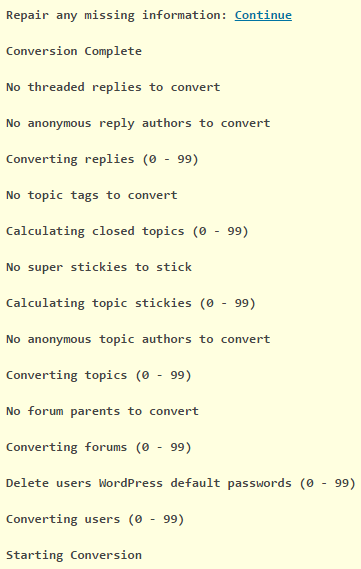
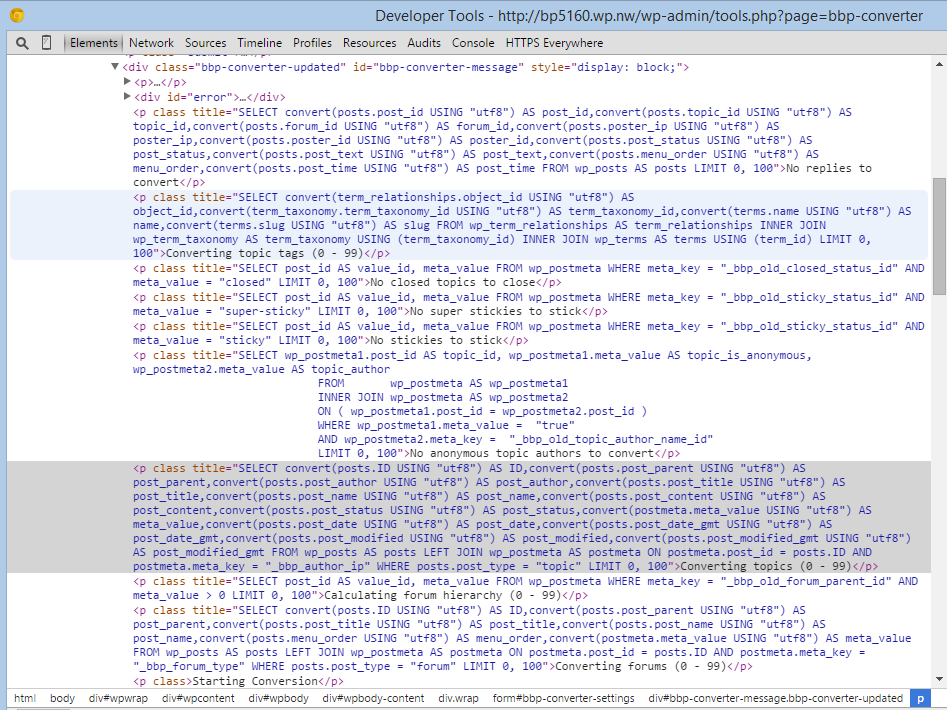
If you also view the source of the page, right click and “inspect” will also bring this up, you should see some debug code showing the SQL queries being performed during the import:
The forums, if imported will be in the
wp_poststable of your WordPress database, if you filter the posts and search thepost_typecolumn forforum,topic, orreplyyou should see any imported posts.September 21, 2016 at 3:40 am #178006In reply to: Adding New Role Mess The Site
Moderatorsorry the code is/was untested.
Try this with a correction
function add_custom_role( $bbp_roles ) {

$bbp_roles['my_custom_role1'] = array(
'name' => 'vip',
'capabilities' => bbp_get_caps_for_role( bbp_get_participant_role() ) // the same capabilities as participants
);
return $bbp_roles;
}
add_filter( 'bbp_get_dynamic_roles', 'add_custom_role', 1 );
September 21, 2016 at 1:37 am #177999In reply to: Problem importing forum to bbPress
KeymasterOn the importer screen there is an option to select what forum you are importing from, I presume you selected
phpBBfrom that dropdown?September 20, 2016 at 5:53 pm #177984In reply to: First post not showing
ModeratorInstall the other wpfix 2 plugin. It should have the same code snippet you are trying to use, without having to place any code anywhere.
I recommend users who are beginners to not edit bbPress core files. Or any other plugin/theme/wordpress core files unless you know exactly what you are doing code wise.
September 20, 2016 at 5:25 pm #177982In reply to: Threaded layout
ModeratorOkay, yeah this site does have an interesting layout.
http://eat.at/swap/forum1/251729_Help_Need_recipe_for_fig_jam_ASAP
From what I can see real quick.
Your not going to edit the
loop-single-reply.phpfile like @netweb suggested, because after clicking the reply title link you are redirected to a normal layout single reply. So to get this layout you are going to editcontent-single-topic.php, remove the pagination, and place a custom template instead of loop-replies..php so that you won’t mess with replies in a forum profile.<?php if ( bbp_has_replies() ) : ?> <?php bbp_get_template_part( 'pagination', 'replies' ); ?> <?php bbp_get_template_part( 'loop', 'replies' ); ?> <?php bbp_get_template_part( 'pagination', 'replies' ); ?> <?php endif; ?>Replace the above code with this for example.
<?php if ( bbp_has_replies() ) : ?>

	<?php bbp_get_template_part( 'loop',       'classic-threads' ); ?>

<?php endif; ?>
The code that will be in
loop-classic-threads.phpwill be a copy ofloop-replies.phpand a very minimalloop-single-reply.php. Wherever say<?php bbp_get_template_part( 'loop', 'single-reply' ); ?>is called in the newloop-classic-threads.phpfile, I would just copy the wholeloop-single-reply.phptemplate where that get template function was and keep only the code you need.The code that is going to be in the area you put the
loop-single-reply.phpcode is only going to have the username, date, maybe the reply positions, and reply title. The reply title is going to mostly come from a customized version of the bbPress reply title plugin. But you are going to output the reply title in the template as a link. A link (I think bbp_reply_url() is the right function ) to the single reply template, which is only 1 reply isolated, which bbPress can do.Does this help enough??
I’m gonna see if I can recreate most of this layout later
-
AuthorSearch Results

