When i create new topic it shows normally no issues!!
But i had a huge data that needed to be imported on the same site. I used WP All Import Plugin for the import and I imported the data into topics… Actually I only require the topics section so there is forum I want to show… I managed the look. But after the import finished. I cant see the list of topics that meant to be seen on my homepage. Though I see the topics in the sidebar under related topics. I used shortcode [bbp-topic-index] to show the topic on my homepage.
I can also see the topic in my wordpress topics section…
So, I decided to take a look in my database. I saw that earlier when i created topics it was stored in wp_posts table but now after import all that new data is in wp_pmxi_ tables and topics were in wp_pmxi_topics table. I don’t know if that supposed to be but I cant solve this issue… I even imported data again in posts which then went to wp_posts table in database but ofcourse wordpress was taking that as posts not bbpress topics…
Can please someone help me out?
if you have put the code in the plugin – that’s it !
On a load, the code looks to see if it is a topic or reply, and if so turns off pingbacks
OK I added the plug-in. Can you give some specific instructions on how to enter the code?
Do I do this for each forum page?
TNX Robin.
Peter
@robin-w how much i have to pay for that code?
<!DOCTYPE html>
<!--[if IE 7]>
<html class="ie ie7" lang="en-US" prefix="og: http://ogp.me/ns#">
<![endif]-->
<!--[if IE 8]>
<html class="ie ie8" lang="en-US" prefix="og: http://ogp.me/ns#">
<![endif]-->
<!--[if !(IE 7) | !(IE 8)  ]><!-->
<html lang="en-US" prefix="og: http://ogp.me/ns#">
<!--<![endif]-->
testing some code…
edit: YEP! Code tag is working .
no.
The simplest way is to use this plugin
Code Snippets
and put the code in there
add_action( 'private_title_format', 'xbs_hide_second_prefix_title' );
function xbs_hide_second_prefix_title( $title ) {
   $prefix = str_replace( '%s', '', $title );
   return "<span class=\"private-title\">$prefix</span>%s";
}
and in CSS:
.private-title + .private-title {
    display: none;
}
I just looked in trac, and fixing this is now a 2.8 goal.
However this looks like it might help
// Force ping_status on bbPress post types
add_filter( 'pings_open', 'rew_force_ping_status' );

function rew_force_ping_status( $open, $post_id = 0 ) {

// Get the post type of the post ID
$post_type = get_post_type( $post_id );
// Default return value is what is passed in $open
$retval = $open;
// Only force for bbPress post types
switch ( $post_type ) {
case bbp_get_forum_post_type() :
case bbp_get_topic_post_type() :
case bbp_get_reply_post_type() :
	$retval = false;
break;
// Allow override of the override
return apply_filters( 'rew_force_ping_status', $retval, $open, $post_id, $post_type );
}
not within free help, sorry, but if you have a way to allocate I could probably write some code cheaply
contact me via
http://www.rewweb.co.uk
OK guys, probably not really relevant now, but I experience the same issue and found this thread.
Here is solution I use:
add_filter( 'wp_mail', function( $args = array() ) {
	/**
	 * If WordPress wants to send an email to bbp_get_do_not_reply_address() we check
	 * if $search_header is set. If it is, we take its value (email address) and set
	 * it as "to" address. Also we unset the $search_header.
	 */
	$search_header = 'Bcc:';

	if ( bbp_get_do_not_reply_address() === $args['to'] && is_array( $args['headers'] ) ) {
		foreach ( $args['headers'] as $key => $header ) {
			if ( false !== stripos( $header, $search_header ) ) {
				$args['to'] = trim( str_replace( $search_header, '', $header ) );
				unset( $args['headers'][ $key ] );
				break;
			}
		}
	}

	return $args;
} );
The space is where the site is trying to show your avatar
<a href="http://logicbenchmarks.com/forums/users/logicbenchmarks/" title="View Admin's profile" class="bbp-author-avatar" rel="nofollow"></a>
which is somehow not showing – no idea why, but suspect you have code doing this
Hi there!
If you’re looking for an off-the-shelf solution, BuddyPress and the Private Messages component sounds like the best one. You’d still need to tune it a bit with some custom code to lock it down exactly how you’ve described, but it gives you isolated message threads with invitees, notifications, an inbox, etc…
Technically, in the next major version of bbPress (2.6) you could use the new engagements API to keep those conversations a forum topic, but limit them to specific invited users, but that’s probably more work and less obvious to end users what it’s for & doing.
I created a list of 5 forums some with sub forums and used the short code to display the index of forums on a page which I added to my navigation menu. Today it is only showing the first forum and none of the others. I’ve tried refreshing the page, renewing the page with the shortcode and gone back over some of the steps (I’ve been trying to remove a sidebar from the forum page) but nothing seems to work. All the forums are listed and I haven’t changed any of the settings within the forums…
I’m using the Ruby theme – but have tried it with twenty fifteen, sixteen and seventeen and the problem persists. I’m using bbpress Version 2.5.14 and the bbpress style plug in Version 4.0.3 which was updated today.
My site is not published as I’m still working on it, ironing out some of these issues.
Thanks for any advice
// Time Variable
$localTime = str_replace('at ', '', $localTime);

$localTime = do_shortcode('[localize_time before_local=" " after_local=" " fmt="F j, Y g:i a"]'.$localTime.'[/localize_time]');
echo $localTime;
Having a really difficult time figuring out a way to output topic reply time stamps in a users local timezone. I have a forum with global users and this is a necessity.
WP version: 4.9.8
bbPress version: 2.5.14
Currently using this plugin: Localize Time (https://wordpress.org/plugins/localize-time/)
I am wrapping the bbp_get_reply_post_date() with the shortcode [localize_time]; however, I cannot alter the format of the output date from the shortcode.
I need an alternate solution.
I should also not that this is only happening in Chrome not Firefox. I’m seeing this in the console. (sanitized)
Uncaught DOMException: Failed to read the 'cssRules' property from 'CSSStyleSheet': Cannot access rules
    at et_core_page_resource_fallback (https://mydomain.com/topic/test-video/embed/:12:160)
    at HTMLLinkElement.onload (https://mydomain.com/topic/test-video/embed/#?secret=HEI33yuPgo:158:289)
et_core_page_resource_fallback @ (index):12
onload @ VM2025 :158
What is the best way to add login and a register link to “You must be logged in to reply to this topic”
I found this but I realized I cannot edit a code as I am very new to PHP.
Please suggest.
	<div id="no-topic-<?php bbp_topic_id(); ?>" class="bbp-no-topic">
		<div class="bbp-template-notice">
			<p><?php is_user_logged_in() ? _e( 'You cannot create new topics.', 'bbpress' ) : _e( 'You must be logged in to create new topics.', 'bbpress' ); ?></p>
		</div>
	</div>
ok, take the change above out.
Then find
wp-content/plugins/bbpress/templates/default/bbpress/loop-single-reply.php
Make a copy of this file to your pc
The edit this file to be this
<?php

/**
 * Replies Loop - Single Reply
 *
 * @package bbPress
 * @subpackage Theme
 */

?>
<div class='rew-border'>
<div id="post-<?php bbp_reply_id(); ?>" class="bbp-reply-header">

	<div class="bbp-meta">

		<span class="bbp-reply-post-date"><?php bbp_reply_post_date(); ?></span>

		<?php if ( bbp_is_single_user_replies() ) : ?>

			<span class="bbp-header">
				<?php _e( 'in reply to: ', 'bbpress' ); ?>
				<a class="bbp-topic-permalink" href="<?php bbp_topic_permalink( bbp_get_reply_topic_id() ); ?>"><?php bbp_topic_title( bbp_get_reply_topic_id() ); ?></a>
			</span>

		<?php endif; ?>

		<a href="<?php bbp_reply_url(); ?>" class="bbp-reply-permalink">#<?php bbp_reply_id(); ?></a>

		<?php do_action( 'bbp_theme_before_reply_admin_links' ); ?>

		<?php bbp_reply_admin_links(); ?>

		<?php do_action( 'bbp_theme_after_reply_admin_links' ); ?>

	</div><!-- .bbp-meta -->

</div><!-- #post-<?php bbp_reply_id(); ?> -->

<div <?php bbp_reply_class(); ?>>

	<div class="bbp-reply-author">

		<?php do_action( 'bbp_theme_before_reply_author_details' ); ?>

		<?php bbp_reply_author_link( array( 'sep' => '<br />', 'show_role' => true ) ); ?>

		<?php if ( bbp_is_user_keymaster() ) : ?>

			<?php do_action( 'bbp_theme_before_reply_author_admin_details' ); ?>

			<div class="bbp-reply-ip"><?php bbp_author_ip( bbp_get_reply_id() ); ?></div>

			<?php do_action( 'bbp_theme_after_reply_author_admin_details' ); ?>

		<?php endif; ?>

		<?php do_action( 'bbp_theme_after_reply_author_details' ); ?>

	</div><!-- .bbp-reply-author -->

	<div class="bbp-reply-content">

		<?php do_action( 'bbp_theme_before_reply_content' ); ?>

		<?php bbp_reply_content(); ?>

		<?php do_action( 'bbp_theme_after_reply_content' ); ?>

	</div><!-- .bbp-reply-content -->

</div><!-- .reply -->
</div>

<div class='rew-spacer'><p/> </div>
Then put this in the directory called bbpress that you created above, so you end up with
wp-content/themes/%your-theme-name%/bbpress/loop-single-reply.php
Finally in your theme’s custom css area put
#bbpress-forums ul.bbp-replies {
border : none ;
}

.rew-border {
border: 1px solid #eee;
}
Thank you so much. This code added the space between replies.
Can this also be done with css? If yes, how?
Thank you so much. This code added the space between replies but pushed the border below.
ok,
create a directory on your theme called ‘bbpress’
ie wp-content/themes/%your-theme-name%/bbpress
where %your-theme-name% is the name of your theme
find
wp-content/plugins/bbpress/templates/default/bbpress/loop-replies.php
Make a copy of this file to your pc
The edit this file to add this line after line 50
<div class='rew-spacer'> <p/> </div>
so you end up with
<?php bbp_get_template_part( 'loop', 'single-reply' ); ?>

<div class='rew-spacer'> <p/> </div>
Then put this in the directory called bbpress that you created above, so you end up with
wp-content/themes/%your-theme-name%/bbpress/loop-replies.php
You may need to do some styling to get it how you want it, but I would need to see your site to help on that
As Robin pointed out (thank you), “My SQL Workbench” is likely the tool or at least a starting tool. I’ve tried its “Migration Wizard” going from a MS SQL database, but unfortunately the wizard errors out on MS ntext fields that contain 4 byte unicode characters (the error is “Inserting Data: Incorrect string value:” on the MySql side) despite both src and dst database fields having utf8mb4 as the character set, and even ensuring all of MySQL database connections are utf8mb as per here.
Since it is not too practical to try and filter out the offending 4 byte unicode chars, so as an alternative now I’m trying saving the src data to CSV and importing CSV on the MySQL side – but apparently the CVS libraries disagree on encoding/decoding – the dst table ends up with more records than the source, not sure who is a fault.
bbp_[get]_reply_post_date( bbp_get_topic_id() );
Really the bbp_reply_post_date() function doesn’t analyze post_type so you can give it anything you want, not only with type “reply”.
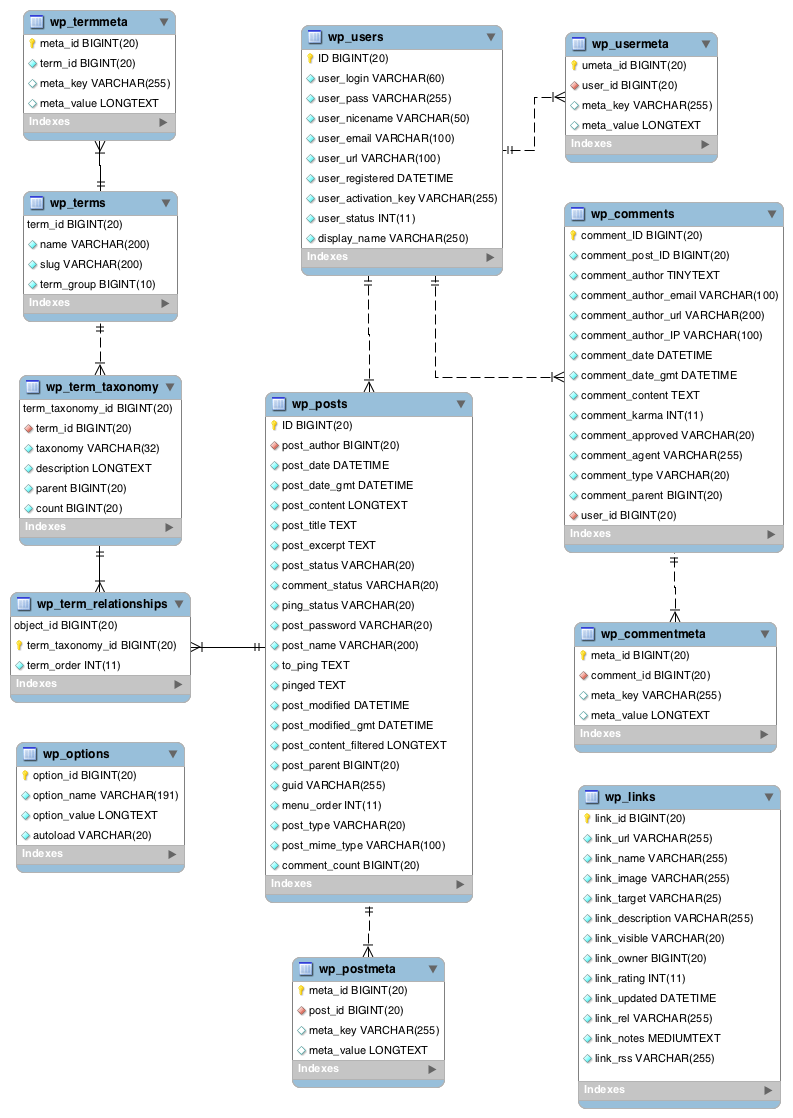
P.S. Topics (and everything) is bbPress is a post (class WP_Post), and every post has post_date (https://codex.wordpress.org/images/2/25/WP4.4.2-ERD.png).
I think this way is the most elegant and straightforward.
Can a custom (forum) import, import from “any SQL” database or does it have to be an “MySQL” database?
The high level custom import documentation here states “to setup an import from any SQL database”.
And the deeper link here state “to setup an import from any MySQL database.”
you can put the code in your child theme functions file or put it in a plugin like this which is probably easier
Code Snippets