Search Results for 'bbpress'
-
Search Results
-
Hello,
I want to include WP template tags in bbPress templates and vice versa.
For example in user-profile.php in my bbPress template, I want to include <?php echo get_the_author_posts(); ?> (http://codex.wordpress.org/Function_Reference/get_the_author_posts), which is a WP template tag.
Similarly, for author.php in my WordPress template, I want to include topics started by the author.
I imagine I’d have to query the user, so is there a way of doing this?
Topic: Few customizations
Hello.
Standalone bbPress 1.0.2
I have to do few changes with my working forum.
1) First I use mini-stats plugin what shows http://www.pruulimine.ee/foorum/?stats=statistics that information. But I have to know top posters also, how can I do that to see?2) Users can upload avatars but how is possible to set some default ready avatars what user can pick so he/she doesn’t have to upload.
3) My registration works at the moment when user register, then he will recieve password after approving in admin panel. But is this possible to register immediatly with user own password and with captcha to avoid robots. Then there is no need to admin approve those users.
Maybe someone know solutions.
For full support I can pay for help!
The formatting toolbar on our discussion forum above the comment box keeps disappearing. Was working on Firefox, then it went away. Now switched to Chrome, where it’s still available, but not appearing on Safari at all. Using latest version of the bbPress plugin and WordPress.
Still available and working fine in this support forum (currently using Safari browser) so would seem to be site-specific. Any help appreciated.
I’ve been trying to import my vanilla 2 forum posts (just under 500000 replies) and it’s been working away for a very very long time. Tried to do it on the server as well as locally on my macbook pro running Mountain Lion. It seems that it’s even running slower locally than on my server and after leaving it to run for a couple of days, I’m about 1/4 of the way there.
Tried all kinds of delay times and row limits but I can’t find a way to improve the speed of the import.
I was wondering if anyone here has successfully imported a database this size and has tips on how to speed up the process? Even at a 200 Limit with 3 second delay my MySQL workbench on my local machine shows 11000 Queries/second which seems a bit high?
I’m using the latest versions of bbpress, wordpress and vanilla.Topic: Fancy editor doesn't show
Hi,
I am running a BBpress powered forum since a few weeks and I have a problem with the fancy editor bar.
I can’t get it to appear on my forum pages.
As I saw in other post here, I tried with the official BBpress theme and it shows, so I’m guessing my Custom community based theme is causing the problem.Do you have any advise to solve this ? somewhere I show look ?
Here is on of my forum pages : http://912club.fr/912club-forum/forums/general/
my theme : Custom community (customized)
BBpress version : 2.3.2Topic: bbPress + Editorial Calendar
Hi there –
There’s something wonky going on between Editorial Calendar and bbPress. When I try to access the forums, topics, or replies on the backend, I’m redirected to the calendar.
When I deactivated the calendar, the forum menu disappeared (but the forum remained on the front end). SMH
Any advice for fixing this issue?
Topic: how to ban users
I cannot find, how to have moderators or key masters be able to ban users – without them also being ADMIN on the WordPress site ?
Have I missed something ?
(lastest version of everything -wordpress+bbpress etc.)
Topic: bbpress Overloading Server?
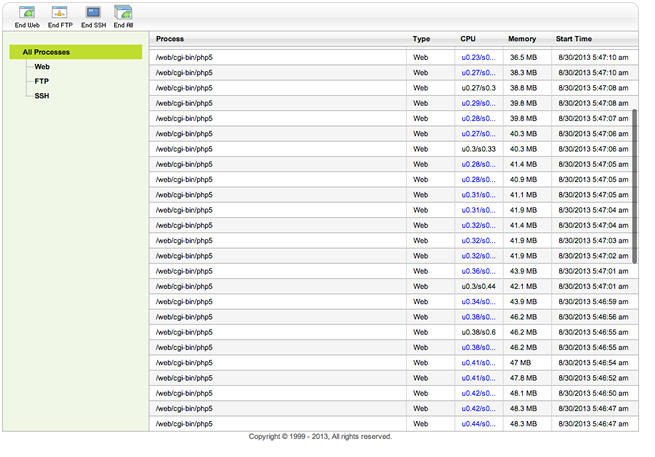
I am pretty sure bbpress is overloading my Godaddy server take a look at the server process page it’s being over run. Any ideas why this would be happening?
I’m trying to edit
"user" started the topic "Topic" in the forum "Forum"in the activity header of my buddypress activity page. I looked forever to try and find it in wp-content/pluggins/buddypress/bp-languages/buddypress.POT and couldn’t find this:%1$s started the topic %2$s in the forum %3$sI eventually found it in
wp-content/plugins/bbpress/languages/bbpress.POT I then did this:1. edit the file bbpress.pot file in poedit.
2. create the folder “bbpress” in the wordpress content languages folder. Make the languages folder if you need to so your path looks like this: wp-content/languages/bbpress
3. save the edited bbpress.pot file as bbpress-en_US.po
4. upload the created po and mo files to the bbpress folder in lanugaes. reset your cashe to see it workingI found that in this thread: http://bbpress.org/forums/topic/language-file-isnt-working/
I also tried
define ('WPLANG', 'en_US');Nothing. Am I doing this right?
Please help, I’ve been stuck for weeks on this.
Topic: Pagination Problem
Hello,
I’m developing theme for my site where I made it look pretty much like this one here.
So how I did it:
First of all in bbpress.php (in the root)
<?php if (is_post_type_archive( 'forum' )) { ?> <div class="entry-content row"> <div class="forum-sidebar span3"> <h3 style="float:left;margin-bottom:11px">Forums:</h3> <?php bbp_get_template_part( 'bbpress/content', 'archive-forum-home' ); ?> </div> <div class="span7"> <h3 style="float:left">Recent Topics:</h3> <div class="bbp-new-topic-form" style="float:right"> <button id="bbp_forums_new_topic" class="btn"><i class="icon-edit"></i> New Topic</button> </div> <?php bbp_get_template_part( 'bbpress/content', 'archive-topic-home' ); ?> </div> </div> <?php } else { ?>so in my achive-topic-home I use this template:
	<?php if ( bbp_has_topics() ) : ?>
		<?php bbp_get_template_part( 'loop',       'topics'    ); ?>
		<?php bbp_get_template_part( 'pagination', 'topics'    ); ?>
	<?php else : ?>
		<?php bbp_get_template_part( 'feedback',   'no-topics' ); ?>
	<?php endif; ?>
	<?php do_action( 'bbp_template_after_topics_index' ); ?>
I didn’t touch much of the template files.
The problem is pagination.
For example second page in pagination links to http://example.com/page/2
where my forums are located at http://example.com/boards
where I try to navigate to http://example.com/boards/page/2 it gives me an 404.——
Also interesting what I found:
first archive-forum-home template:<div id="bbpress-forums" class="forum-news"> <?php do_action( 'bbp_template_before_forums_index' ); ?> <?php if ( bbp_has_forums() ) : ?> <?php bbp_get_template_part( 'loop', 'forums-home' ); ?> <?php else : ?> <?php bbp_get_template_part( 'feedback', 'no-forums' ); ?> <?php endif; ?> <?php do_action( 'bbp_template_after_forums_index' ); ?> </div>so when I delete everything inside, now pagination points to
http://example.com/boards/forum/SOMEFORUMNAME/page/2/I don’t get how it chose this SOMEFORUMNAME..
Maybe you guys here have an idea what going on
If you need any more information I can provide, please askThanks
Hello,
I have a problem with de link favorite and suscribe link, they do nothing.
But when excecute any link in new browser’s page they works.
The bbpress run in a windows server (index.php)
Thanks
Hi,
First I would like to say well done to the folks at bbPress. It was a breeze migrating the site, and while it’s different then what I’m used to using (phpBB type forums), I’m really diggin the integration it has with our new WP site.
Anyhow, after I migrated the forums everything is working, but in bbPress all my subforums are now individual forums. The title of my phpBB forum was Obutto, but it appears I don’t need this Obutto forum anymore, is this correct?
If it is correct, how do I remove it? So far I just have it listed as a Category. So far I tried sending it to the trash but then I couldn’t view the other forums. I almost went to delete it permanently but was afraid I might lose data, so thought it may be a good idea to get some proper advice.
Thanks for your time!
Chris


