Search Results for 'bbpress'
-
Search Results
-
Hi,
I would like to put in my WP menu a customized navigation button that leads the logged in current user to his/her bbpress profile.
Basically, I want the WP menu bar to have a button that enables the user to navigate to his/her bbpress profile. What is the CCS function code to put in the menu bar?
Currently it’s too complicated for a user to find his/her bbpress profile and navigate to the forum area. Any information would be appreciated.
Topic: bbPress 2.4 Now Available
Drop feedback about bbPress 2.4 here.
See the 2.4 milestone on Trac for changes.
If your viewing this from the forum and not the blog check this 🙂 http://bbpress.org/blog/2013/09/bbpress-2-4-released/
Topic: A bi-language site
Hi *,
I’m trying to setup bbPress and BuddyPress in a bi-language site being English and Dutch. I’m using the PolyLang plugin for that.
However, after following the instructions, everything stays in English.
Any suggestions how to make things work?Best regards,
Will MoonenHi,
I have a buddypress installation + bbpress1, with more than 12000 topic replies. I tried migrating to bbpress2 on the host (online). but after lots of timeout errors, I tried in a localhost. but the problem is, it takes a long time to repair forums. I’m waiting 4 hours for “Recalculate last activity in each topic and forum” beig done, but still it’s on progress.
what can I do to do the migrating process faster?Hi guys,
On my site, bbPress and the “Recent Post” widget of my blog conflict. Could anyone please give me some clue to fix this?
Wordpress version:3.6
bbPress version: 2.3.2
My site:http://geekroo.com/site/forumsPlease refer to the right sidebar and the footer on the page.
Cheers!
Karl
Topic: BBPress – Post Count
Hi
This is such a simple request so I’m probably being an idiot but I can’t find a clear answer anywhere!
I need to display the number of post a user has made on my forum
I am using the BBPress plugin for WordPress.
Topic: bbPress ruining widgets
Hell everyone,
First I want to thank the developers for doing such a great job with this plugin (I just discovered it) and I hope I’ll get it working.
I installed bbPress on my website and observed it ruined the forum’s sidebar (practically, the old sidebar was still active but pushed down and looked weird and at the top of the forum’s sidebar I had a message “comments are closed on this page”).
Nonetheless I discovered the problem:
Well, I am using the thesis theme on my website and I customized all my posts to show related posts by inserting this code in custom.css file:
function my_related_posts() {
if (is_single()) {
global $post;
$current_post = $post->ID;
$categories = get_the_category();
foreach ($categories as $category) :
?>
<div class=”my-recent-posts”><h4>Additional Reading…</h4>-
<?php
- “><?php the_title(); ?>
$posts = get_posts(‘numberposts=5&category=’. $category->term_id . ‘&exclude=’ . $current_post);
foreach($posts as $post) :
?><?php endforeach; ?><?php endforeach; ?>
</div>
<?php
}
wp_reset_query();
}
add_action(‘thesis_hook_after_post’,’my_related_posts’);I absolutely want to keep related posts on my posts.
When I delete this “related posts code”, the sidebar works as it should.
Any workaround/Suggestions?
Topic: bbPress Mobile Tweak needed
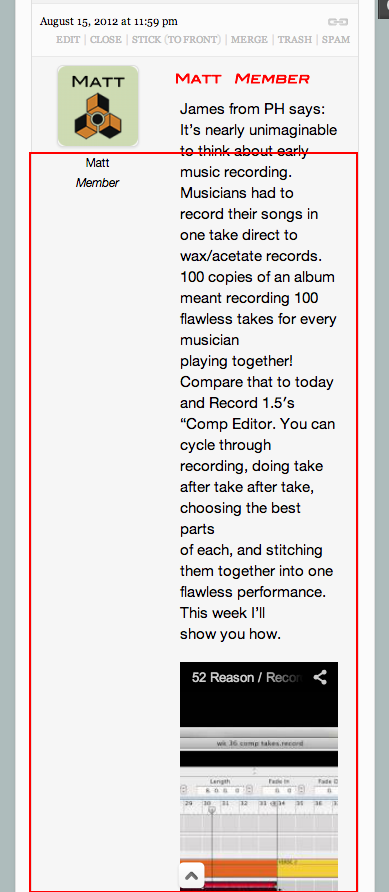
I am building a new site that I want to be totally responsive and it is but for bbPress. In the picture you can see that when bbPress is resized the content of a post goes down to half & half…meaning half of the posts content area goes to member avatar/user name/User Role & half goes to content area.
What I would like to do is move the member avatar/user name/User Role to the top part of the post and have the Member Name and Role to the “right” of the avatar with a line below and then leave the full with of the content area for the post content. This would help a great deal in making bbPress more responsive. Any help with this would be greatly appreciated.