Throughout WordPress and bbPress and BuddyPress included having posts, pages, terms can NOT have the same slug, most likely you have something else either titled or using the slug discuss and this includes any items in trash as even though they are in the trash they still reserve that slug and it is not released until the item is removed from the trash.
I cant seem to find an error for the term “Possible BuddyPress Conflict”, where are you seeing this error?
Doing so breaks the page. It creates a conflict by attempting to dynamically generate a forum root, using the same url as the wordpress page which is using the shortcode.
This works fine for me and is part of the backend philosophy of how bbPress works allowing a page with the same name as the forum root to take precedence.
* Created a page titled discuss and added the shortcode [bbp-forum-index]
* Changed the bbPress setting ‘Forum Root Slug -> Forum Root’ to discuss
So now for the site http://example.com/
– A forum list at http://example.com/discuss/
– A topic at http://example.com/discuss/topic/exammple-topic/
– A forum at http://example.com/discuss/forum/example-forum/
After 1 day importet from e107 forum tu bbpress! Alleluia!
Excellent 🙂
old code for video youtube not fix
I’ll take a look at the BBCode’s and see what I can find and add some conversions for them (if I can can)
utf8 encoding accented words not fix
Hmmmm, this might be a little harder, will take a look.
Stephen for news and content from e107 to wordpress I asked a programmer who will take me some money, if he fails, can you do it?
I’m not sure I’d be able to help, I have never used e107, I have a basic forum setup and that is it. I do everything I need for bbPress directly in the MySQL database.
Hi Stehpen!
Utenti registrati
2.169
Forum
10
Discussioni
4.221
Repliche
148.749
After 1 day importet from e107 forum tu bbpress! Alleluia!
Error:
old code for video youtube not fix
utf8 encoding accented words not fix
nothing serious!
Alleluia!
Stephen for news and content from e107 to wordpress I asked a programmer who will take me some money, if he fails, can you do it?
Sorry sorry for my english.
Hi everyone…
I hope I’m not posting this in the wrong place, but I have a question. I’m an absolute neophyte with bbPress, only having installed it a couple days ago. I’ve tinkered around with a lot, but I’m having trouble with the following. My forum index displays as show in the first image. I WANT it to display as the forum page itself does in the second image. Any ideas where I might find that and make the proper change?
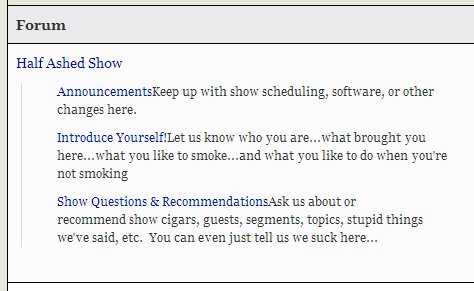
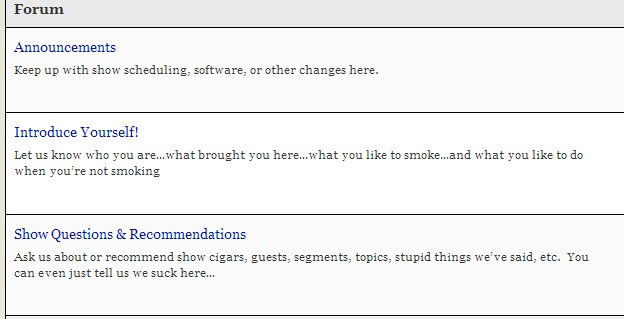
Thanks for getting back to me Robin. The area of the site where this occurs is in the members section, for which you would have to be a registered member to view. (feel free to join the site if you wish…no obligation to remain a member). the url is thehinge.org.
Here’s a combined screen shot showing that page without (left) and with (right) bbPress activated. We only have one other plug in on this site, which is S2Members. I considered deactivating it to see if it was possibly conflicting but fearful of what might happen to the userlist if I deactivate it. Being a live site that scares me.
Thoughts? (and in advance, thanks!) d
on styling, yes all can be changed.
see
bbPress Styling Crib
for lots of help.
On your page http://atlantacraftbeer.com/beer-exchange/ – what is this page? In theory if it is a normal page with a sidebar, and you put the [bbp-forum-index] shortcode on it it should work.
How is this page set up?
I apologize in advance for posting this here but couldn’t find a way to start a new topic. Although, this one is similar in that it’s related to Enfold (by Kriesi). If I need to start a new thread can you direct me on how to do that? Otherwise, here’s my issue:
I just installed bbpress and when I activate there appears to be a conflict with my custom sidebar widget. The widget actually disappears completely, although the sidebar theme still exists. Deactivating bbPress returns the widget to normal. I’m a newbie (an understatement for sure) and it’s possible I’m overlooking an action. Any advise you can offer would be greatly…no wait, GREATLY appreciated.
Derek
Not sure if this is a question for bbPress or WordPress.. please let me know if you can help
I am setting up WordPress Multisite + BuddyPress + bbPress
One annoyance I have is that when a user registers and creates a new blog, when they login they see the parent site as well as their blog under ‘My Sites’
There is a link to ‘Dashboard’ of the parent site, which they don’t have access to.
I’d like to remove the parent site from the list of My Sites
I’ve been able to establish the reason why it’s showing in the Admin bar is because they’re automatically assigned Participants to the parent blog for the bbPress forum. This is fine, but I really don’t want that showing in the admin bar.
I thought this would of already been asked before, but can’t find a similar thread
Thanks in advance.
Hi there,
Very strange issue. When logged into my bbpress forum (via WP 3.9) the sort order
of the forums (talking top-level forums) is correct as setup in admin, however
when I log out the top-level forums are listed in reverse order. Any ‘sub’ forums
within those top-level ones are fine.
Any ideas?
Thanks
Mark
Hello community.
I have several plugins for content migration from different platforms to bbPress.
Is it a possibility to list it on bbpress.org?
Many thanks!
Using
WordPress 3.9 “Smith”
WPML Multilingual CMS 3.1.5
WooCommerce 2.1.7
BuddyPress 2.0
bbPress 2.5.3
Hello, can somebody please tell me how to fix the buttons for editing text?
Instead of being displayed like these nice little white cubes above the text field, they look like big red stacked bars with a single letter (B / I / Link etc.) in each bar, so it’s basically one big red block. Also the “notify me” square is not located where it’s supposed to be. :/ The buttons do work, but they look weird. I’m using WooCommerce, WPML, BuddyPress and bbPress.
Thanks.
Well, it turns out more and more I can’t get around buddypress. Need private messaging and ssome other features too
BUT bbpress is soooo cool by itself.
1) I have just set up the bbpress plugin. When users register they don’t receive emails with passwords.
2) Is there an easy way to allow new users to choose the password they like?
thanks!
Been looking into this for a few days, and I can’t find a solution.
By default, bbpress offers two solutions for the index of a forum page:
- Using the default settings, and a customizable ‘forum root’ available in the settings panel
- Using a page with a shortcode to implement the section that you want
However, when you use the shortcode solution, there are two ‘forum root’ urls. The one that is associated with the page you want to use, and the one generated with the ‘forum root’ url.
For example, let’s say that I created the forum using the shortcode on site.com/discuss, and I need to use custom fields to customize the appearance of that page with a header, a hero graphic, and some descriptive text. I can style it, and it looks perfect. However, the site.com/forums url is still present in the forum topic urls (site.com/forums/post, not site.com/disucss/post), and as it’s own page without the custom styling.
While I could customize the page template for bbpress on site.com/forums, there are no methods for displaying fields defined by the client/user in the dashboard on that template, completely eliminating the purpose of using the custom page & shortcode option.
Are there any solutions for this or am I stuck? I’ve yet to find any solutions on this.
These are the steps I took on my local test area to recreate the problem;
– latest version of both WP and BBpress
– both are fresh installs
– using twentyfourteen theme
– no child themes
1. Create a public category
2. Create a public forum
3. Make a topic on participant user
4. Mark the topic as private on keymaster account – via wordpress visibility
5. Try to read topic on keymaster account. It will show up in the topic loop, but when you click on the specific topic to read it the topic content will not show.
6. Try and read the topic on the participant (author) account and everything shows fine.
In the forum you will always see: Posted by “user name” and that “user name” is clickable that will direct you to the profile page of “user name”. Also inside a topic you are able to click on the avatar and “user name” at each reaction.
I found this post http://bbpress.org/forums/topic/remove-hyperlink-from-user-name/
But it places a “,” in front of each name and avatar and did not gave me the perfect result, because I needed to put it in functions.php so it was also placed in the widget bbpress login.
The main thing is, I want to disable user profiles to be viewable by any user.
If anyone got a clue, please let me know. Thanks in advance
Hey guys,
I have made a test of bbPress on my page here:
http://gamehub.dk/forum/
However, as you can see, there is a “read more” (Læs mere in danish) in the bottom of the page, and I have no clue how to remove this? Anyone who can help?
I have installed BBPress in my website but I would like users to moderate the topics that they have previously created. I don’t know how to do this with existing roles and permissions. Is there any possibility to achieve this?
Do you think there is a limit with database size?
No, all size constraints are upstream and relate directly to WordPress and the size you are talking about is not an issue.
There is almost 100,000 posts and the database is bigger than 350 Mb
That’s fine…
Now the fine print, this will take a while to import, depending on your setup it might be a couple of hours right through to 8, 16 or 24, “how long is a piece of string” theory.
I am not sure what tools Invision includes but optimizing and cleaning the database first is a very good idea.
As bbPress imports the topics and replies it parses all the BBCodes ([b][i][url] etc) through a custom conversion script, if it comes across data it doesn’t like it will stop and no longer continue. Thus it is advisable to setup a local MAMP/XAMPP install and perform an import on your local machine as it gives you a good idea on how the process works, how much time it will take and the data integrity. Once your happy with all that then give it a go on your webhost.
Hello, I just downloaded and succesfully activated bbpress forum. I am using woothemes definiton template. I am facing problems on publishing widgets such as the log in widget put on the forum page. Nothign shows on the site.
Kindly ask for help.
Tim Vukan
As per the ticket you linked in your post #2088, this should be fixed.
I’ll take a closer look at this when I get a chance.
Detailed reproduction steps would be helpful so I am trying the same things you are 🙂
eg.
1. Create a topic with user ‘x’ who has a bbPress role of ‘participant’
2. …
3. …
4. etc…
I did ping to my site.
http://www.dnsqueries.com/it/ping_online_host.php
my e107 version: 1.0.4
corretto nome database
corretto utente database
corretta password
port 3306
table prefix wp_e107_
result:
Repair any missing information: Continue
Conversione completata
No there are reply_to parents from convertire
No response from convertire
No tag from convertire
No super stickies to stick
No stickies to stick
No discussion forum convertire
No from parent to convertire
No forum by convertire
No password pulire
No user from convertire
Inizio conversation
<hr>
before writing in reply [bbPress Trac] # 2421 I do still other test…


