Search Results for 'bbpress'
-
AuthorSearch Results
-
nicmak
ParticipantI can get in with my Admin, but all other can´t com in. it´s started after 25. januar 2015
i have:
PMPro bbPress
running with Paid Memberships ProRobin W
ModeratorI have a problem with BBpress. Mmembers can´t login at my forum and see the post
you will need to provide more information to enable us to help you – the above is like saying ‘my car won’t start – what’s wrong?’
why can’t members log in, what are you using to log in, do they get this, if they do what error messages are they getting, how long has this been going on – always, just started, what else has happened to the site eg upgrades, additional plugins, new themes, can you log on? is it just one bbpress level or all levels etc. etc. etc.
ParticipantI have a problem with BBpress. Mmembers can´t login at my forum and see the post
February 4, 2015 at 3:15 pm #157784In reply to: Turning off file uploads
Editor Mike
Participantah-ha, top man, not sure but this one seems the likely culprit:
GD bbPress Attachments version 2.1
February 4, 2015 at 3:14 pm #157783In reply to: Turning off file uploads
Moderatorok, have received the email, and the attachment settings are not part of bbpress, so they must be part of a plugin.
Do you know which one, and is it a forum specific one?
February 4, 2015 at 3:07 pm #157782In reply to: Import Forums
Moderatorbbpress will need to access the old database, so it will need the name, and within that database and ‘prefix’ which helps separate databases.
Is there anyone you can contact to find out that info, or where is the database at the moment?
February 4, 2015 at 2:58 pm #157780Moderatorseems they are helping you on the trac ticket, but first step would be
It could be a theme or plugin issue
Plugins
Deactivate all but bbpress and see if this fixes. if it does, re-enable one at a time to see which is causing the error.
Themes
If plugins don’t pinpoint the problem, as a test switch to a default theme such as twentytwelve, and see if this fixes.
Then come back
February 4, 2015 at 2:00 pm #157765In reply to: Participants aren't able to edit their own topics
Moderator◾
When viewing http://thewritepractice.com/topic/test/ as admin, the Edit link is there in the box. When viewing it as the author of it however, not seeing Edit.
The above are wordpress roles (and useful info) but can you tell me what bbpress roles you have set for this user.
February 4, 2015 at 1:16 pm #157763Topic: Import Forums
in forum TroubleshootingSpringgg
ParticipantMaybe I’m blind but …
I’ve just installed bbPress plugin to my WP, with the idea to import Mingle forums but “Getting There” is not getting me anywhere as there is no Import Forums tab.
The only tabs there are All Forums and New Forum
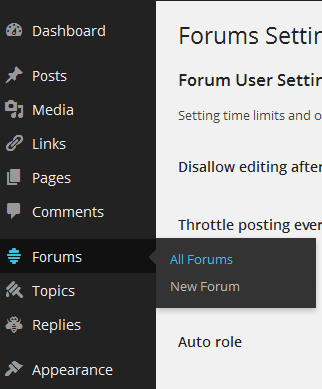
Am I in the wrong place or…?Help please! 🙁
February 4, 2015 at 12:58 pm #157760In reply to: User role upgrade
mvaneijgen
ParticipantIm designing a forum with users, panel users and expert users.
I want users to be able to ‘upgrade’ there account. All they have to do to make this happen is provide the website with extra information. (this sounds to me like a “buy a subscription” function and have them pick a Bronze, Silver or Gold subscription, so im looking in to bbpress/wordpress membership plugins, but there doesn’t seem to be one that suits me)
I don’t need paid subscriptions, I just want to change there forum role. It would be nice to intergrade this with something like a form plugin, so I can intergrade that with mailchimp so i can make lists based on there ‘subscription’
Another method would be have different sign up form on the website, before they become member and have them fill out the information I need based on the Role they want to become.
February 4, 2015 at 12:46 pm #157757In reply to: Participants aren't able to edit their own topics
Moderatorok, it’s back to looking at this aspect specifically.
1. some themes only show the edit when you hover in the topic/reply content, this is theme specific not bbpress.
2. I know you have already tested the below but please try again as bbpress is tested with default themes. Try twentyten as I know it gives a firm edit box :
Plugins
Deactivate all but bbpress and see if this fixes. if it does, re-enable one at a time to see which is causing the error.
Themes
If plugins don’t pinpoint the problem, as a test switch to a default theme such as twentytwelve, and see if this fixes.
Then come back.
February 4, 2015 at 11:57 am #157748In reply to: Participants aren't able to edit their own topics
Martyn Chamberlin
ParticipantHi Robin,
Okay, I’m just now realizing that we have two problems going on here then.
1. Problem #1 was a universal to bbPress problem, and your code above fixes that.
2. Problem #2 is the fact that at http://thewritepractice.com/bw, the forum does not realize that you are the author of the topic you’re posting. There is no Edit button in the in-box area. Only when I enable “Edit others topics” for Participants via the bbPress Advanced Capabilities plugin do you then see the Edit link in the in-box area.
Any ideas on how we can fix this problem, and what might be causing it?
February 4, 2015 at 10:02 am #157744In reply to: User role upgrade
ParticipantBBpress roles.
February 4, 2015 at 10:00 am #157743In reply to: User role upgrade
Moderatorok, you mention ‘contributor’ – do you mean wordpress roles or bbpress roles?
February 4, 2015 at 8:44 am #157736In reply to: Turning off file uploads
ModeratorI have disabled file uploads in my bbPress forum
ok, so how did you do that?
February 4, 2015 at 8:41 am #157734In reply to: Move the textarea to the top of the page
Moderatorok,
create a directory on your theme called ‘bbpress’
ie wp-content/%your-theme-name%/bbpress
find
wp-content/plugins/bbpress/templates/default/bbpress/content-single-forum.php
Make a copy of this file, and put in in the directory called bbpress that you created above, so you end up with
wp-content/%your-theme-name%/bbpress/content-single-forum.php
bbPress will now use this template instead of the originalthen change lines
<?php if ( !bbp_is_forum_category() && bbp_has_topics() ) : ?>

<?php bbp_get_template_part( 'pagination', 'topics'    ); ?>

<?php bbp_get_template_part( 'loop',       'topics'    ); ?>

<?php bbp_get_template_part( 'pagination', 'topics'    ); ?>

<?php bbp_get_template_part( 'form',       'topic'     ); ?>

<?php elseif ( !bbp_is_forum_category() ) : ?>

<?php bbp_get_template_part( 'feedback',   'no-topics' ); ?>

<?php bbp_get_template_part( 'form',       'topic'     ); ?>

<?php endif; ?>
to
<?php if ( !bbp_is_forum_category() && bbp_has_topics() ) : ?>

<?php bbp_get_template_part( 'form',       'topic'     ); ?>

<?php bbp_get_template_part( 'pagination', 'topics'    ); ?>

<?php bbp_get_template_part( 'loop',       'topics'    ); ?>

<?php bbp_get_template_part( 'pagination', 'topics'    ); ?>

<?php elseif ( !bbp_is_forum_category() ) : ?>


<?php bbp_get_template_part( 'form',       'topic'     ); ?>

<?php bbp_get_template_part( 'feedback',   'no-topics' ); ?>

<?php endif; ?>
and save
that should do it
February 4, 2015 at 5:51 am #157729Topic: Turning off file uploads
in forum TroubleshootingParticipantI have disabled file uploads in my bbPress forum, and all works well, that is to say, people can’t upload files.
Until… you go back into a post you made and edit it, when you are editing the post then the ability to attach a file is now available.
How can I switch it off so it is actually off?
Please help.
🙂
WordPress 4.0.1
bbPress Version 2.5.4
http://www.thewargameswebsite.com/February 4, 2015 at 4:55 am #157721In reply to: Participants aren't able to edit their own topics
Moderatorok, the following code removes the edit for bbpress, but leaves it for normal wordpress pages
function wpse_remove_edit_post_link( $link ) {
	if (is_bbpress()) return '' ;
	else return $link ;
	}
add_filter('edit_post_link', 'wpse_remove_edit_post_link');
The users will still be able to edit their topics and replies via the in-box edit buttons
February 4, 2015 at 4:32 am #157720In reply to: PLEASE HELP!
ModeratorNo problem.
Now you are back to the original, you might like to try this plugin that I have recently published
https://wordpress.org/plugins/bbp-style-pack/
to style the elements within bbpress
February 3, 2015 at 9:14 pm #157711In reply to: Participants aren't able to edit their own topics
ParticipantWow. Crazy that nobody has ever tried to use that feature before!
Here’s the interesting thing though. WordPress.org’s support forum is (I’m 99% sure) built in bbPress and it does successfully allow you to edit topics that you’ve posted. The interface you are sent to when editing your topic does not reside inside the WordPress admin area. Rather it is right there on the publicly facing page.
I wonder how they are doing that?
Another interesting wrinkle in this whole thing is that according to the bbPress User Roles and Capabilities, participants should be able to edit their own topics.
February 3, 2015 at 9:05 pm #157710Manny Rodrigues
ParticipantI too had this issue and found countless other posts dated many years ago with no solution. I am using bbpress v2.5.4 and buddypress v2.1.1 on WordPress v4.1. I “resolved” this by editing my functions.php file within the bbpress plugin directory and replacing any character values with a blank. Good enough for me. This “solution” IS NOT RECOMMENDED as any update to bbpress is more than likely to overwrite it. Unless you don’t mind going back in and remembering to re-hack it after each update. No doubt it can be done better. The client just requested I get rid of the code values. Without further to do…
GoTo: yoursite\wp-content\plugins\bbpress\includes\common\functions.php
Between Lines 1090 and 1091 Add:
$search_bbpress_titles = array("&# 039;", "&am p;", "R 11;", "&qu ot;"); // ' & - " $topic_title = str_replace($search_bbpress_titles, '', $topic_title);Then add the same two lines further down between Lines 1233 and 1234.
NOTE: You will have to remove the spaces from the $search_bbpress_titles array line as I was unable to post without it parsing that line. Don’t know the coding on this form to post properly. Email me if you need the code.
Looking forward to any other helpful input. No need to remind me how better you are at coding. 🙂
February 3, 2015 at 7:21 pm #157706In reply to: My new social forum | please review
peter-hamilton
ParticipantOops I am typing too fast for BBpress
February 3, 2015 at 7:21 pm #157705In reply to: Participants aren't able to edit their own topics
ModeratorJust shows how much we don’t play with – I’ve never hit that link.
By the way I’m not part of the plugin team, just a humble user !
But after a bit of testing, for a topic called Test Topic :
Within the post you’ll see an edit which takes you to
http://www.mysite.com/forums/topic/test-topic/edit/
which allows a user to edit
But the EDIT link at the bottom goes to
http://www.mysite.com/wp-admin/post.php?post=18358&action=edit
which is a wordpress supplied link, which a user isn’t allowed to edit as it is a backend function, unless they have privilege to access topics on the backend which only moderators and keymasters can do.
So participants see this link which they can’t use !!
Well spotted – I’ll take a look when I get a moment at whether this can be switched off in wordpress for bbpress pages, or the link changed.
February 3, 2015 at 5:42 pm #157699In reply to: PLEASE HELP!
Seo45
ParticipantSorry u might be confusing. There’s 2 different backgrounds. The one that I’m talking about now is the actual background of the tables. The even and odd of the forum. I changed it by putting this in my child theme:
#bbpress-forums div.odd,
#bbpress-forums ul.odd {
background-color: “the color you see”!Important;
}
#bbpress-forums div.even,
#bbpress-forums ul.even {
background-color:” the color you see”!important;
}I then changed the parts that affect the actual theme through theme options. After doing this, I noticed stuff wasn’t changing back once I put it back to the default color. I then tried changing the code above and it didn’t work anymore. Then I even deleted the code, yet it still didn’t change back to normal.
The original background was dark I believe. Can’t remember for sure. But now it’s white and a tan, which I set with the code above, but I can’t change it back.
February 3, 2015 at 2:13 pm #157691In reply to: Adding Custom View Shortcode
ModeratorHaven’t had a detailed look but
bb_register_view should be bbp_register_view
bb is buddypress, bbp is bbpress
-
AuthorSearch Results

