@pgmvanrijn
It could be a theme or plugin issue
Plugins
Deactivate all but bbpress and see if this fixes. if it does, re-enable one at a time to see which is causing the error.
Themes
If plugins don’t pinpoint the problem, as a test switch to a default theme such as twentytwelve, and see if this fixes.
I deactivated bbPress WP Tweaks and it still does not show up. Otherwise, nothing has changed.
can you see the forum list widget on any page if you deactivate bbPress WP Tweaks??
@mvaneijgen
it probably wouldnt work now since that was for the standalone version of bbpress
i just tested it out and it seems to work fine.
you can find the files to install for wp-content/languages/bbPress here
http://danieljuhl.dk/wordpress/oversaettelse/
more information specifically for your language
https://codex.bbpress.org/bbpress-in-your-language/danish-dansk-da_dk/
I am adding a member forum section to a church website. It is just for congregation members to communicate with each other once logged in. The board wants only one main forum in which all topics will be listed/added. I have added the (bbPress) Forums List to the sidebar widget area, but it does not show up. When I log in, I see “member login” with my user name and below that “recent topics” with all topics listed in the right sidebar. The “forum List” does not appear at all, making it very confusing to navigate the topic threads. I don’t know css and am totally lost here, so please be kind and very specific with your help. 🙂
My WordPress version is 4.1.1 and we are using the “Risen” Theme.
bbPress version is 2.5.4, I am also using bbl style pack and bbPress WP Tweaks 1.3.1
the site is http://www.uugrassvalley.org
Thanks. Nice to at least get a response, so your thoughts are appreciated.
However, the ticket you refer to is closed. The file in latest bbPress download matches the final version (smf3.php) available there, so I’m sure it’s reasonable to assume the code is the latest available.
But while waiting for some help I did some further digging in my smf database. I found one user with an invalidly formatted user_id. After removing that the import worked.
Regarding “Remap existing users to default forum roles”, the import instructions recommend running ALL repair functions after importing, which I did at every import attempt.
you can see if any of the unread posts plugin add a body class to the replies to use.
Feature Plugins Tracking
other than that i suggest maybe https://wordpress.org/plugins/bbpress-new-topics/
@giuseppecuttone
i dont know any plugin that can handle notifications very well , all i know is the default bbpress notifications and they seem to be having issues for users lately.
as for changing the default email address see if this works
use this for custom email address
add_filter( 'wp_mail_from', function( $email ) {
	return 'webmaster@mydomainname.com';
});
use this for custom from name
add_filter( 'wp_mail_from_name', function( $name ) {
	return 'WordPress Email System';
});
@wpgerd
you should of added the changes to a child theme.
follow this so the next update you wont lose anything
https://codex.bbpress.org/theme-compatibility/
make sure you are NOT just placing the new CSS at the bottom of the file , because the media queries will make it show for certain browser widths.
place any custom CSS before this note in the bbpress.css file
/*--------------------------------------------------------------
 Media Queries
--------------------------------------------------------------*/

/* =Standard Mobile Landscape
-------------------------------------------------------------- */
and any media querie specific size you want to have custom CSS please put custom CSS to the ones in the file.
^^i know it has to be that for sure.
Hello Robkk,
thanks for your great help. I add this code in my style.css of the child-theme and everythings looks nice now. Thanks.
What is your recommondation? I made in bbpress.css, but I think if there is an update of bbpress-Plugin, this possible will be deleted. So it’s better to add this changes in the style.css of the child-theme?
Gerd
Yes it’s OK now and I will go on with bbPress.
Thx for your support
@kiwi3685
what importer did you use , the one listed in tools>forums Import??
because i see the bbPress one doesnt have much information in the codex and it is still in beta testing.
this could work or not , im only guessing to try to help
what you could try is go to tools>forums Repair forums and check
Remap existing users to default forum roles
and see if that fixes it.
there is also a ticket on the importer for SMF
https://bbpress.trac.wordpress.org/ticket/2380
download and place this file in a folder called bbpress in your child theme
https://github.com/robkk/bbPress-Hierarchical-Forum-and-Category-Layout
you can also download https://wordpress.org/plugins/bbp-style-pack/ and use his file too.
Only for your information:
I am able to rebuild the error.
I’ve reinstalled WP step by step and I’ve check the function after every step of the configuration. I think the error is based in the bbPress Forum plugin.
All plugins are installed as in my first installation and the forum plugin is working fine.
The problem will appear only if you do the next steps over the WP backed.
I started my first Forum entry. After this I’ve added the first Topic. All is working fine.
Now I add my first Replie without a title and the error occurs.
Cheers
Normen
It could be a theme or plugin issue
Plugins
Deactivate all but bbpress and see if this fixes. if it does, re-enable one at a time to see which is causing the error.
Themes
If plugins don’t pinpoint the problem, as a test switch to a default theme such as twentytwelve, and see if this fixes.
@robin-w thanks for your note — we’ve been using bbpress and buddypress with our forums for a while.
@robkk thanks for the tips. I’ve deactivated all plugins (which actually helped with another problem, so thank you!) but that didn’t seem to do the trick.
since this site is active, I’ll make a test environment to switch themes and comment back with my findings.
thanks all!
I am using the standard forum index template for the front page of my forum.
This template only shows the latest post day / time for each of the group of sub forums. What I want is to show the latest post post day / time for each of the sub-forums not just against the top level one. (see screenshot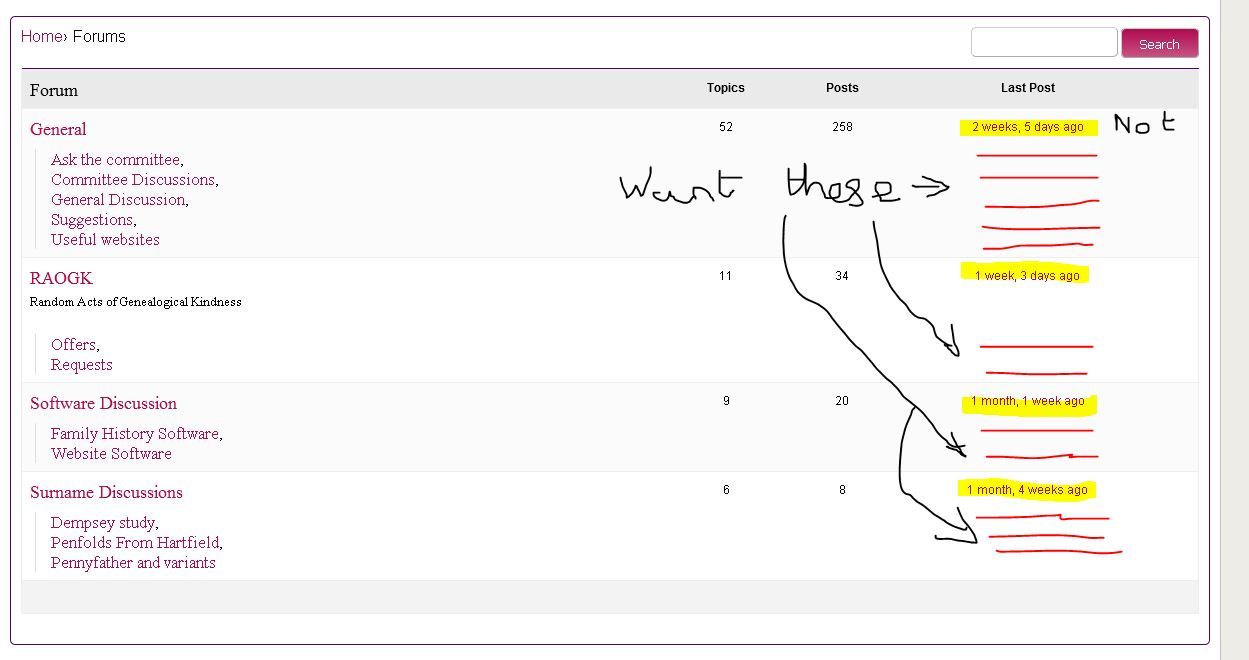 )
)
How do I do this?
Wordpress v4.4.1, bbPress 2.5.4
Hello Robkk,
Thanks for you hint. I analyze with firebug and expand this form Label in bbpress.css
.bbp-login-form label {
width: 235px;
display: inline-block;
}
Also Change text-align:
.bbp-submit-wrapper {
text-align: left;
}
But now I have other layout Problems. Can’t found how I Change this:

Can you please give me some CSS-Tips for this? I’m still learning. Thanks very much
Gerd
i dont know why only chrome and IE , but try this
#bbpress-forums div.bbp-forum-author a.bbp-author-name,
#bbpress-forums div.bbp-reply-author a.bbp-author-name,
#bbpress-forums div.bbp-topic-author a.bbp-author-name {
word-wrap: break-word;
font-size: 12px;
}
make the font-size smaller if you want
@seo45
yeah i see it looks fine now, maybe your theme is so customized for bbPress that maybe the function wont work. contact theme author and see if they can help you.
@macpresss
id say dont use bbPress then and just use WordPress blog posts/categories ,and some other thing to handle favorites and subscriptions either be jetpack subscriptions/likes , mailchimp and some other rating plugin like Polldaddy ratings for example.


