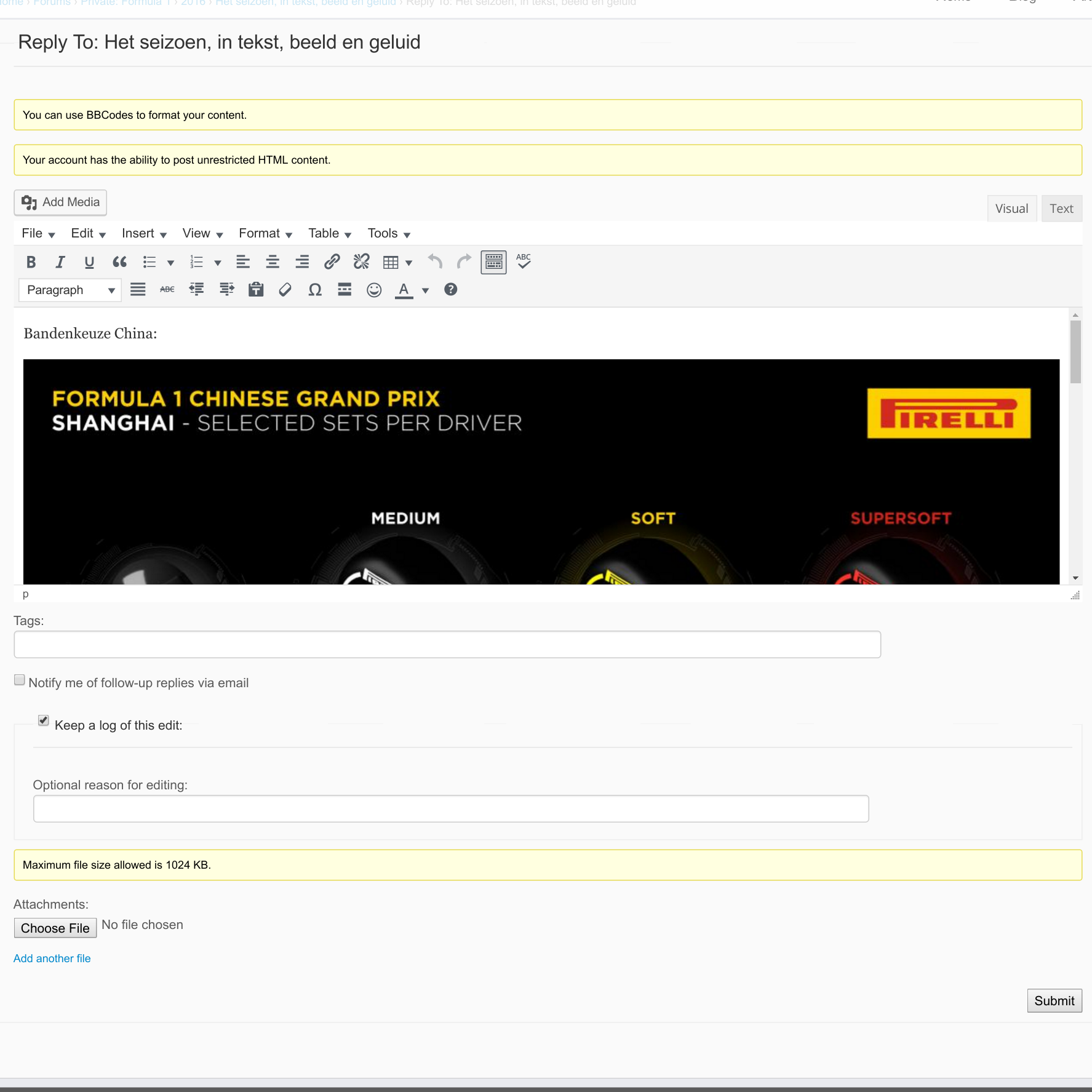
The image in the first post is visible when editing the post, as shown below:

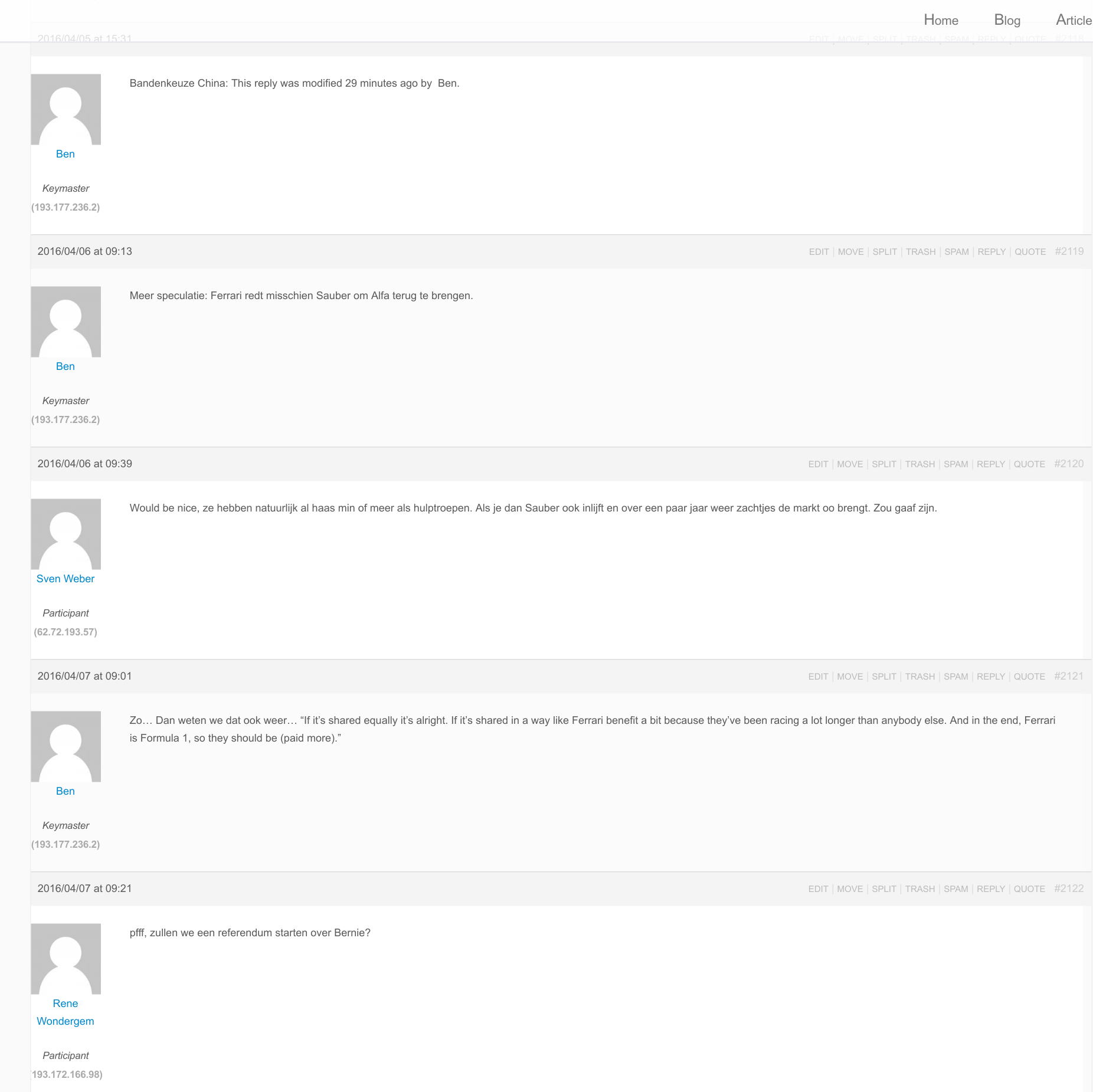
The problem I am facing is that since the upgrade to WP4.5, no formatting is applied to the forums anymore. See the screenshot below:

The first post you see should contain an image and the second post should contain a link.
I am using WordPress 4.5 and bbPress 2.5.8.
I have tested the following on both Chrome and FireFox, in both normal and incognito modes.
The issue persists when using the Twenty … themes.
The issue also persists when turning off all extra bbPress plugins.
The issue is also present in bbPress 2.6-alpha.
The rest of my site works normally.
Hello!
Is there a way to include private forums in forums RSS feed (for authenticated users, which have access to specified forums)?
bbPress 2.5.8, WP 4.5
Thank you!
Hi,
In the bbpress profile edit page, one can change the password. The verbal explanation says that the password must be at least 10 characters long. But I find that this is not enforced at all: I could successfully change the password to any lenght, even single character passwords are accepted.
What would be the way to:
1) Enfoce that the password has a minimum length?
2) Customize the minimum length to a value different from 10?
Thanks,
//György
wordpress 4.4.2 , bbpress 2.5.8, site http://szuloiosszefogas.hu
Okay, so this one shows up. Why did the other two disappear?
They were pretty elaborate posts on an issue I am facing with bbPress, and had two images in them (including links to the full post).
The one from today had an additional link to my site, so I would assume that would have to be approved, as is stated. However, I submitted it, it was shown to me, I favorited it and subscribed to it, but that doesn’t show up in my dashboard.
Awesome, glad you’ve got your site running faster 🙂
Hopefully as bbPress 2.6 main focus has been on performance this will get even better once 2.6 is released.
Thank you all for your feedback. After some thorough investigation, I managed to finally configure my caching so that it actually works (never checked that… my mistake – I entered the wrong path in .htaccess). Also, I hard-coded some tweak in my theme, something which was only recently brought to my attention.
And this morning, one of our users finally had site load times of <1s on our forums. I can happily leave them on our main site – even if P3 reported bbpress & Associates as major sources of site load time: That it still is very little with good caching and static CSS/JS files in place (which I did not have before, they were computed on site load, thanks to my theme).
Best
Manuel
@thebrandonallen You’re right. I made a mistake when doing these tests.
Here’s the results when I keep only the essential extensions, but without bbPress:
WordPress Plugin Profile Report
===========================================
Report date: 14 avril 2016
Theme name: FQSA
Pages browsed: 13
Avg. load time: 1.4570 sec
Number of plugins: 6
Plugin impact: 80.34% of load time
Avg. plugin time: 1.1705 sec
Avg. core time: 0.2184 sec
Avg. theme time: 0.0286 sec
Avg. mem usage: 142.06 MB
Avg. ticks: 189,088
Avg. db queries : 57.92
Margin of error : 0.0394 sec
Plugin list:
===========================================
P3 (Plugin Performance Profiler) – 0.0039 sec – 0.34%
Query Monitor – 0.0140 sec – 1.20%
Maintenance – 0.0040 sec – 0.35%
WooCommerce Memberships – 0.0311 sec – 2.66%
WooCommerce Subscriptions – 1.0300 sec – 87.99%
WooCommerce – 0.0874 sec – 7.47%
Here’s the results when bbpress is activated:
WordPress Plugin Profile Report
===========================================
Report date: 14 avril 2016
Theme name: FQSA
Pages browsed: 11
Avg. load time: 4.8047 sec
Number of plugins: 7
Plugin impact: 93.15% of load time
Avg. plugin time: 4.4756 sec
Avg. core time: 0.2278 sec
Avg. theme time: 0.0339 sec
Avg. mem usage: 210.25 MB
Avg. ticks: 289,193
Avg. db queries : 126.36
Margin of error : 0.0673 sec
Plugin list:
===========================================
P3 (Plugin Performance Profiler) – 0.0038 sec – 0.08%
Query Monitor – 0.0146 sec – 0.33%
bbPress – 0.0824 sec – 1.84%
Maintenance – 0.0040 sec – 0.09%
WooCommerce Memberships – 0.0421 sec – 0.94%
WooCommerce Subscriptions – 4.2424 sec – 94.79%
WooCommerce – 0.0864 sec – 1.93%
You can see, in fact, that Subscriptions seems to be the problem… I don’t really know because all these plugins seems to be connected a lot.
OK, now I see !
How about [bbp-lost-pass] ?
Check out https://codex.bbpress.org/features/shortcodes/
Pascal.
Hello,
I was wondering if there is any plugin available to change the font size (and maybe color) of BBPress? I have seen dozen of BBPress plugins but I failed to see one to accomplish this basic task.
I have spent several hours editing the fonts in order to make them bigger only to find them reset after updating BBPress, so a plugin for that matter would come in handy.
Thanks in advance!
Hi,
If you have already deactivated all plugins except bbPress and switched to a default theme and you still do not see ‘Forums’, ‘Topics’ and/or ‘Replies’, then please try this in Settings > Forums (check after every step if you find the options back on your dashboard):
– ‘Settings > Forums’ : (de)activate ‘Anonymous posting’, save, (de)activate it again to get back to your original setting, save
– ‘Settings > Forums’ : (de)activate ‘Auto role’, save, (de)activate it again to get back to your original setting, save
– Deactivate the bbPress plugin, then reactive the bbPress plugin
– ‘Tools > Forums > Repair Forums’ : Remap existing users to default forum roles, click ‘Repair Items’ (WARNING: Make sure to have multiple admins in case the keymaster role would disappear from one account)
Pascal.
Hi hope someone can help?
I’m using the Boating theme by Flexithemes and running WP 4.5 and BBPress 2.5.8.
I was in the frontend and went to edit one of my own forum posts and got an error stating the page did not exist. On looking in admin I notice Forums are now missing including the ability to create new forum posts etc. The only mention of BBpress I can see is the BBP Style Pack in Settings.
If I try to Edit a forum category in the frontend I now get this error:”You are not allowed to edit posts in this post type.”
None of the previous posts have gone missing in the frontend which looks fine, only the backend has lost Forums. Any ideas anyone?
Hi,
In the bbpress index page, the top row shows:
homepage-title > Forums > Forum-title
How could I change homepage-title here? bbpress seems to take this from the title of the site’s default page. Is there a way to put a different text there (or remove the homepage-title altogether)?
Thanks,
//György
wordpress 4.4.2 , bbpress 2.5.8, site http://szuloiosszefogas.hu
Hi,
I don’t think this is bbPress related, right ?
If not, then you’re better off on the wordpress.org support forum
If it IS related, then please explain how you see that in the bbPress context.
Thanks,
Pascal.
It might be your theme too is causing you issues with 4.5
The only way to find out is to switch to a default theme like Twenty Fifteen, deactivate all plugins except bbPress and start testing from there.
When you found what is blocking, open support requests for the theme/plugin. But I confirm that on bbPress side all seems working great with 4.5.
Sorry I can’t further help you, but if you find the issue, please post it back here.
Pascal.
solved with the following custom CSS
#bbpress-forums div.reply { height: auto; width: inherit !Important; }
There is some problem with GD bbPress Attachments too. An attachment to a post doesn´t appear in the post.
will the changes affect this rewrite set? i see bbpress replies as comments?
No, for bbPress 2.7 yes, but not for bbPress 2.6
@netweb
https://github.com/siparker/bbpress-vbulletin-permalink
Also i was reading yesterday about the bbprewss changes due for the next version.
will the changes affect this rewrite set? i see bbpress replies as comments?
Hi all,
I am running wordpress 4.5 and bbpress 2.5.8
Recently, one thread on my forum has started redirecting to the first page (not the last page) in the thread. Therefore once posted the user needs to click on the last page to see their post.
All other posts are fine.
Here is the post.
I updated the permalinks, and ran all of the bbpress repair tools, but no change.
Any help would be appreciated!
Hello Pascal there non funcation codit for bbpress but i see some change made to some files in bbpress
in db wp-usermeta allows when i reply the topic id been deleted from the colomuns wp__bbp_subscriptions
i had check all files are inside bbpress\includes\topics all are orginal from the plugin and nothing been edited where i have to check as well
thank you for your help
Regards
which functions.php you mean the theme one or the one in plugins\bbpress\includes\replies\functions.php
or \plugins\bbpress\templates\default\bbpress-functions.php ?!!!
I have installed
bbPress
bbp style pack
bbPress New Topics
bbPress WP Tweaks bbP private groups
Here where I write this text there is a linkbutton which works, but i doesn´t work in my forum ab update to wp 4.5. It did weork before I updated.