I was having trouble with bbPress so decided to uninstall then reinstalll it. Now, though it’s activated, I can’t find a ‘Forums’ link under ‘Settings’ in the back end side menu; nor any other link in that menu to access all the forums, nor can I find ‘+ create forum’ in the admin bars. So the plugin is activated, but I can’t use it to create any forums. Does anyone have an idea ow why?
Could it be connected to the fact that I deleted the user#1 “Admin”? (replaced by a new admin account)? I’ve read some plugins might need that account to operate…
Thanks for your helo!
MP
How can I rename this page title http://prnt.sc/c6uex8 ? From “Forums Archive” to something else.
I really tried everything.. from adding filters.. to edit the core of BBpress Templates and etc… nothing worked. I don’t want to create a page and add the shortcode in it. Please help me find a different way. I have read everything in internet but nothing solves the problem…
I always forget GD-bbPress-Tools also has a quote thing :/
The quote plugin I mentioned does have an issue sadly, so go with Rob’s suggestion 🙂
Problem solved! I have contacted Zippy courses, it was the theme translation. The theme overrides bbpress plugin translations so it must be translated itself.
I have updated the theme translation files and it works.
Thanks a lot!!
You might also be able to look yourself. In the zippy theme directory, e.g. wp-content/themes/zippy you might find a bbpress folder with some bbPress templates located inside, if that is the case then maybe the Zippy version of form-reply.php is out of date.
I appreciate your help, thanks!
I have compared the files and they match. I can see it is working in your installation so I think there might be a problem with Zippy courses integration. They say in their documentation that their theme/plugin integrates with bbpress. I am writing them and I tell you.
I just setup a new site with WP 4.5.3 and bbPress 2.5.10 es_ES
Everything is translated for me: https://cloudup.com/ckbF2DGSPEl
Does the theme you are using include custom bbPress templates?
It looks like there might be an issue with the file form-reply.php
The file can be found in: templates/default/bbpress/form-reply.php
It should match: https://bbpress.trac.wordpress.org/browser/tags/2.5.10/templates/default/bbpress/form-reply.php
Can you check the above for me please?
Thanks for the screenshots, they are a big help 🙂
The “before” screenshot has lots of untranslated strings, Topic, Viewing 2 posts - 1 through 2, Participant, Edit, Move etc etc
Wheres most of the above are now translated in your “after” screenshot, I see 4 strings untranslated though: Reply to, Notify me of follow-up replies via email, Tags: and Submit
Those 4 strings all appear to be translated correctly, e.g https://translate.wordpress.org/projects/wp-plugins/bbpress/stable/es/default?filters%5Bstatus%5D=either&filters%5Boriginal_id%5D=93987&filters%5Btranslation_id%5D=3551506
p.s. Spam isn’t translated, Spam appears to be Spam in any language 😉
I’ll dig around some more and see what I can find
No, there hasn’t been anything like that released for Xenforo
I’d suggest forking this repo though: https://github.com/CybMeta/kunena-attachments-to-bbpress
Hi! Robkk,
I have aleady tried your suggestion before posting it to bbpress forum but no solution till now.
🙁
Hi there,
I’m slowly putting together a bbPress forum and have been researching the best ways to quote replies. Many of the threads I’ve seen on the topic are old, some pointing to outdated plugins; others point to trying custom development work. In general, it’s left me wondering how to go about enabling quoted replies.
Is anyone in the same boat? Do any of the mods have any wisdom to share? I’d prefer an updated plugin -type solution, but I’ve also done a bit of web dev and a fair bit of Python, so I’m willing to put in the work and code a solution if need be–I just don’t know where to start.
Thanks in advance for your help,
-maruthemany
This issue is still here, buddypress social with bbpress forum: if we filter order with fresh posts first then after a reply redirect goes to last page instead of first, where I can insert go to page 1 or something like this?
Hi there,
I am using WordPress 4.6, a Genesis child theme, and the latest BBPress. I have set up BBPress and it’s all working well. The only issue is that when I click on a username in the forum the link doesn’t go to the profile page. It goes to a page with all of that users WordPress posts on it.
I don’t seem to have a profile page that I have access to anywhere. Do I need to set up a profile plugin of some kind? How do I control what url those links go to?
Any help would be great!
Thank you!
I need the opposite, lol, have this problem after last updates, until now GD bbPress Tools tweak worked for me but not anymore, I’m not able to redirect to first page after a reply, since my order is with fresh posts first.
Must be an easy fix, anybody?
WP version 4.5.3
Theme Zippy Courses Theme 1.0.4
PHP version 5.5.32
bbPress version 2.5.10-6063
Hi again,
I got the plugin translated to es_ES by updating language files in WP and it worked partially, as some strings appear in english even if they are translated in the .mo file.
For instance:
Topic Voices Posts Freshness
Reply To:
Tags:
Notify me of follow-up replies via email
Does anyone have the same problem? Thanks a lot!!
For subscribing to a topic you should see this subscribe link by the favorites link. Theme devs can move it though.
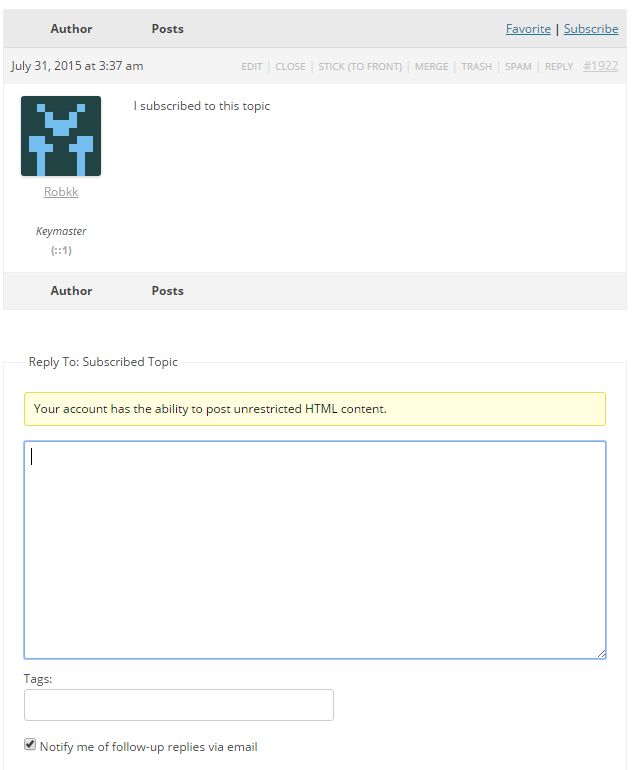
https://codex.bbpress.org/features/subscriptions/
Hi There,
We’re running WP 4.5.3 and bbpress 2.5.1 on the Jupiter theme. For some reason the link to subscribe to topics/posts doesn’t show.If I understand correctly, this link should display next to the “Topic”
heading. Please see attached.
Has anyone experienced this?
Thanks!
Q


@robin-w
And does this work for all themes, or just this one?
I just come across the issue in themes every now and then. Depends if the theme includes a file called content-search.php as well, like in TwentyFifteen and TwentySixteen default themes.
So whilst copying all the templates to the theme fixed it for the OP, is the fix just to copy content-search.php to get
wp-content/themes/%your-theme-name%/bbpress/content-search.php
Yes this would work as a temporary fix for bbPress forum users right now.
You can add a patch to the ticket I created if you want to create a possible fix.
I think possibly you would need to just rename the file on the bbPress end and that will do it, but there might be other instances in the plugin that would need a name change like in other additional template files, and possibly somewhere in the theme compat code.
@robkk – nice one. So whilst copying all the templates to the theme fixed it for the OP, is the fix just to copy content-search.php to get
wp-content/themes/%your-theme-name%/bbpress/content-search.php
And does this work for all themes, or just this one?
Regarding password. I’m talking about a single password protected page on my site. Then I use this plugin
https://wordpress.org/plugins/ft-password-protect-children-pages/
to then password protect child page under that one password protected page. Hasn’t been updated in forever, but despite the warning, it still works fine.
Now, the forums don’t use true child pages, so that plugin shouldn’t work – it didn’t. Tried anyway for the hell of it. So that led me to ask about whether bbpress can be put behind a general password like that – couldn’t find anything about password in the settings.
As for the style plugin, I’ll check that out. Tkx.
@adanoski
Your issue could be related to what I detailed here. This happens in a good amount of themes now.
https://bbpress.trac.wordpress.org/ticket/2966


